Hi all,
I tried to write a simple and straight forward code, but somehow it does not work as expected and look very off. Its relatively simple code, and I cannot quite figure out which part is the mistake. Can anyone pls help with some advise and put me out of my misery? Thanks.
//
//  Long only strategy to buy 10 contracts when price crosses over SMA(55),
//  which is the middle of Billinger Band
//  and stop loss set to the swing low
//
//  Sell 5 when price cross the upper bollinger band of 1 SD (BBUp1SD)
//  and stop loss set to the swing low
//
//  Sell 3 when price cross the upper bollinger band of 2 SD (BBUp2SD)
//  and stop loss set to the middle of bollingerband SMA(55)
//
//  and sell 2 when price cross the upper bollinger band of 3 SD (BBUp3SD)
//  and stop loss set to BBUp1SD)
//

DEFPARAM CumulateOrders = False

//Define parameters
SMA55 = average[55](close)
BBUp1SD = Average[55](close) + (1*std[55](close))
BBUp2SD = Average[55](close) + (2*std[55](close))
BBUp3SD = Average[55](close) + (3*std[55](close))

//Entry Conditions
LongCondition = close > SMA55

// Take Profit conditions
TP1Condition = close Crosses over BBUp1SD
TP2Condition = close > BBUp2SD
TP3Condition = close > BBUp3SD

// Stop Loss Definition
SwingLow = lowest[10](low[1])


If LongCondition and Not LongOnMarket Then
buy 10 Contracts at market
Flag1 = 0
Flag2 = 0
Set Stop Loss SwingLow
EndIf

If LongOnMarket AND TP1Condition AND Flag1 and Flag2 Then
Sell 5 Contract At Market
Flag1 = 1
Set Stop Loss SMA55
EndIF

If LongOnMarket AND TP2Condition AND Flag2 AND NOT Flag1 Then
Sell 3 Contract At Market
Flag2 = 1
Set Stop Loss BBUP1SD
EndIf

If LongOnMarket AND TP3Condition AND NOT FLAG1 AND NOT Flag2 then
sell 2 Contracts At market
endif
Hello phanz – What I would do make If/Else situations of all the Buy’s and Sell’s, so that you can automatically be sure that nothing happens twice (unless you explicitly want it to happen twice, of course).
Something else I see is the several StopLoss commands occurring. Maybe some insider can tell whether this is allowed. Thus in your case you might change a StopLoss (value) at each bar because of e.g. the SMA changes each bar. I envision that some broker may not be happy with that (because these commands go to the broker for real (when live of course) and for that reason PRT may not allow it. For example, possibly it sets the StopLoss only once after the order is filled.
Hi PeterSt,
Thank you for your suggestion. The Elsif function defnitely help. At least the entry and take profit code works as expected.
i purposely set the TP3 target to be unreachable to check if the Stop Loss order works. Unfortunately the SL order does not work. More investigations needed. If anyone can give a helping hand will be greatly appreciated. Thank you.
//
//  Long only strategy to buy 10 contracts when price crosses over SMA(55),
//  which is the middle of Bollinger Band
//  and stop loss set to the swing low
//
//  Sell 5 when price cross the upper bollinger band of 1 SD (BBUp1SD)
//  and stop loss set to the swing low
//
//  Sell 3 when price cross the upper bollinger band of 2 SD (BBUp2SD)
//  and stop loss set to the middle of bollingerband SMA(55)
//
//  and sell 2 when price cross the upper bollinger band of 3 SD (BBUp3SD)
//  and stop loss set to BBUp1SD)
//

DEFPARAM CumulateOrders = False

//Define parameters
SMA55 = average[55](close)
BBUp1SD = Average[55](close) + (1*std[55](close))
BBUp2SD = Average[55](close) + (2*std[55](close))
BBUp3SD = Average[55](close) + (3*std[55](close))

//Entry Conditions
LongCondition = close > SMA55

// Take Profit conditions
TP1Condition = close Crosses over BBUp1SD
TP2Condition = close > BBUp2SD
TP3Condition = close > BBUp2SD

// Stop Loss Definition
SwingLow = lowest[10](low[1])


If LongCondition and Not LongOnMarket Then
buy 10 Contracts at market
Flag1 = 0
Flag2 = 0
Set Stop Loss SwingLow

ElsIf LongOnMarket AND TP1Condition AND Flag1=0 and Flag2=0 Then
Sell 5 Contract At Market
Flag1 = 1
Set Stop Loss SMA55

ElsIf LongOnMarket AND TP2Condition AND Flag1=1 AND Flag2=0 Then
Sell 3 Contract At Market
Flag2 = 1
Set Stop Loss BBUP1SD

ElsIf LongOnMarket AND TP3Condition AND NOT FLAG1=1 AND Flag2=2 then
sell 2 Contracts At market

endif
Hi sorry Line 30 shud read:
TP3Condition = close > BBUp3SD
the SL order does not work
Which one does not work … you have several in the code?
SL within ElsIf would only work if the conditions within respective ElsIf are met.
Just a few thoughts.
Hi,
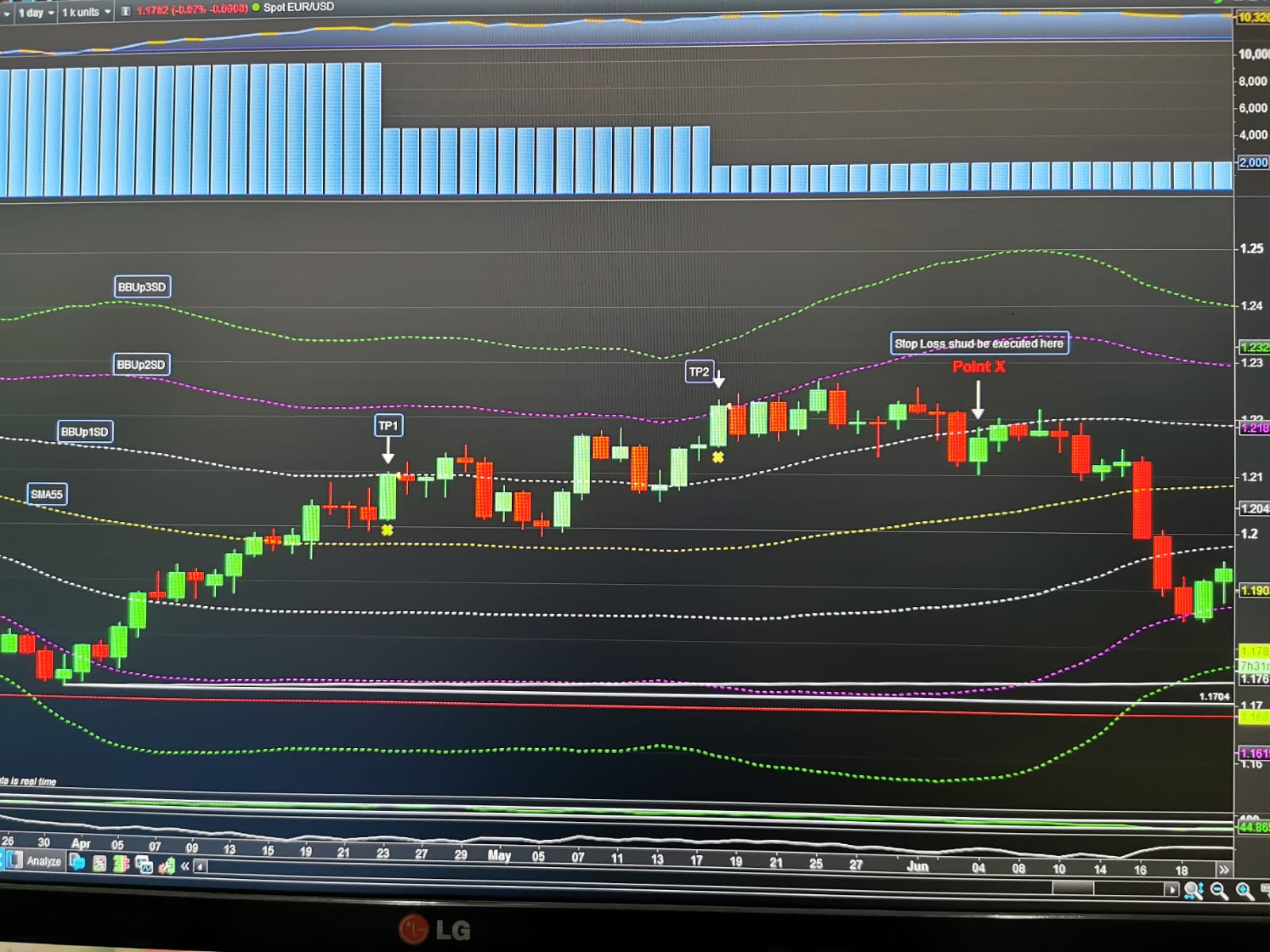
Line 43 we see the condition for the system to sell 5 contracts at TP1.
Line 48 we see the condition for the system to sell 3 contracts at TP2. So after the sale of the 3 contracts, we have balance of 2 contracts left (10-5-3=2).
Pls see the attached screenshot.
And also in Line 51 we Set Stop Loss BBUp1SD. So from the screenshot, the balance 2 contracts should have been taken out at point X by the virtue of the Set Stop Loss BBUp1SD. Since TP2 is executed, the Set Stop Loss BBUp1SD shud be read by the algo right?
//
//  Long only strategy to buy 10 contracts when price crosses over SMA(55),
//  which is the middle of Billinger Band
//  and stop loss set to the swing low
//
//  Sell 5 when price cross the upper bollinger band of 1 SD (BBUp1SD)
//  and stop loss set to the swing low
//
//  Sell 3 when price cross the upper bollinger band of 2 SD (BBUp2SD)
//  and stop loss set to the middle of bollinger band SMA(55)
//
//  and sell 2 when price cross the upper bollinger band of 3 SD (BBUp3SD)
//  and stop loss set to BBUp1SD)
//

DEFPARAM CumulateOrders = False

//Define parameters
SMA55 = average[55](close)
BBUp1SD = Average[55](close) + (1*std[55](close))
BBUp2SD = Average[55](close) + (2*std[55](close))
BBUp3SD = Average[55](close) + (3*std[55](close))

//Entry Conditions
LongCondition = close > SMA55

// Take Profit conditions
TP1Condition = close Crosses over BBUp1SD
TP2Condition = close > BBUp2SD
TP3Condition = close > BBUp3SD

// Stop Loss Definition
SwingLow = lowest[10](low[1])


If LongCondition and Not LongOnMarket Then
buy 10 Contracts at market
Flag1 = 0
Flag2 = 0
Set Stop Loss SwingLow

ElsIf LongOnMarket AND TP1Condition AND Flag1=0 and Flag2=0 Then
Sell 5 Contract At Market
Flag1 = 1
Set Stop Loss SMA55

ElsIf LongOnMarket AND TP2Condition AND Flag1=1 AND Flag2=0 Then
Sell 3 Contract At Market
Flag2 = 1
Set Stop Loss BBUP1SD

ElsIf LongOnMarket AND TP3Condition AND FLAG1=1 AND Flag2=1 then
sell 2 Contracts At market

endif
Hi guy, will really appreciate if anyone can give some advice on this. Thank you for your time. Cheers
Have you tried using GRAPH on all of your conditions to make sure all conditions are being met when you are expecting them to be?
You are using SET STOP LOSS incorrectly, as it doesn’t require a price (CLOSE, SMA55, HIGH, BollingerUP, etc…) but a price difference such as RANGE, (close – low[1]), (close – BollingerUP), (SMA55 – close), AverageTrueRange, etc…).
SET STOP pLOSS is the sane as above but it requires that the difference be expressed in pips, usually PIPSIZE, such as (Sma55 – close ) * PipSize.
The same rules apply to SET TARGET PROFIT.
Hi Roberto,
Thank you for taking your time to reply and correcting my mistakes. I have few qns about the nature of multiple stops.
Looking at the code below, when the code open a long trade, it sends the StopLoss (SL) order as SL1. Then after the first partial profit taking, it sends the SL orders as SL2. My question is, is the SL1 order cancelled and a new SL oda SL2 is sent? Likewise after 2nd profit taking, the algo set SL as SL3. So at any point in time, there is only one SL order, which in this case the latest one SL3 right (no more SL1 and SL2 oda). Is my understanding correct?
Also “Set Stop Loss 0 ” before exiting the endif ?
Thanks!
If LongCondition and Not LongOnMarket Then
buy 10 Contracts at market
Flag1 = 0
Flag2 = 0
Set Stop Loss SL1

ElsIf LongOnMarket AND TP1Condition AND Flag1=0 and Flag2=0 Then
Sell 5 Contract At Market
Flag1 = 1
Set Stop Loss SL2

ElsIf LongOnMarket AND TP2Condition AND Flag1=1 AND Flag2=0 Then
Sell 3 Contract At Market
Flag2 = 1
Set Stop Loss SL3

ElsIf LongOnMarket AND TP3Condition AND FLAG1=1 AND Flag2=1 then
sell 2 Contracts At market
Set Stop Loss 0

endif
How does the complete code look like?
How does the backtest look like?
The code is in #175475. Its not really a trading strategy as I am just experimenting with stop loss and limit orders.
I never tried setting different SLs that way, as I use pending STOP orders, but they seem correct. If they work, then they are! 🙂
Set Stop Loss 0
simply removes any active SL.