Ne pas afficher de valeur de retour de mon indicateur

Viewing 4 posts - 1 through 4 (of 4 total)

  • Author
    Posts
  • #229878 quote
    Player
    Participant
    Average

    Bonjour,

    J’ai un indicateur qui trace une ligne et me retourne une valeur “Return MaVariable as MaValeur”

    Dans Prorealtime 12 lorsque j’insère cet indicateur sur mon graph je peux choisir de ne pas afficher la valeur de retour en la décochant après avoir choisi configurer.

    Par contre dans Prorealtime 11 en Java, que j’utilise car au travail je peux pas installer la version 12 à cause de droits Admin”, il m’est impossible de décocher la valeur de retour dans mon indicateur.

    D’ailleurs cette option n’existe pas. Pourtant j’étais persuadé que jusqu’à il y a quelques jours, que c’était possible.

    Cette option aurait t’elle sautée ?

    Merci par avance.

    #230111 quote
    Iván González
    Moderator
    Master

    Bonjour, le mois dernier, il n'y a pas eu de mise à jour vers la version 11 donc je ne comprends pas quelle pourrait en être la raison.

    #230125 quote
    fifi743
    Participant
    Master

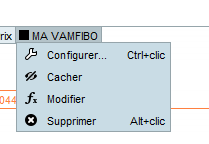
    si tu fais un clic droit tu as pas ce menu ou il y a marqué caché voir screen ci joint

    Capture-decran-2024-03-20-165022.png Capture-decran-2024-03-20-165022.png
    #230158 quote
    druby
    Participant
    New

    Hello… I encountered this in version 11.

    I noticed that if you had 1 variable in the return line, the on/off box would disappear.

    The simple solution was to add 0, in front of the returned variable or have a second dummy variable on the return line. Then, update the indicator with ‘Add Indicator’.

    Then, in the configuration window, both have checkboxes to enable and disable. Disable both!


    Another thing I’ve noticed is that when you add a single return variable to a chart, its name will take the text used in the variable’s ‘AS’ text if it’s used. Outside of this scenario, it takes the name of the file.


    Typically, the square box that precedes the indicator name in the chart takes the colors set in the configuration window, or a default color.

    I noticed that in version 12, by clicking on this box, there is now a shortcut to ‘hide’ the plots of the indicator similar to the switch that is at the top of the configuration window and in the drop-down menu of the [left click] indicator displayed in #fifi743 image.


    Maybe the thinking was if you only had one return variable, you could turn off via the indicator on, off, hide functions. And if you were returning variable there would be more than one.


    I hope this solves your problem!

    Sincerely, druby


    var = 1
    return   0, var
Viewing 4 posts - 1 through 4 (of 4 total)

  • You must be logged in to reply to this topic.

Ne pas afficher de valeur de retour de mon indicateur


Support Plateforme : Graphiques, Données & Courtiers

New Reply
Author
author-avatar
Player @player Participant
Summary

This topic contains 3 replies,
has 4 voices, and was last updated by druby

1 year, 11 months ago.

Topic Details
Forum: Support Plateforme : Graphiques, Données & Courtiers
Language: French
Started: 03/16/2024
Status: Active
Attachments: 1 files
Logo Logo
Loading...