MY NEW 3K LAPTOP WILL NOT WORK WITH PRT

Viewing 12 posts - 1 through 12 (of 12 total)

  • Author
    Posts
  • #17290 quote
    toptrader8
    Participant
    New

    HI, Hope somebody here can help because the technical folks at prorealtime cannot.

    I recently purchased a MSI Titan GT8o 18inch screen gaming laptop for daytrading.  Unfortunately prorealtime does

    not work properly on it, and it is the only software that does not.  Basically I am getting parts of a layout duplicating

    itself onto other parts of the layout when I open the application.  Its actually hard to explain what’s happening but

    it is some king of ghosting when I manoever thru the application.  Any help appreciated.  Thanks

    #17297 quote
    Nicolas
    Keymaster
    Master

    I met the same problem sometimes dunno why. PRT relaunch always fix this issue, I believe due to my graphic card.

    Did you made a support ticket through the platform already? I suggest you to do so.

    #17317 quote
    JC_Bywan
    Moderator
    Master

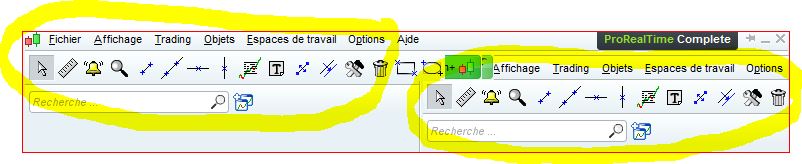
    I have this problem too with parts of windows (often top left corners) duplicating themselves inside other windows more or less from where my mouse pointing is… Thought it was my GPU too because it more or less coïncided with the time I added my second GPU, and no-one else seemed to have encountered the same problem when I mentionned it on the french forum. Maybe there really is a problem from software rather than hardware then if several of us are facing this.

    #17319 quote
    Nicolas
    Keymaster
    Master

    Next time I encounter this problem I’ll post a screenshot to see if we are talking about the same thing, or maybe toptrader8 could begin with his own one if he can.

    #17327 quote
    JC_Bywan
    Moderator
    Master

    Not so easy to get a screenshot, because the screens tend to get refreshed and bug-free when clicking on the screen capture tool, but I finally managed to capture one occurence before it refreshes and disappear, on the main menu itself. Same sort of “topleft corner of the window repeating itself from where my mouse is” tend to happen inside graph windows too, and that’s where it’s most annoying obviously.

    PRT_buggraphiquemenu.jpg PRT_buggraphiquemenu.jpg
    #17340 quote
    Nicolas
    Keymaster
    Master

    Used to have the problem 3 or 4 weeks ago, but with many other software opened, it has vanished since then… What is your CGI brand name?

    #17347 quote
    JC_Bywan
    Moderator
    Master

    Radeon R9 380X

    #17351 quote
    Nicolas
    Keymaster
    Master

    Got an ATI CGI too, I have updated the drivers recently, did you update yours too?

    #17366 quote
    JC_Bywan
    Moderator
    Master

    ok I’m on v16.30.2311 driver, I’ll try the update to 16.40.2311 and see if it makes a difference

    #23543 quote
    Nicolas
    Keymaster
    Master

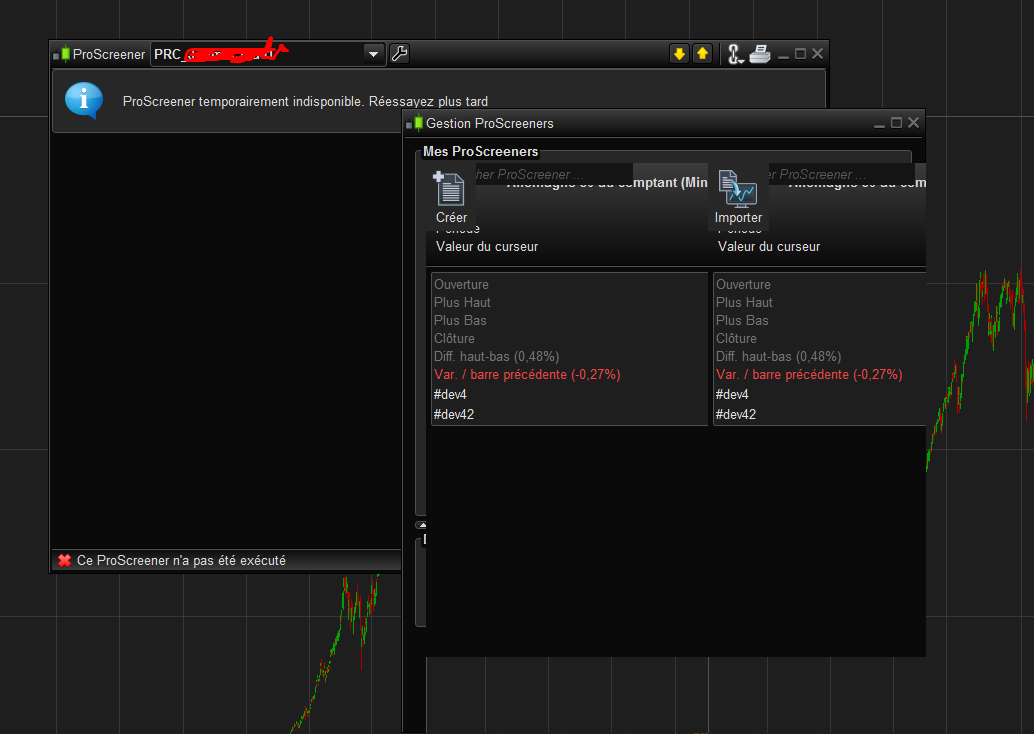
    Just got this problem once more, seems that it begins once I launch the ProScreener module. What about you?

    Screenshot_176.png Screenshot_176.png
    #23554 quote
    JC_Bywan
    Moderator
    Master

    Not proscreener specific, I have the bug during sessions using indicators with probuilder only, not even needing to launch proscreener or probacktest/proorder…

    Could be memory usage related maybe? ( maybe an unintended consequence of performance improvements modifications made in version 10 series?). Because it seems to be triggering when the java.exe process launched by PRT exceeds 1Go in my task manager readings, even if my “prt complete version” is supposed to be comfortable with my 4Go ram.

    However can’t say what subset of this 1Go is basic usage for price windows and how much is personal indicators calculations. So should this be related to personal indicators memory needs, I guess any other user could exceed 1Go with more windows in their working space but less personal indicators and still not have the bug… (which could explain why only few of us have it)

    Also bug is never there at launch, but appears after a while for each launch. I can live with it for a while, and having a multiscreens setup, I’ve noticed it affects the screens one by one, not all at the same time. When all screens are contaminated by the bug it’s too painful to read anything and I usually need to relaunch the platform. Also, it seems to calm down after 10pm French time when Cac40 Futures close, resulting in much less ticks activity in my F40 x ticks windows and related personal indicators.

    #25910 quote
    Nicolas
    Keymaster
    Master

    I stumble upon the same graphics issues with other Java softwares. So I did research on the web and find the problem related to the “java graphic glitch”. Did not find ready-made solution, but it seems it is related to CGI settings such as Anti-aliasing, etc.. So I have reset my CGI settings to their default factory ones and it seems that the problem is now gone away.. fingers cross! 🙂

Viewing 12 posts - 1 through 12 (of 12 total)
  • You must be logged in to reply to this topic.

MY NEW 3K LAPTOP WILL NOT WORK WITH PRT


Platform Support: Charts, Data & Broker Setup

New Reply
Author
author-avatar
toptrader8 @toptrader8 Participant
Summary

This topic contains 11 replies,
has 3 voices, and was last updated by Nicolas

8 years, 12 months ago.

Topic Details
Forum: Platform Support: Charts, Data & Broker Setup
Language: English
Started: 11/27/2016
Status: Active
Attachments: No files
Logo Logo
Loading...