Hi,
I’m trying to have a few strategies, triggered based on different conditions, within one trading system. Is it possible in PRT? And if yes, would anyone please give me a simple example and give advice on what mistakes to avoid and how to write it structurally correct?
Thanks,
Thomas
// Conditions to enter long positions
IF NOT LongOnMarket Then
If Condition1 THEN
BUY n CONTRACTS AT MARKET
a = 1
ENDIF
If Condition2 THEN
BUY n CONTRACTS AT MARKET
a = 2
ENDIF
ENDIF

// Conditions to exit long positions
IF LongOnMarket THEN
IF a = 1 AND ConditionToExit1 THEN
SELL AT MARKET
ENDIF
IF a = 2 AND ConditionToExit2 THEN
SELL AT MARKET
ENDIF
ENDIF
Sorry I wasn’t more specific before, I’m new to PRT. I just wondered whether you can run the code on various strategies within (condition1 and condition2) and have specific exit conditions linked with those strategies (ConditionToExit1 and ConditionToExit2) – but they will be triggered only to those assigned strategies (a = 1 or a = 2). It looks doable to me, but I wonder if there is any restriction.
Sounds good, so to keep the discussion simple, … You had Trade Entry on Condition A and Exit on Condition 1 (for example) but elsewhere in the same coded ‘Auto-Trading System’ you might use a different Condition for Exit … let’s call it Exit Condition 2 for example?
Have I misunderstood your question?
Generally the term Strategy / Strat / Bot / Algo is used to describe a coded ‘Auto-Trading System’ which runs on, for example, the DAX. You could of course run the same Strat on the EUR/USD, but likely your variables (the [20] in Average[20] ) may need to be optimised for the DAX different from the EUR/USD.
Cheers
GraHal
Link doesn’t work Roberto (404 error – page not found) maybe it’s temporary and Nicolas is doing work on the site? Maybe leave and I’ll try it later?
They seem not to work at the moment.
Here is a copy of my post.
You can assembly all of your strategies into a bigger file.
“DEFPARAM CumulateOrders = false” will do the hard job!
Of course you may need to name variables in different ways, say, a1s1 or cond1s1 for the first strategy, then a2s1/cond2s1….. a1s2/cond1s2 for the second strategy etc….
You may name a variable StrategyID = 0 when NOT ONMARKET, then set it to any number you want each buy/sell is executed so you know which strategy was triggered.
Example:
DEFPARAM CumulateOrders = False                                 //Only 1 trade at a time

IF NOT OnMarket THEN                                            //Make sure you reset this variable to ZERO when not trading
   StrategyID = 0
ENDIF
//-----------------------------------------------------------------------------------------------------------------
IF (StrategyID = 0) OR (StrategyID = 1) THEN					//Strategy 1
   s1.... = ......
   .
   .
ENDIF
//-----------------------------------------------------------------------------------------------------------------
IF (StrategyID = 0) OR (StrategyID = 2) THEN					//Strategy 2
   s2Avg = Average[20](close)
   s2Rsi = Rsi[14]
   .
   .
   .
   //************************************************************************
   //                                 LONG
   //************************************************************************
   IF close CROSSES OVER s2Avg  THEN
      StrategyID = 2
      SET TARGET PPROFIT 20
      SET STOP PLOSS     10
      BUY nLots CONTRACT AT MARKET
   ENDIF
   //************************************************************************
   //                                 SHORT
   //************************************************************************
   IF close CROSSES UNDER s2Avg  THEN
      StrategyID = 2
      SET TARGET PPROFIT 20
      SET STOP PLOSS     10
      SELLSHORT nLots CONTRACT AT MARKET
   ENDIF
   .
   .
   .
   .
ENDIF
//-----------------------------------------------------------------------------------------------------------------
IF (StrategyID = 0) OR (StrategyID = 3) THEN					//Strategy 3
   s3.... = ......
   .
   .
   .
ENDIF
Sorry for the broken links, for an unknown reason, some words are truncated..even if the link is correct in html format. I’m looking to fix this issue.
what if you have different timeframe strategies. and different stoploss and take profit strategies. and different opening and closing time strategies.. is there still a way to put them together in one tradingsystem?
In my example above I used TP & SL several times with the same values but they can be different.
You can also use TIMEFRAME multiple times, as needed.
You cannot use more than 5 different TF’s + default one.
TIMEFRAME(1 hour,default) and TIMEFRAME(1 hour,updateonclose) count as one, not two!
Hi,
Sorry for resurfacing an old thread, but I was having a similar conundrum. Is there a way of adding strategy specific exit rules, rather than just TP or SL? I tried doing so, but my sell rules seem to be mixing in the actual trading process. For example, this code exits trades that strategy 2 initiated based on strategy 1 exit parameters.
Here’s my code:
DEFPARAM CumulateOrders = false // Cumulating positions deactivated

//dynamic position sizing
INITIALCAPITAL = 10000
c = (INITIALCAPITAL/close)
if c < 0.2 then
c = 0.2
endif

// Conditions to enter long positions

IF NOT onmarket then
StrategyID = 0
ENDIF

//trend following strategy
IF (StrategyID = 0) OR (StrategyID = 1) THEN
indicator1 = SAR[0.14,0.01,0.3]
c1 = (close > indicator1)
indicator2 = RSI[14](close)
c2 = (indicator2 < 80)
c3 = (close >= open)
indicator3 = AroonUp[10]
c4 = (indicator3 > 15)
indicator4 = CALL "ATR"[14,2]
c5 = (close > indicator4)
IF c1 AND c2 AND c3 AND c4 AND c5 THEN
StrategyID = 1
BUY c PERPOINT AT MARKET
set stop $loss 420
ENDIF
indicator5 = SAR[0.14,0.01,0.3]
c6 = (indicator5 > close)
indicator6 = RSI[14](close)
c7 = (indicator6 > 80)
IF c6 OR c7 THEN
SELL AT MARKET
ENDIF
ENDIF


//mean reversion strategy
IF (StrategyID = 0) OR (StrategyID = 2) THEN
indicator4 = CALL "ATR"[14,2]
c8 = (close < indicator4)
indicator7 = RSI[14](close)
c9 = (indicator7 < 30)
IF c8 and c9 THEN
StrategyID = 2
BUY c PERPOINT AT MARKET
ENDIF
c10= (indicator7 > 50)
IF c10 THEN
SELL AT MARKET
ENDIF
ENDIF


graph StrategyID
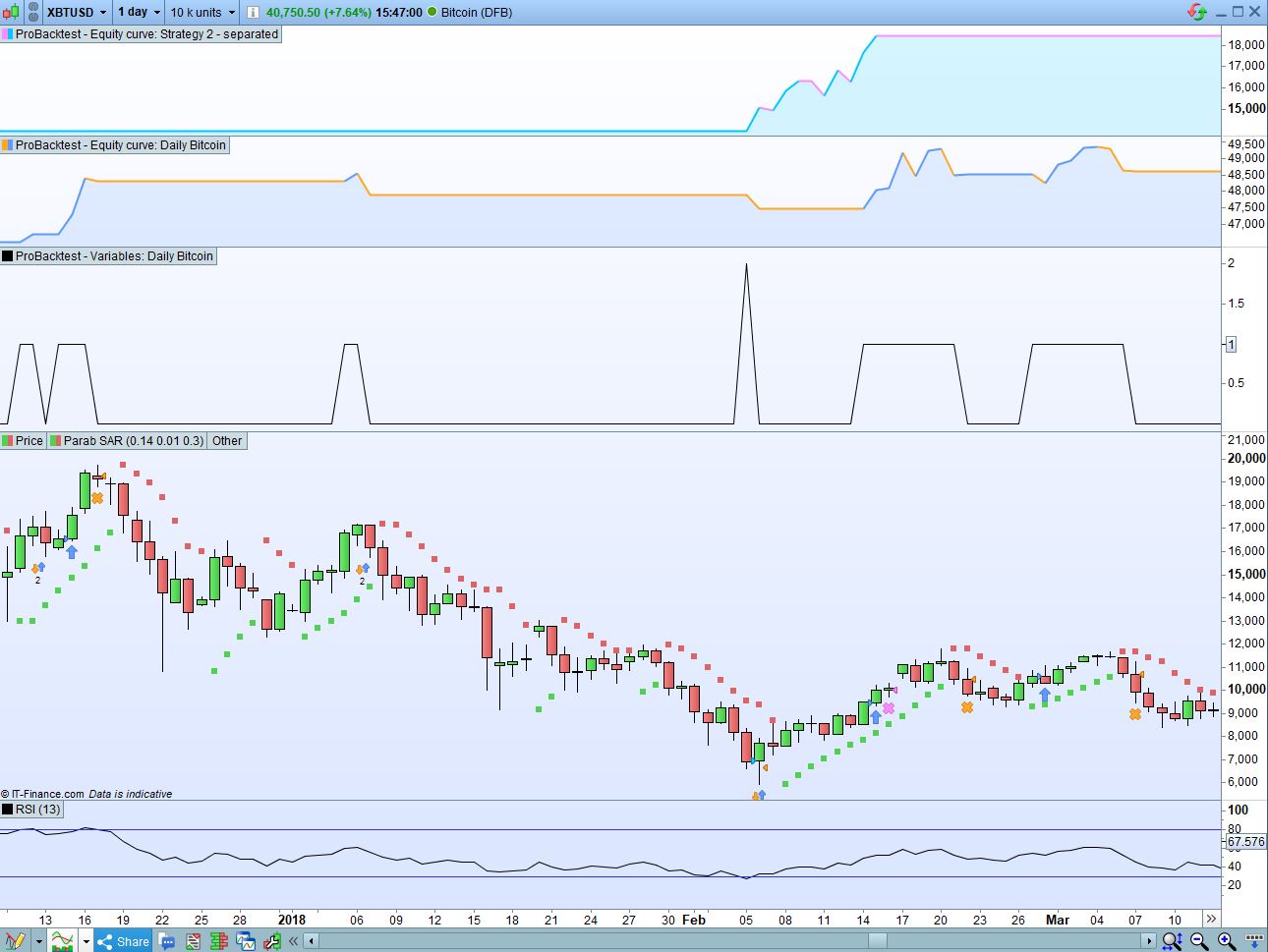
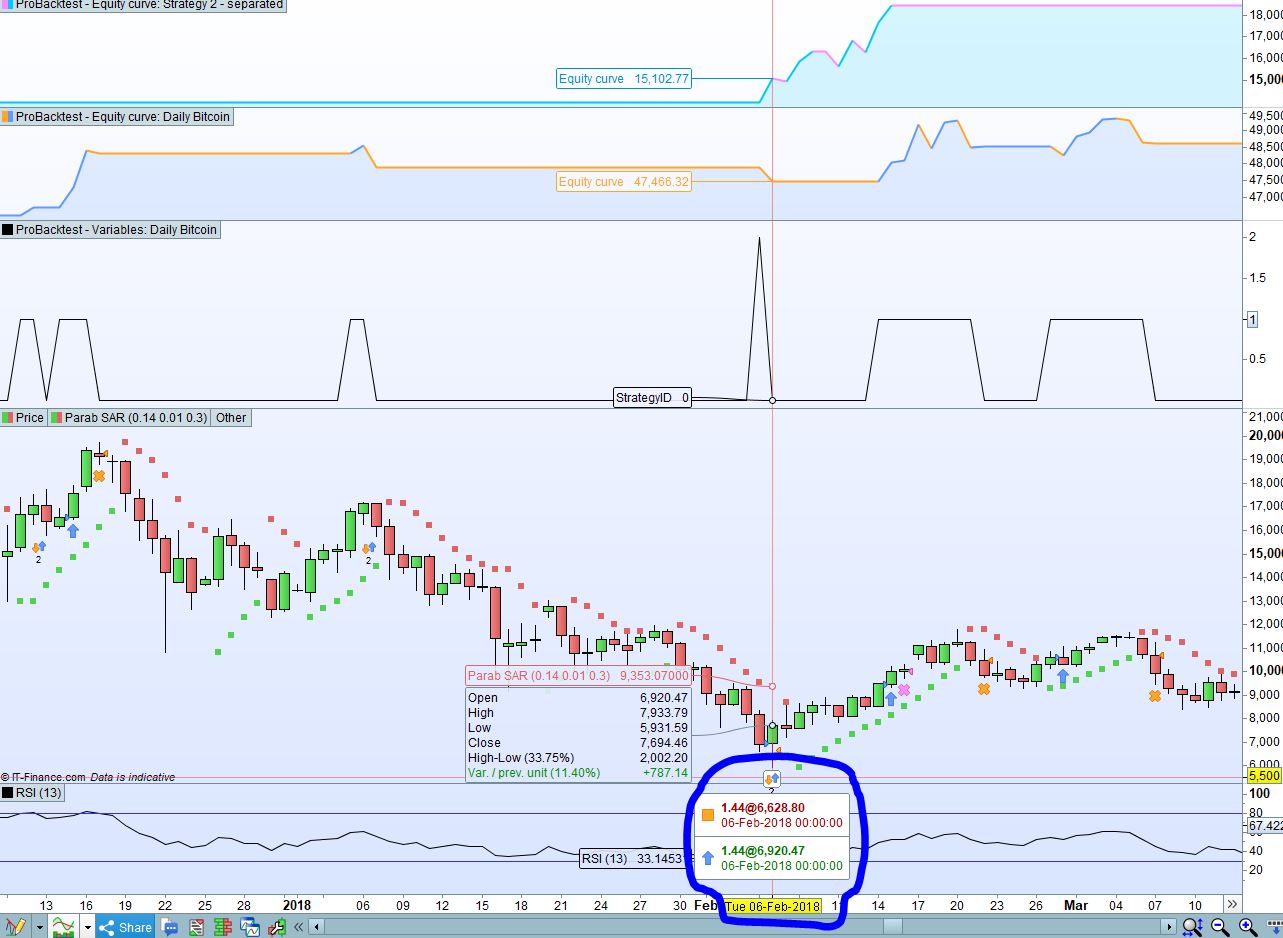
To illustrate my point, I’ve attached a screenshot of my strategy working. Strategy 2 -Separated is the code I used for strategy 2, but separated from the code I posted above. As you can see, Strategy 2 took the same trade as my initial code and held it until the exit criteria were met, whereas my original code immediately closes this trade because it meets strategy 1 exit rules.
The code you posted CANNOT close one strategy because of conditions from the other one.
The two strategies are clearly separated with a different ID and, as long as IF…ENDIF works, they cannot mix.
The above code user RSI[14], while on your pic I can spot RSI[13], this can be a cause.
I cannot test it because I don’t have the ATR indicator you are calling. Post it or post a link where I can find it.
Sure, the ATR that I am using is this indicator: https://www.prorealcode.com/prorealtime-indicators/another-atr-trailing-stop/
The RSI that is on the chart is purely used for visualisation purposes and isn’t reflective of the strategy that I am using.
Maybe my IF statements are wrongly worded? I ask because as soon as strategy 2 kicks in, the code I posted closes the position. See my screenshot:
Thenumber of parameters for the indicator is three:
CALL "ATR"[14,2,1]
why did you use only two of them?
What instrument is the one traded in your last pic?
Dear robertogozzi,
Thank you for your reply. I’m attaching some extra info.
First, the code to “Strategy 2 – separated”. As you can see its the same as strategy 2 in the first code I posted, so the ATR settings are exactly the same.
DEFPARAM CumulateOrders = false // Cumulating positions deactivated

INITIALCAPITAL = 10000
c = (INITIALCAPITAL/close)
if c < 0.2 then
c = 0.2
endif

indicator4 = CALL "ATR"[14,2]
c8 = (close < indicator4)
indicator7 = RSI[14](close)
c9 = (indicator7 < 30)
IF c8 and c9 THEN
StrategyID = 2
BUY c PERPOINT AT MARKET
ENDIF
c10= (indicator7 > 50)
IF c10 THEN
SELL AT MARKET
ENDIF
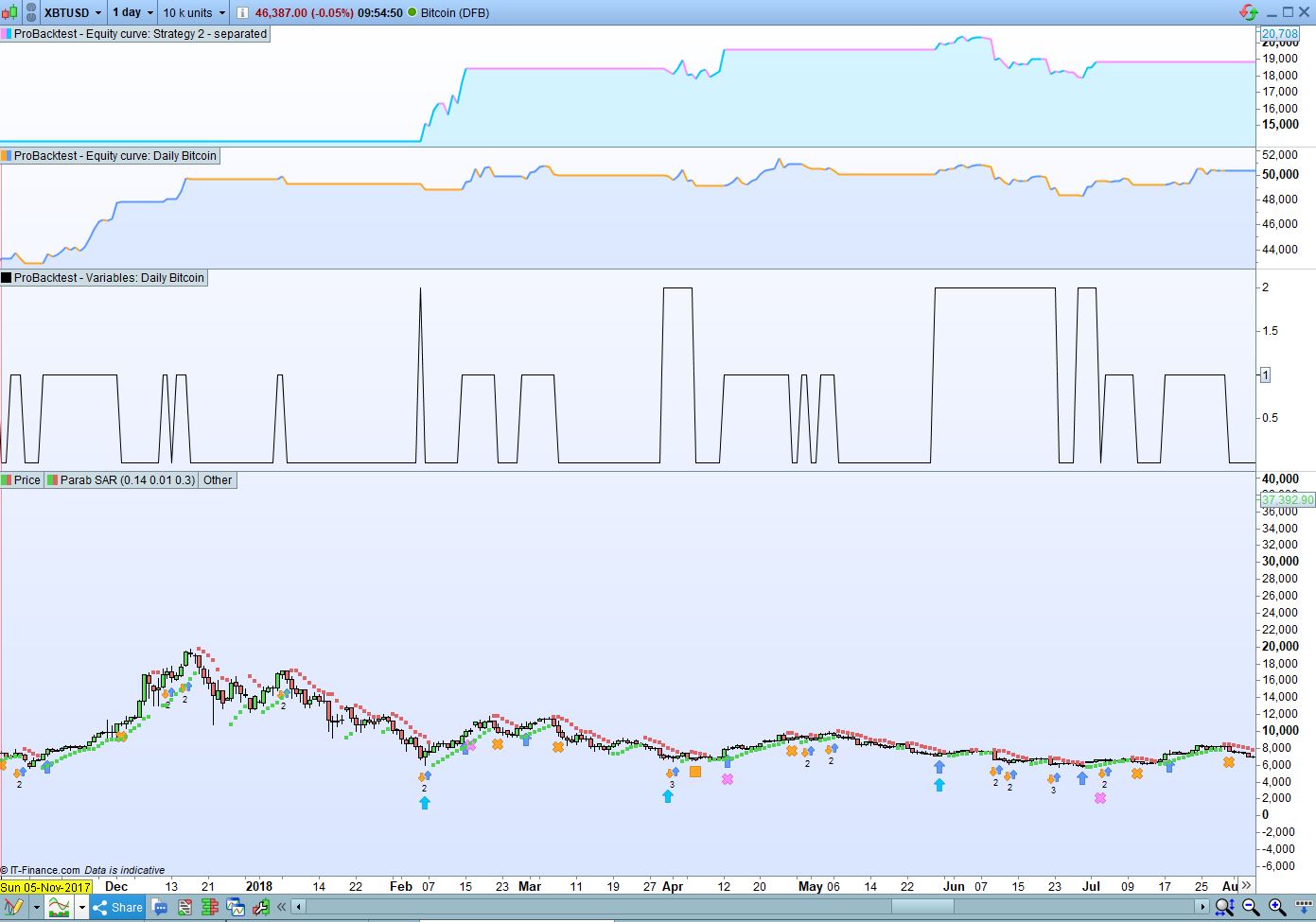
Second, I have uploaded an expanded screenshot showing the instrument, along with the “graph StrategyID” function from the first code I posted.
I believe that the issue rests with how I have worded my IF statements- could you please test?