


Multi timeframe Moving Averages

Viewing 4 posts - 1 through 4 (of 4 total)

  • Author
    Posts
  • #135107 quote
    OzTrader
    Participant
    Junior

    Hi.

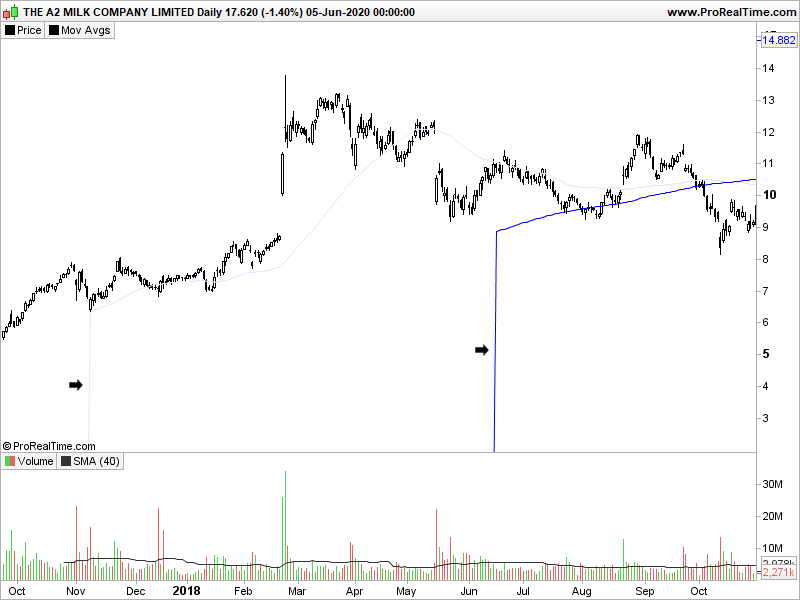
    I have got a formula that will plot different length moving averages depending on the timeframe selected. Is there a way to stop the moving average being plotted when its zero? I don’t want the vertical line at the start of the moving average.

    Thanks,

    Alan

    If (date-date[1])=1 OR (date[1]-date[2])=1 Then
    a=1 // 1 signals Daily timeframe
    Endif
    If (date-date[1])=7 OR (date[1]-date[2])=7 Then
    a=7 // 7 signals Weekly timeframe
    Endif
    If (date-date[1])=30 OR (date[1]-date[2])=30 Then
    a=30 // 30 signals Monthly timeframe
    Endif
    If (date-date[1])=299 OR (date[1]-date[2])=299 Then
    a=100 // 100 signals Quarterly timeframe
    Endif
    If (date-date[1])>9500 Then
    a=200 // 200 signals Annual timeframe
    Endif
     
     
    If (a=100) Then
     
    Q12= Average[12](close)
    
    
    Elsif (a=30) Then
     
    M10= Average[10](close)
    M40= Average[40](close)
    
     
    Elsif (a=7) Then
     
    W10= Average[10](close)
    W40= Average[40](close)
     
    Elsif (a=1) Then
     
    D50= Average[50](close)
    D200= Average[200](close)
     
    EndIf
    
    
    return Q12 COLOURED(0,0,255) AS "12 Quarter SMA",M10 COLOURED(230,230,250) AS "10 Month SMA",M40 COLOURED(0,0,255) AS "40 Month SMA", W40 COLOURED(0,0,255) AS "40 Week SMA",W10 COLOURED(230,230,250) AS "10 Week SMA", D50 COLOURED(230,230,250) AS "50 Day SMA", D200 COLOURED(0,0,255) AS "200 Day SMA"
    A2M-Daily.png A2M-Daily.png
    #135115 quote
    Vonasi
    Moderator
    Master

    Topic moved to ProBuilder forum as you posted your indicator question in the wrong forum. Please read the forum rules and ensure that any future topics are posted in the most relevant forum before posting again.

    To answer your question – declare your variables once as undefined at the start of your code.

    once q12 = undefined
    once m10 = undefined
    once m40 = undefined
    once w10 = undefined
    once w40 = undefined
    once d50 = undefined
    once d200 = undefined
    
    If (date-date[1])=1 OR (date[1]-date[2])=1 Then
    a=1 // 1 signals Daily timeframe
    Endif
    If (date-date[1])=7 OR (date[1]-date[2])=7 Then
    a=7 // 7 signals Weekly timeframe
    Endif
    If (date-date[1])=30 OR (date[1]-date[2])=30 Then
    a=30 // 30 signals Monthly timeframe
    Endif
    If (date-date[1])=299 OR (date[1]-date[2])=299 Then
    a=100 // 100 signals Quarterly timeframe
    Endif
    If (date-date[1])>9500 Then
    a=200 // 200 signals Annual timeframe
    Endif
     
     
    If (a=100) Then
     
    Q12= Average[12](close)
    
    
    Elsif (a=30) Then
     
    M10= Average[10](close)
    M40= Average[40](close)
    
     
    Elsif (a=7) Then
     
    W10= Average[10](close)
    W40= Average[40](close)
     
    Elsif (a=1) Then
     
    D50= Average[50](close)
    D200= Average[200](close)
     
    EndIf
    
    return Q12 COLOURED(0,0,255) AS "12 Quarter SMA",M10 COLOURED(230,230,250) AS "10 Month SMA",M40 COLOURED(0,0,255) AS "40 Month SMA", W40 COLOURED(0,0,255) AS "40 Week SMA",W10 COLOURED(230,230,250) AS "10 Week SMA", D50 COLOURED(230,230,250) AS "50 Day SMA", D200 COLOURED(0,0,255) AS "200 Day SMA"
    OzTrader thanked this post
    #135148 quote
    OzTrader
    Participant
    Junior

    Thanks Vonasi.

    Works just how I wanted it to. Just out of interest is there an easier way of determining the timeframe?


    Thanks,


    Alan

    #135173 quote
    Nicolas
    Keymaster
    Master

    2 snippets for timeframe detection with code: https://www.prorealcode.com/topic/determine-the-charts-time-frame-in-a-program/#post-105538

    OzTrader thanked this post
Viewing 4 posts - 1 through 4 (of 4 total)
  • You must be logged in to reply to this topic.

Multi timeframe Moving Averages


ProBuilder: Indicators & Custom Tools

New Reply
Author
author-avatar
OzTrader @oztrader Participant
Summary

This topic contains 3 replies,
has 3 voices, and was last updated by Nicolas

5 years, 8 months ago.

Topic Details
Forum: ProBuilder: Indicators & Custom Tools
Language: English
Started: 06/08/2020
Status: Active
Attachments: 1 files
Logo Logo
Loading...

