Hi,
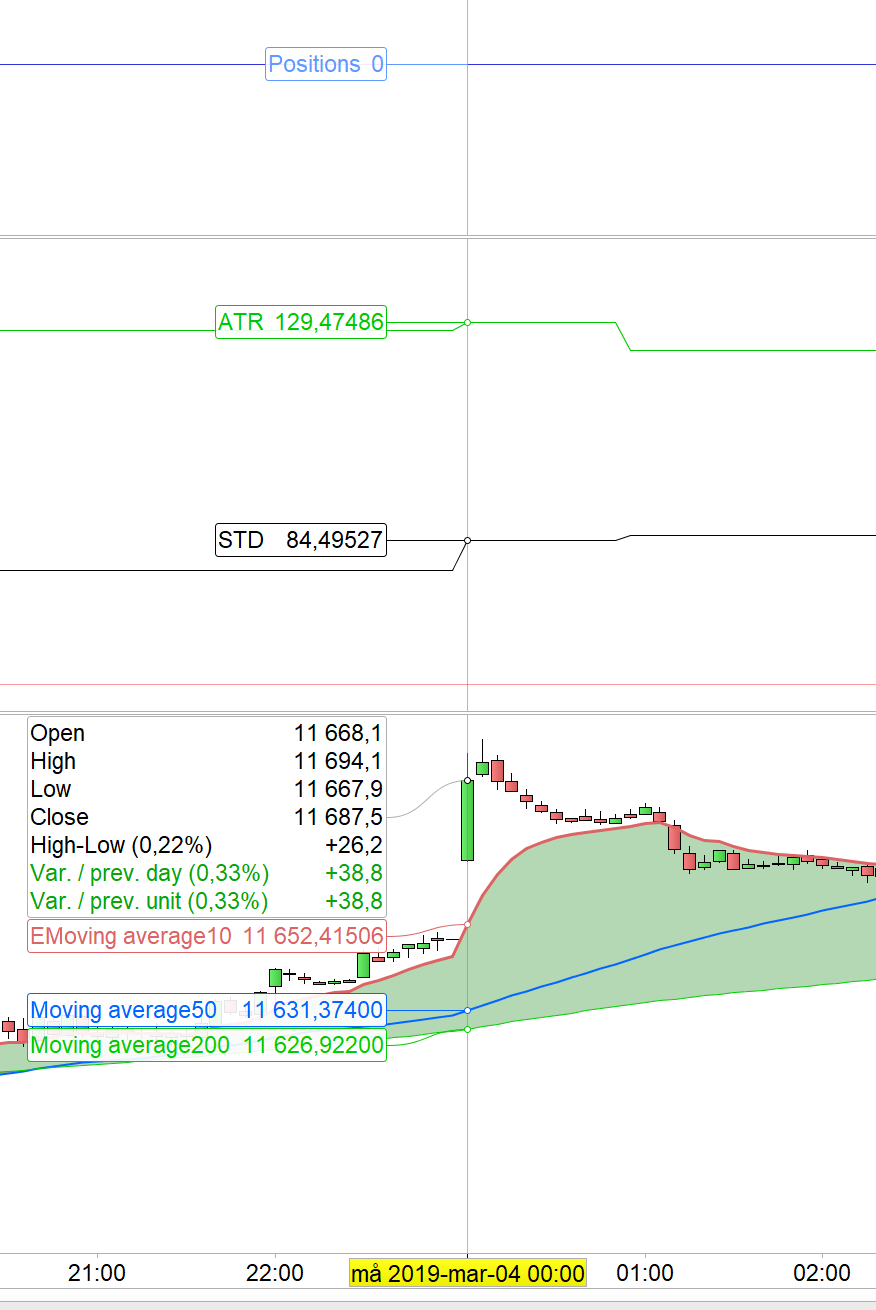
I have tried experimenting with the multi timeframe feature (great to finally have it!). I have run into the slightly strange issue that the calculated value updates a few times near midnight (last time 01:00) rather than just once. Anyone seen this? Knows why?
So – code runs on DAX, broker is IG. Instrument should use GMT on IG if I understand correctly, I’m in Sweden (GMT+1), which I suspect has something to do with it. Please look at attached image for details (GRAPH instructions in strategy in middle graph).
Relevant code:
TIMEFRAME(Daily, UpdateOnClose)
atr = AverageTrueRange[14](Close)
stDev = Std[20](Close) / 2.5
GRAPH atr COLOURED(0,200,0) AS "ATR"
GRAPH stDev AS "STD"
TIMEFRAME(Default)
// ... other code
Any idaes?
/Victor
Any MTF strategy is executed according to the timing of the default (or main, must be the lowest one used and the one on the chart) TF.
If you are running your strategy froma 1-minute chart GRAPH will show you ALL values, no matter from which TF they come, any 1-minute candle. Since you use UPDATEONCLOSE you will see the same values throughout the day.
DAILY candle closes at 01:00am (utc+1). Now, which is Wednesday March 13th, 00:25am (utc+1), on your chart you will still see the candle labelled March 12th.
None of the two above values you GRAPHED should have changed throughout the day.
Show Sunday bar or not could have produce this “visual” behavior. Try with Sunday data visible to see if it is still the case.
@robertogozzi: Not sure we completely understand each other, I agree that it SHOULD show the same value for each 24h period, problem is that it doesn’t (it changes several times 00:00 -> 01:00
@Nicolas: Interesting behavior… I had weekend data showing in the screenshot, removing weekend data will hide the issue since hours 23:00 Fri => 01:00 Mon are removed (not really sure why it removes more than 48 hours, but that’s not really related to this). However: Very eagle-eyed of you that this example was a Monday. As it happens, the issue only occurs on Mondays!
So: Some more investigation shows that there seems to be a difference between selecting “Computer time zone (UTC+1)” and forcing “Europe/Berlin (UTC+1)”. The latter seems to remove the issue, at least sometimes. Reproducing this consistently is actually very hard especially since it requires restarting the platform after every time zone change.
Either way: The extra bump I’m quite sure comes from Sunday’s data, so it’s not really wrong per se, but at least very confusing and a bit unsettling. I cannot get DAX to show all the hours on the weekend, but that’s expected I suppose? Depending on time zone settings (and luck/randomness?) I get the extra bump or not. Timeline typically (on 5min) looks like Fri 22:00 (! why not 21:55? zero-height bar), Sun 23:00-23:55, Mon 00:00, Mon 00:05, … Extra values in TIMEFRAME daily for the Sunday hour shown (which is 1hr long instead of 24hrs which makes it look strange).
So, this is probably not a huge issue, but I’m still a bit worried that Strategy calculations seem to be dependent on UI settings. What can I expect when deploying the strategy to PRT servers? Will I get 5 day weeks in DAILY calculations for DAX? 7 days? 5 days + 1 hour on Sunday? Or dependent on my UI settings?
TIMEFRAME is, either way, a great feature, but it would be good to know how it actually works 🙂
Thanks for your help!
/Victor
Very eagle-eyed of you that this example was a Monday. As it happens, the issue only occurs on Mondays!
Call it “experience” of fixing issues of people since 3 years now 🙂
Hmm… Some more investigation reveals that strategy backtest timezone is actually dependant on what I select in my UI. So, the below code (for DAX):
ONCE BuyTime=100000
ONCE NoMoreBuying=153000
ONCE Selltime=172000
// Actual strategy code...
shows some gains for my default settings (computer = GMT+1). However, setting my timezone to GMT-11 to test completely destroyed gains! (btw also shows Sunday bars from 11:00 which is expected I suppose)
This is very unsettling to me. I would really have hoped the PRT strategy code ran in the default timezone of the instrument!
But most importantly: What happens when I deploy my strategy? If I deploy with the GMT-11 setting above, will deployed code use GMT-11 on PRT servers as well? I certainly hope so!
/Victor
I suggest not to tweek any time zone.
Use your own, then adjust trading hours to the instrument you want to trade.
If you want to trade an Aussie stock, don’t change your own TZ, just trading hours. Keep in mind that hours are just a label/tag, no matter what it reads, any candle/bar at any moment is the same everywhere. So if you need to reference the opening of an Aussie stock, just use THAT time (say 09:00) and convert it to your own TZ and use the result to set your trading hours in your strategy.
Yeah, sure. So… What you’re saying is that if I’m in GMT-11, trading DAX (which natively is in in GMT+1), I should define my system’s trading hours in GMT-11 (so DAX open at 9AM I should set to 9PM the day before). I then set my system live, and IG/PRT will make sure the code actually runs in my local GMT-11 time zone?
When sharing my code with a German person (GMT+1) then that person would then need to change the script to make it work, since the code itself is not timezone-aware (I’m pretty sure about this since my system broke when I changed the timezone display in PRT).
Finally – what happens to daily strategies? Will the results be completely different (different midnight cutoff) depending on your time zone? So the GMT-11 person and the GMT+1 person will not get the same results when running a strategy?
Why do time zones always get so complicated?
/Victor
Candles/Bar close according to ftom where your broker is.
At present IG closes/opens its daily candle at 01:00 (utc+1) no matter what TZ you/everybody sees on their charts.
Yes, scripts need to changed accordingly. It’s much easier than tweaking with TZ’s, though.
Ok, thanks for the help clarifying., very helpful! I must still say though that I much prefer that the code itself completely specifies the strategy. So…
Feature request: Defparam TIMEZONE = “Europe/Berlin” //”UTC+1″ // “GMT+1”
… to control daily candles, what TIME actually refers to, etc
Either way I’m really looking forward to v11 with multi instrument strategies!
/Victor
looking forward to v11 with multi instrument strategies!
This feature is not included in v11.
looking forward to v11 with multi instrument strategies!
This feature is not included in v11.
Oh, I see, thanks… I misunderstood what “Backtest on multiple instruments” meant. Still nice to be able to backtest multiple, but of course not at all the same as being able to run a strategy towards a universe of equities…
/Victor