


Multi Timeframe Indicator Style Changes

Viewing 4 posts - 1 through 4 (of 4 total)
  • Author
    Posts
  • #124245 quote
    Bard
    Participant
    Master

    Hi there,

    What a great feature this MTF is for graphing — I’m referring to this resource: https://www.prorealcode.com/blog/learning/approach-multi-timeframe-trading-prorealtime/

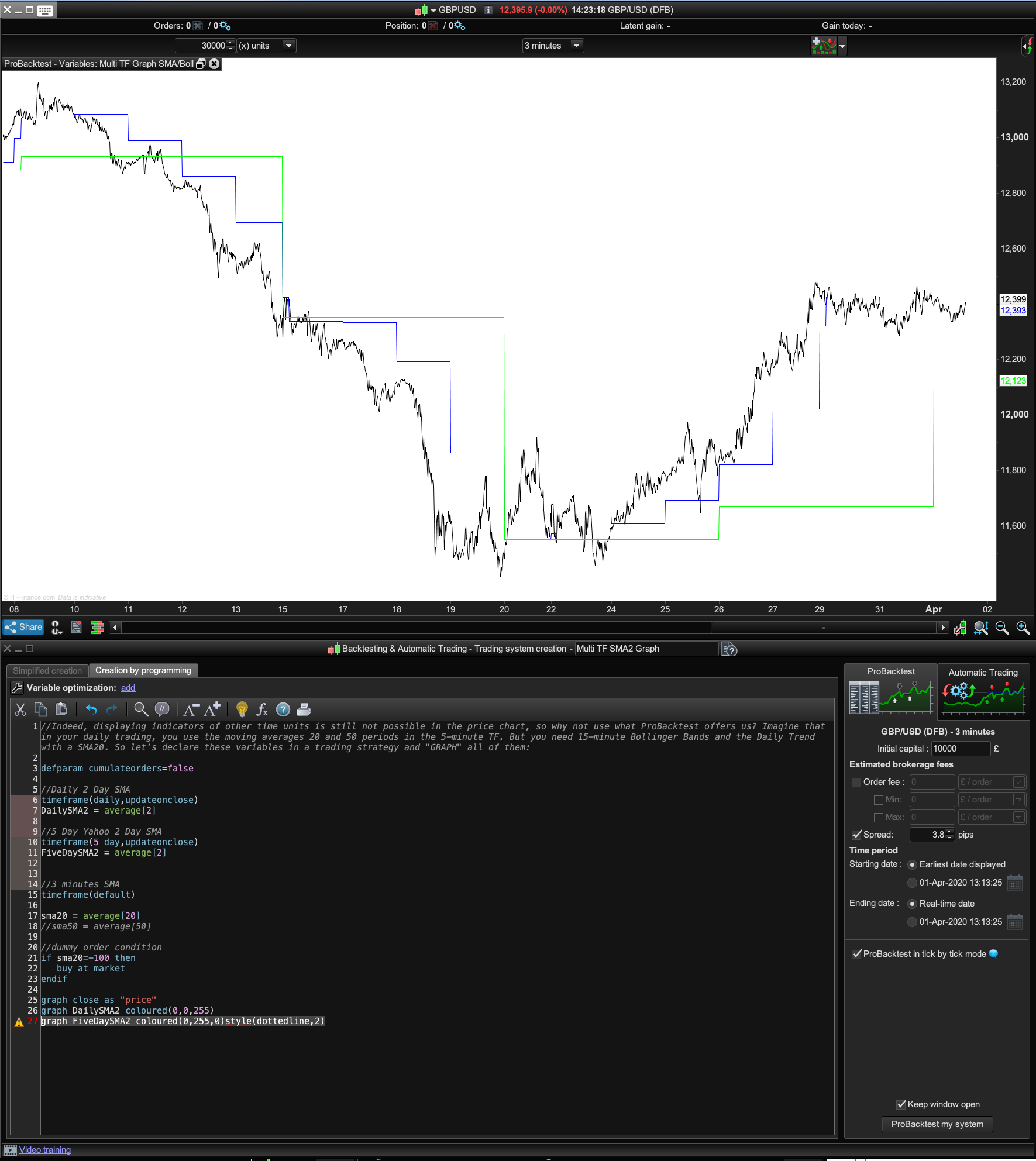
    I’m using it to simply plot both daily and 5 day, 2 day moving averages and on a 3 minute chart. (Back in the day when I was successfully scalping forex, I used to always check the Yahoo charts using a 2 day moving average for the daily and 5 day period, to make sure I was trading on the right side of the short term trend).

    I wanted to add a dotted line style to the SMA’s and also change the price line from black to blue and wondered how to do that as when I add something like style(dottedline,2) to the graph code:

    graph FiveDaySMA2 coloured(0,255,0)style(dottedline,2)

    it doesn’t like it?
    Cheers!

    Multi-Timeframe-SMA-3-Min-£.png Multi-Timeframe-SMA-3-Min-£.png
    #124247 quote
    Vonasi
    Moderator
    Master

    You can only have solid lines with the GRAPH and GRAPHONPRICE instructions. They are really just meant to be used for debugging purposes.

    Bard thanked this post
    #124256 quote
    Bard
    Participant
    Master

    Thanks for the tip Vonasi.

    Do you know why a working MTF indicator (using a 3 min default TF with 1 day and 5 day simple moving averages indicators) gives that warning “All timeframes in your code should be multiples of the timeframe used on the chart” (3 mins), if all I did was change a simple 2 day moving average to a 2 day exponential moving average?

    Update, it’s not the exp average causing the issue. I even pasted in the working code I keep as a copy in Text Edit that was fine  and it’s also giving me the same “All timeframes in your code should be multiples” warning?

    Thanks.

    #124263 quote
    Bard
    Participant
    Master

    Logged out, but now I’m back in the PRT platform is frozen. Had to force quit and re-log back in but it’s still slow, so I guess despite no orange warning triangles on the charts and good broadband I must have too many charts and indicators. You can delete these last two comments if you wish. Cheers.

Viewing 4 posts - 1 through 4 (of 4 total)

  • You must be logged in to reply to this topic.

Multi Timeframe Indicator Style Changes


ProBuilder: Indicators & Custom Tools

New Reply
Author
author-avatar
Bard @brad Participant
Summary

This topic contains 3 replies,
has 2 voices, and was last updated by Bard

5 years, 10 months ago.

Topic Details
Forum: ProBuilder: Indicators & Custom Tools
Language: English
Started: 04/01/2020
Status: Active
Attachments: 1 files
Logo Logo
Loading...
