Hi Roberto, sorry if I didn’t precisely explain the references on the chart.
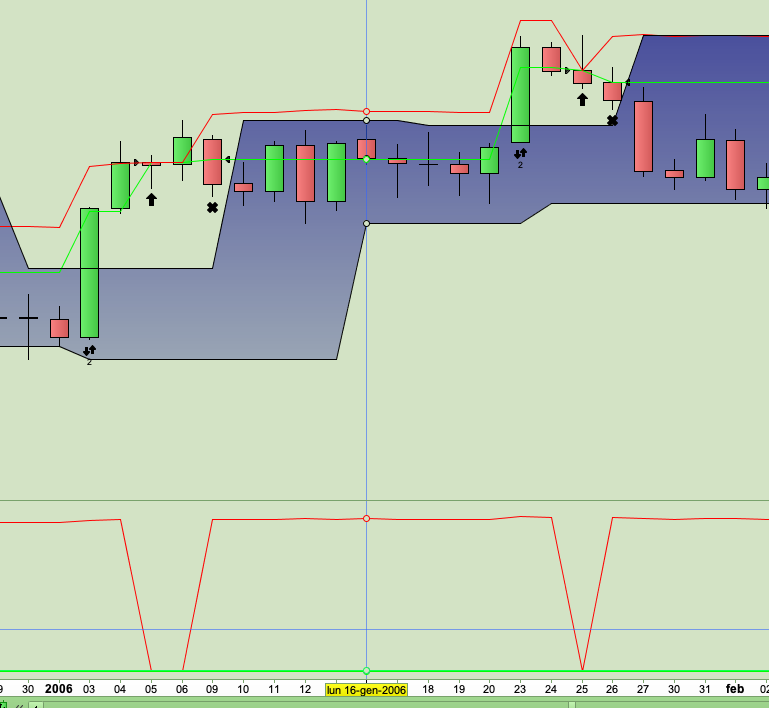
In the screen that I attach again for convenience, we see that on 3 January 2006 there is an operation that opens and closes on the same day. On 5 January 2006, a position was reopened and closed on 9 January 2006 (this operation should not have been performed because the fractal line had already been passed regularly on 3 January).
The same applies to the next operation. the operation of 23 January 2006 was corrected and the operations of 25 and 26 January were not to be carried out.
Now I try to understand how to apply your last suggestion. Have you tried to insert it in the code and it works?
GRAZIE !
GRAZIE ROBERTO !!! your last suggestion concerning the modification of line 15 solved ALL the problems of overlapping operations.
Now everything works great !!!!
I’m spending a lot of time checking the results to make sure there is no exception not covered by the current code and for the moment everything works fine.
Now I can finally concentrate on optimizing parameters and then starting with paper trading.
I spent so much time programming the code that I realized now that I know little about how the platform works. Could you please tell me how can I link the equity curve to the system I’m testing? I noticed during some tests that I change the system to be tested but the equity curve remains linked to the previous code. Surely it’s my fault that I touched something by mistake, but I don’t know what …
As a very last thing I would like to ask you for advice.
By trading on Forex with a 4-hour time frame, I would like to avoid trading with the first candle on Sunday evening and being flat after 9pm on Friday.
As for Sunday I have to use the DayOfWeek function but where should I put it? in the initial parameters or in the conditions?
How can I do in the FlatAfter function to specify not only the time (21:00:00) but also that the day is Friday? (because in Forex trading is continuous).
Thanks again for your help which has been crucial.
DayOfWeek returns the day of the week 1-7, Monday through Sunday (ProBuilder returs 0-6, Sunday through Saturday, instead. In Any case Monday is 1 and Friday is 5) when a candle closes, while OpenDayOfWeek when the candle opens.
You need to add it to your conditions, lines 7-8 and 11 are what you are looking for https://www.prorealcode.com/topic/gian-7/#post-88045.
DEFPARAM FLATBEFORE/AFTER deals only whit time, not dates.
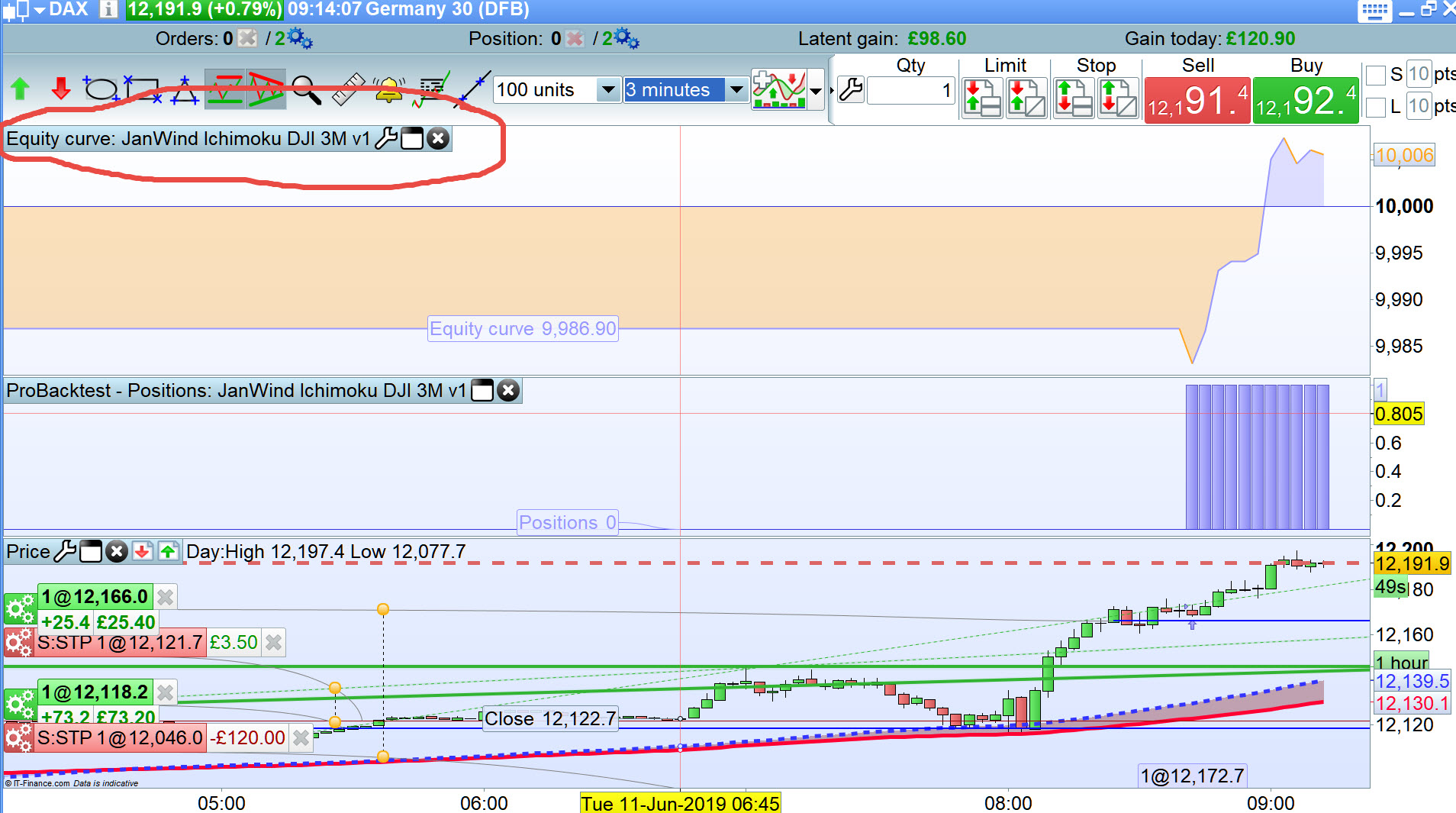
Could you please tell me how can I link the equity curve to the system I’m testing? I noticed during some tests that I change the system to be tested but the equity curve remains linked to the previous code
The equity curve will always be linked to the System filename you give that System … example shown attached in the red squiggly line.
Thanks Roberto for all the information you’re giving me.
I read the link with the parameters for days and hours with great interest.
But I would like to ask you a couple of questions.
In Forex the trading period is like a single long day that starts on Sunday evening and ends on Friday evening.
If I set “FlatAfter 210000” the system will close all the trades that are still opened every day at 9pm.
I, however, would like the system to automatically close all the trades that are still opened ONLY on Friday evening at 9 pm.
How can I specify in the code “9 pm” AND Friday?
Second question: if I set the trading on Sunday as forbidden, what happens if I have a Sunday signal (which would obviously be ignored) when it becomes Monday? is the signal still pending and it is immediately executed at the first price on Monday or since it was not executed the first time it appeared, it is subsequently not considered?
GRAZIE !!
Thanks GraHal for clarification.
tonight I’ll do some tests and if I can’t fix it I’ll show a screen to explain the problem.
GRAZIE !
You said “How can I specify in the code “9 pm” AND Friday?“. Just combine the two from the above link:
IF OpenDayOfWeek = 5 AND OpenTime = 210000 THEN  //or Time, whatever you prefer
   SELL AT MARKET
   EXITSHORT AT MARKET
ENDIF
Each candlestick hast its own “moment”, if you don’t save what is happening at that time you won’t be able to retrieve it later.
PRT does (and can) NOT keep signals for later use, until you arrange your code to.
Hi Roberto, following your suggestion regarding the days of the week and the times I tried to modify my code but I think there is a problem with the instructions.
I modified line 48 by adding “AND OpenDayOfWeek <6” in order to work only from Monday to Friday and therefore excluding Saturday and Sunday and I think it can work well.
The real problem however is the automatic closing of all positions still open at 9.00 pm on Friday.
On lines 72, 73 and 74 I wrote that if I am on the market AND it is Friday (day of week = 5) AND if the time is greater than or equal to 21 PM, the position must be closed with sale order AT MARKET.
But in this case the program tells me that there is an error but I cannot understand which one.
Could you please help me?
Furthermore, the OpenTime function indicates the current candle’s opening time. If I work with a 4-hour time frame, I have to calculate at what time the candle opens, (which is active at 9 pm), or by checking the trailing stop with a 1 minute time frame, there is not this kind of problem?
GRAZIE !!
DEFPARAM CumulateOrders = False
MioRischio = 100  //importo massimo euro che voglio rischiare per ogni singola operazione
PercStop1  = 0.50 //attiva il pareggio al 50% del profitto
PercStop2  = 0.80 //attiva lo SL a metà del profitto quanto questo ragguinge la seconda %
PagoSpese  = 5 * pipsize //numero pips che aggiungo a breakeven per ripagarmi delle spese
MyStep     = 5 * pipsize //5 pip step after PercSTop2 is hit
indicator1, ignored = CALL "Fracta linee"
MyATR = AverageTrueRange[14](close)
ATRperSTOP = 1
ATRperTARGET = 2
DaysForbidden = OpenDayOfWeek > 5
IF Not OnMarket THEN
BreakEven    = 0
MyTradePrice = 0
ENDIF
IF OnMarket AND Not OnMarket[1] OR StrategyProfit[1] <> StrategyProfit THEN
MyTradePrice = TRADEPRICE
BreakEven    = 0
Flag         = 0
SET STOP   pLOSS   StopLoss
SET TARGET pPROFIT TargetProfit
ENDIF
ONCE Flag = 0
//IF OnMarket OR LOW < MinimoPat THEN //?????
//ENDIF
IF StrategyProfit[1] <> StrategyProfit THEN
TradeON = 0
ELSE
TradeON = 1
ENDIF
Cond1 = HIGH<=indicator1 AND HIGH[1]<=indicator1[1]
CondTOT = Cond1        //Condizione globale da tradare
IF CondTOT THEN
Flag = 1
ENDIF
IF CondTOT AND Not LongOnMarket THEN
TargetProfit    = ((MyATR * ATRperTARGET)/pipsize) //VALORE in PIPS del mio TARGET INIZIALE
Prezzo          =  indicator1                //VALORE al quale si entra in posizione
//   se vengono soddisfatte TUTTE le CONDIZIONI
StopLoss        = ((MyATR * ATRperSTOP)/pipsize) //VALORE in PIPS dello STOP LOSS INIZIALE
MinimoPat       =  LOW
//TargetProfit    = max(80,TargetProfit)
//StopLoss        = TargetProfit * 0.5
Profitto1       = (TargetProfit * PercStop1)
Profitto2       = (TargetProfit * PercStop2)
ENDIF
//Moltiplicatore = (MioRischio/(StopLoss/Prezzo)/pipsize)
IF not onmarket AND Flag AND TradeON AND OpenDayOfWeek < 6 THEN
Moltiplicatore = (MioRischio/(StopLoss/Prezzo)/pipsize)
BUY Moltiplicatore lots AT (Prezzo+0*pipsize) STOP
SET STOP   pLOSS   StopLoss
SET TARGET pPROFIT TargetProfit
ENDIF
//------------------------------------------------------------------
CurrentProfit = (high - MyTradePrice) / pipsize
IF CurrentProfit > Profitto2 AND MyTradePrice < (TRADEPRICE + Profitto2 * pipsize) THEN
MyTradePrice = TRADEPRICE + Profitto2 * pipsize
BreakEven    = TRADEPRICE + Profitto1 * pipsize
ELSIF CurrentProfit > Profitto1 AND BreakEven = 0 THEN
BreakEven = MyTradePrice + PagoSpese
ENDIF
IF BreakEven > 0 AND CurrentProfit > 0 AND MyTradePrice > (TRADEPRICE + PagoSpese) THEN
IF close - MyTradePrice >= MyStep THEN
BreakEven    = BreakEven + MyStep
MyTradePrice = MyTradePrice + MyStep
ENDIF
ENDIF
IF BreakEven AND OnMarket THEN
SELL AT BreakEven STOP
ENDIF

IF OnMarket AND OpenDayOfWeek = 5 AND OpenTime >= 210000
SELL AT Market
ENDIF
graphonprice tradeprice    coloured(0,255,0,255)     AS "Entry"
graphonprice MyTradePrice  coloured(255,0,0,255)     AS "MyTradePrice"
//graphonprice BreakEven     coloured(0,0,255,255)     AS "Breakeven"
graph        CurrentProfit coloured(255,0,0,255)     AS "CurProfit"
graph        Profitto1     coloured(0,255,0,255)     AS "Profit1"
graph        Profitto2     coloured(0,0,255,255)     AS "Profit2"
graph        StopLoss      coloured(181,181,181,255) AS "SL"
graph        TargetProfit  coloured(18,255,81,255)   AS "TP"
Add THEN at the end of line 72.
Try using TIME, in place of OPENTIME, to close at 21:00 when the 17:00 candle closes. (edited)
Hi everyone,
I am completing the first part of the tests using take profit and the trailing stop, that you kindly suggested to me, and it seems to me that at the moment everything is going well.
before starting with the multi timeframe tests (4h for signals and 1 min for checking SL and TP) I would like to ask you for help, that would save me a lot of time.
I explain very quickly my current situation.
I would like to operate on up to 4 currency pairs, long and short, analyzing the 5 days of the week individually and looking for the best combination of SL and TP with 0.5 steps (avoiding overfitting of course).
the total number of possible combinations of these factors would give me exactly a total of 1000 systems among which I would like to choose only the best ones to put in paper trading.
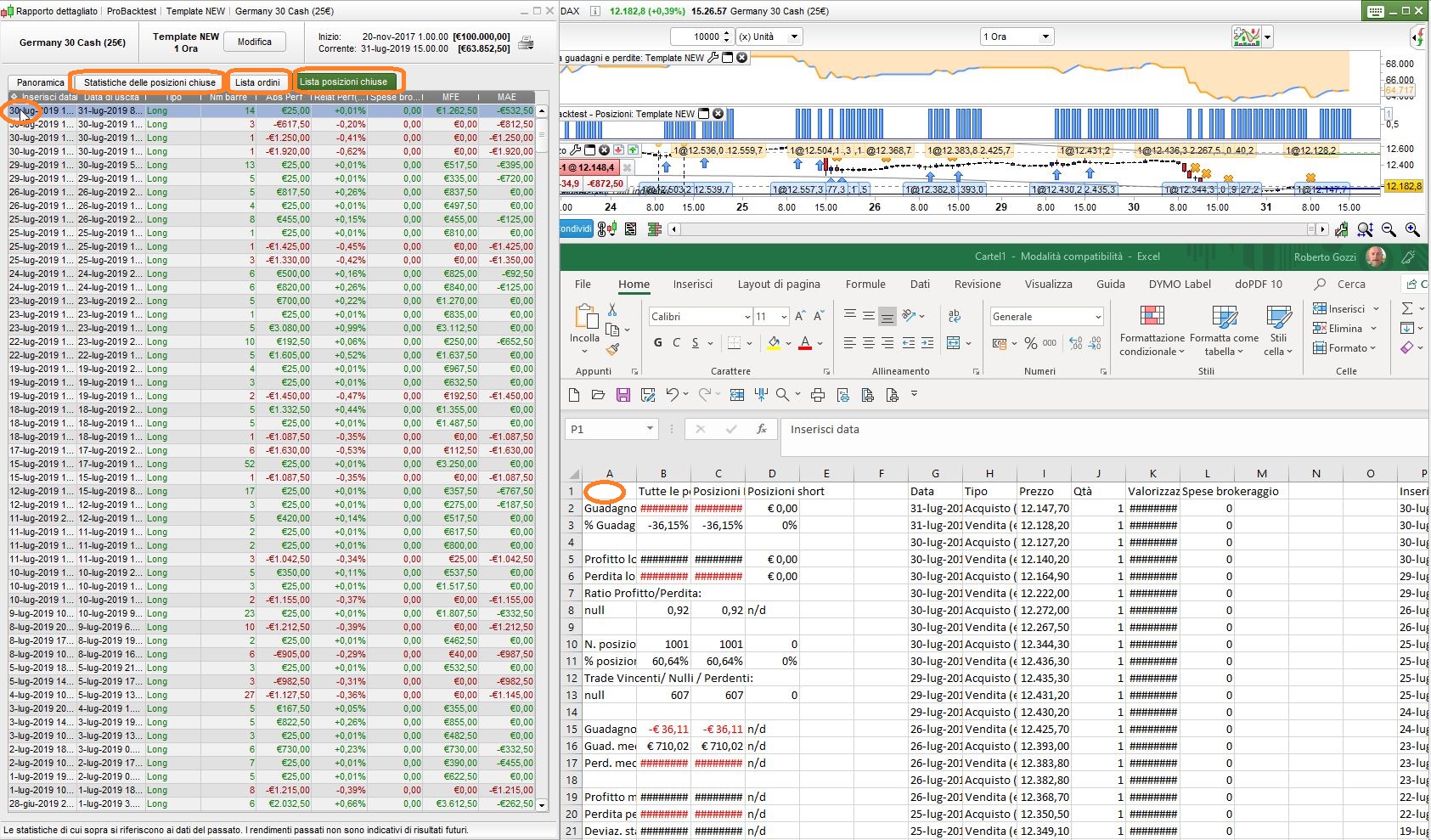
with reference to the attached screen I would like to ask you if it is possible to export all the data to Excel, for example, in order to sort them (for winning trades, for max drawdown, for gain/loss ratio etc.) and try to identify which are the best systems for the trading.
to avoid manually entering all the results for each test on an excel table.
GRAZIE !
Yes, you can drag & drop data from one of the lists (from the first line, or from wherever you prefer), to the eXcel column/line where you want to store them.
Hi everyone,
after many weeks of tests and thanks to your precious help, I finally managed to complete the code of my system.
now I have also activated the possibility to use the multitimeframe functions, but I have a small problem …
I read that the default timeframe must be the lowest and therefore I modified the code but I still can’t get any results.
the candles for the entry setup are based on the fractal with a 4 hour time frame
when then I am “onmarket” to manage the movements of stoploss and takeprofit as quickly as possible, the time frame must automatically become 1 minute.
unfortunately I can’t set these time frames and I kindly ask for your help.
on line 8 I set the 4 hour timeframe and on line 56 I would like to change it to the 1 minute timeframe (which I have obviously already chosen by opening the graph before testing the system).
I probably didn’t put the instructions for the two timeframes in the right place …
can you please try running my code and see what happens and explain how to modify it so that it can work properly?
thank you very much !!!
DEFPARAM CumulateOrders = False
MioRischio = 100  //importo massimo euro che voglio rischiare per ogni singola operazione
PercStop1  = 0.50 //attiva il pareggio al 50% del profitto
PercStop2  = 0.80 //attiva lo SL a metà del profitto quanto questo ragguinge la seconda %
PagoSpese  = 2 * pipsize //numero pips che aggiungo a breakeven per ripagarmi delle spese
MyStep     = 5 * pipsize //5 pip step after PercSTop2 is hit
indicator1, ignored = CALL "Fracta linee"
timeframe(4h,updateonclose)
MyATR = AverageTrueRange[14](close)
ATRperSTOP = 1
ATRperTARGET = 2
DaysForbidden = OpenDayOfWeek > 5
IF Not OnMarket THEN
BreakEven    = 0
MyTradePrice = 0
ENDIF
IF OnMarket AND Not OnMarket[1] OR StrategyProfit[1] <> StrategyProfit THEN
MyTradePrice = TRADEPRICE
BreakEven    = 0
Flag         = 0
SET STOP   pLOSS   StopLoss
SET TARGET pPROFIT TargetProfit
ENDIF
ONCE Flag = 0
//IF OnMarket OR LOW < MinimoPat THEN //?????
//ENDIF
IF StrategyProfit[1] <> StrategyProfit THEN
TradeON = 0
ELSE
TradeON = 1
ENDIF
Cond1 = HIGH<=indicator1 AND HIGH[1]<=indicator1[1]
CondTOT = Cond1        //Condizione globale da tradare
IF CondTOT THEN
Flag = 1
ENDIF
IF CondTOT AND Not LongOnMarket THEN
TargetProfit    = ((MyATR * ATRperTARGET)/pipsize) //VALORE in PIPS del mio TARGET INIZIALE
Prezzo          =  indicator1                //VALORE al quale si entra in posizione
//   se vengono soddisfatte TUTTE le CONDIZIONI
StopLoss        = ((MyATR * ATRperSTOP)/pipsize) //VALORE in PIPS dello STOP LOSS INIZIALE
MinimoPat       =  LOW
//TargetProfit    = max(80,TargetProfit)
//StopLoss        = TargetProfit * 0.5
Profitto1       = (TargetProfit * PercStop1)
Profitto2       = (TargetProfit * PercStop2)
ENDIF
//Moltiplicatore = (MioRischio/(StopLoss/Prezzo)/pipsize)
IF not onmarket AND Flag AND TradeON AND OpenDayOfWeek < 6 THEN
Moltiplicatore = (MioRischio/(StopLoss/Prezzo)/pipsize)
BUY Moltiplicatore lots AT (Prezzo+0*pipsize) STOP
SET STOP   pLOSS   StopLoss
SET TARGET pPROFIT TargetProfit
ENDIF
//------------------------------------------------------------------
timeframe(default)
CurrentProfit = (high - MyTradePrice) / pipsize
IF CurrentProfit > Profitto2 AND MyTradePrice < (TRADEPRICE + Profitto2 * pipsize) THEN
MyTradePrice = TRADEPRICE + Profitto2 * pipsize
BreakEven    = TRADEPRICE + Profitto1 * pipsize
ELSIF CurrentProfit > Profitto1 AND BreakEven = 0 THEN
BreakEven = MyTradePrice + PagoSpese
ENDIF
IF BreakEven > 0 AND CurrentProfit > 0 AND MyTradePrice > (TRADEPRICE + PagoSpese) THEN
IF close - MyTradePrice >= MyStep THEN
BreakEven    = BreakEven + MyStep
MyTradePrice = MyTradePrice + MyStep
ENDIF
ENDIF
IF BreakEven AND OnMarket THEN
SELL AT BreakEven STOP
ENDIF

IF OnMarket AND OpenDayOfWeek = 5 AND OpenTime >= 210000 then
SELL AT Market
ENDIF
Haven’t you seen the error that DAYSFORBIDDEN and MINIMOPAT are not used? Some lines must be missing.
Indicator FRACTA LINE is also missing. Please attach it or post a link when I can find it.
Please, when posting code make sure it is perfectly running.
When you ask for some help you need to supply ALL code and information to enable those who want to help you to replicate your environment.
SCUSA Roberto !!
Sorry for the misunderstanding,
the code I attached is exactly the last one I had attached after making that small change that you suggested in your post # 100598.
now I have only added lines 8 and 56 to try to set the two timeframes of 4 hours and 1 minute.
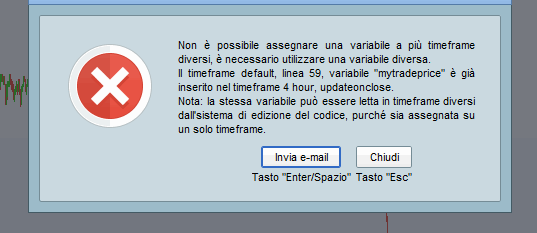
the code already worked without problems, but adding these two lines I got an error message which I attach below.
the errors you mentioned do not block the code and were just instructions that are not needed at the moment but that I left for future use
I certainly didn’t enter the timeframes settings correctly but I didn’t understand how to put them in the code.
could you please suggest me how to solve the problem?
the “mytradeprice” variable named in the error message is the one you put in the code to solve a problem to set a value after entering the market …
unfortunately right now I don’t know how and where to fix the problem.
GRAZIE MILLE !!