Multi Fractals ZigZag High/Low Fib Levels

Viewing 9 posts - 1 through 9 (of 9 total)
  • Author
    Posts
  • #24328 quote
    Johan
    Participant
    Average

    I’m just starting out playing with the “Multi Fractals ZigZag High/Low” indicator and wondering how to calculate fib levels between two points?

    Indicator can be found here: https://www.prorealcode.com/prorealtime-indicators/multi-fractals-zigzag-highlow/

    #24397 quote
    Johan
    Participant
    Average

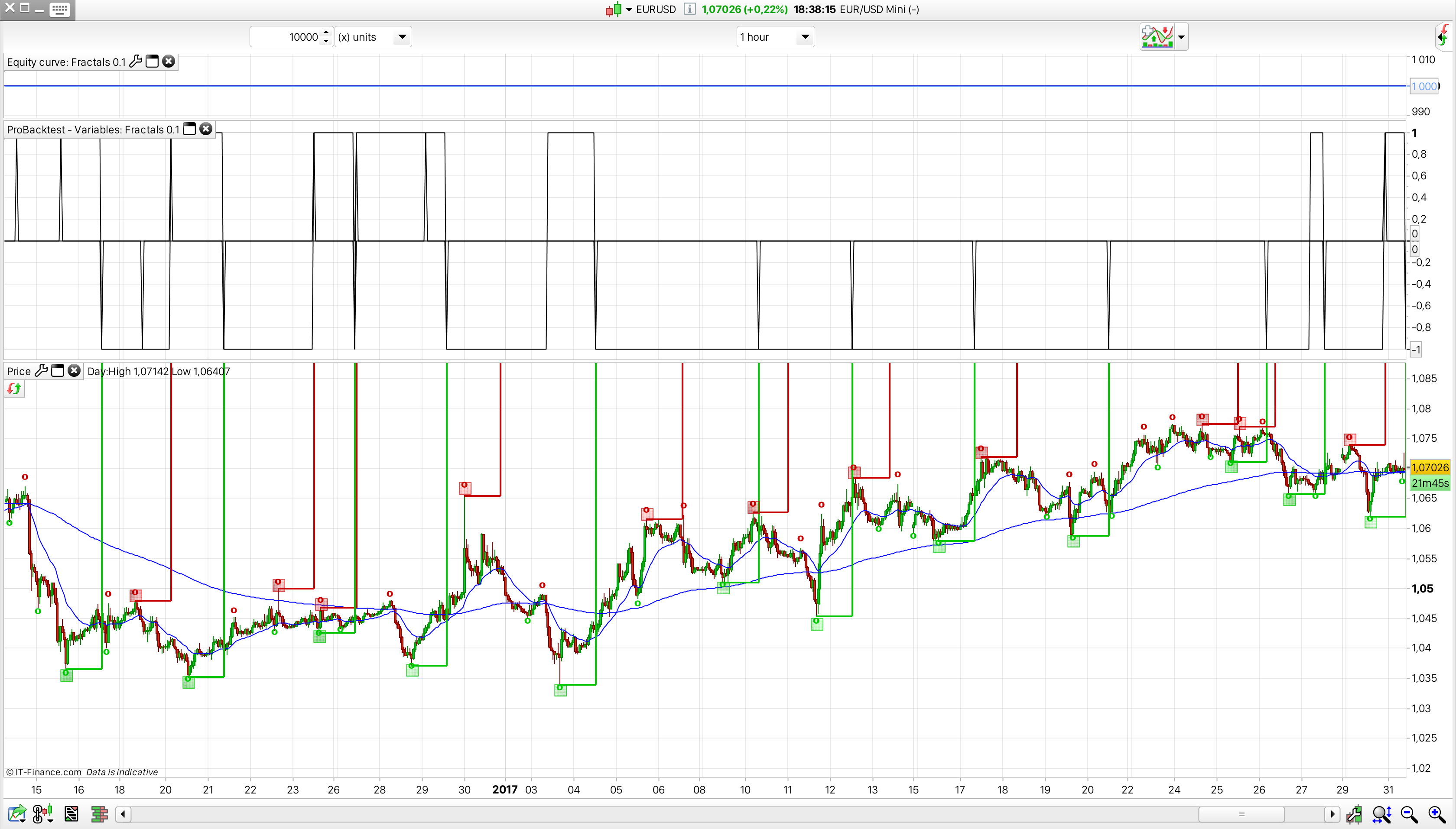
    One thing i’ve discovered is that it’s a bit tricky to get hold of the high and low points consistently. It’s weird, shouldn’t be because to indicator is working and indicating them. To illustrate the problem i’ve uploaded a picture. There’s a system with the indicator copied into it and which graphs out the “lh”, “ll” and “lastpoint”. I’ve also edit the indicator to include vertical lines which makes it easier to referens the 20 period delay.

    What becomes clear is that the “graph” of the system don’t compare to the indicator. During the beginning and through out the up trend there’s no graphs of the tops – only bottoms. This is where i get confused, the indicator is indicating tops but the graphs does not, but same code.

    What am i missing?

    [EDIT:] May be a bug in PRT or i have done something really strange code. But this only happens if i don’t do an active trade. What i have in the example was a not filled limit order.

    Screen-Shot-2017-02-08-at-18.38.10.png Screen-Shot-2017-02-08-at-18.38.10.png
    #24410 quote
    Joachim Nilsson
    Participant
    Average

    I think it´s because the dots on the chart are drawn when the indicator know that its right, not in real time. Or am I wrong?

    #24412 quote
    Johan
    Participant
    Average

    No, you’re right. Sort of. The indicator have a 20 period delay. So the dots/squares appear if it hits new highs och lows after that period in time. The problem i faced was, what i think a bug in PRT and it’s graph print event. If i set a sellshort or buy at market and let it run without exit the system graphs out the exact values as indicator.

    #24417 quote
    Johan
    Participant
    Average

    The code i use to calculate fib levels, say for an example in down trend and entry at a 68.1% retrace i use…

    entryFib = ((TOPy - BOTy) * 0.618) + BOTy
    sellshort at entryFib limit
    #24465 quote
    Nicolas
    Keymaster
    Master

    Your pending order at 61.8% fibonacci level retrace from the latest fractals low, seems correct to me. Joachim is right, because the TOPy and BOTy are set only 20 periods later (ordinary fractals are 3 periods only..), sometimes you try to put a pending order at a level which is already below the actual Close.

    So sometimes, you try put the limit order at the wrong place (above 0.618 level) with the correct values, or sometimes you put the order at the correct place with the old values (previous fractals).

    #24672 quote
    Johan
    Participant
    Average

    @Nicolas, if you would like to store the last 5 TOPy/x and BOTy/x. How would you do that?

    #24677 quote
    Nicolas
    Keymaster
    Master

    Since we got no data array capability, we’ll have to make new variables and populate them while time pass by with their values. But we should also consider barindex of each of them to know if the current TOPy (for instance) is newer than the already stored one, etc.. Should be very tricky I must admit, but possible ..

    #24678 quote
    Johan
    Participant
    Average

    Yes, it’s a big draw down with no array capability…

Viewing 9 posts - 1 through 9 (of 9 total)

  • You must be logged in to reply to this topic.

Multi Fractals ZigZag High/Low Fib Levels


ProOrder: Automated Strategies & Backtesting

New Reply
Author
author-avatar
Johan @johan_holmberg Participant
Summary

This topic contains 8 replies,
has 3 voices, and was last updated by Johan
9 years ago.

Topic Details
Forum: ProOrder: Automated Strategies & Backtesting
Language: English
Started: 02/08/2017
Status: Active
Attachments: No files
Logo Logo
Loading...