Dear Pro Real Code Team,
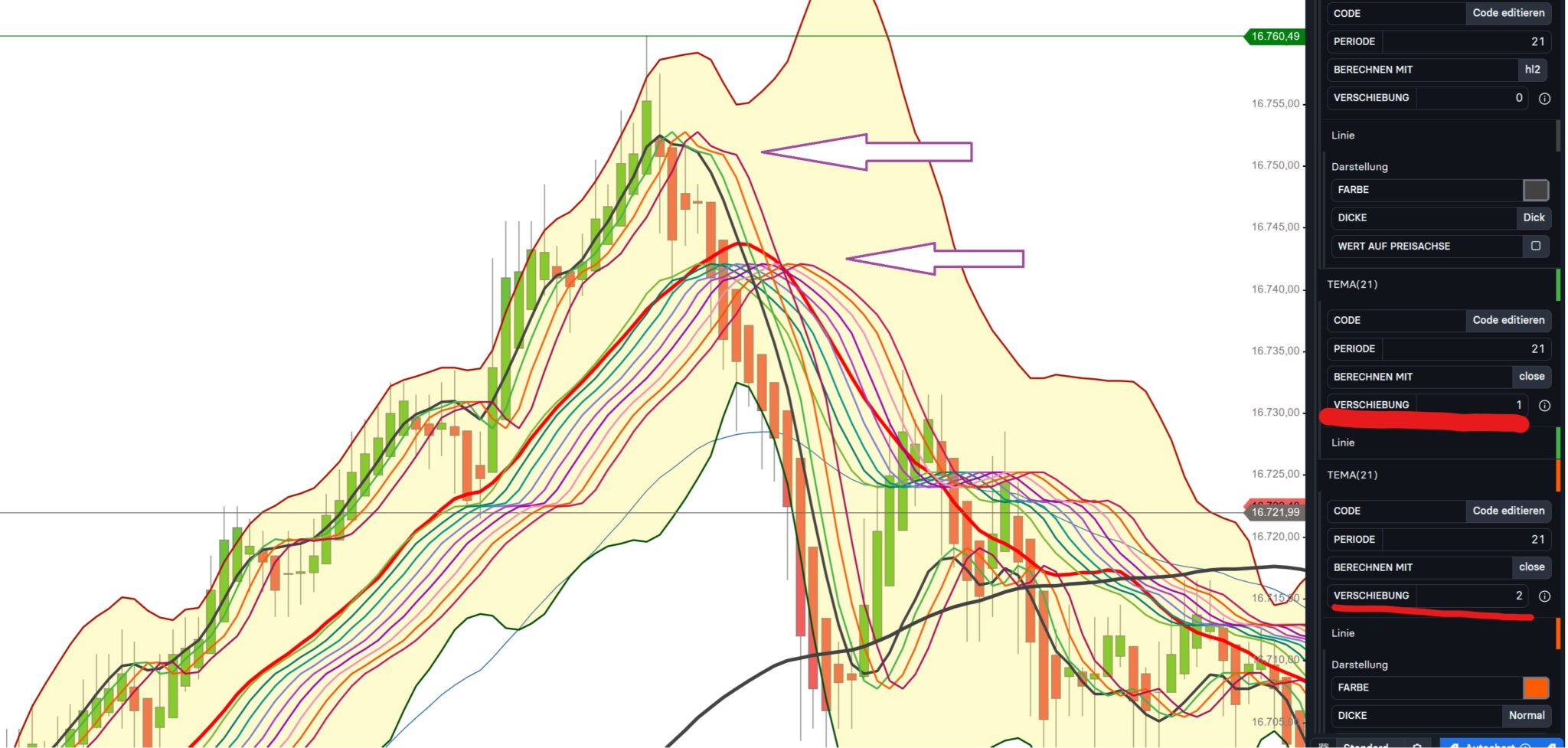
I would like to know whether it is possible to shift moving average lines like EMA or TEMA in the price chart window via customizing.
I have seen this in other charting software and I see a great advantage in the visualization of trend reversals.
See also the example in the attachment.
Many thanks and best regards.
 JS
JSParticipant
Senior
Hi @Traderfox06
What you show in your screenshot is not a “shift” (Close[n+shift]) in the indicator but “fast” and “slow” averages…
In this indicator you can see how it works:
Guppy Indicator
JSParticipant
Senior
Average[21+1](Close) = Average[22](Close)
Average[21+2](Close) = Average[23](Close)
Average[21+3](Close) = Average[24](Close)
Etc..
Increasing, slower averages…
I think it is a shift all right. But what
@Traderfox06 will want to do, is not possible in code. It is possible with some indicators though (e.g. Hull Moving Average).
Shift in code is possible, but to “later”, while you’d want earlier.
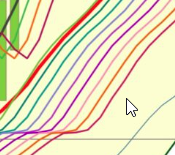
A description about this is written somewhere by Nicolas, but from the top of my head he talks about “shift to the right is not possible”. But … see below. What the mouse points at, would be shifted to the right. That *is* possible. But you would want to shift to the left, so the average etc. peaks as where reality happened. The right most line shown here would be reality. The others will have been shifted to the left.
I suppose the (e.g.) HMA indicator does that with a kind of repaint.
N.b.: I recall that if you try this in practice, the to the left shifted part is lacking at the right side of the chart (thus repaint ?).
Add [xhiftamount] to the average commands at the right side. OK, here for SMA (from Nicolas) :
X = 10 //you'll get the value of the SMA from 10 bars ago
sma20 = average[20](close)[X]
… which means “10 bars too late” according to my interpretation.
Shifted to the left:
Periodi    = 10      //10
Tipo       = 0       //0=sma
Shift      = 1       //1 period shifted to the left
src        = CustomClose
MyAvg      = average[Periodi,Tipo](src)
IF BarIndex > Shift THEN
   drawsegment(barindex - Shift - 1,MyAvg[1],barindex - Shift,MyAvg) coloured(139,69,19,255)
ENDIF
return
Shifted to the right (into the future):
ONCE Periods = 10
ONCE AvgType = 0
ONCE Hshift  = 1
MyMA   = Average[Periods,AvgType](close)
Result = MyMA
r      = 0
g      = 0
b      = 255
t      = 0
IF BarIndex > Periods THEN
   IF Hshift = 0 THEN
      t      = 255
   ELSE
      x1 = BarIndex + (Hshift - 1)
      y1 = Result[1]
      x2 = BarIndex + Hshift
      y2 = Result
      DrawSegment(x1,y1,x2,y2) coloured(0,128,155,255)
   ENDIF
ENDIF
RETURN Result AS "MA" coloured(r,g,b,t)
Roberto, I think this is great. It is about the first version of course (shift to the left).
Visually this works perfectly. Now it should return the MyAvg as a line which can be checked for crossing etc. (trend change). It requires a bit of staring for me on how to do that. But I suppose it can be done with this as the base.
Well, it works like CHIKOU (Ichimoku), which is the current price shifted 26 bars leftwards. Nobody could know, 26 bars ago what the price would have been now.
It’s of no practical use as is. We could try to forecast tomorrow’s price. This snippet returns both the regular SMA and the same one to which I added the average difference as a simplicistic way to forecast the next price:
Periods    = 10      //10
Type       = 0       //0=sma
src        = CustomClose
MyAvg      = average[Periods,Type](src)
MyDiff     = average[Periods,Type](MyAvg - MyAvg[1])
MA         = MyAvg + MyDiff
return MA AS "Shifted SMA",MyAvg AS "Sma"
Hello community,
thanks for all these helpful contributions.
I have tested and interestingly came to the conclusion, that the calculation is not
Average[21+1](Close) = Average[22](Close)
Average[21+2](Close) = Average[23](Close)
Average[21+3](Close) = Average[24](Close)
like in the Guppy or Rainbow indicators, but
Average[21](Close)+1
Average[21](Close)+2
Average[21](Close)+3
So no matter how you call it, but it is working with an increasing offset,
which makes the trend change better visible.
And robertogozzi is right, it works like the Ichimoku.
Regarding the negative offset, I think this makes no sense, because a moving average with e.g. -4 periods can only be painted from the moment, the current period (candle) appears.
Will check the coding later.
Thanks and kind regards.
Well
Traderfox06, I agree +1 is an offset, but it may not be what you want, as it’s a fixed price, with different effects:
- with indices it will add usually 1 to the current price and should not cause any inconvenience
- with FX pairs, say Eur/Usd, adding 1 to, say 1.0870, will make it 2.0870!!! that’s pretty undesired, I think
- with SHARES, it will add 1 to the current price; if it’s 1000+ that won’t make much difference, while if the stock price is, say 5 or 10, it will make a big difference.
If you want to use a price offset, I suggest that you use
1*PipSize, to let ProOrder do the necessary conversions, without the hassle of taking care of that nuisance.