


More options when Exporting – Importing

Viewing 3 posts - 1 through 3 (of 3 total)
  • Author
    Posts
  • #3571 quote
    RicLg
    Participant
    Senior

    Hello,

    Lets says i’d like to sent to a friend only the return’s code, not the code it self.

    return x as “New signal”, y  as “New Position”, z  as “Original Signal”,zz as “Original Position”

    Value1 ,             Value2              ,               Value3             ,   Value4

    Export’s return may like  : date,return Value1, return’s Value2, …..,  ….,

    Let say that friend would like  import these data into Prorealtime.

    Thank for reading

    screener-data-to-excel.png screener-data-to-excel.png
    #3575 quote
    Nicolas
    Keymaster
    Master

    Hello RicLg,

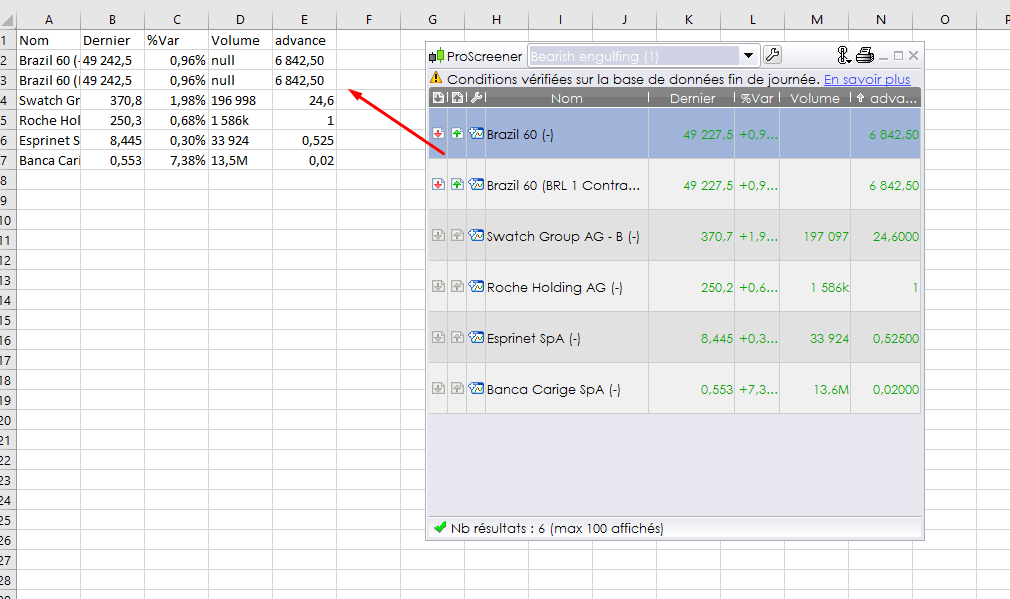
    You can already do that, with a little trick and one value at once, by using ProScreener. The return values are sorted in a table that can be copy/paste to Excel for example, or just swipe them to the Excel sheet area to make the values appear in the cells.

    screener data to excel

    It works too with ProBacktest results, that’s how I made my deep analysis of strategies.

    #3588 quote
    RicLg
    Participant
    Senior

    Thanks Nicolas for the trick, Nicolas

Viewing 3 posts - 1 through 3 (of 3 total)

  • You must be logged in to reply to this topic.

More options when Exporting – Importing


Platform Support: Charts, Data & Broker Setup

New Reply
Author
author-avatar
RicLg @riclg Participant
Summary

This topic contains 2 replies,
has 2 voices, and was last updated by RicLg

9 years, 11 months ago.

Topic Details
Forum: Platform Support: Charts, Data & Broker Setup
Language: English
Started: 03/10/2016
Status: Active
Attachments: No files
Logo Logo
Loading...
