Month and Year gives incorrect values

Viewing 6 posts - 1 through 6 (of 6 total)

  • Author
    Posts
  • #246344 quote
    lilicronje
    Participant
    New

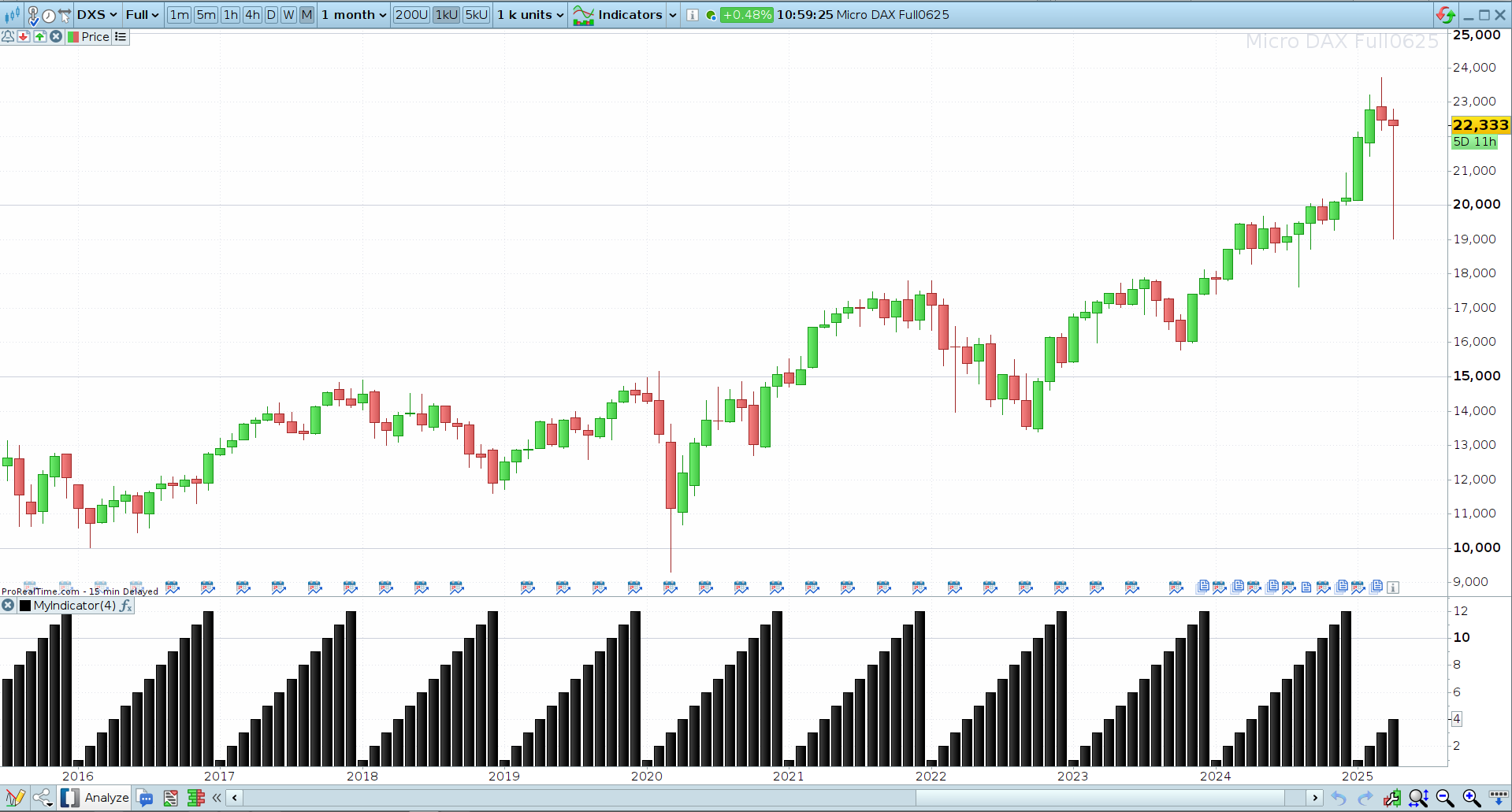
    When trying to program an indicator (on the DAX for now), the “Month” and “Year” will give inconsistent values, for example January might sometimes have a value of 2, Both November and December could have values of 12 etc.  The way in which the values are incorrect is not consistent (I viewed the variable on a monthly chart, but the same applies to smaller time frames).  Similarly, the year sometimes changes in January, but other times December will already show the next year (eg Dec 2024 is displayed as being 2025).  This will sometimes be correct, for example in 2022, the new year correctly only shows in January.

    I saw a post of 4 years ago where this issue was discussed, with a promise that it will be fixed soon?

    Not having a solid point of reference makes it harder to write an indicator if I don’t want it to repaint based on whatever history is on display, so assistance would be much appreciated.

    #246382 quote
    Iván González
    Moderator
    Master

    Hi. Could you share screenshots showing the data you mentioned? What ticker and what timeframe are you using?
    Also, if this issue persists, you can open a support ticket.
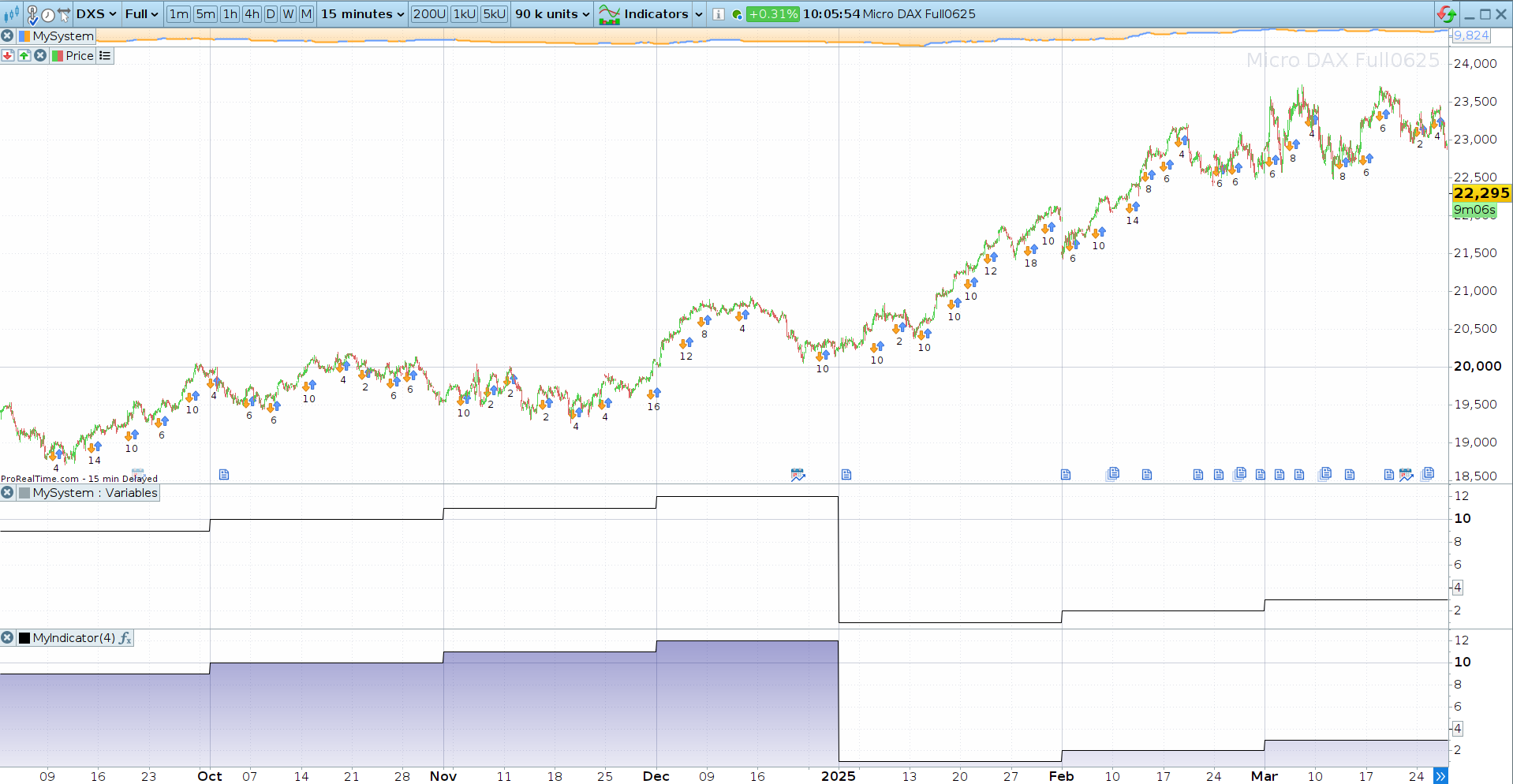
    I tested using the month variable on DAX and DXS with daily, 1-hour, and 5-minute timeframes. The months display correctly both in the indicators and in the backtesting module. (See screenshot)

    2025-04-25_10-21.png 2025-04-25_10-21.png
    #246385 quote
    lilicronje
    Participant
    New

    Hi.  So, it is for the DAX.  I show a monthly chart for reference, and the “MyMonths” indicator I programmed only consist of 1 line, being “Return Month” on a new panel.  I circled in red where the months do not display correctly.  Also added some drawings.  I did not indicate all the incorrect values, but you should get a good idea….  Also, the “printing” function is not an exact duplicate of what I see on the screen, so some of the writings I did are a bit obscured, but the overall picture should come accross.

    Screenshot-24-April.pdf
    #246393 quote
    Iván González
    Moderator
    Master

    I see… I can’t help you because you have IG account and I don’t have access to this ticker.
    I checked micro DAX Full in EUREX Micro Futures.
    Please open a ticket support.

    2025-04-25_11-14.png 2025-04-25_11-14.png
    #246409 quote
    JS
    Participant
    Senior

    Hi,

    The “problem” arises when a single week contains days from different months—so which month does that week belong to?
    The PRT rule states that if more than three days of that week fall in the following month, then the entire week is considered part of that next month.
    For example, the last days of December fell on a Monday and Tuesday, meaning only two days of that week are in December, while the remaining five are in January. According to the rule, that week belongs to January 2025.
    As a result, the month of December gets assigned a “1”.

    Take March 2025 as another example: the last day of March (March 31) falls on a Monday. The other six days of that week (i.e., more than three) fall in April. Therefore, March is considered part of April and receives a “4”.

    robertogozzi thanked this post
    #246410 quote
    robertogozzi
    Moderator
    Master
    What JS says is right, that’s the same rule applied to the first week of the year which belongs to year that as 4+ days in that week.
Viewing 6 posts - 1 through 6 (of 6 total)
  • You must be logged in to reply to this topic.

Month and Year gives incorrect values


Platform Support: Charts, Data & Broker Setup

New Reply
Author
author-avatar
lilicronje @lilicronje Participant
Summary

This topic contains 5 replies,
has 4 voices, and was last updated by robertogozzi
9 months, 3 weeks ago.

Topic Details
Forum: Platform Support: Charts, Data & Broker Setup
Language: English
Started: 04/24/2025
Status: Active
Attachments: 3 files
Logo Logo
Loading...