Hi everyone,
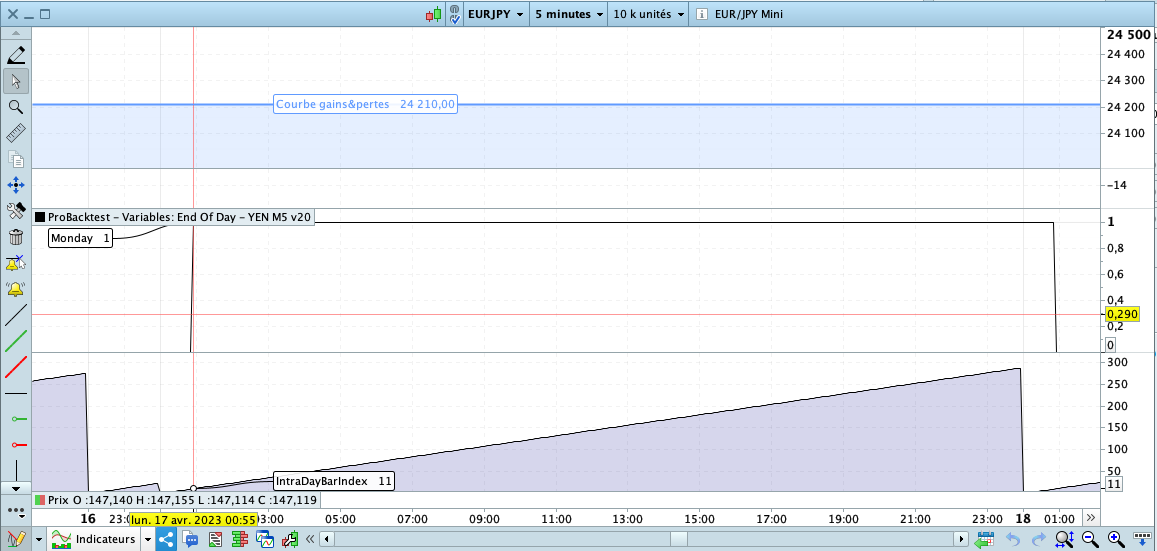
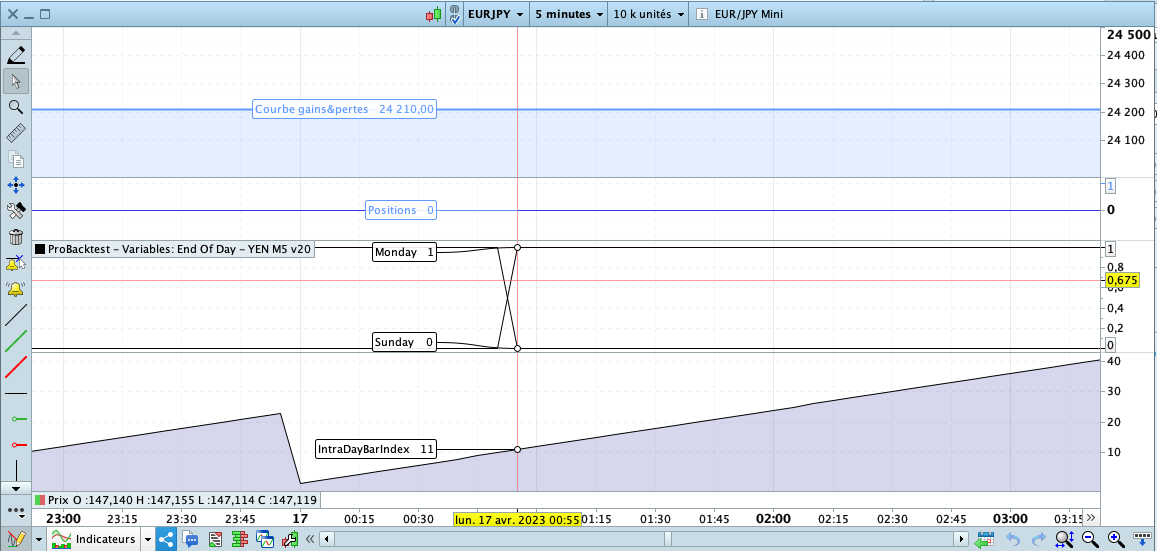
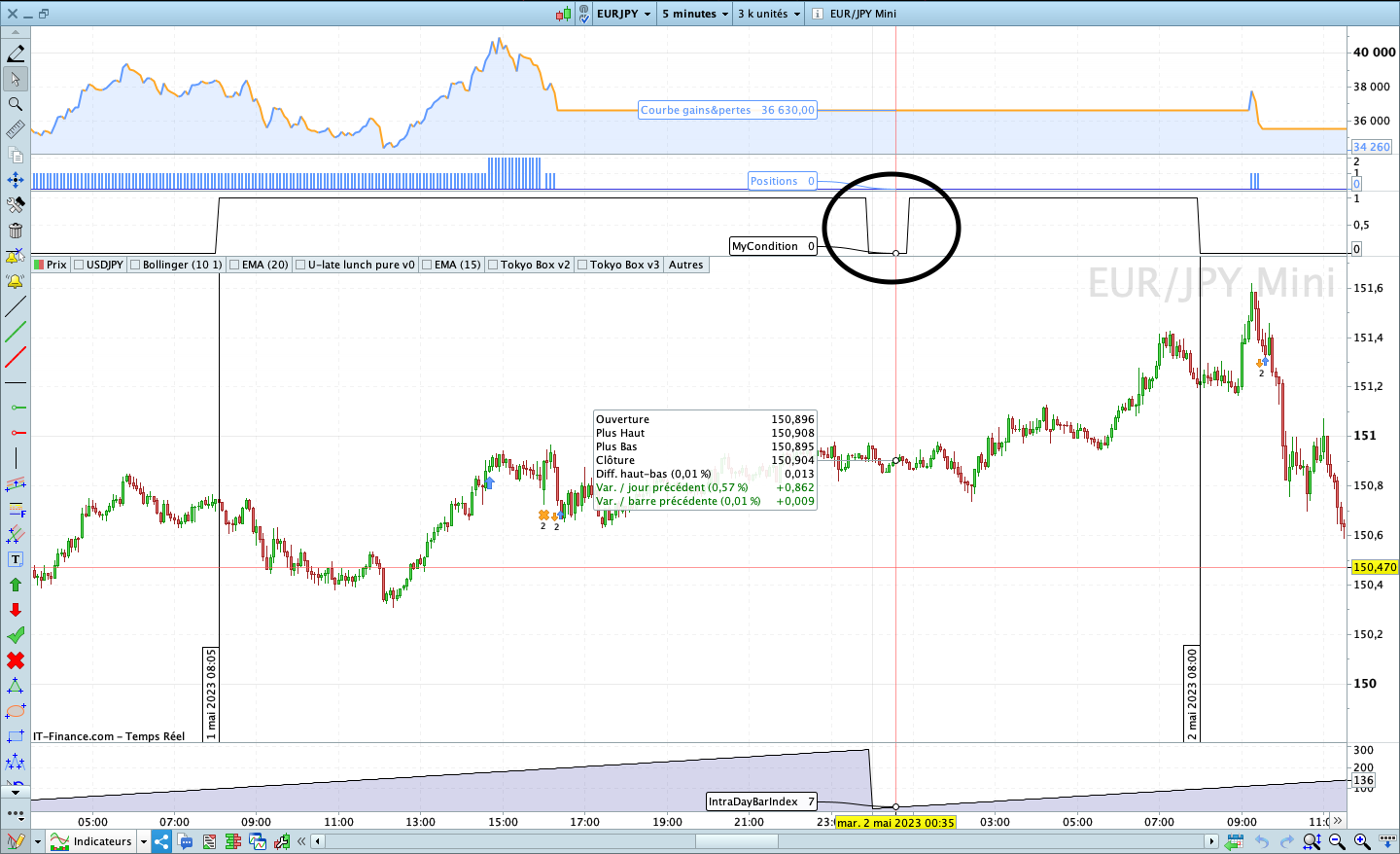
I hope you are fine, I broke my head, and here is the result I see that the day does not start with INTRADAYBARINDEX = 0 but 11 as you can see on the picture,
Is it a time zone setting that I have to do on the platform?
code of ProOrder :
IF DayOfWeek = 1 THEN
  Monday = 1
ELSE
  Monday = 0
ENDIF

Graph Monday AS "Monday"
Code of Indicator :
Return IntraDayBarIndex AS "IntraDayBarIndex"
Best Reguards,
ZeroCafeine
I don’t know the answer hence how to deal with it, but this may be related to when the Fx pair resets. For example, for EUR/USD this is 02:00 our time (Brussel) for IB.
I said “for IB” because I recall that for IG this is not the same. This is how the daily gain in % is not equal for both.
Then I said in the first sentence “may be”, because it also looks like your issue being that the week starts at 23:00 (our time) while it is still Sunday. Now compare with e.g. the UK where it will be 22:00.
I hope that someone else has a good answer to this. If not, best is to work around it. Offset it yourself (somehow). Don’t forget daylight savings !
Hi @Zerocafeine, although it hasn’t been discussed for a while, this question used to be raised in the early days of the site with topics of users trying to calculate pivot points on IG ruling out Sundays and/or a few night hours in the week. The key points are :
- times and intradaybarindex keywords are in your timezone, related to « your » midnight,
- but dates keywords and therefore date changes are not in your timezone, they are common to everyone in the market’s timezone, the market date changes at the same instant wherever you are on the globe (I like to call it the « market’s midnight », but you don’t have to, it’s not an official term), so this date change frontier is not at the same hour for different people in different timezones.
dayofweek=1 is a market date keyword, it is not in your timezone, so in this case it is true from midnight UK time market date change (however, note : not all cfd’s from IG necessarily have a UK midnight date change), which happens to be 1:00am your time, and another time for someone in another timezone.
You are in 5mn timeframe, so at « your » midnight you first have intradaybarindex=0 and 12 times 5mn candles in total (0,1,2,…,11 if no empty ones) make up one hour until market ‘s midnight, that’s your intradaybarindex=11 candle count since midnight, starting at 0 :55 and closing at 1 :00am your time.
As a sidenote, your code says it’s Monday only because you picked candle close, you could just as well have picked date at candle open with opendayofweek=1 and it would have been the =12 candle starting at 1am.
I don’t hide from you that I am really annoyed,
First there is the problem I mentioned above and now I see that there is another problem,
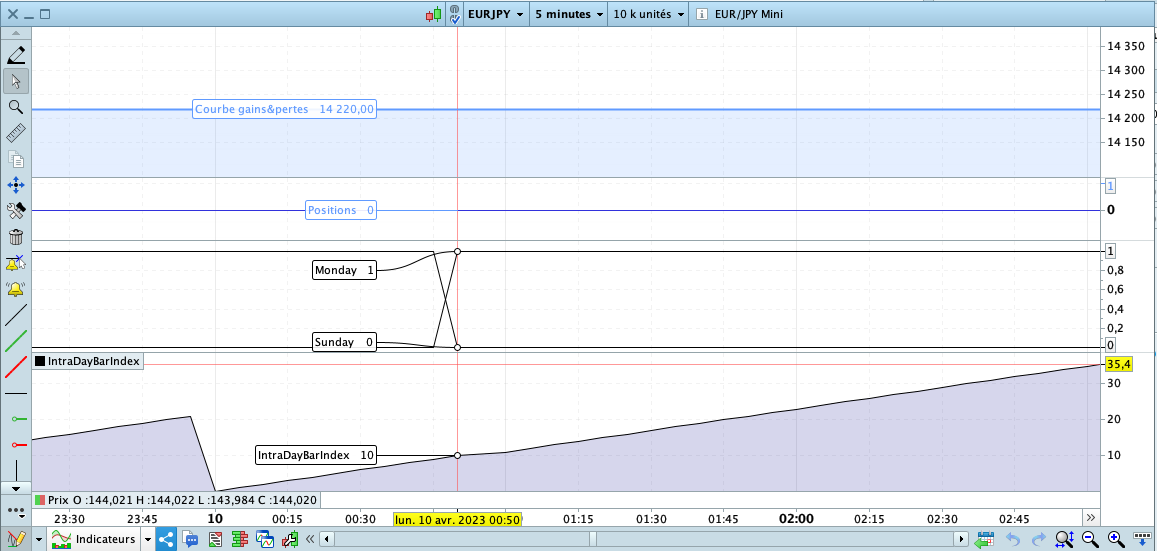
Sometimes Monday starts at IntraDayBarIndex 11, but for example you can see on the screenshot that on Monday 10 April, it starts at IntraDayBarIndex 10 🙁
I have attached two captures and you can see that on Monday it sometimes starts at IntraDayBarIndex 11 and sometimes at IntraDayBarIndex 10, if someone could explain to me why that would be nice ?
I don’t want to sound like a pain in the ass 😅, but I can’t afford to use risky programming, I hope you agree with me 🙂,
Also are there other cases with other functions where I could have this problem,
if you can give me function names or links it would save me time please 😊
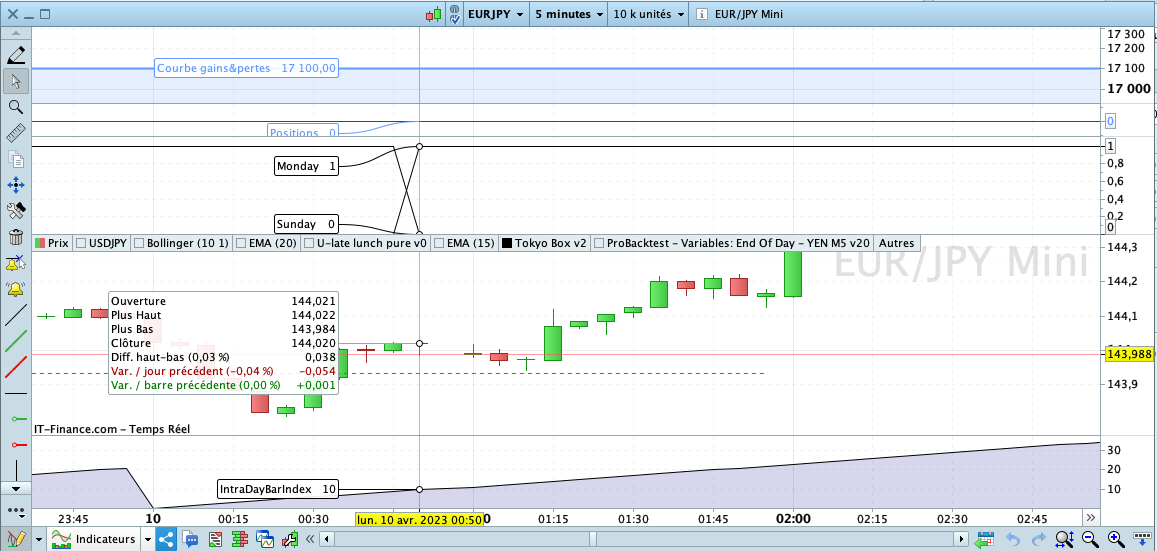
As screen capture doesn’t show candles, and taking into account intradaybarindex is made to count only actual candles not the empty ones (hence the above precision in previous post: “12 times 5mn candles in total 0,1,2,…,11 if no empty ones”), best guess is there was no tick at IG during one of these 5 minutes intervals and your monday 1am starting from your midnight arrives at a count =10 instead of =11.
Maybe as an MTF. And count whole hours.
that is code and photo with candle sorry
IF DayOfWeek = 1 THEN
 Monday = 1
ELSE
 Monday = 0
ENDIF

IF DayOfWeek = 0 THEN
 Sunday = 1
ELSE
 Sunday = 0
ENDIF

Graph Monday AS "Monday"
Graph Sunday AS "Sunday"
Wouldn’t it just be better to use the Time function instead of the IntraDayBarIndex ?
Wouldn’t it just be better to use the Time function instead of the IntraDayBarIndex ?
To do what exactly?
Maybe it’s because I am sick and I’m being very slow today, so apologies if I missed it, but as far as I can tell, you didn’t really say what it is you are trying to achieve, you only described tests that showed you some coding instructions normal behaviour was different from your initial expectations.
@JC_Bywan
First of all, thank you very much for all your answers 😊, and I wish you a good recovery 😊
It’s me I messed up and instead of using the times of day I thought using the INTRADAYBARINDEX function would be nicer for various reasons, but since it can have missing candles and therefore skew all the calculations then I’ll go for conditions with the Time function instead
@JC_Bywan
maybe someone can help for this : How to make the condition true in the area I have circled ?
IF (DayOfWeek = 1 AND Time > 080500) OR (DayOfWeek = 2 AND Time < 080500) THEN
MyCondition = 1
ELSE
MyCondition = 0
ENDIF

//Graph Monday AS "Monday"
Graph MyCondition AS "MyCondition"
The issue is due to DayOfWeek which is NOT updated whan a new day start, but when the DAILY candle opens. So, when the daily candle is set to open by IG at 010000, your date will show the new day (in this case Tuesday), but DayOfWeek will retain 1 (it’s still the Monday’s candle) from 000000 to 005959.
Use this code:
IF (DayOfWeek = 1 AND Time > 080500) THEN
   MyCondition = 1
ENDIF
IF (DayOfWeek >= 2 AND Time >= 080500) THEN
   MyCondition = 0
ENDIF

//Graph Monday AS "Monday"
Graph MyCondition AS "MyCondition"
tks you robertogozzi, I want to make a calculation during a period X,
This period X starts on Monday at 8am and ends on Tuesday at 8am
how to define X ?
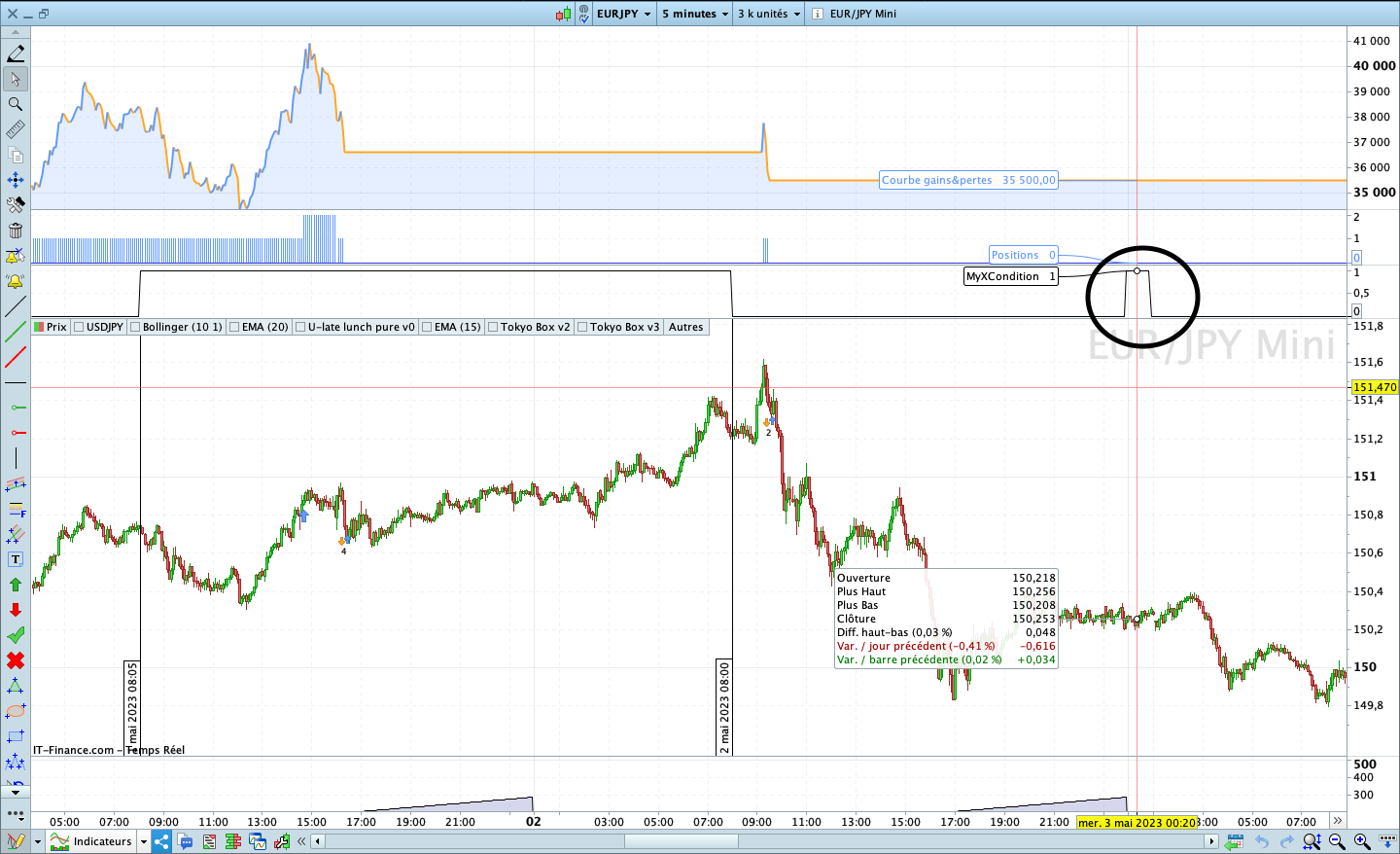
with this code is neer ok, but you can see on the picture what I have circled that should not be in the condition
MyXCondition = (DayOfWeek = 1 AND Time > 080500) OR (DayOfWeek = 1 AND Time < 010000) OR (DayOfWeek = 2 AND Time < 080500)

Graph MyXCondition AS "MyXCondition"
You probably did not understand my explanation fully.
Use my code, replacing MyCondition with X, then add
X = X + 1
just before GRAPH.