


Minimise two Windows and then Every Other Chart Minimises Too

Viewing 5 posts - 1 through 5 (of 5 total)

  • Author
    Posts
  • #179882 quote
    Bard
    Participant
    Master

    Hi there,

    Has anyone ever minimised two charts (they were on top of each other) and then all the other charts and open platform windows (to both sides of those two charts) also then minimise one at a time too!? There’s nothing you can do to stop it until the whole platform has disappeared into the dock then you have to click on the top right PRT icon in the main menu and then they all come back one at a time. I’m on Mac OS 10.14.6.

    Also when I minimise eg one chart (which works), why is it when I click on the main options chain window on my PRT platform that the chart I’d literally just minimised then pops back onto the desktop?

    Any help much appreciated,
    Cheers
    Bard

    #179885 quote
    GraHal
    Participant
    Master

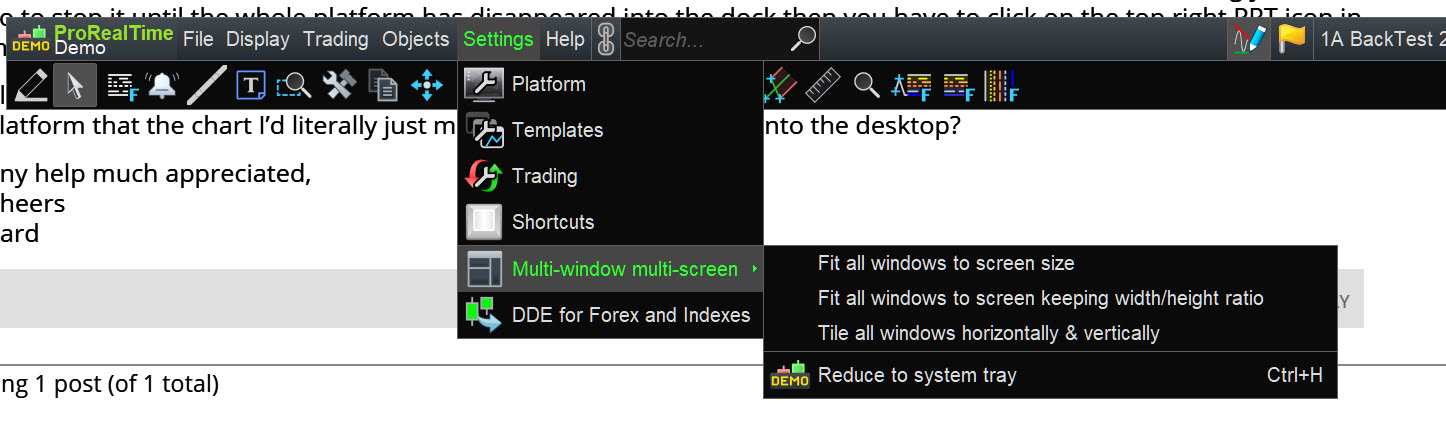
    Anything to do with the Setting as shown on attached?

    Bard thanked this post
    Bard.jpg Bard.jpg
    #179899 quote
    Nicolas
    Keymaster
    Master

    Change the options as described in the settings for windows reduction (picture attached).

    Bard thanked this post
    windows-reduction-prorealtime.png windows-reduction-prorealtime.png
    #179943 quote
    Bard
    Participant
    Master

    Hi @nicolas,
    Thanks, I checked but my Interface is unchecked for “simultaneous reduction”?
    Cheers,
    Bard.

    #179944 quote
    Bard
    Participant
    Master

    Hi GraHal, hows it going?
    I looked but I don’t think so, thanks.

Viewing 5 posts - 1 through 5 (of 5 total)
  • You must be logged in to reply to this topic.

Minimise two Windows and then Every Other Chart Minimises Too


Platform Support: Charts, Data & Broker Setup

New Reply
Author
author-avatar
Bard @brad Participant
Summary

This topic contains 4 replies,
has 3 voices, and was last updated by Bard

4 years, 4 months ago.

Topic Details
Forum: Platform Support: Charts, Data & Broker Setup
Language: English
Started: 10/18/2021
Status: Active
Attachments: 2 files
Logo Logo
Loading...


