 Ξ3
Ξ3Participant
Senior
Is there any chance that the maximum value for the PreLoadBars will be increased to more than 10000?
I ask this as I use an adaptive EMA that uses a 1 second timeframe to calculate the rolling value of an X period 1 hour EMA and it needs significantly more than 10000 bars for the results to become accurate (for the decimals to become significant).
I have implemented a BarIndex warm-up period check into my code to overcome this limit but every time the ProOrder strategy needs to be restarted I have to wait a long time for the warm-up bars to be attained before I can automatically start trading again. This is obviously not ideal for my strategy. Any ideas?
Add a piece of code with a TimeFrame of 1 minute (or even more) and integrate the results of that (time period -) part with your normal calculations ?
Should be 60 times faster. 😉
Btw, I would say that adding more PreLoadBars would make it as more slow as you already experienced ?
Ξ3Participant
Senior
Hi PeterSt,
That is not a bad idea and I have tried something similar to this in the past using MTF. In my use case I would like to keep the granularity of the 1 second bar if I can…?
In terms of performance, the actual calculations are fairly simple so, not a computational heavy calc (no For, While or other loops) just a simple EMAValue = (Alpha * SomeValue) + ((1 – Alpha) * EMAValue[1]).
Of course there is some other magic I need to perform in my system for everything to come together nicely (hence the preference to keep 1 sec granularity).
Thank you for your input!
Ξ3Participant
Senior
For those who are wondering how I got around the “historical data loaded was insufficient to calculate at least one indicator during the evaluation of the last candlestick” problem (because of the PreLoadBars 10k limitation when I need much more), I have implemented something like the extracts below, which works for me:
Once VisibleChartBars = 5525 // Number Of Bars Used For Chart Scale Calculation
Once VisibleOnlyAfter = 94500 // 10000 // (Max PreLoadBars limited to 10k) // Number Of Bars Before Display Calculations (Historical Data Less +/- 10k Bars)
.
.
.
Once MTFReady = 0 // Default Multi Time Frame Ready State
Once MTFReadyBar = VisibleOnlyAfter // Minimum Multi Time Frame BarIndex To Commence Trading
Once MTFReadyFake = VisibleChartBars // Maximum Multi Time Frame BarIndex To Commence Fake Trading (historical data loaded was insufficient to calculate at least one indicator during the evaluation of the last candlestick)
.
.
.
// -> Bar Index Of Multi Time Frame
MTFBarIndex = BarIndex
If (MTFBarIndex >= MTFReadyBar) or (MTFBarIndex <= MTFReadyFake) then
MTFReady = 1
Else
MTFReady = 0
EndIf
Btw, I would say that adding more PreLoadBars would make it as more slow as you already experienced ?
No, because I did not get it fully, yesterday.
Okay, next trick :
Create a bunch of parameters to your program like PreCalculatedEMA and all you further need and maybe a BarIndexCounter / desired look-back time – this latter to feed to your backtest (see below).
Now run a backtest over the (additional) period you like. Say 200K bars (1M is max with PRT Premium). Just do your thing in there for the EMA calculations. Make the program lean (EMA math only) so it remains fast (the fewer lines of code the faster it will be).
Note : mentioned your program is thus not your Strategy code. It is dedicated to your PreLoadBar calculations.
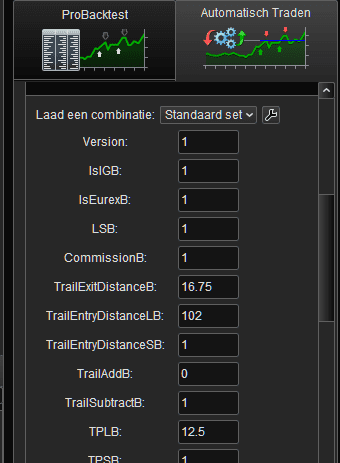
Now add the necessary parameters to your Strategy code program, which will be fed manually by you and which comprise the output of the EMA-calc program. In case you don’t know : such parameters (as many as you like I think) can be given to the part which hands the lot to ProOrder.
Now your Strategy code will act as it if just did a Preload run of 200K etc. bars.
*You will never be able to restart your Strategy code without running the EMA-math code first (which technically applies a backtest).
Summarized :
- Run your EMA-Calc program and give it per parameter the number of PreLoadBars to use (e.g. 200000). Note : calculate the time where it should start its calculations from the number of bars you give it. Or the other way around : give it 24 hours and know that it will roughly need to start 86400 seconds (bars) back. Or make it fixed to 200K bars because this lean code will run for 30 seconds max anyway (it differs per instrument).
- Show the results per Print command (or Graph but that is way slower). Maybe start printing only when close to the end of this backtest (that’s what it is – a backtest). **
- ASAP after this, start your ProOrder Strategy code. Feed it with the dedicated output per Print command from EMA-Calc. Note : this will now start right away but best set PreLoadBars to 200 (or whatever the minimum is) because it is not used.
**): You can let the backtest run in forward mode and keep judging the print output while you wait for the best moment to start the Strategy in ProOrder and only then grab the parameter values.
PS: Your Strategy code is to contain the EMA calculations redundantly because it still requires then underway, from order to order.
Ξ3Participant
Senior
What a fantastic idea. This will most certainly provide me with an elegant solution to get the precision that I am looking for without waiting for ProOrder to build it up over time. Much appreciated!
Only downside is I must remember to set these correctly.before firing up the strategy.
From a convenience point of view, I guess there are no immediate plans to give us more than the 10k limit on the PreLoadBars? Having said that, I just realised that the rest of my MTF code in the strategy may be impacted by any additional bars here…
If you give the Strategy to ProOrder and you have defined Parameters to the Strategy (these are the same ad Backtesting Parameters), you will be presented this screen automatically.
Can’t forget it. 🙂
Ξ3Participant
Senior
I didn’t know about this… I just assumed you meant manually adding parameters with the correct value as a starting point.
Will have to do some research on it but this is really a great help.
Much appreciated!