// ------------------------------------------------------------------------
// MACDZ Component Mapping (Aligned with PRT Chart Labels):
//   - MACD Zero Lag       → myMACDline     (Blue Line)
//   - Zero Lag Signal     → myMACDsignal   (Red Line)
//   - MACD - Signal       → Histogram      (Green Histogram = myMACDline - myMACDsignal)
// ------------------------------------------------------------------------
// OPTIMIZATION RANGES:
//   - R1: myMACDFast     → Short-term EMA
//   - R2: myMACDSlow     → Long-term EMA
//   - R3: myMACDSignal   → Signal EMA applied to MACD line
// ========================================================================

// === INPUT PARAMETERS ===
myMACDFast     = myMACDFast       // R1: Short-term EMA
myMACDSlow     = myMACDSlow       // R2: Long-term EMA
myMACDSignal   = myMACDSignal     // R3: Signal EMA
myATRperiod    = 14
myATRmultiplier = 2.5
myRiskPercent  = 5
myInitialBalance = 100000

// === INDICATORS ===
myMACDline     = ExponentialAverage[myMACDFast](close) - ExponentialAverage[myMACDSlow](close)
myMACDsignal   = ExponentialAverage[myMACDSignal](myMACDline)
myATR          = AverageTrueRange[myATRperiod]


// === ENTRY SIGNALS ===
// Detect actual crossover on previous bar and act on current bar
myLongSignal  = myMACDline[1] <= myMACDsignal[1] AND myMACDline > myMACDsignal
myShortSignal = myMACDline[1] >= myMACDsignal[1] AND myMACDline < myMACDsignal


// === EXIT SIGNALS ===
// Detect crossover in reverse direction to close position on the same bar
myExitLongSignal  = myMACDline[1] >= myMACDsignal[1] AND myMACDline < myMACDsignal
myExitShortSignal = myMACDline[1] <= myMACDsignal[1] AND myMACDline > myMACDsignal
Hi there buddy PRT coders.
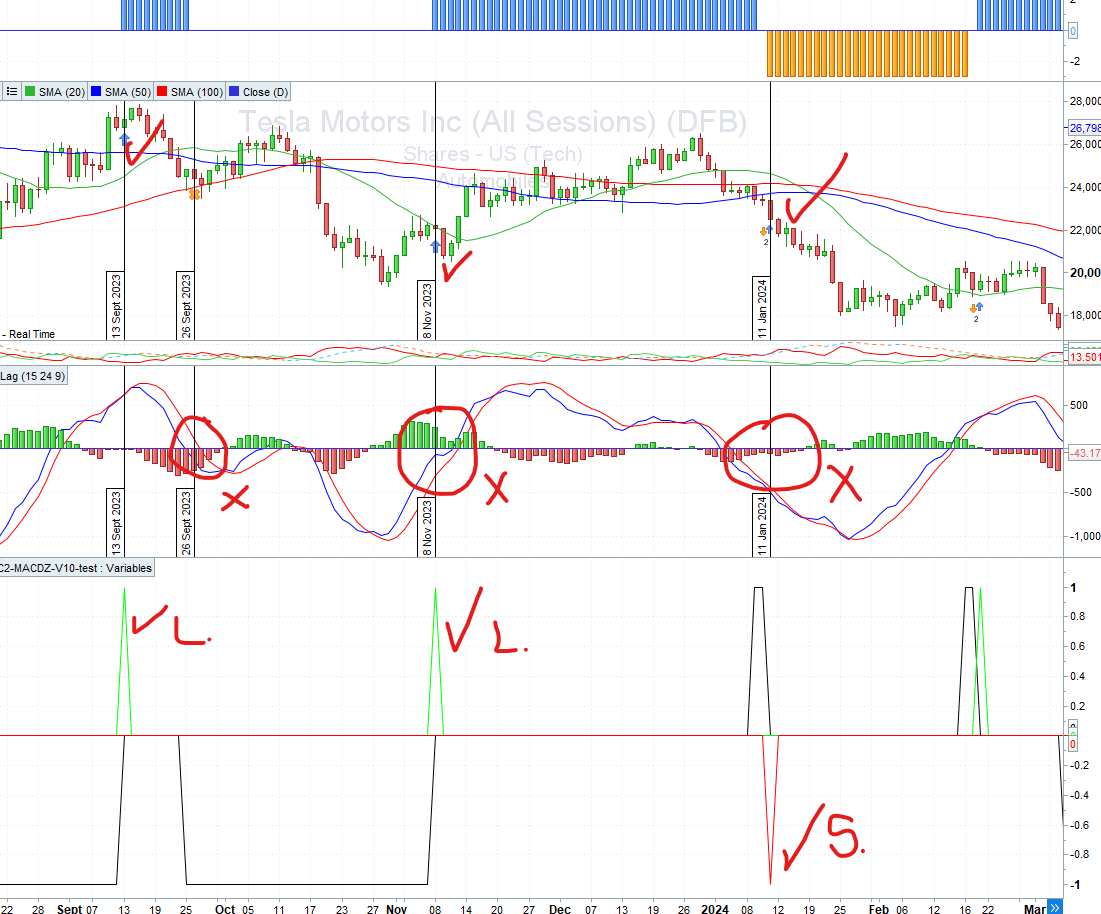
I am having alignment issues with MACDZ and the actual trade entry on the price chart.
Panel = variables:
makes clear and correct trade entry and exit, as per the actual (stated above)
green peak = long trade entry
red peak = short trade entry
black shape -1 = stop loss hit
black shape +1 = opposite signal hit
see attached images, there is a clear mis-alignment of the MACDZ no matter the param values I use.
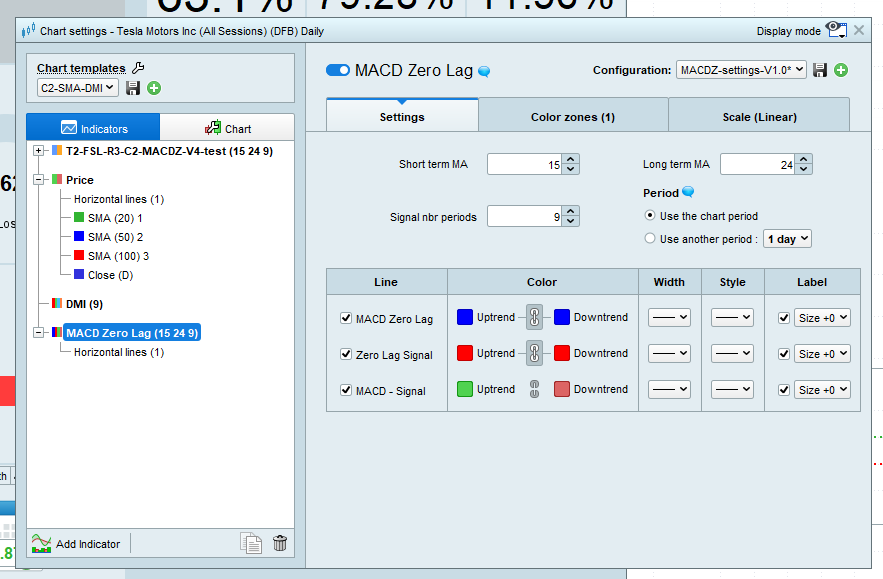
Also attached is param variable for said MACDZ
Code snippets pasted, as coded…
Any guidance on this is very much appreciated, as always.
NT
BTW: we really need to use discord… it is so much easier to use, to share code, chat, links to chat, upload files etc…. !!!
and so very easy to manage…. 🙂
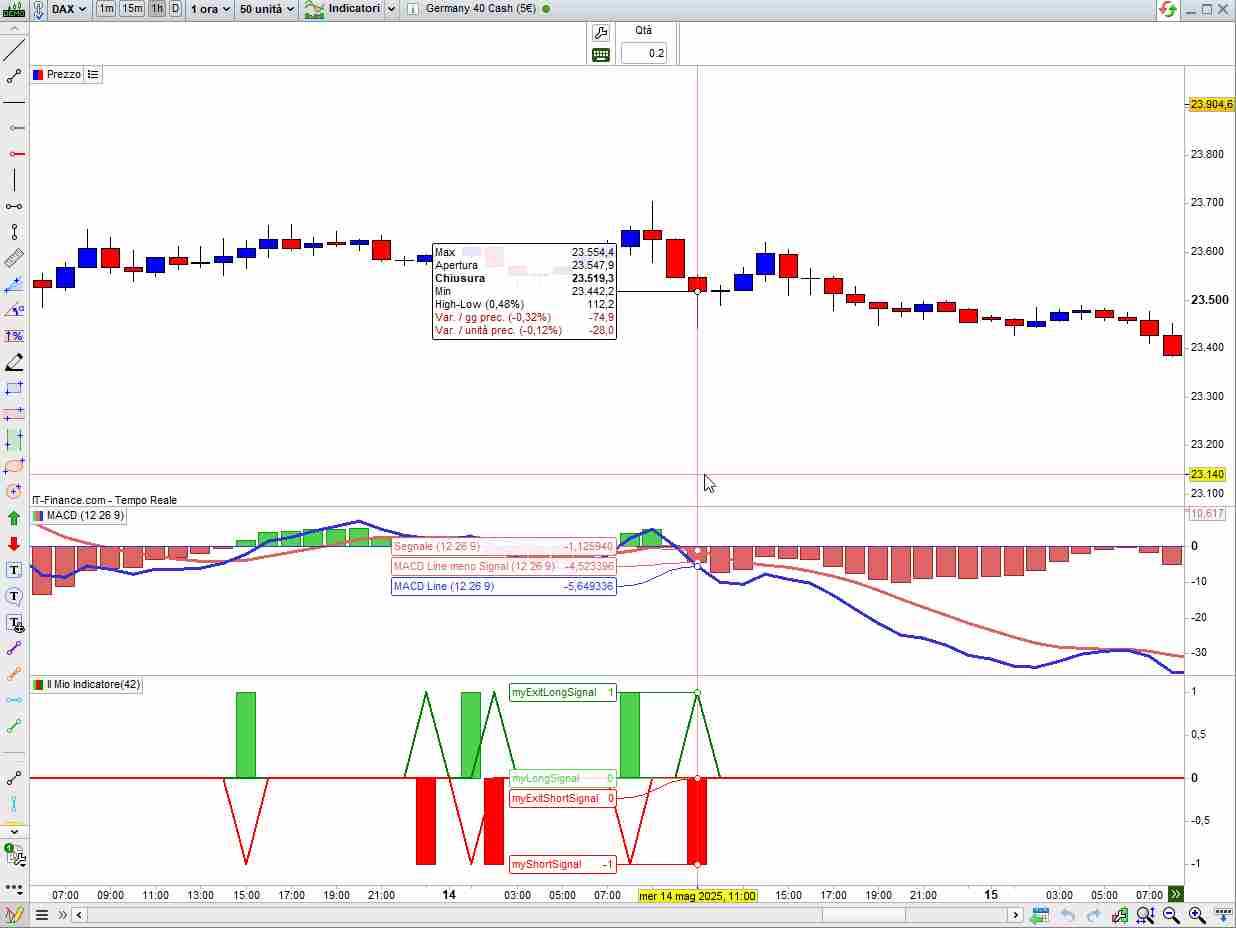
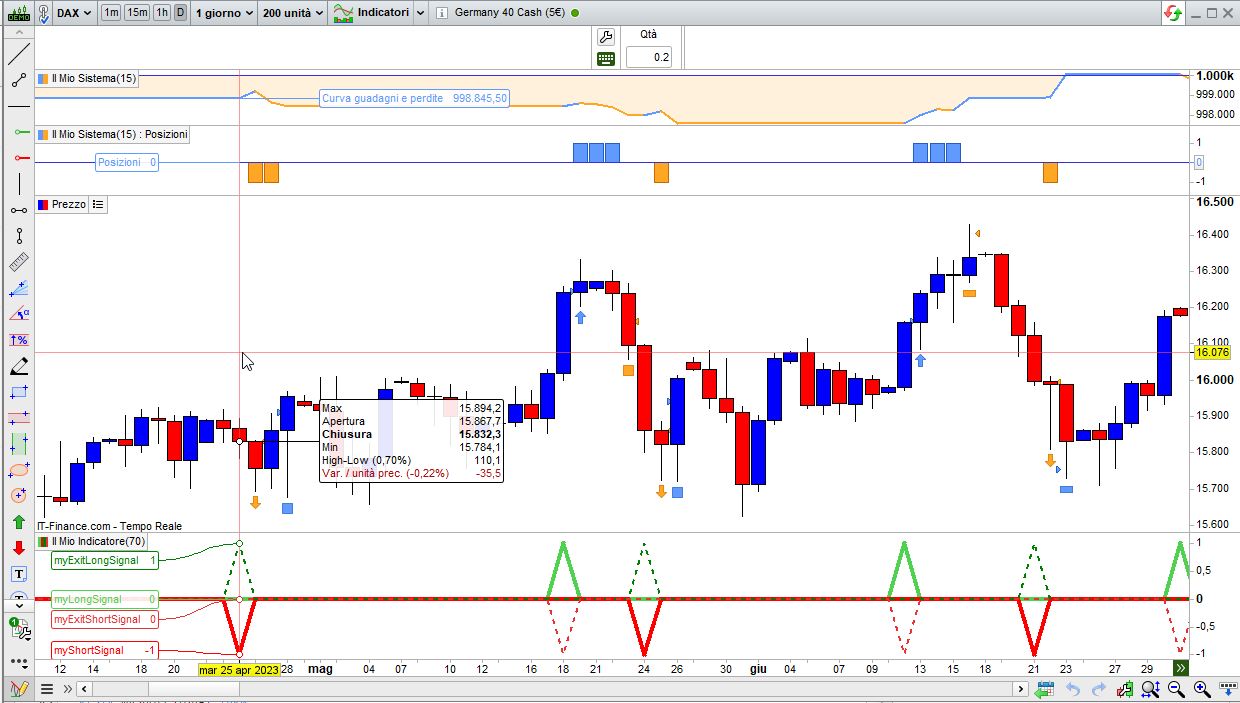
I used your code with standard MACD parameters and all signals seem correct:
// ------------------------------------------------------------------------
// MACDZ Component Mapping (Aligned with PRT Chart Labels):
//   - MACD Zero Lag       → myMACDline     (Blue Line)
//   - Zero Lag Signal     → myMACDsignal   (Red Line)
//   - MACD - Signal       → Histogram      (Green Histogram = myMACDline - myMACDsignal)
// ------------------------------------------------------------------------
// OPTIMIZATION RANGES:
//   - R1: myMACDFast     → Short-term EMA
//   - R2: myMACDSlow     → Long-term EMA
//   - R3: myMACDSignal   → Signal EMA applied to MACD line
// ========================================================================

// === INPUT PARAMETERS ===
myMACDFast     = 12//myMACDFast       // R1: Short-term EMA
myMACDSlow     = 26//myMACDSlow       // R2: Long-term EMA
myMACDSignal   = 9 //myMACDSignal     // R3: Signal EMA
myATRperiod    = 14
myATRmultiplier = 2.5
myRiskPercent  = 5
myInitialBalance = 100000

// === INDICATORS ===
myMACDline     = ExponentialAverage[myMACDFast](close) - ExponentialAverage[myMACDSlow](close)
myMACDsignal   = ExponentialAverage[myMACDSignal](myMACDline)
myATR          = AverageTrueRange[myATRperiod]


// === ENTRY SIGNALS ===
// Detect actual crossover on previous bar and act on current bar
myLongSignal  = myMACDline[1] <= myMACDsignal[1] AND myMACDline > myMACDsignal
myShortSignal = myMACDline[1] >= myMACDsignal[1] AND myMACDline < myMACDsignal


// === EXIT SIGNALS ===
// Detect crossover in reverse direction to close position on the same bar
myExitLongSignal  = myMACDline[1] >= myMACDsignal[1] AND myMACDline < myMACDsignal
myExitShortSignal = myMACDline[1] <= myMACDsignal[1] AND myMACDline > myMACDsignal
RETURN myLongSignal AS "myLongSignal",-myShortSignal AS "myShortSignal",myExitLongSignal AS "myExitLongSignal",-myExitShortSignal AS "myExitShortSignal"
I used your code with standard MACD parameters and all signals seem correct:
Hey Robert
Thank you so much for replying…
Ah…
Have you used this in ProBuilder?
I notice you have used ‘RETURN’ which wont work for me, as I am backtesting only ProBacktest?
And that might explain why I see an alignment error (backtest), and you see alignment (forward module)…
Could you please do me a kindness and backtest this and check the entry alignment?
Also, what what be so useful, is your MACD parameter settings – as used in the PRT platform 🙂
Also, I do like your infill for panel 3, nice !!!
I do not think i can have such infill when backtesting… or can I ?
My thanks and appreciation.
NT
12,26,9 is the standard set of values used as settings for MACD, but you can change the code (and the indicator on your chart) as suits you best.
RETURN can only be used in indicator, in strategies just remove or comment out that line.
Backtesting doesn’t support graphics (actually strategies cannot plot anything, as they run on a server even when your PC is shut down, so they have no peripheral to which output could be sent), you can only use GRAPH and GRAPHONPRICE.
Tomorrow morning I will write the code for the backtest.
12,26,9 is the standard set of values.
Tomorrow morning I will write the code for the backtest.
That is very much appreciated Robert 🙂
Thank you kindly in advance…
Do you mind me asking, if you do write this code…
Long entry example:
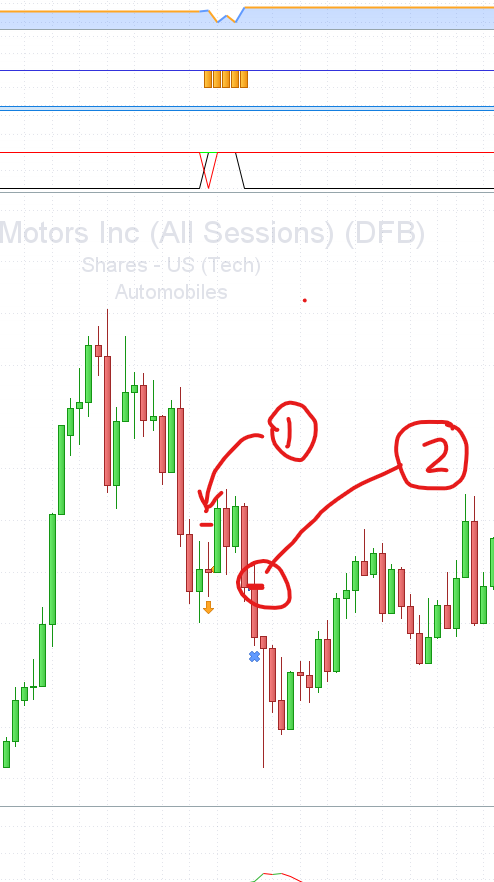
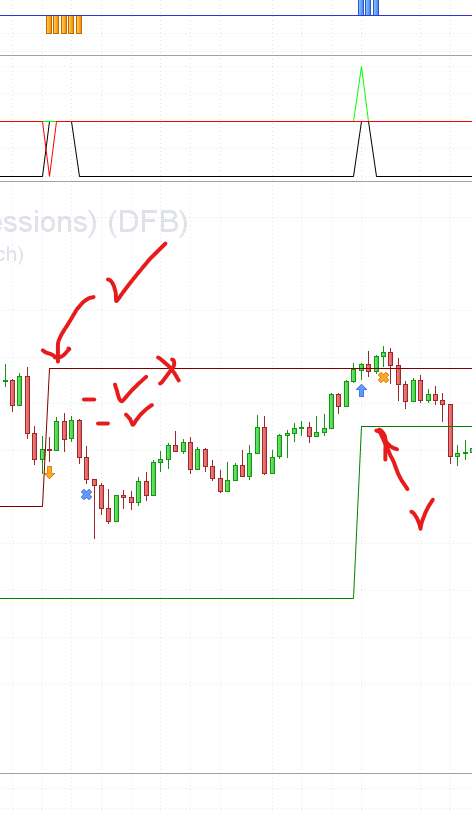
Is is possible on the price chart, to show a single green line under the ‘bar’ where the trade entry occurs, and this line is at the stop loss level (initial)?
The opposite would apply to a short entry (red). see attached image…
1. is line for short entry level
2. is trailing stop engaged (breakeven), but not ratcheting down!
I can get a line to stagger across the chart as a trailing stop, but it does not adjust (ratchet up) when the price rises… and the same is true for the short, the trailing stop line, does not ratchet down, when the short trade is exited…
See attached with staggered horz lines…. acting as trailing stop levels…. which is true for the entry, but not for the exit.
1. horz trailing stop for short starts well, at 3. it fails to ratchet down, hence the ‘X’
2. ideally a line like so, tracking the trailing stop, would be ideal 🙂
with thanks and much appreciation Robert.
NT
 JS
JSParticipant
Senior
Hi,
The difference in observation arises because your code uses a standard MACD, while your comparison is based on a Zero Lag MACD…
Naturally, the Zero Lag MACD produces different signals than the regular MACD, which explains the discrepancies…
Hi,
The difference in observation arises because your code uses a standard MACD, while your comparison is based on a Zero Lag MACD…
Naturally, the Zero Lag MACD produces different signals than the regular MACD, which explains the discrepancies…
Hi JS,
I’m not following you on this one… as I have used coding, parameter naming that is relative to MACDZ (MACD Zero Lag)!
Oddly enough, I had the same alignment issue with the standard MACD usage, so I think my coding needs attention…
Thankfully, Robert has stepped in, to produce the code tomorrow morning, so hopefully, I’ll learn from his coding suggestion.
NT
JSParticipant
Senior
Hi,
The code you’re using is not for a zero-lag MACD but for a standard MACD…
In the calculation of a zero-lag MACD, a compensation is applied to eliminate the lag, but this calculation is missing in your code…
Your code represents a regular MACD, while the MACD you’re using in your comparison is a zero-lag MACD — and these two cannot be compared…
Hi,
The code you’re using is not for a zero-lag MACD but for a standard MACD…
In the calculation of a zero-lag MACD, a compensation is applied to eliminate the lag, but this calculation is missing in your code…
Your code represents a regular MACD, while the MACD you’re using in your comparison is a zero-lag MACD — and these two cannot be compared…
I have no idea about this compensation, I do not see it in any notes on this platform…
Rather than just pick out the errors, a solution or pointer would be useful.
That would be appreciated.
NT
JSParticipant
Senior
You’re asking why there’s a difference, and I’m explaining where that difference comes from — so I don’t fully understand your reaction…
The pointer is: use either the regular MACD in both cases, or the zero-lag MACD in both cases…
Then you’ll see there are no differences…
Hi
robertogozzi
Just wondering how you are getting on with the code for the backtest you mentioned yesterday 🙂
My regards
NT
Can’t GPT help you any more ?
Here is the code ready for backtesting:
// ------------------------------------------------------------------------
// MACDZ Component Mapping (Aligned with PRT Chart Labels):
//   - MACD Zero Lag       → myMACDline     (Blue Line)
//   - Zero Lag Signal     → myMACDsignal   (Red Line)
//   - MACD - Signal       → Histogram      (Green Histogram = myMACDline - myMACDsignal)
// ------------------------------------------------------------------------
// OPTIMIZATION RANGES:
//   - R1: myMACDFast     → Short-term EMA
//   - R2: myMACDSlow     → Long-term EMA
//   - R3: myMACDSignal   → Signal EMA applied to MACD line
// ========================================================================

// === INPUT PARAMETERS ===
myMACDFast     = 12//myMACDFast       // R1: Short-term EMA
myMACDSlow     = 26//myMACDSlow       // R2: Long-term EMA
myMACDSignal   = 9 //myMACDSignal     // R3: Signal EMA
myATRperiod    = 14
myATRmultiplier = 2.5
myRiskPercent  = 5
myInitialBalance = 100000

// === INDICATORS ===
myMACDline     = ExponentialAverage[myMACDFast](close) - ExponentialAverage[myMACDSlow](close)
myMACDsignal   = ExponentialAverage[myMACDSignal](myMACDline)
myATR          = AverageTrueRange[myATRperiod]

// === ENTRY SIGNALS ===
// Detect actual crossover on previous bar and act on current bar
myLongSignal  = myMACDline[1] <= myMACDsignal[1] AND myMACDline > myMACDsignal
myShortSignal = myMACDline[1] >= myMACDsignal[1] AND myMACDline < myMACDsignal

// === EXIT SIGNALS ===
// Detect crossover in reverse direction to close position on the same bar
myExitLongSignal  = myMACDline[1] >= myMACDsignal[1] AND myMACDline < myMACDsignal
myExitShortSignal = myMACDline[1] <= myMACDsignal[1] AND myMACDline > myMACDsignal
//RETURN myLongSignal AS "myLongSignal",-myShortSignal AS "myShortSignal",myExitLongSignal AS "myExitLongSignal",-myExitShortSignal AS "myExitShortSignal"

IF Not oNmARKET THEN
   IF myLongSignal THEN
      BUY 1 CONTRACT AT MARKET
   ELSIF myShortSignal THEN
      SELLSHORT 1 CONTRACT AT MARKET
   END
   SET STOP   %LOSS   4.0
   SET TARGET %PROFIT 6.0
ENDIF
IF LongOnMarket AND myExitLongSignal THEN
   SELL AT MARKET
ELSIF ShortOnMarket AND myExitShortSignal THEN
   EXITSHORT AT MARKET
ENDIF
both SL and TP are set to quite high percentages to make sure they have enough time to show exiting on an opposite signal.
This is the almost the same version, but uses Stop & Reverse to exit on an opposite signal:
// ------------------------------------------------------------------------
// MACDZ Component Mapping (Aligned with PRT Chart Labels):
//   - MACD Zero Lag       → myMACDline     (Blue Line)
//   - Zero Lag Signal     → myMACDsignal   (Red Line)
//   - MACD - Signal       → Histogram      (Green Histogram = myMACDline - myMACDsignal)
// ------------------------------------------------------------------------
// OPTIMIZATION RANGES:
//   - R1: myMACDFast     → Short-term EMA
//   - R2: myMACDSlow     → Long-term EMA
//   - R3: myMACDSignal   → Signal EMA applied to MACD line
// ========================================================================

// === INPUT PARAMETERS ===
myMACDFast     = 12//myMACDFast       // R1: Short-term EMA
myMACDSlow     = 26//myMACDSlow       // R2: Long-term EMA
myMACDSignal   = 9 //myMACDSignal     // R3: Signal EMA
myATRperiod    = 14
myATRmultiplier = 2.5
myRiskPercent  = 5
myInitialBalance = 100000

// === INDICATORS ===
myMACDline     = ExponentialAverage[myMACDFast](close) - ExponentialAverage[myMACDSlow](close)
myMACDsignal   = ExponentialAverage[myMACDSignal](myMACDline)
myATR          = AverageTrueRange[myATRperiod]


// === ENTRY SIGNALS ===
// Detect actual crossover on previous bar and act on current bar
myLongSignal  = myMACDline[1] <= myMACDsignal[1] AND myMACDline > myMACDsignal
myShortSignal = myMACDline[1] >= myMACDsignal[1] AND myMACDline < myMACDsignal


// === EXIT SIGNALS ===
// Detect crossover in reverse direction to close position on the same bar
//myExitLongSignal  = myMACDline[1] >= myMACDsignal[1] AND myMACDline < myMACDsignal
//myExitShortSignal = myMACDline[1] <= myMACDsignal[1] AND myMACDline > myMACDsignal
//RETURN myLongSignal AS "myLongSignal",-myShortSignal AS "myShortSignal",myExitLongSignal AS "myExitLongSignal",-myExitShortSignal AS "myExitShortSignal"
//
IF Not LongoNmARKET AND myLongSignal THEN
   BUY 1 CONTRACT AT MARKET
ELSIF Not ShortOnMarket AND myShortSignal THEN
   SELLSHORT 1 CONTRACT AT MARKET
ENDIF
SET STOP   %LOSS   4.0
SET TARGET %PROFIT 6.0
Here is the code ready for backtesting:…
Roberto, thank you for such fine code.
I look forward to testing said code.
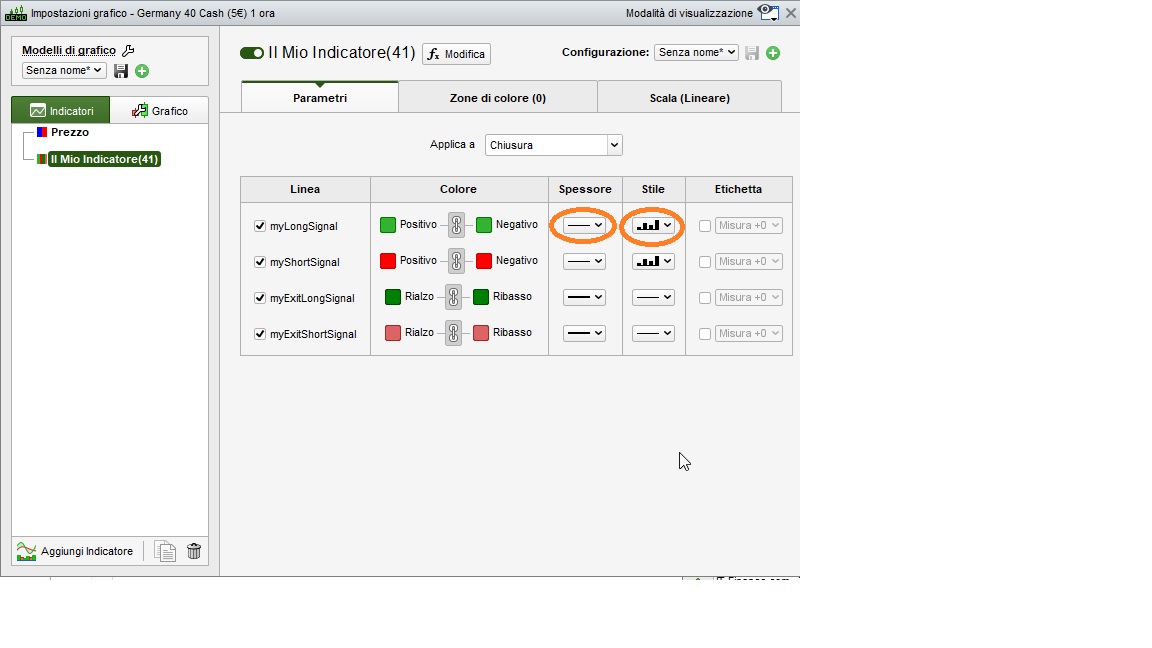
The lines (thickness) in panel 3, have me asking, how did you do that ???
Please do share 🙂
My thanks and appreciation,
NT
In the settings panel of the indicators, next to each line returned, you can find the style and thickness (as from the attached pic).