MACD Value Discrepancy

Viewing 15 posts - 1 through 15 (of 16 total)
  • Author
    Posts
  • #235060 quote
    VMarkov
    Participant
    New

    Hi all,

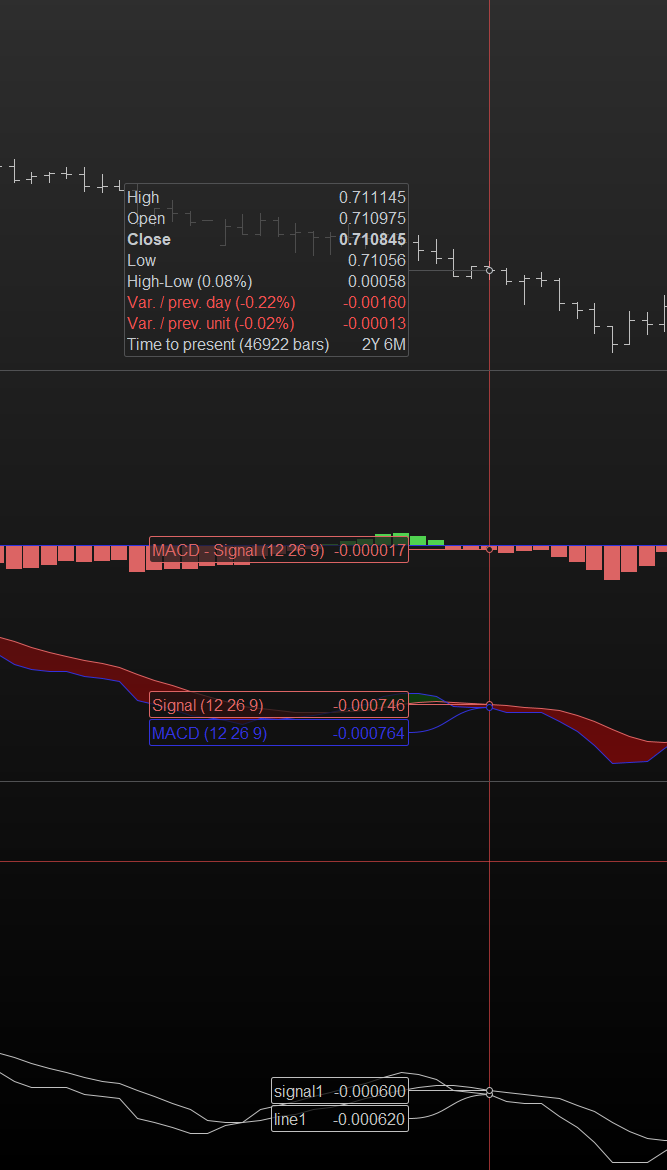
    I am trying to backtest a strategy that relies on the precise values of the MACD line and signal. However, the ProBacktest values always seem to be slightly different to the indicator (sometimes the difference is quite severe and the actual histogram is wrong).

    I’ve attached a screenshot of what this looks like. For this example, I’ve simply graphed the MACD line and signal values at each current bar to see what exactly is going on.

    line1 = MACDLine[12, 26, 9](Close)
    line2 = MACDLine[12, 26, 9](Close)[1]
    
    signal1 = MACDSignal[12, 26, 9](Close)
    signal2 = MACDSignal[12, 26, 9](Close)[1]
    
    graph line1 as "line1" 
    graph signal1 as "signal1"
    
    //<Order Logic Below>

    I’ve tried playing around with Preloadbars and the number of units to no avail. This is also run on a single TF.

    If anyone can shed some light on this, that would be very much appreciated.

    Thank you.

    Screenshot-2024-07-11-185526.png Screenshot-2024-07-11-185526.png
    #235077 quote
    JS
    Participant
    Senior

    So, there is a (big) difference between your system and the indicator, I see that you use Forex as data, is this difference also there when you use an index, for example…?

    #235086 quote
    VMarkov
    Participant
    New

    Yes, only dealing with Forex at the moment (I should have mentioned that in the original post).

    You are correct, even when previous values of MACD are referenced ([1], [2], etc) the difference is present. It simply spits out the value that it calculated previously, still with a big difference.

    #235087 quote
    JS
    Participant
    Senior

    Can you show (part of) your strategy?

    #235095 quote
    VMarkov
    Participant
    New
    It doesn’t quite matter what the strategy is as you will never get the correct MACD values anyway. Take this very basic example that tries to capture the movement of a water line cross.
    DEFPARAM CumulateOrders = False
    DEFPARAM Preloadbars = 10000
    
    line0 = MACDLine[12, 26, 9](Close)
    line1 = MACDLine[12, 26, 9](Close)[1]
    line2 = MACDLine[12, 26, 9](Close)[2]
    
    signal0 = MACDSignal[12, 26, 9](Close)
    signal1 = MACDSignal[12, 26, 9](Close)[1]
    signal2 = MACDSignal[12, 26, 9](Close)[2]
    
    hist0 = MACD[12, 26, 9](Close)
    hist1 = MACD[12, 26, 9](Close)[1]
    hist2 = MACD[12, 26, 9](Close)[2]
    
    if (hist0 < 0 AND hist1 < 0 AND hist2 < 0 AND line0 < 0 AND signal0 < 0 AND line1 < 0 AND signal1 > 0AND line2 > 0 AND signal2 > 0) then
    
        entry = Close[0]
    
        stopLevel = High[0]
        stopUnits = stopLevel - entry
    
        risk = 500.0 / ((stopUnits) * 10000.0)
    
        SELLSHORT risk SHARES AT MARKET
        SET STOP LOSS stopUnits
    endif
    
    if(OnMarket AND hist0 > 0) then
        BUY AT MARKET
    endif
    
    graph line0 as "line0"
    graph signal0 as "signal0"
    graph hist0 as "hist0"


    The discrepancies are enough to provide false entries. Compare this to an identical indicator in ProBuilder without the order placement.
    line0 = MACDLine[12, 26, 9](Close)
    line1 = MACDLine[12, 26, 9](Close)[1]
    line2 = MACDLine[12, 26, 9](Close)[2]
    
    signal0 = MACDSignal[12, 26, 9](Close)
    signal1 = MACDSignal[12, 26, 9](Close)[1]
    signal2 = MACDSignal[12, 26, 9](Close)[2]
    
    hist0 = MACD[12, 26, 9](Close)
    hist1 = MACD[12, 26, 9](Close)[1]
    hist2 = MACD[12, 26, 9](Close)[2]
    
    enter = 0
    
    if (hist0 < 0 AND hist1 < 0 AND hist2 < 0 AND line0 < 0 AND signal0 < 0 AND line1 < 0 AND signal1 > 0AND line2 > 0 AND signal2 > 0) then
        enter = 1
    endif
    
    return enter
    I hope someone can clarify this strange behaviour.
    #235100 quote
    JS
    Participant
    Senior

    When I use your last example/information, I get (almost) the same values for the indicator as for the system for the MACD…

    VMarkov thanked this post
    Scherm­afbeelding-2024-07-11-om-16.34.55.png Scherm­afbeelding-2024-07-11-om-16.34.55.png
    #235103 quote
    VMarkov
    Participant
    New
    I get areas that are relatively close and some that are not. Are yours the same? In theory, shouldn’t they be exactly the same? I still don’t want to accept best case scenario as they are “close enough” as this is quite annoying for what I am trying to do.
    #235104 quote
    JS
    Participant
    Senior

    The difference you see are “rounding errors” and only noticeable after the fourth decimal place… (six decimal places doesn’t make sense anyway)

    I’ve checked the other areas, and the values are the same…

    #235105 quote
    JS
    Participant
    Senior

    You can use this mathematical function in your strategy, to adjust the decimal places (e.g. 2 decimal places) …

    ROUND
    VMarkov and Iván González thanked this post
    #235113 quote
    druby
    Participant
    New
    The stock, custom and custom indicator called from another file all align up. However, results from the backtest versions do slightly deviate. Can’t shed any further light on that. On a different observation, you can write the code this way as well. Because most variables store its value for each bar,  you can use the [‘n’] to get previous values. This way you only have to repeatedly call external code for one since there all got the same settings.      
    iMacd   = MACDLine[12, 26, 9](Close)
    iSignal = MACDSignal[12, 26, 9](Close)
    iHist   = MACD[12, 26, 9](Close)
    
    enter = 0
    if (iHist < 0 AND iHist[1] < 0 AND iHist[2] < 0 AND iMacd < 0 AND iSignal < 0 AND iMacd[1] < 0 AND iSignal[1] > 0 AND iMacd[2] > 0 AND iSignal[2] > 0) then
    enter = 100
    endif
    
    return enter
    VMarkov thanked this post
    #235115 quote
    VMarkov
    Participant
    New
    This is quite a shame as I do need exact values since some instruments have MACD values only beginning at the 4th decimal (in some cases 5th). So it’s not an option for me to round. Is it possible to get an official confirmation as to why this is happening, or a workaround? Thanks for your help so far guys.
    #235118 quote
    JS
    Participant
    Senior

    It seems that the BackTest module calculates with a maximum of 5 decimal places, while an Indicator calculates with 6 decimal places…

    5 decimal places should be enough for Forex, because here, with most pairs, 5 decimal places are also used (tick size = 0.00001) …

    druby, VMarkov and Iván González thanked this post
    #235123 quote
    druby
    Participant
    New
    That solves one of life’s great mystery’s… iMacd = round(MACDline[12,26,9](close)),5)    in an indicator matches iMacd = MACDline[12,26,9](close)   in backtest.
    JS, VMarkov and Iván González thanked this post
    #235125 quote
    JS
    Participant
    Senior
    Plenty of other “Great Mystery’s” in PRT to solve… 🙂
    #235128 quote
    VMarkov
    Participant
    New
    Glad we were able to get to the bottom of this. This discrepancy in decimal precision surely affects other indicators as well, and not just MACD. I’ve checked both the IG and PRT Trading platforms and this looks like a fundamental issue that impacts the accuracy of all calculations. Accurate indicators are the backbone of any reliable strategy, so it is legitimately beyond me why this is something we have to discuss and “deal with” in the first place.
Viewing 15 posts - 1 through 15 (of 16 total)
  • You must be logged in to reply to this topic.

MACD Value Discrepancy


ProOrder: Automated Strategies & Backtesting

New Reply
Author
author-avatar
VMarkov @vmarkov Participant
Summary

This topic contains 15 replies,
has 3 voices, and was last updated by druby

1 year, 7 months ago.

Topic Details
Forum: ProOrder: Automated Strategies & Backtesting
Language: English
Started: 07/11/2024
Status: Active
Attachments: 2 files
Logo Logo
Loading...