macd entry arrows indicator

Viewing 8 posts - 1 through 8 (of 8 total)
  • Author
    Posts
  • #143551 quote
    baptisteberard
    Participant
    New

    Hello everyone

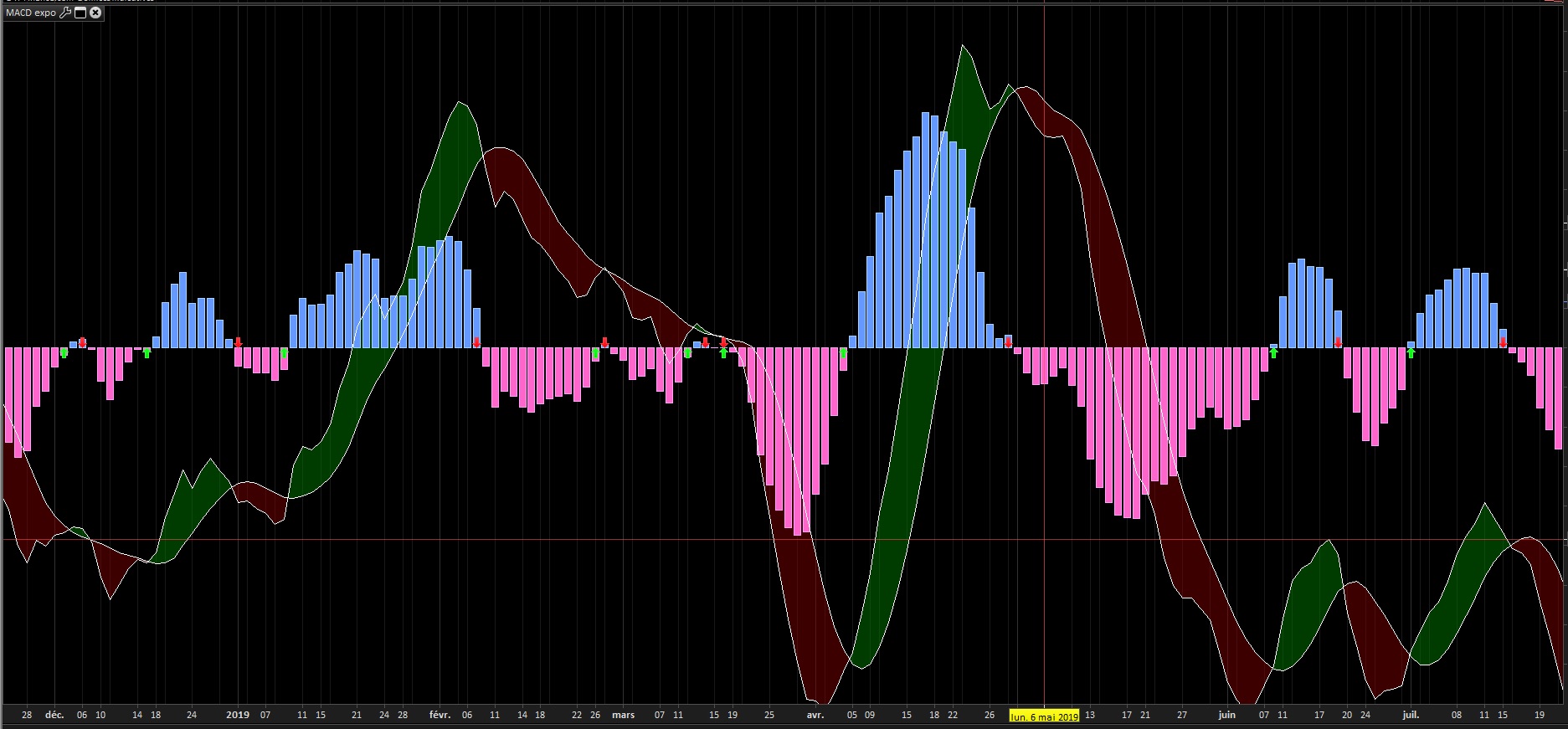
    my purpose was to create an indicator that displays an arrow on the macd when the histogram crosses the zero line.

    Here’s my code:

    MMC = exponentialAverage[C](close)
    MML = exponentialAverage[L](close)
    
    MACDL = MMC - MML
    Signal = Average[S](MACDL)
    MACDH = MACDL - Signal


    fast = MACDH
    slow = 0
    
    //first arrow is blueish
    CrossOver = fast crosses over slow
    IF CrossOver THEN
    CrossUnder = 0
    //cross = slow[1]
    DRAWARROWUP(barindex,0) COLOURED(0,255,10)
    endif
    
    IF CrossOver[5] THEN
    IF summation[4](CrossOver OR CrossUnder) = 0 THEN
    TopLine = highest[5](high) + (5 * pipsize)
    DRAWTEXT("---#TopLine#---",barindex-3,TopLine,SansSerif,Bold,16)coloured(153,0,0)
    ENDIF
    ENDIF
    
    CrossUnder = fast crosses under slow
    if CrossUnder then
    CrossOver = 0
    DRAWARROWDOWN(barindex,0) COLOURED(255,0,10)
    endif
    IF CrossUnder[5] THEN
    IF summation[4](CrossOver OR CrossUnder) = 0 THEN
    BottomLine = lowest[5](low) - (5 * pipsize)
    DRAWTEXT("---#BottomLine#---",barindex-3,BottomLine,SansSerif,Bold,16)coloured(153,0,0)
    ENDIF
    ENDIF
    
    RETURN MACDH as "MACD Histogramme", Signal as "Signal", MACDL as "MACD Ligne"

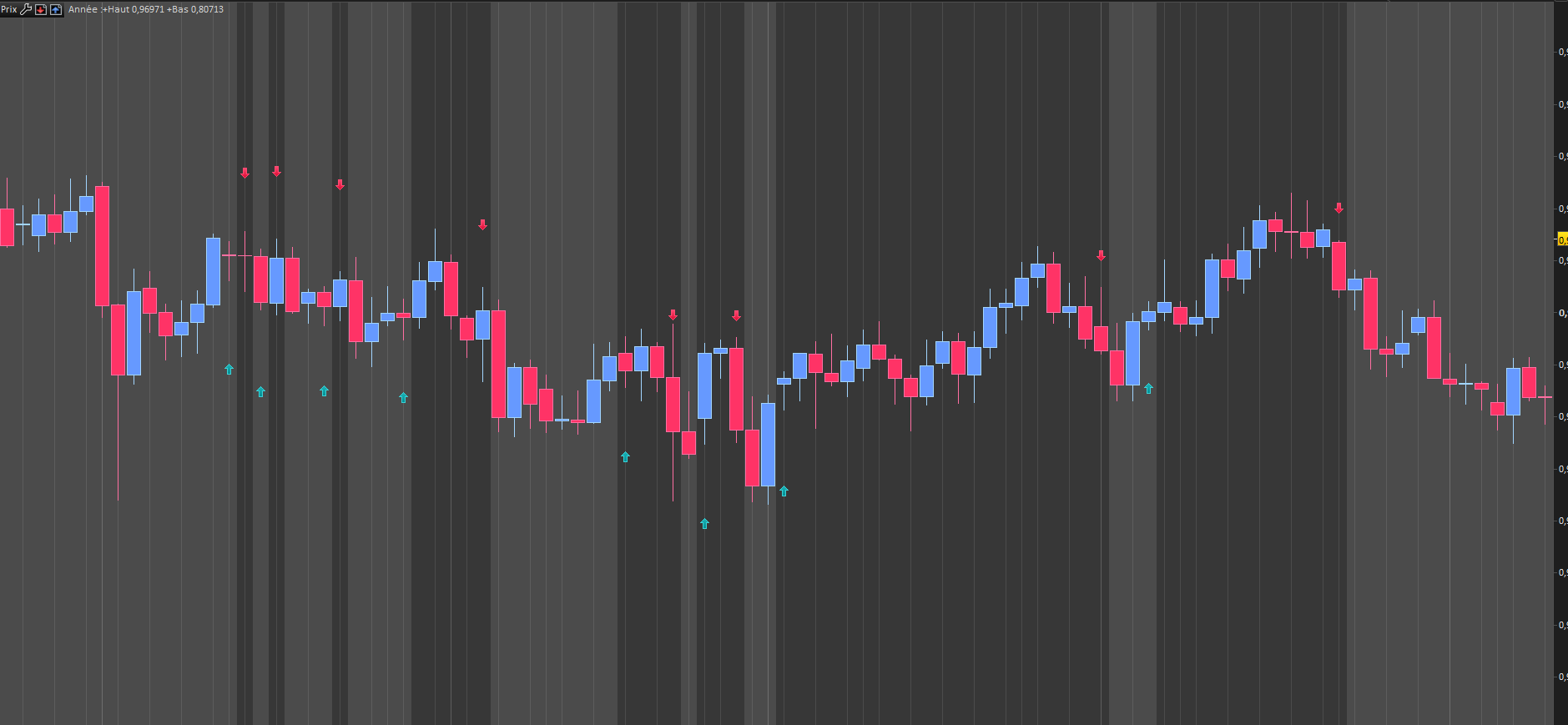
    Sadly the arrows are very often one candle too early, (as you can see in the screenshot)

    does anyone have a clue on why this is?

    thanks in advance!

    macd-signal.jpg macd-signal.jpg
    #143562 quote
    KarlBenjamin
    Participant
    Average

    Hi I’m not sure what it is exactly that you are trying to achieve but this is my go to code for whenever I want to use arrows:

    Remove lines 11-39 and add the following:

    (make a duplicate of your code first just incase this wasn’t what you were after.)


    if MACDH crosses over 0 then
    drawarrowup(barindex,0 -5*pipsize)coloured(0,255,0)
    elsif MACDH crosses under 0 then
    drawarrowdown(barindex,0 +5*pipsize)coloured(255,0,0)
    endif
    Nicolas thanked this post
    #143588 quote
    Zigo
    Participant
    Master

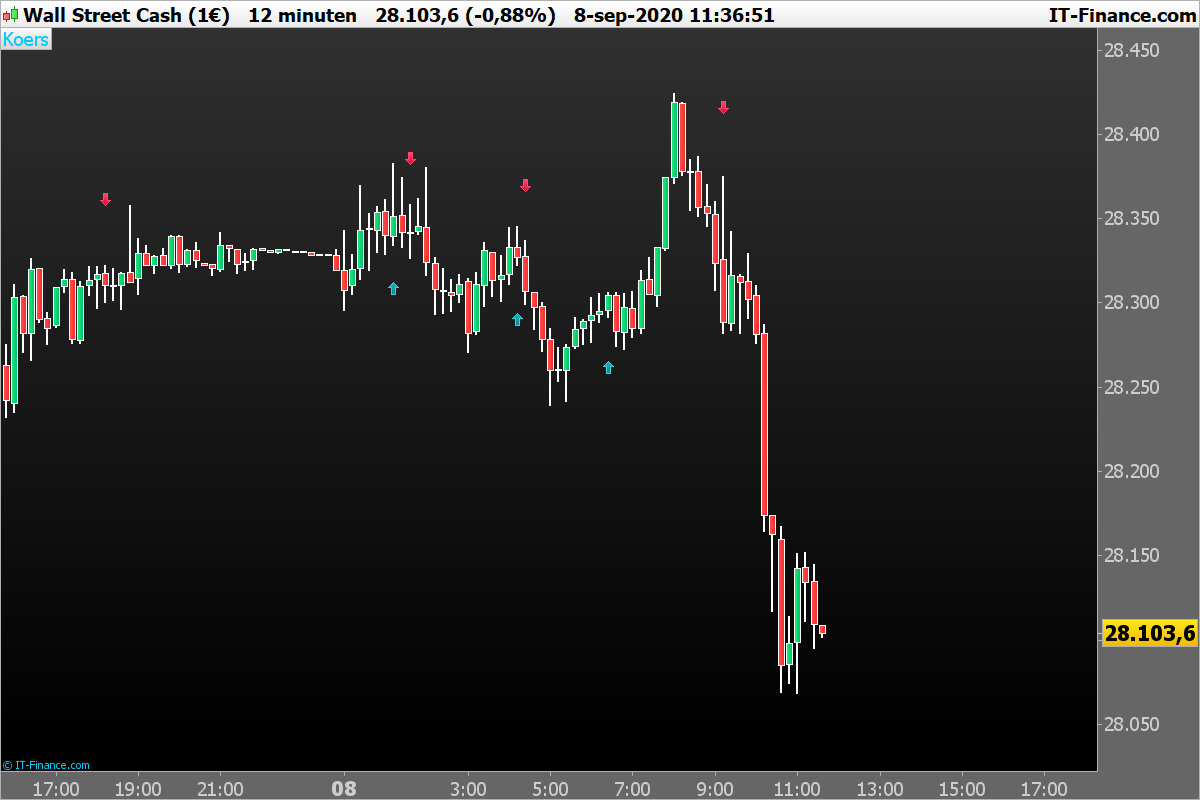
    The Arrows on the graph

    if macd crosses over 0 then
    DRAWARROWUP(barindex, low-AverageTrueRange[14](close))coloured(0,150,155,255)
    elsif macd crosses under 0 then
    DRAWARROWDOWN(barindex, high +AverageTrueRange[14](close))coloured(225,15,55,255)
    endif
    return
    Nicolas thanked this post
    DOW-12-minutenArrows.png DOW-12-minutenArrows.png
    #143592 quote
    Zigo
    Participant
    Master
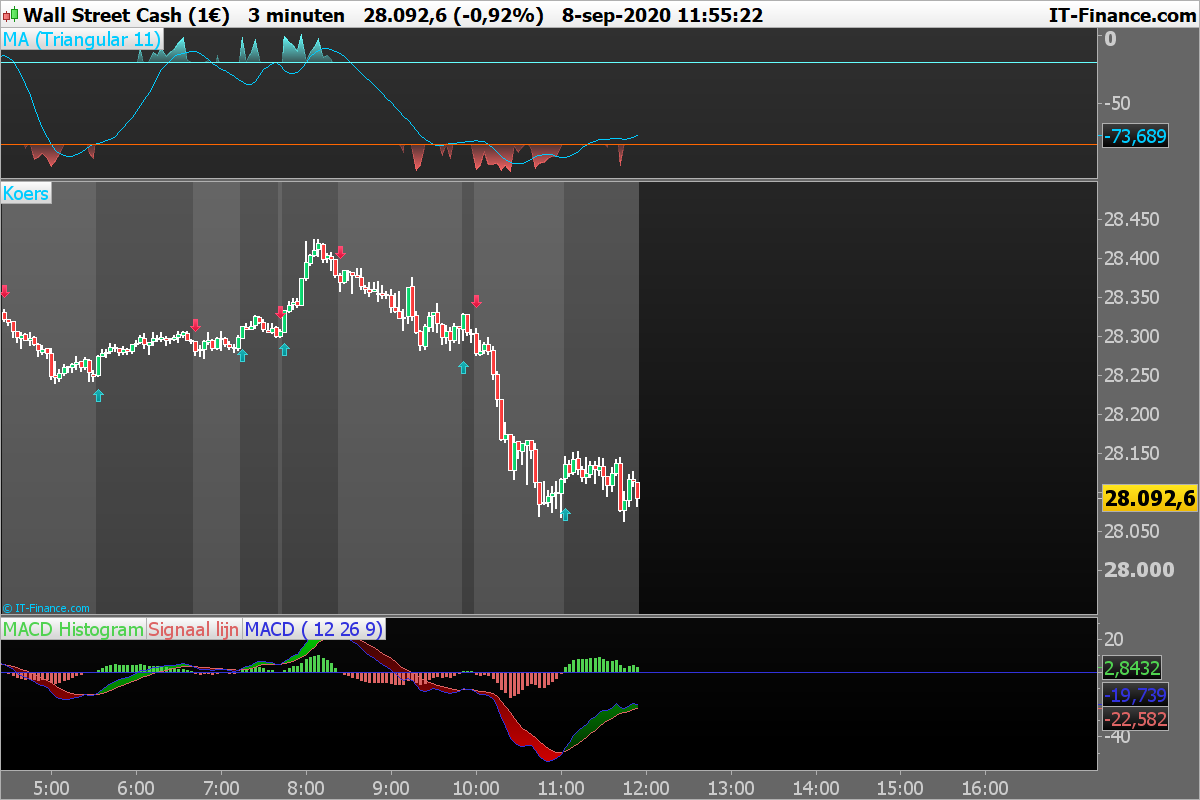
    if macd crosses over 0 then
    DRAWARROWUP(barindex, low-AverageTrueRange[14](close))coloured(0,150,155,255)
    endif
    if macd > 0 then
    BACKGROUNDCOLOR(255,255,255,55)
    elsif macd crosses under 0 then
    DRAWARROWDOWN(barindex, high +AverageTrueRange[14](close))coloured(225,15,55,255)
    endif
    if macd <0 then
    BACKGROUNDCOLOR(255,255,255,75)
    endif
    return
    DOW-3-minutenArrows.png DOW-3-minutenArrows.png
    #143710 quote
    baptisteberard
    Participant
    New

    Thanks for your help! I’ve tried your code and the arrows are still missplaced, so i guess the problem is probably coming from the software configuration and not the code.

    prt-signal.png prt-signal.png
    #143712 quote
    baptisteberard
    Participant
    New

    Update, it works well on the 1 hour time frame, so the problem is coming from the daily i guess

    #143715 quote
    baptisteberard
    Participant
    New

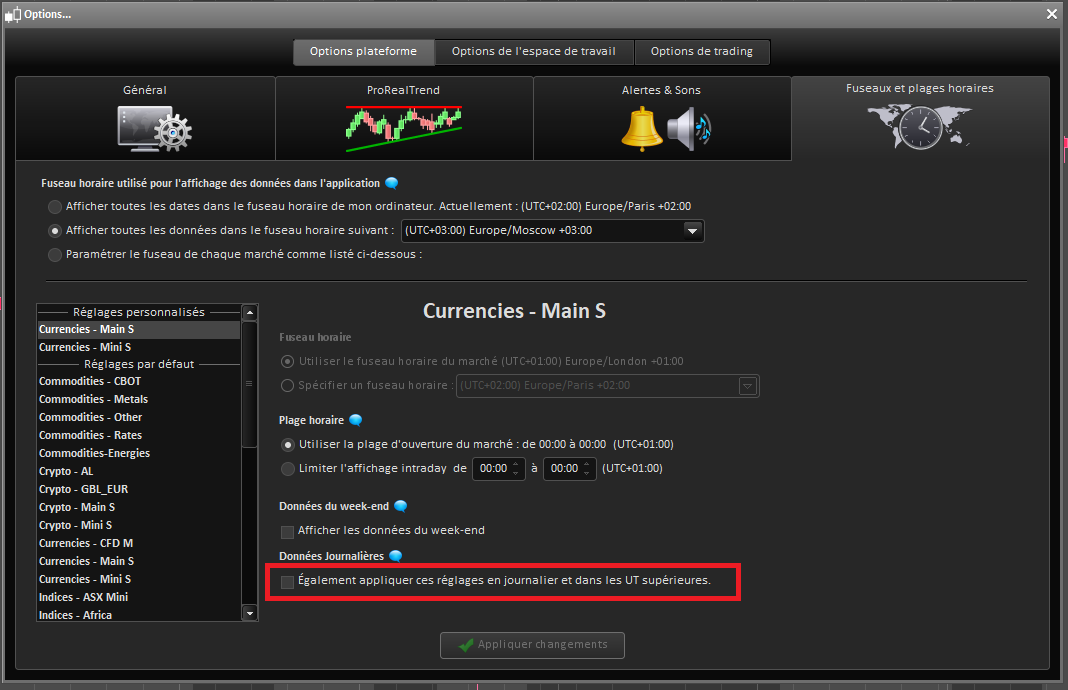
    So i unactivated this feature (also apply these settings on the daily and higher timeframes),

    and now the arrows are placed correctly on the daily timeframe. Problem is solved.

    prt-signal-3.png prt-signal-3.png
    #189587 quote
    datageek
    Participant
    Average

    “The Arrows on the graph”

    Where do I put this code?

    I am getting error “following variables undefined C, L, S”

Viewing 8 posts - 1 through 8 (of 8 total)

  • You must be logged in to reply to this topic.

macd entry arrows indicator


ProBuilder: Indicators & Custom Tools

New Reply
Author
Summary

This topic contains 7 replies,
has 4 voices, and was last updated by datageek

3 years, 11 months ago.

Topic Details
Forum: ProBuilder: Indicators & Custom Tools
Language: English
Started: 09/07/2020
Status: Active
Attachments: 5 files
Logo Logo
Loading...