MACD Assistance please
Forums › ProRealTime English forum › ProOrder support › MACD Assistance please
- This topic has 5 replies, 3 voices, and was last updated 6 years ago by
GraHal.
-
-
06/30/2019 at 6:26 AM #101662
Hi im trying to use the probuilder to create a simple Macd auto strategy that will open both long and short positions on the FX market, but the simple help screen wants to turn each trade off when it makes a new 1.
Knowing that the FX market bounces up and down quite a bit, my aim is to set a take profit point of say 50, and then at some point the trades will close out given the continual up/down nature of the market, im not really concerned with how many open orders it might create initially, but over time all orders should close out. Its just a theory for now, but would like to try it out on the demo b4 going live if it gives some decent results, basically in theory all trades will close out at a profit, its just a matter of time, and its that time factor i want to test.
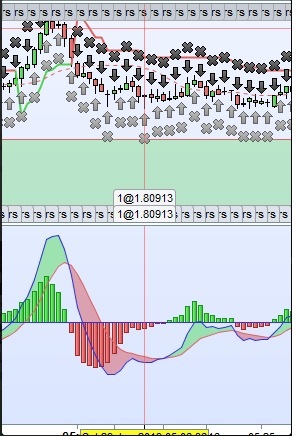
you can see on the attached chart pic, its creating an order every tic basically, but looking at the Macd chart, theres only 4 times it crosses
heres the code that i have started with, any help would be much appreciated.
Cheers
DJ
123456789101112131415161718192021222324// Definition of code parametersDEFPARAM CumulateOrders = False // Cumulating positions deactivated// Prevents the system from placing new orders on specified days of the weekdaysForbiddenEntry = OpenDayOfWeek = 0// Conditions to enter long positionsindicator1 = MACD[6,13,8](close)c1 = (indicator1 >= indicator1)IF c1 AND not daysForbiddenEntry THENBUY 1 CONTRACT AT MARKETENDIF// Conditions to enter short positionsindicator2 = MACD[6,13,8](close)c2 = (indicator2 >= indicator2)IF c2 AND not daysForbiddenEntry THENSELLSHORT 1 CONTRACT AT MARKETENDIF// Stops and targetsSET TARGET pPROFIT 5006/30/2019 at 8:28 AM #101665Conditions C1 and C2 are ALWAYS true, because each bar the indicator is = to itself!
You should change the conditions.
Writing >= is useless, just use = since no indicator can be > itself!
The first candle enters a Long position, since Long’s are evaluated first despite C2 is also true, the next candle Long’s are ignored, despite C1 being true, because you can’t cumulate orders, but C2 is true so it closes any open Long position and enters a Short positions and so on.
It simply does a Close & Reverse each candle.
You should define better conditions to suit your needs.
06/30/2019 at 10:08 AM #101673All good and true advice from Roberto … now you now why it didn’t work.
Try below … should get you going to test your theory out and move forward onto a better strategy (as Roberto advises).
You will need deep pockets though! 🙂
123456789101112131415161718192021222324// Definition of code parametersDEFPARAM CumulateOrders = TRUE // Cumulating positions deactivated// Prevents the system from placing new orders on specified days of the weekdaysForbiddenEntry = OpenDayOfWeek = 0// Conditions to enter long positionsindicator1 = MACD[6,13,8](close)c1 = (indicator1 > indicator1[1])IF c1 AND not daysForbiddenEntry THENBUY 1 CONTRACT AT MARKETENDIF// Conditions to enter short positionsindicator2 = MACD[6,13,8](close)c2 = (indicator2 < indicator2[1])IF c2 AND not daysForbiddenEntry THENSELLSHORT 1 CONTRACT AT MARKETENDIF// Stops and targetsSET TARGET pPROFIT 501 user thanked author for this post.
06/30/2019 at 10:37 AM #10167406/30/2019 at 11:09 AM #10168306/30/2019 at 12:30 PM #101685Backtest with fixed spread = 1.5 (on eurusd for example) and tick by tick mode selected else you will get misleading results.
Best you come back on here with any code and results before put real money at risk … we don’t want you to get wiped out. 🙁
-
AuthorPosts
Find exclusive trading pro-tools on