How to make a loop

Viewing 11 posts - 1 through 11 (of 11 total)

  • Author
    Posts
  • #15464 quote
    IG_CFD_Trader
    Participant
    Average

    Hi All,

    How do I loop the below sample code?

    c1 = low < Low[1]  and  high > high[1]
    c2 = low < Low[2] and  high > high[2]
    c3 = low < Low[3] and  high > high[3]

    c4 = etc….

    i=1
    
    for i = 1 to 4 do
    
    low < Low[i] and  high > high[i]
    
    next


    does not seem to loop it correctly.

    Any thoughts?

    #15469 quote
    Nicolas
    Keymaster
    Master

    >> For clarity of messages on ProRealCode’s forums, please use the “insert code PRT” button to separate the text of the code part! Thank you! <<

    Your loop statement is ok, but you are not couting how much time your condition on line 5 is true. You should set it as a variable and count how much time this variable is returned true by storing this count in another variable.

    #15515 quote
    IG_CFD_Trader
    Participant
    Average

    Thank you Nicolas.

    I am a novice at programming so you assistance is greatly appreciated.

    How do I set line 5 as a variable to count how much time this variable is returned true and how do I sort this count in another variable?

    #15533 quote
    Nicolas
    Keymaster
    Master

    You can do it this way:

    count = 0
    
    for i = 1 to 4 do
    
     x = low < Low[i] and  high > high[i]
    
     if x then 
      count = count +1
     endif  
    
    next
    
    return count

    x is your variable condition, if its true, then increment your new “count” variable. That’s all.

    #31104 quote
    donaldthetrader
    Participant
    Average

    Good day all. I’m new to Prorealcode and want your help with what should be a “fairly” simple loop! this is the requirement:

    for a stock, loop from the first bar (index 0) bar to the 5th bar (index 4) and determine if the stochastic at the previous bar (index n+1) is less than or equal to 50 (or 20) and the next bar (index n) is greater than or equal to 50 (or 20). Please see my code below. I’m not sure why its not working like it should.

    FOR Period = 0 TO 3 DO
    stochCon1 = (Stochastic[8,3](close)[Period+1]<=50)>0 AND (Stochastic[8,3](close)[Period]>=50)>0
    stochCon2 = (Stochastic[8,3](close)[Period+1]<=20)>0 AND (Stochastic[8,3](close)[Period]>=20)>0
    
    IF (stochCon1 OR stochCon2) THEN
    // Do stuff
    ENDIF
    NEXT
    #31106 quote
    Nicolas
    Keymaster
    Master

    @donaldthetrader

    You could also code the loop like this: (always a better idea to declare your indicator outside of the loop). Since you want to test a crossover of the stochastic, we embed the indicator declaration into a boolean variable to test the cross.

    mystoch = Stochastic[8,3](close) 
    stochCon = mystoch crosses over 50 or mystoch crosses over 20
    
    FOR i = 0 TO 3 DO
     IF stochCon[i] THEN
      // Do stuff
     ENDIF
    NEXT
    #31118 quote
    donaldthetrader
    Participant
    Average

    @Nicolas, thanks for the quick reply! update the code and see the outcome…

    #31130 quote
    donaldthetrader
    Participant
    Average

    @nicolas, i’ve tried the above code. I’m not looking for a %D and %K crossover i simply want to know if the %K has ever gone below 50 or 20 and now moving over 50 or 20 over “n” periods. In this case the last 5 bars.

    #31138 quote
    Nicolas
    Keymaster
    Master

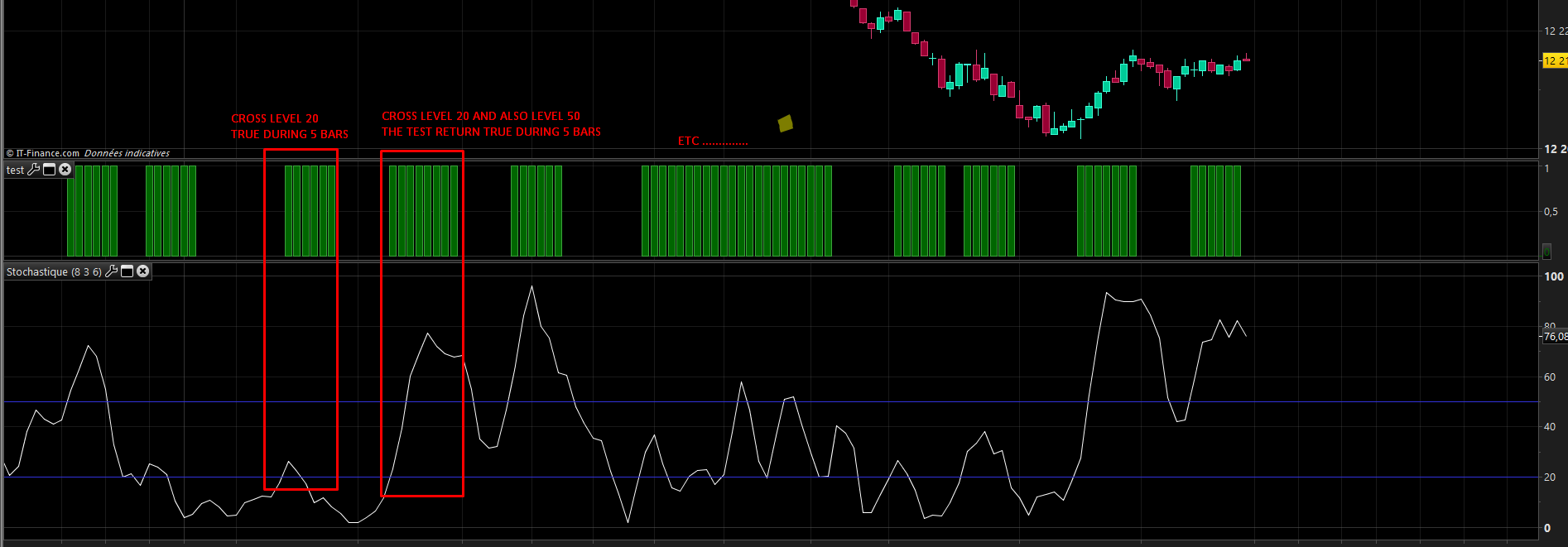
    and this is exactly what it does (example attached).

    for 5 bars lookback instead of 3, the code need to be modified though:

    mystoch = Stochastic[8,3](close)
    stochCon = mystoch crosses over 50 or mystoch crosses over 20
    
    test=0
    FOR i = 0 TO 5 DO
     IF stochCon[i] THEN
      test=1
     ENDIF
    NEXT
    
    return test
    #31152 quote
    donaldthetrader
    Participant
    Average

    Nice!. Thanks @Nicolas

    #31248 quote
    donaldthetrader
    Participant
    Average

    @ Nicolas, hope you are well..

    Pls desperately need your input on this topic: https://www.prorealcode.com/topic/previous-years-highest-high-and-lowest-lows/

    Thanks!

Viewing 11 posts - 1 through 11 (of 11 total)
  • You must be logged in to reply to this topic.

How to make a loop


ProBuilder: Indicators & Custom Tools

New Reply
Author
author-avatar
IG_CFD_Trader @wnakhoul Participant
Summary

This topic contains 10 replies,
has 3 voices, and was last updated by donaldthetrader

8 years, 10 months ago.

Topic Details
Forum: ProBuilder: Indicators & Custom Tools
Language: English
Started: 10/25/2016
Status: Active
Attachments: 1 files
Logo Logo
Loading...