Looking for a function, which can tell if there is an event happend in the last

Viewing 14 posts - 1 through 14 (of 14 total)

  • Author
    Posts
  • #241118 quote
    thomas2004ch
    Participant
    Average

    For example, I will check if in or within the last n days the SMA(5) crosses over the SMA(10).

    #241119 quote
    LucasBest
    Participant
    Junior

    You can ever use Barssince if you want to know when it happened last time (and then check if it is within the last n bars,

    BarsSince

    or Summation to check if it happened at least once within the last n bars

    Summation

    robertogozzi, druby and Iván González thanked this post
    #241132 quote
    druby
    Participant
    New

    Here’s an example of using BARSSINCE and SUMMATION. This may not be the only way to do this.

    defparam drawonlastbaronly = true
    
    //constants
    daysBack = 1 // number of days back or maximum bars in chart!
    
    // indicators
    sma5 = average[5,0](close)
    sma10 = average[10,0](close)
    
    // crossover  condition
    c = sma5 crosses over sma10
    
    //  offset to last crossover
    Clast = barssince(c,0)
    
    // crossover bar
    Xbar = (barindex-Clast)
    //drawtext("#Xbar# crossovers",0,-60)anchor(top,xshift,yshift)
    
    
    // threshold limit bar
    Lbar = barindex -  (barssince(day<>day[1],daysBack-1)-1)
    //drawtext("#Lbar# threshold limit bar",0,-60)anchor(top,xshift,yshift)


    // drawing!
    
    // if theres at least one crossover after threshold limit then display text
    if Xbar > Lbar and cLast > -1 then
    
    // draw last crossover line
    drawVline(Xbar) coloured("red") style(dottedline,1) // crossover line
    
    // draw text
    bi = barindex // as a user variable
    dif = Xbar-var  // difference between xover offset and threshold
    
    drawtext("Threshold at bar #var# SMA5 last crossed over SMA10 at bar #Xbar# , #dif# bars from threshold ",0,40, dialog,standard,20)anchor(bottom,xshift,yshift)
    drawtext("Also, last crossed over is  #Clast# bars back from current bar #bi# ",0,20, dialog,standard,20)anchor(bottom,xshift,yshift)
    endif
    
    // draw threshold limit line
    var = barindex - (barindex - Lbar) // threshold bar
    drawVline(var)   style(dottedline,1) // threshold line
    
    // number of crossovers sine threhold bar
    if barindex > var then
    sum = summation[barindex-var](c)
    drawtext("#sum# crossovers in range",0,-30)anchor(top,xshift,yshift)
    
    Xover = summation[barindex-var](c) > 0
    if Xover = 1 then
    drawtext("#Xover# YES! ",0,-60)anchor(top,xshift,yshift)
    else
    drawtext("#Xover# NO! ",0,-60)anchor(top,xshift,yshift)
    endif
    endif


    return sma5 coloured("red") as"sma5" ,sma10 coloured("lime") as"sma10",close style(dottedline,1)
    robertogozzi and Iván González thanked this post
    #241136 quote
    thomas2004ch
    Participant
    Average

    Many thanks all!

    #241150 quote
    thomas2004ch
    Participant
    Average

    Here i smy indicator:

    MyMA5 = Average[5](close)
    MyMA20 = Average[20](close)

    cond2 = MyMA5 crosses over MyMA20
    testCross = BarsSince(cond2, 1)

    return testCross

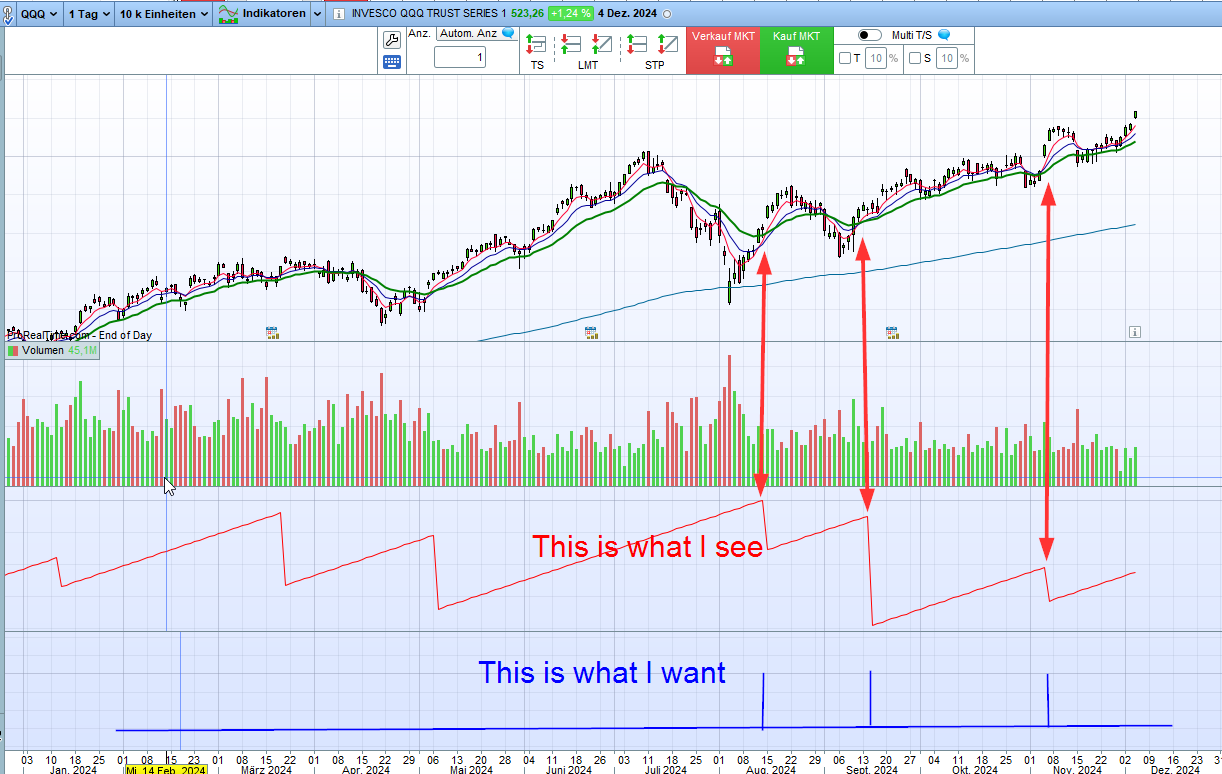
    The output looks like the saw signal. But what I want is like pulse as shown as in the attached picture. Is it possible?

    #241155 quote
    druby
    Participant
    New

    It appears from image, that you want to highlight when crossovers occur.

    MyMA5 = Average[5](close)
    MyMA20 = Average[20](close)
    
    cond2 = 0
    if MyMA5 crosses over MyMA20 then
    cond2 = 1
    endif
    
    testCross = BarsSince(cond2, 1) 
    
    return cond2 style(histogram,1)
    #241156 quote
    thomas2004ch
    Participant
    Average

    wonderful, many thanks!

    #241162 quote
    thomas2004ch
    Participant
    Average

    @druby

    Hi, I thnik it is not correct since you used the cond2 but not the testCross.


    Surely it maybe because I used the ‘1’ in the BarsSince(). In this case the Barssince() has less meaning.  I should change it to any number greater than 1.

    #241163 quote
    druby
    Participant
    New

    Not sure where you going with this, with regards to original question.

    BarsSince(condition,0) with’0′ gets the bar offset to last condition that was true, from the current bar..

    Using ‘1’ gets the offset to the true condition prior to the last.

    The saw tooth action is plotting the current continuous offset value,  since it is plotted every bar from on return line.

    Additionally, the staggering level of the low of the saw tooth is because, when a new crossover happens,

    the one being plotted stops being the prior one and the prior last one becomes the current prior one, and so on after each new crossover.

    From your image I took it as you were highlighting the crossover points which is when you use ‘0’ in barsSince.

    Regardless, of what value you put in BarsSince, each crossover will be highlighted other than  crossovers below n down to ‘0’

    So the crossovers never change position with respects to the averages and the bars number there on, just the offset from the current barindex value.

    Why did you only highlight 3 crossovers in your image?

    #241174 quote
    thomas2004ch
    Participant
    Average

    Hi,

    my original question is: I wonder if there is a function which can tell me in the last or within the last n days an event or condition comes true.

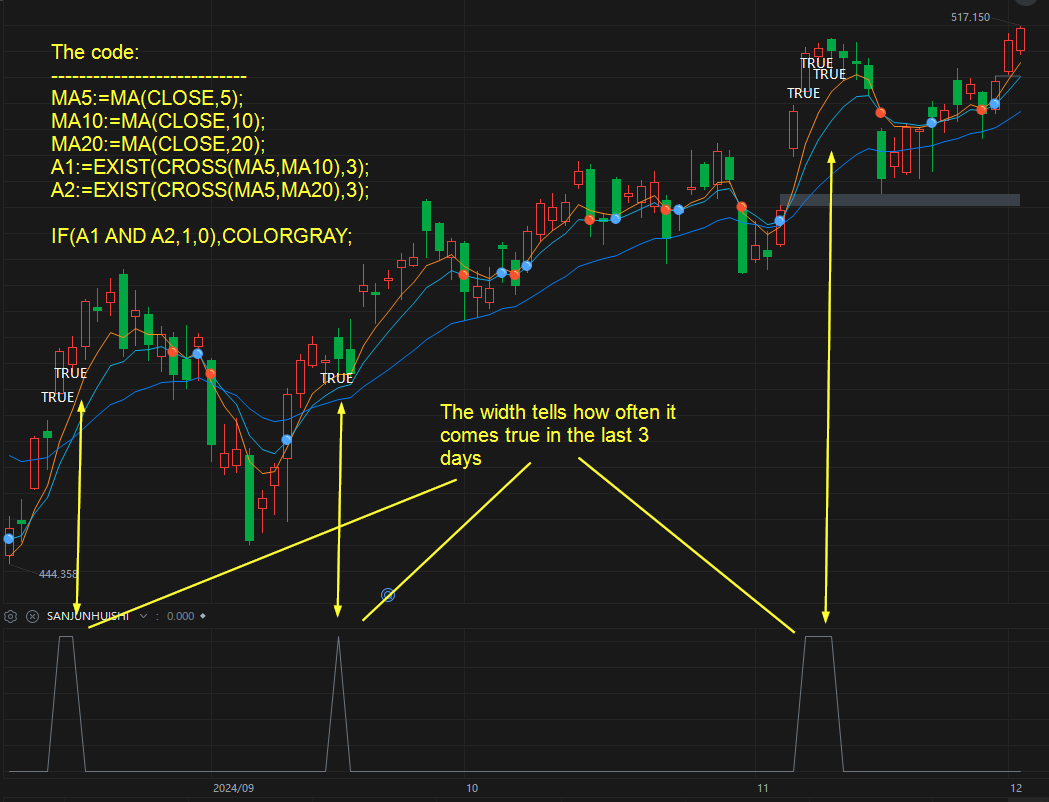
    I use another chart software where there is a function called EXIST(event, days). I attach a screesnhot. Maybe  you can understand what I wat better?

    #241183 quote
    robertogozzi
    Moderator
    Master

    This will return the number of occurrences withim the last N bars:

    ONCE N = 5
    MyMA5  = Average[5](close)
    MyMA20 = Average[20](close)
    return summation[N](MyMA5 crosses over MyMA20) style(histogram,1)
    #241190 quote
    thomas2004ch
    Participant
    Average

    HI @roberto,

    here i smy code:

    ONCE N = 3
    MyMA5 = Average[5](close)
    MyMA10 = Average[10](close)
    MyMA20 = Average[20](close)

    c1 = MyMA5 crosses over MyMA10
    c2 = MyMA5 crosses over MyMA20

    return summation[n](c1 and c2)


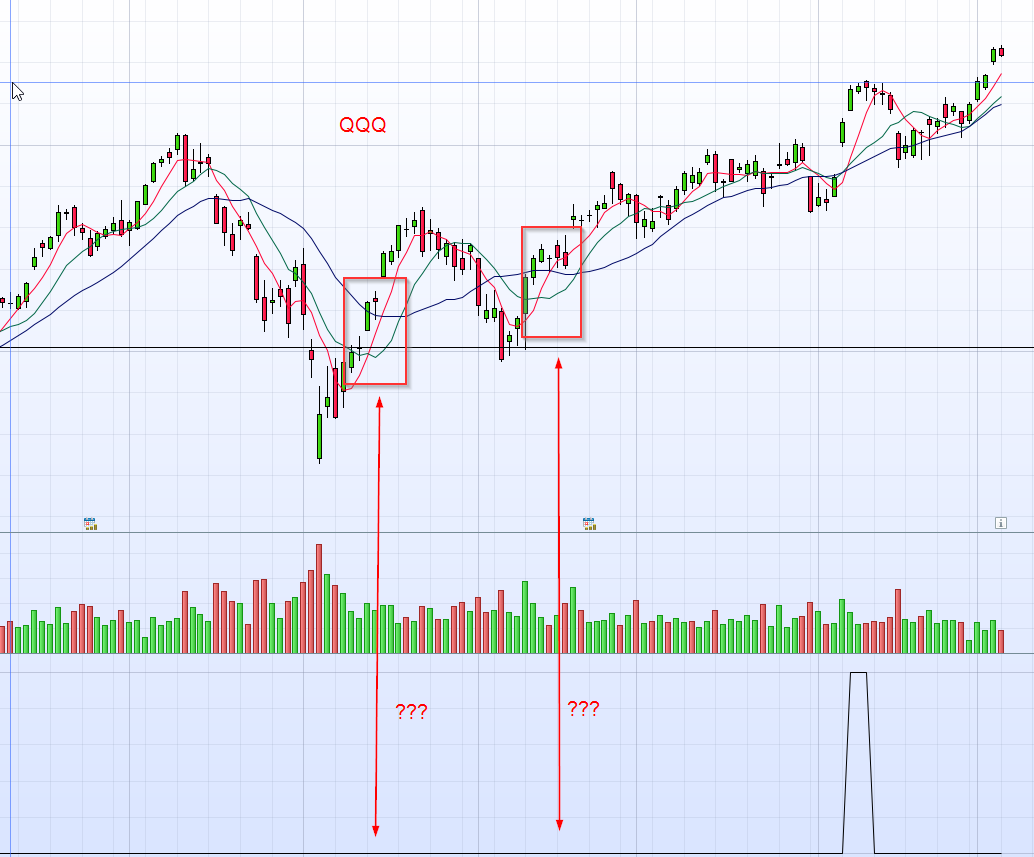
    Attached is the creenshot. One can see there is much less signals.

    #241198 quote
    LucasBest
    Participant
    Junior

    In your code, fast MA have to cross the 2 others at same barindex…

        ONCE N = 3
        MyMA5 = Average[5](close)
        MyMA10 = Average[10](close)
        MyMA20 = Average[20](close)
    
        A1 = summation[n](MyMA5 crosses over MyMA10)>0
        A2 = summation[n](MyMA5 crosses over MyMA20)>0
    
        R = A1 and A2
    
        return R
    robertogozzi thanked this post
    #241199 quote
    thomas2004ch
    Participant
    Average

    beautiful! Many thanks!

Viewing 14 posts - 1 through 14 (of 14 total)

  • You must be logged in to reply to this topic.

Looking for a function, which can tell if there is an event happend in the last


ProBuilder: Indicators & Custom Tools

New Reply
Author
Summary

This topic contains 13 replies,
has 4 voices, and was last updated by thomas2004ch
1 year, 2 months ago.

Topic Details
Forum: ProBuilder: Indicators & Custom Tools
Language: English
Started: 12/04/2024
Status: Active
Attachments: 3 files
Logo Logo
Loading...