Locking windows together?

Viewing 7 posts - 1 through 7 (of 7 total)

  • Author
    Posts
  • #183228 quote
    MLPatwardhan
    Participant
    New

    Hi

    I’m opening my ProrealTime through IG’s and ProRealTime doesn’t open in a browser window but independently. The problem I have is that

    every sub window acts independently and to move ProRealTime I have to move every sub-window one by one and the snap them all together.

    How do you lock them together? I have to position them every time I open the program because I have a large widescreen.

    Many thanks

    #183247 quote
    PeterSt
    Participant
    Master

    Hi ML,

    PRT always opens as you describe (not in a Browser window). So yes, you snap them together (that is, if you want that) and next Save (activate the main menu bar – Ctrl-s, or via the File sub menu). The next time they will open all as how you left the behind.
    Maybe save your template under an explicitly denoted name (Same As). That way you get a feel at loading back (but the last one saved will be loaded back at next startup automatically).

    If you see it working differently, something is amiss.

    Regards,
    Peter

    #183248 quote
    PeterSt
    Participant
    Master

    @Nicolas – My post appeared immediately (right after posting) as Best Answer. This is nice of course, but …

    image_2021-12-13_152346.png image_2021-12-13_152346.png
    #183250 quote
    Nicolas
    Keymaster
    Master

    Yes sorry, trying to resolve this issue 🙂

    #183251 quote
    PeterSt
    Participant
    Master

    Maybe save your template under an explicitly denoted name (Same As).

    *SAVE as.

    #183257 quote
    MLPatwardhan
    Participant
    New

    Hi

    Thank you for you answers but it doesn’t solve the problem.

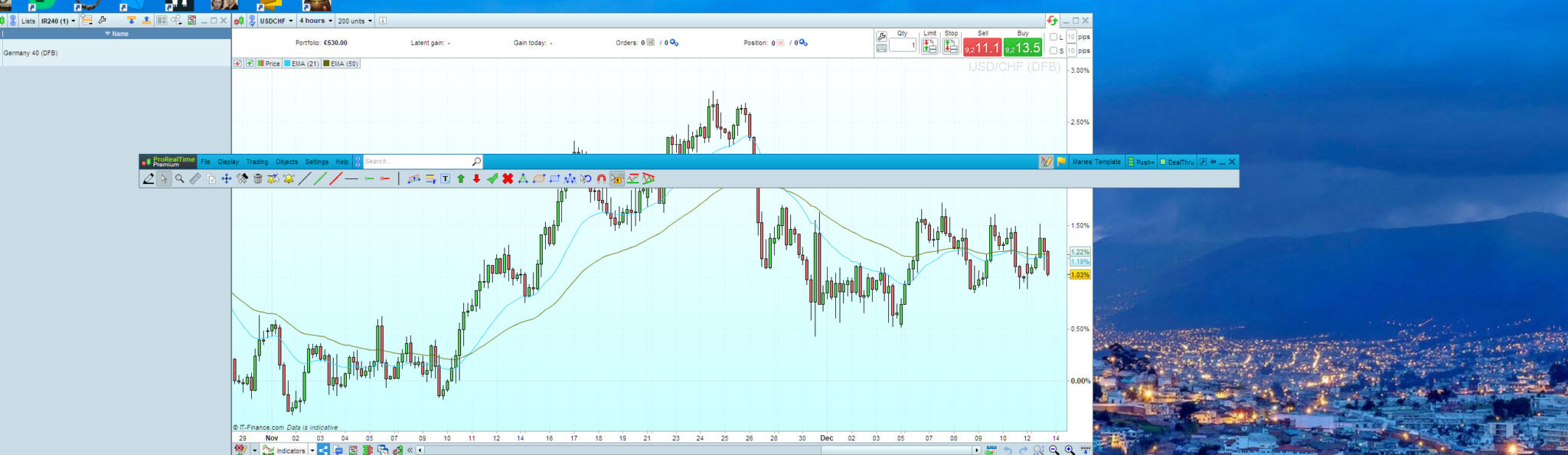
    Yes they open as they were left when saved, which I had done before. The problem is and sorry if this was unclear is that

    I can’t move them all together in one go. For example- if I drag the the top bar where “File”, “Display” etc it will just move that narrow window and

    everything else will be left behind. How do I lock them together like one unit so I can move them all together? See the attached file how the top window is

    detaching from the rest of the windows. I hope that this makes sense.

    Thank you 🙂

    Screenshot-247.jpg Screenshot-247.jpg
    #183268 quote
    JS
    Participant
    Senior
    When you look under Setup => Platform => Interface, it says which key (on your keyboard) you have to hold down to move all windows when moving 1 window.
Viewing 7 posts - 1 through 7 (of 7 total)
  • You must be logged in to reply to this topic.

Locking windows together?


Platform Support: Charts, Data & Broker Setup

New Reply
Author
Summary

This topic contains 6 replies,
has 4 voices, and was last updated by JS

4 years, 2 months ago.

Topic Details
Forum: Platform Support: Charts, Data & Broker Setup
Language: English
Started: 12/13/2021
Status: Active
Attachments: 2 files
Logo Logo
Loading...