LIN Forward

Viewing 7 posts - 1 through 7 (of 7 total)
  • Author
    Posts
  • #74148 quote
    JohnScherJohnScher
    Participant
    Veteran

    Hello

    To describe my problem briefly, I have shortened to the essential from PopGun-Indicator i coded – see at the bottom

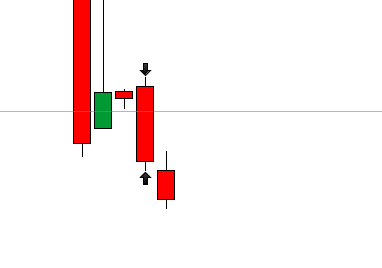
    The LIN generated by this code turns backward and ends with the current candle. (screenshot1)

    r= 0
    b=0
    g=0
    
    Support = 0,3*pipsize
    Lin = 3
    DRAWSEGMENT(barindex,LOW-SUPPORT,barindex-LIN, LOW-SUPPORT )coloured(r,g,b)


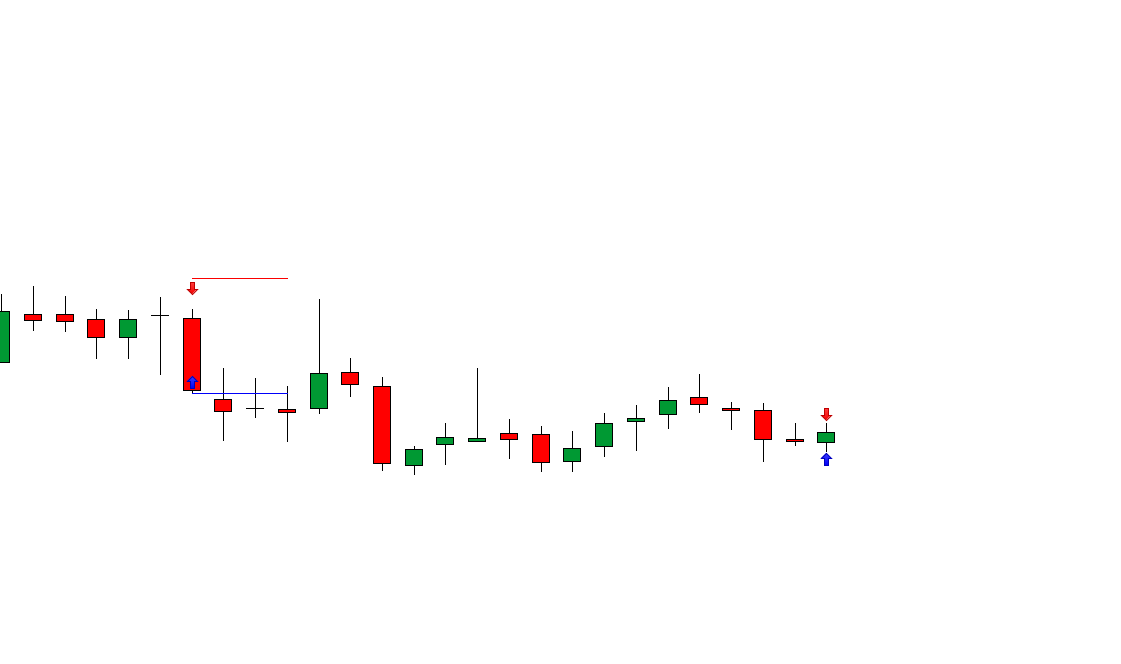
    I change the code from “barindex-lin” into “barindex+lin” and the lin turns forward.(screenshot2)

    r= 0 
    b=0 
    g=0 
    Support = 0,3*pipsize 
    Lin = 3 
    
    DRAWSEGMENT(barindex,LOW-SUPPORT,barindex+LIN, LOW-SUPPORT )coloured(r,g,b)

    So far so good.


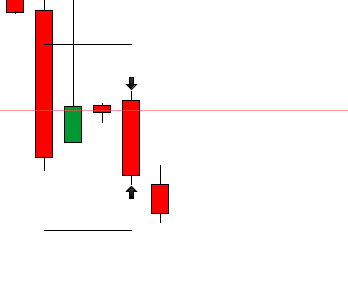
    But: The Lin forward will not displayed before until 3 new candles have been created. (screenshot3, same picture like screenshot1 but the Lin is missing)

    How can i program that the lin is already drawn on the current candle before the 3 new candles created.


    Kind regards

    JohnScher

    Translated with http://www.DeepL.com/Translator


    // PopGun Indikator
    // Coded by JohnScher
     
    PIP = 0.3*pipsize
    LIN = 3
    Support = (High-Low)*0.5
    Resistance = (High-Low)*0.5
    
    r=0
    g=0
    b=0
     
    //indicator PopGun
    PG = High[2]>High[1] and Low[2]<Low[1] and High>High[1] and Low<Low[1]


    IF PG Then
    DRAWARROWUP(barindex,LOW-PIP)coloured(r,g,b)
    DRAWSEGMENT(barindex,LOW-SUPPORT,barindex-LIN, LOW-SUPPORT )coloured(r,g,b)
    DRAWARROWDOWN(barindex,HIGH+PIP)coloured(r,g,b)
    DRAWSEGMENT(barindex,High+Resistance,barindex-LIN, High+Resistance )coloured(r,g,b)
    ENDIF
    
    return
    
    Screenshot_2-6.png Screenshot_2-6.png Screenshot_3-8.png Screenshot_3-8.png Screenshot_4-4.png Screenshot_4-4.png
    #74213 quote
    JohnScherJohnScher
    Participant
    Veteran

    Here again the problem in a picture.
    You can see that the previous PG is displayed with Lin over 3 candles, but for the current PG the Lin is not displayed with 3 candles.
    How can I solve the problem that the line 3 candles will be displayed forward when the PG is created?

    Screenshot_8-3.png Screenshot_8-3.png
    #74216 quote
    robertogozzirobertogozzi
    Moderator
    Legend

    You cannot draw in the future, go back to -LIN, there’s no workaround!

    JohnScher thanked this post
    #74220 quote
    JohnScherJohnScher
    Participant
    Veteran

    Can i put a trendline in it instead the “Lin”?

    #74229 quote
    robertogozzirobertogozzi
    Moderator
    Legend

    LIN is just the offset to draw a segment across bars (from the past through the current one at most).

    Instead of a segment you can draw lines or whatever else, but still not in the future!

    To draw lines you can read pdf documentation and use the search box for examples.

    #74252 quote
    NicolasNicolas
    Keymaster
    Legend

    As Roberto said, you can use DRAWHLINE, it will plot a thin line, in the future but also in the past …

    JohnScher thanked this post
    #74899 quote
    JohnScherJohnScher
    Participant
    Veteran

    Yes i used the Drawhline function, it works very well, ty

Viewing 7 posts - 1 through 7 (of 7 total)
  • You must be logged in to reply to this topic.

ProRealAI ProRealAI New

Stuck on this ProBuilder code?

Describe what this topic is trying to build, in plain English, and ProRealAI writes the ProRealTime™ indicator, screener or system for you.

Available in 7 languages
Try ProRealAI

LIN Forward


ProOrder: Automated Strategies & Backtesting

New Reply
Author
author-avatar
JohnScher @johnscher Participant
Summary

This topic contains 6 replies,
has 3 voices, and was last updated by JohnScherJohnScher
8 years, 3 months ago.

Topic Details
Forum: ProOrder: Automated Strategies & Backtesting
Language: English
Started: 06/23/2018
Status: Active
Attachments: 4 files
ProRealCode ProRealCode
Loading...