


Limit / Stop Orders – How to Change Colour (V11)

Viewing 5 posts - 1 through 5 (of 5 total)
  • Author
    Posts
  • #153654 quote
    GraHal
    Participant
    Master

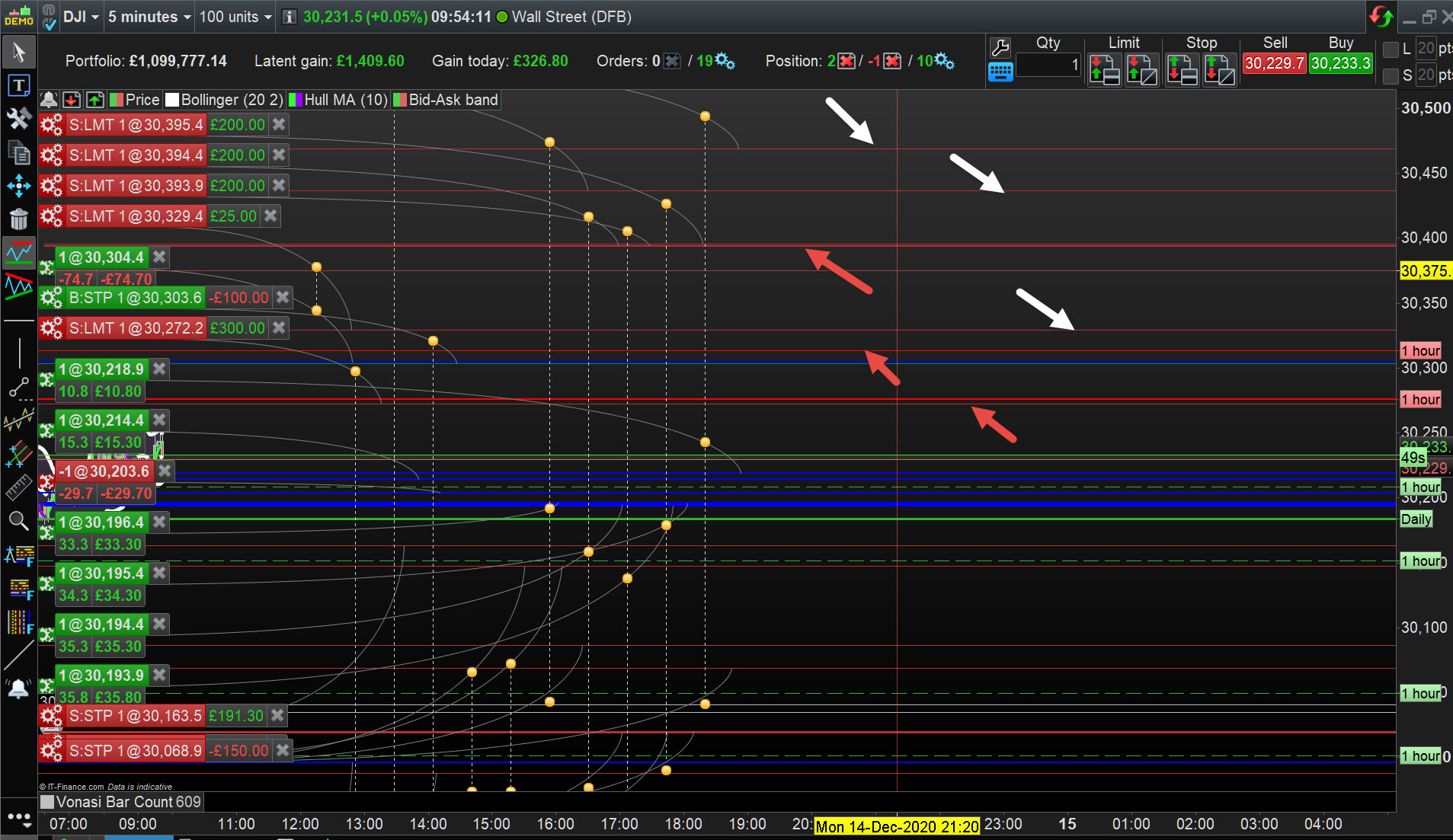
    On V11, Limit and Stop Orders show on my Charts as red lines.

    PRT Resistance lines / levels are also red and so it is annoying and needs concentration to distinguish Order Lines from Resistance Lines.

    On V10.3 Order Lines were white and so seeing Order Lines different from Resistance Lines was not a problem on v10.3.

    So my friends or PRT Support … how do I change Order Lines to white please?

    Attached shows  Order Lines at white arrowhead and Resistance Lines at red arrowhead.

    GH-3.jpg GH-3.jpg
    #153665 quote
    PeterSt
    Participant
    Master

    You can change the colour of the resistance lines ? 😉

    #153666 quote
    PeterSt
    Participant
    Master

    PS: Depending on the instrument, one can get quite crazy of all those (thick) lines, with the notice that the strongest lines can not be made more thin. There’s an option somewhere to hide the horizontal (I mean straight) lines. This is what I have done; hide those.
    The diagonal lines do not hinder me.

    #153669 quote
    GraHal
    Participant
    Master

    Haha but resistance lines red and support lines green is logical ( I know you were teasing!)

    Order Lines red is not logical.

    Also there are so many options to change almost everything many times over on the Platform. I can’t believe I am going to have to use a work around  (resistance lines not red) to fix a no option to change colour of Orders??

    Yes I could change settings to NOT show any Resistance lines, but it’s surprising how often Resistance lines are respected by price / traders … briefly, result – minor retrace or Major Resistance can even result in the start of a Trend reversal.

    Thank you for your answers and humour! 🙂

    #153914 quote
    PeterSt
    Participant
    Master

    OK, now something else then :

    I took it for granted that you have a problem with it WHILE I actually can’t remember that those trend lines bother me for the reason you mention. Side note : Trend Lines could be the foremost smartest thing in PRT as they really really work (and if you can manage to let PRT use them in our codes, I am sure we will both be extremely happy !).

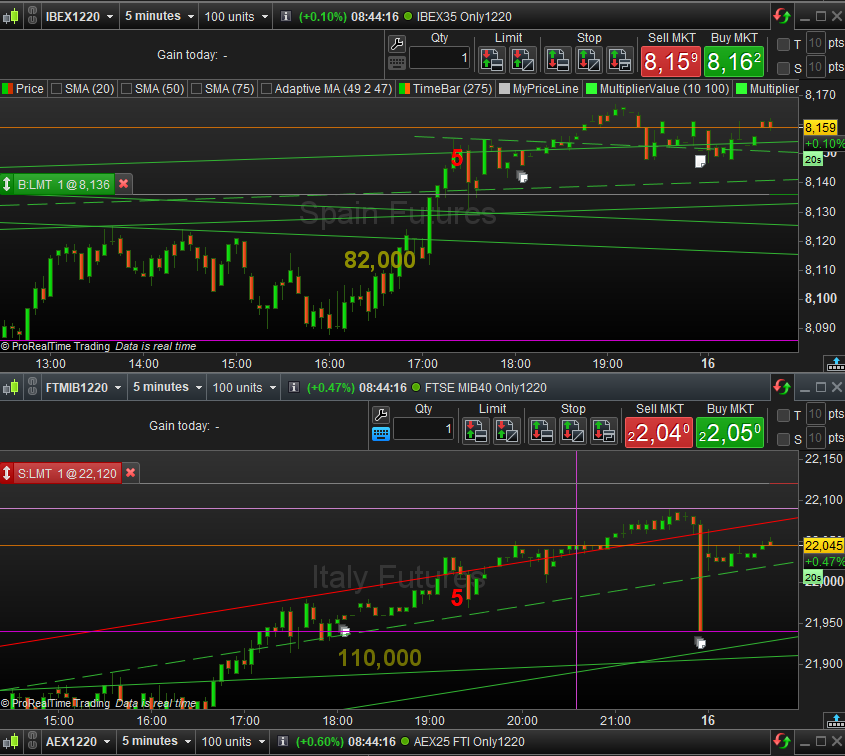
    So … See attachment;
    With the notice that this is “direct” PRT (not via IG), my lines are white. And this is how I am not bothered by the trend lines. But also see the second attachment;
    That shows the right hand side of the Short Limit order and it fills with red … (?). The Long Limit order fills with green. So Yes, if such an order sits there for a couple of hours (or minutes depending on the bar size) then indeed it starts to be confusing.
    Still it never bothered me.

    What remains is that the horizontal straight resistance lines are, well, too thick. There can be so many of them in one chart that my whole screen starts to glow of it. I am almost serious.
    N.b.: I can’t show that because I shut off those (thus only the straight lines and I don’t even know how to get them back – I recall to right click on them and “hide”).

    image_2020-12-16_084509.png image_2020-12-16_084509.png image_2020-12-16_084946.png image_2020-12-16_084946.png
Viewing 5 posts - 1 through 5 (of 5 total)
  • You must be logged in to reply to this topic.

Limit / Stop Orders – How to Change Colour (V11)


Platform Support: Charts, Data & Broker Setup

New Reply
Author
Summary

This topic contains 4 replies,
has 2 voices, and was last updated by PeterSt

5 years, 2 months ago.

Topic Details
Forum: Platform Support: Charts, Data & Broker Setup
Language: English
Started: 12/14/2020
Status: Active
Attachments: 3 files
Logo Logo
Loading...


