Hey guys,
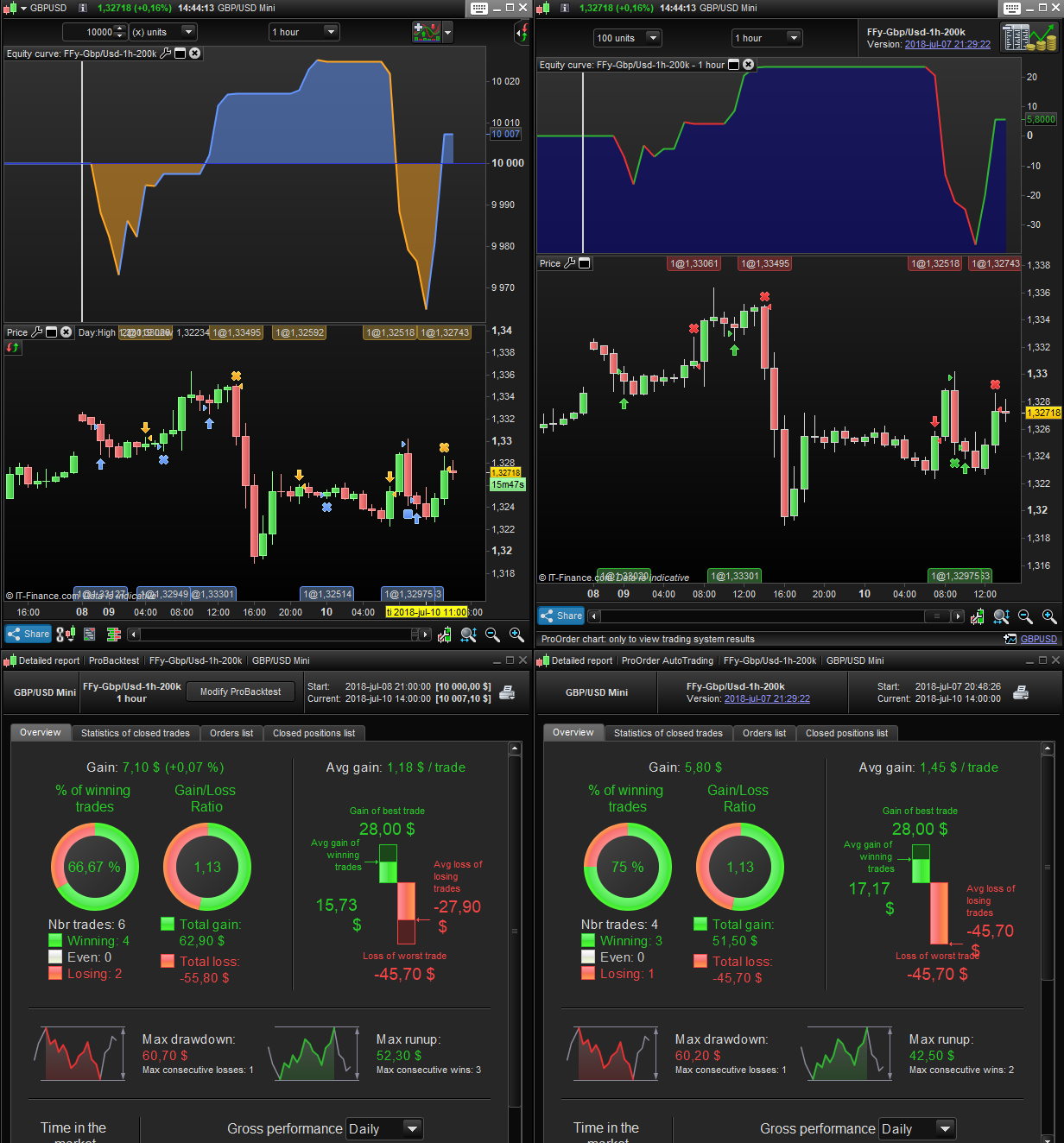
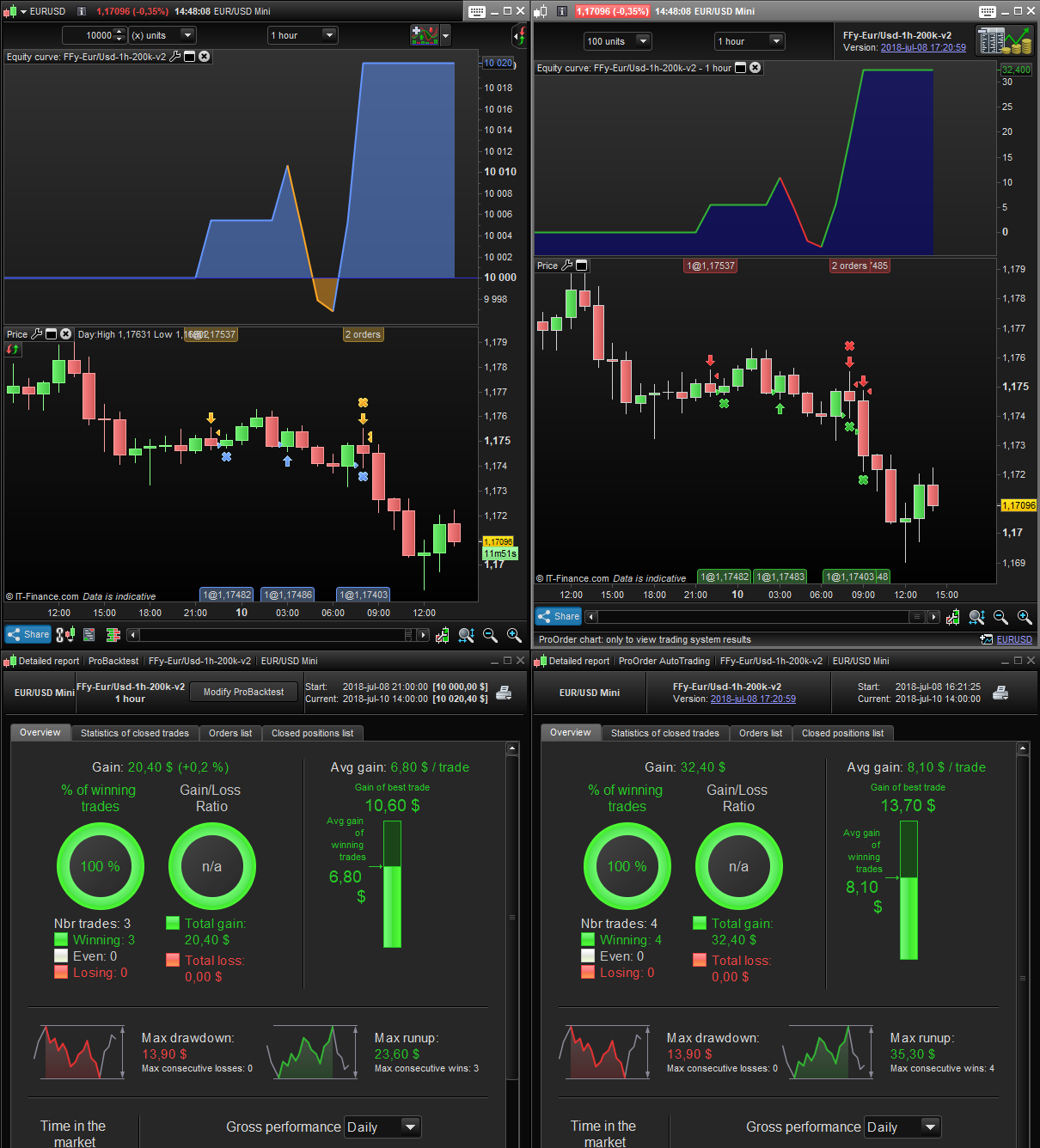
I´m trying to use som limit orders in my automatic systems but it dosen´t seem to work as it should. If you look at my picture something is clearly not right… On the left is the backtest tested with tbt. On the right side is live trading (demo account, it that matters).
Can´t PRT handle limit orders?
 Eric
EricParticipant
Master
Hard to say without the code
just remember that a limit to buy is to buy at a better price (price is 100 and you place a limit to buy at 99)
and a limit to sell (price is 100 and you place a limit to sell at 101)
just pointing out the obvious and you probably know the difference between a stop and a limit order?
Hmm you are right, now I only use limit cause I´m using a tweeked code from here but maybe I have to use stop as well… That might be the thing that makes it wierd?
c1a = (IndicMACD > 0)
NivOuverturePasse = Open[4]

IF c1a AND NivOuverturePasse < MM3LOW THEN
BUY n SHARES AT (MM3LOW-0.0005) limit
ENDIF

SELL AT (MM3HIGH+0.0003) limit

c1v = (IndicMACD < 0)
NivOuverturePasse2 = Open[5]

IF c1v AND NivOuverturePasse2 > MM3HIGH THEN
sellshort n SHARES AT (MM3HIGH+0.0001) limit
ENDIF

exitshort AT (MM3LOW+0.0003) limit
When I watch the code takes positions it looks right tho, so maybe it´s a tbt problem.
Here´s a piece of my code.
Also there was a problem yesterday on IG Demo accounts where Limit Orders were not being triggered.
I sent in a Technical Report and they fixed it later afternoon yesterday.
I just thought of a mnemonic to remember … LimiT is BeTTer price. 🙂
I suggest that you don’t mess with price/pip conversion, let ProOrder do it with PIPSIZE.
0.0003 or similar decimals may be good with forex pairs, but will make your strategy not easily portable to other instruments, like DAX, where a conversion is not needed (at least for those countries having EURO as currency).
If you want to add/subtract pips you’d better use
+3*pipsize
-3*pipsize
which will work anytime with any istrument, despite what your national currency is.
Thanks for you answers.
Roberto- I will change it in the future but even if I change it in the current codes it dosent change the backtest.
It still dosent seem to work. Two different codes below. Backtest to the left and real tradig to the right.
I cannot tell, I sese different size uf units on top of the chart, different backtest times.
I would need the full code, correct instrument, TF and backtest interval to be able to reproduce your results.
Units dosen´t matter in this case. You can´t start a backtest from a saturday. You can se in the pictures that both took their first trade yesterday at the same time so I don´t know what you could be able to see in a backtest that I can´t? 🙂
My code is based on this code from the library- https://www.prorealcode.com/prorealtime-trading-strategies/forex-bounce-code/
I have hade the code in my prt library for a long time and now when I went back to look for it I can see that Wilko have commented this:
”
Do NOT take this system live! The backtest results will never be repeated live due to a shortcoming in PRT backtest, or rather 2 shortcomings:
1. If one issues limit orders to both enter and exit and both levels are within the range of the next candle, PRT will automatically assume that the entry order is performed before the exit order. This will happen in spite of backtesting in tick-by-tick mode. This will give backtest a positive skew which is proportional to the number of trades where both entry and exit happen in same candle with limit or stop orders.
2. This system issues limit orders for both longs and shorts. PRT cannot correctly handle simultaneous longs and shorts.
In short, the backtest for this system will never be even close to reality. In reality, this system is likely to on average end up losing very close to the spread or transaction cost.
These are among some more experienced users known shortcomings in PRT but unfortuntely not well described in the manual.
Again, my strong recommendation is to not take this system live
“