Large range capture in a single bar
Forums › ProRealTime English forum › ProOrder support › Large range capture in a single bar
- This topic has 5 replies, 3 voices, and was last updated 5 years ago by
Nicolas.
-
-
11/14/2020 at 3:44 AM #150449
Hi all,
Simple idea – if there is a large range move in a single bar in your trade direction, then, exit for profit.
DJI for example – if there is anything more than a 1000 (for example) point range in a single bar in your intended direction, then exit.
The idea of this would be you are looking for a large target range in a single bar, and wanting to exit with a stop value, and not at the end/close of the bar.
This prompt to exit might be on the first bar of entry, or, a couple of bars into the trade.
: – If it was on the first bar of the trade, it would be from the high to the positionprice being >=1000 points (positionprice and not open, as sometimes the trade is entered into with a stop, and not at market)
: – If it was on the second bar onwards of the trade, it would be from the high to the open of that bar being >=1000 points.
The exit command would be using stops, and not selling at market, to capture and not lose potential profit.
I hope how you can see that this is a different intended command to “set target profit 1000”.
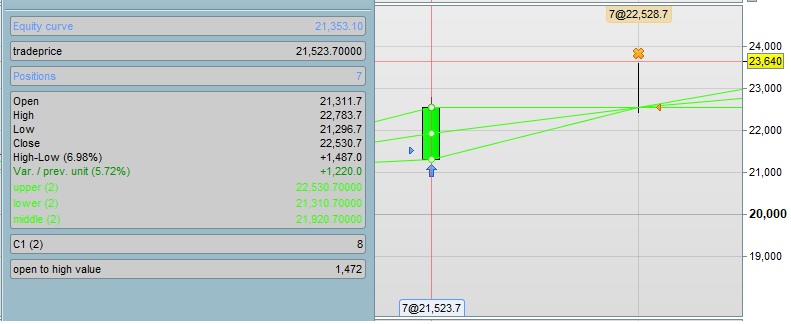
A picture example of this is attached – Daily1000.
The buyin was at 21523.7, and the high of the day was at 22783.7 – a 1260 point difference, without spread.
Now, on the same first daily bar, if I want to sell at that 1000 point gain (from positionprice entry point of 21523.7), I have tried
123456789101112131415if longonmarket or not longonmarket thensell at positionprice+1000 stopendifif longonmarket or not longonmarket thensell at tradeprice+1000 stopendifif longonmarket or not longonmarket thensell at positionprice+1000 limitendifif longonmarket or not longonmarket thensell at tradeprice+1000 limitendifand none of them do what I want – in this case, to sell out/exit with my wanted 1000 points, at 22523.7
The reason being that they are looking at the last value of positionprice/tradeprice from bars gone by, and not seeing the current entry value of 21523.7
Any ideas how I could do this?
For longs for example and an intended 1000 point capture, to:
: – If it is seen in the first bar – capture a 1000 point range from high to the entry positionprice of the same bar – and exit with a stop to capture the profit and not wait until the end of the bar.
and
: – If it is seen in the second bar onwards – capture a 1000 point range from high to open of the same bar – and exit with a stop to capture the profit and not wait until the end of the bar.
Thanks,
Finning
11/16/2020 at 3:38 PM #15066711/18/2020 at 9:47 AM #15085911/19/2020 at 10:28 AM #15093011/19/2020 at 11:34 AM #150947Hi Nicolas,
Yes, the idea was to not have a set target profit – to let the trade run. You could be 2000-3000 points up on a trend trade (pigs can fly too), and then you see this large range in a single bar. If a large range spike is seen in one bar, capture that profit, as you might not see it again, and, chances are it is the end of that trend move. That is the theory… yet to fully/properly test.
Thanks for the timeframe idea, I will have to test. I only have version 10.3 – it can run multi-timeframe live, right?
As long as that
1range>1000*pointsizeisn’t just in the last hour (looking to see >1000 points in the last hour), and that range command looks at the main daily timeframe?
I was thinking, I the only thing I might be able to do is reference the last close, as it is known, and then go from there? And then test for value X to see if the idea holds any water at all??
123if longonmarket or not longonmarket thensell at close+X stopendifSorry, I need to give this more time, and have been very busy away from the computer lately.
Finning.
11/20/2020 at 11:15 AM #151015In my example, for the 1-hour timeframe, there is no “updateonclose” , so the 1-hour candlestick range will be calculated once each default timeframe: e.g. each minute if you launch the strategy on an 1-minute timeframe.
v10.3 supports MTF for strategies since years.
-
AuthorPosts
Find exclusive trading pro-tools on