Label Entry and Exits

Viewing 4 posts - 1 through 4 (of 4 total)

  • Author
    Posts
  • #91567 quote
    VLX1
    Participant
    New

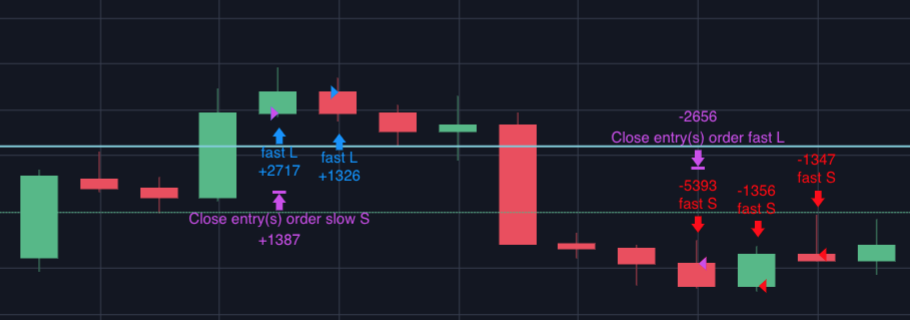
    Hi guys – is there a way to place a label on entry and exits?

    Context is that I have multiple entry and exit indicators and I would like to see how they interact with each other. It would be good to see which pieces of code trigger an entry or exit in the market if we’re able to label them when using ProBacktest.

    I clearly see entry and exits labelled on the price chart – just wondering if we can add any further text to it to identify our trades without having to add all the relevant indicators to the chart.

    See attached for an example of what I’m looking for.

    Screen-Shot-2019-02-17-at-9.28.21-pm.png Screen-Shot-2019-02-17-at-9.28.21-pm.png
    #91569 quote
    Vonasi
    Moderator
    Master

    The easiest way is to set flag variables to 1 when certain conditions are met and zero them at every bar entry. Then GRAPH the flags. For example:

    slhit = 0
    tphit = 0
    condhit = 0
    
    if longonmarket and close > high[1] then
    sell at market
    condhit = 1
    endif
    
    if longonmarket and close crosses under positionprice - sl then
    slhit = 1
    endif
    
    if longonmarket and close crosses over positionprice + tp then
    tphit = 1
    endif
    
    set stop ploss sl
    set target pprofit tp
    
    graph condhit as "Condition Exit"
    graph slhit as "Stop Loss Exit"
    graph tphit as "Take Profit Exit"

    Not tested – just an idea to work with!

    VLX1 thanked this post
    #91610 quote
    VLX1
    Participant
    New

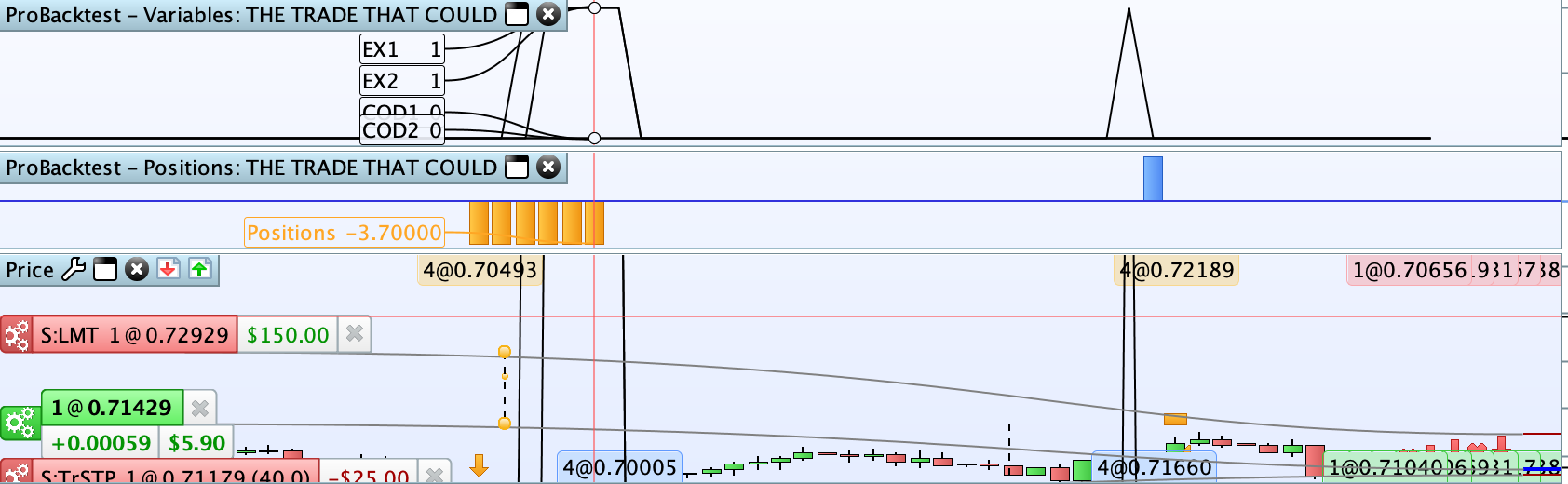
    Thanks Vonasi – works well!

    Even gives me an idea of how long each position stays open.

    Both the GRAPHONPRICE and GRAPH functions are helpful depending on what you prefer to see

    // BUY ENTRY ----------------------------------------------
    if CONDITION AND NOT ONMARKET then
    BUY n LOT AT MARKET
    COD1 = 1
    endif
    
    // SELL ENTRY --------------------------------------------
    if CONDITION AND NOT ONMARKET then
    SELLSHORT n LOT AT MARKET
    COD2 = 1
    endif
    
    // --- RESET CODE ----------------------------------------
    //Reset the counters on the graphs to show which entry and exits being triggered
    IF NOT ONMARKET THEN
    COD1 = 0
    COD2 = 0
    ENDIF
    
    // --- PRINT CODE ----------------------------------------
    GRAPHONPRICE COD1 as "COD1"
    GRAPHONPRICE COD2 as "COD2"
    GRAPH COD1 as "COD1"
    GRAPH COD2 as "COD2"
    Screen-Shot-2019-02-18-at-8.43.11-pm.png Screen-Shot-2019-02-18-at-8.43.11-pm.png
    #91661 quote
    Vonasi
    Moderator
    Master

    No problem. … and thank you for highlighting that the instruction GRAPHONPRICE exists as this one had passed me by. Following a discussion off forum it also appears that it has passed a lot of other PRT coders by as well. It is a powerful instruction now that MTF  is available as we can use it to create MTF indicators on price – so weekly moving averages on daily charts for example. It is an exciting discovery!

Viewing 4 posts - 1 through 4 (of 4 total)
  • You must be logged in to reply to this topic.

Label Entry and Exits


ProOrder: Automated Strategies & Backtesting

New Reply
Author
author-avatar
VLX1 @vlx1 Participant
Summary

This topic contains 3 replies,
has 2 voices, and was last updated by Vonasi

7 years ago.

Topic Details
Forum: ProOrder: Automated Strategies & Backtesting
Language: English
Started: 02/17/2019
Status: Active
Attachments: 2 files
Logo Logo
Loading...