keltner channels multiples

Viewing 5 posts - 1 through 5 (of 5 total)
  • Author
    Posts
  • #81016 quote
    hinelda
    Participant
    New

    Bonjour

    j’aurais besoin d’aide pour la programmation des bandes Keltner…

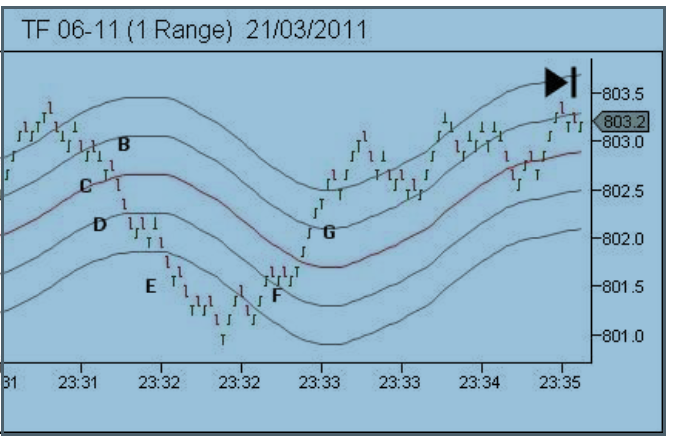
    j’aimerais avoir un indicateur au choisir la séparation des bandes de la moyen de base (comme apparent on peut faire sur ninjatrader)

    l’idee c’est d’avoir 2 fois l’indicateur sur l’ecran, comme il suit:

    Keltner Channels (35,4)

    periode 35,offset multiplier 4, forming the centreline and the inner channel lines

    Keltner channels (35,8)

    periode 35, offset multiplier 8, forming the centreline ant the inner channel lines

    comprenant:

    centreline=SMA (period)

    upper and loyer channel lines are offset up and down by following amount: (offset multiplier x sma(H-L,period))

    j’aimarai pouvoir utiliser l’indicateur sur des graphiques a range. (actuellement les bandes Keltner ne s’affichent meme pas).

    a niveau graphique s’il y aurai la possibilité que juste des petits lignes grises s’affiche, sans remplisage, sans rien, juste des finnes lignes… serai encore un atout.

    mils mercis


    merci

    Capture-1.png Capture-1.png
    #81018 quote
    Nicolas
    Keymaster
    Master

    Avec le code de bandes de Keltner ci-dessous, le réglage est possible :

    //Canaux de Keltner
    n=10 //période
    coeff=1
    decalagehorizontal=0 //en nombre de barres
    REM Moving Average
    MA = Average[N](TypicalPrice)
    
    REM Upper Keltner Band
    
    UpperBand = MA + coeff*Average[N](Range)
    
    REM Lower Keltner Band
    
    LowerBand = MA - coeff*Average[N](Range)
    
    RETURN MA[decalagehorizontal] AS "Keltner Moving Average" , UpperBand[decalagehorizontal] AS "Upper Keltner Band" , LowerBand[decalagehorizontal] as "Lower Keltner Band"

    Je ne pense pas qu’il pourra être affiché sur un graphique en range bars. Appliquer des indicateurs sur des graphiques non corrélés au temps comme les range bars ou renko n’est pas possible pour la plupart des indicateurs actuellement. Il est prévu que ce soit possible dans une prochaine version de la plateforme toutefois.

    #81019 quote
    Nicolas
    Keymaster
    Master

    Désolé, j’ai été trop vite, cela fonctionne 🙂

    Je vais créer l’indicateur complet avec les 4 bandes et la moyenne centrale, un instant.

    #81020 quote
    Nicolas
    Keymaster
    Master

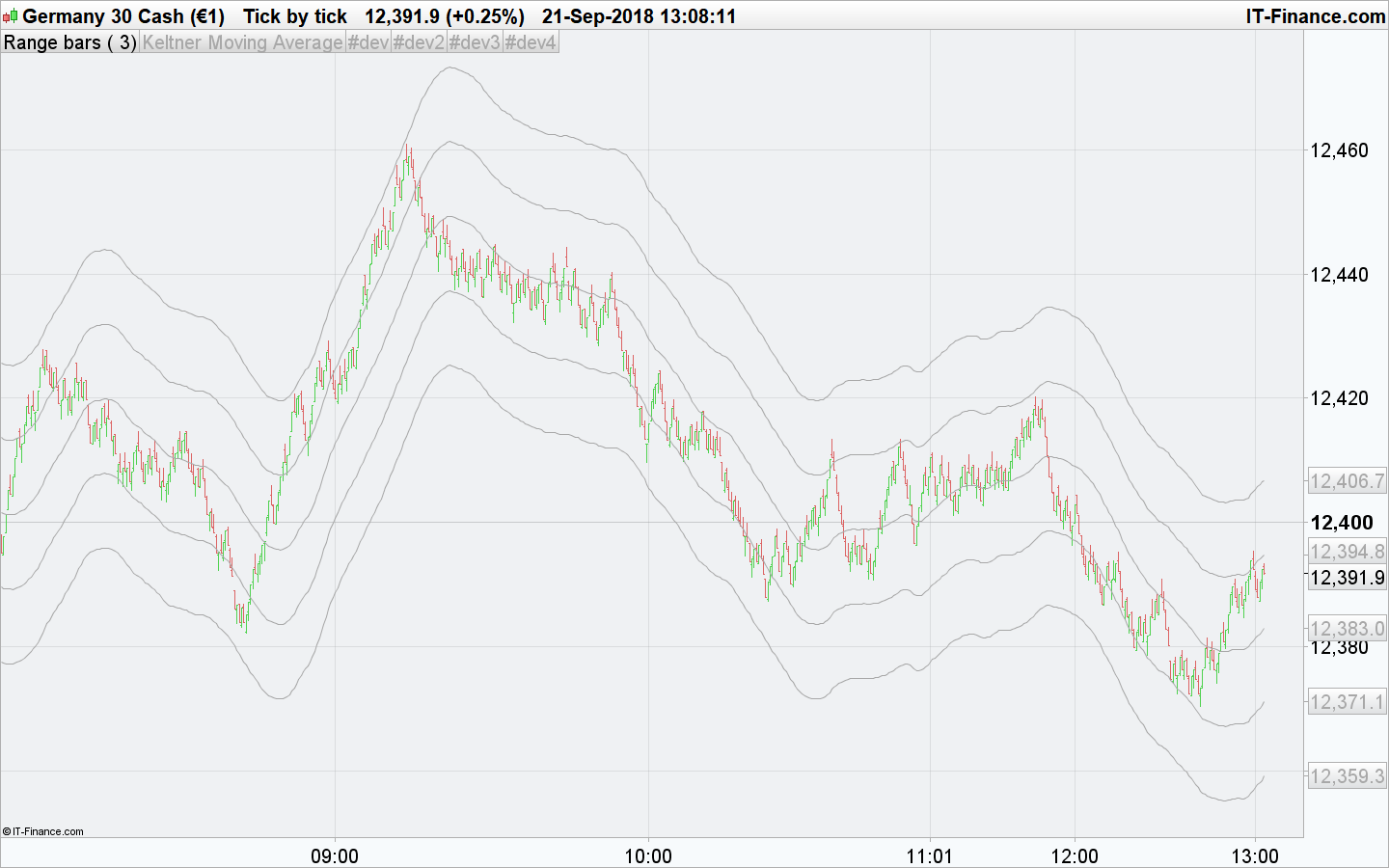
    Voilà, cela devrait fonctionner comme souhaité :

    n=35 //period
    coeff1=4
    coeff2=8
    REM Moving Average
    MA = Average[N](TypicalPrice)
    
    up1 = MA + coeff1*Average[N](Range)
    dn1 = MA - coeff1*Average[N](Range)
    up2 = MA + coeff2*Average[N](Range)
    dn2 = MA - coeff2*Average[N](Range)
    
    RETURN MA coloured(168,168,168) AS "Keltner Moving Average", up1 coloured(168,168,168), dn1 coloured(168,168,168), up2 coloured(168,168,168), dn2 coloured(168,168,168)
    keltner-bands-range-bars.png keltner-bands-range-bars.png
    #81048 quote
    hinelda
    Participant
    New

    Mr Nicolas

    c’est juste parfait

    merci bc

Viewing 5 posts - 1 through 5 (of 5 total)

  • You must be logged in to reply to this topic.

keltner channels multiples


ProBuilder : Indicateurs & Outils Personnalisés

New Reply
Author
author-avatar
hinelda @hinelda Participant
Summary

This topic contains 4 replies,
has 2 voices, and was last updated by hinelda

7 years, 5 months ago.

Topic Details
Forum: ProBuilder : Indicateurs & Outils Personnalisés
Language: French
Started: 09/21/2018
Status: Active
Attachments: 2 files
Logo Logo
Loading...