Hi all I’m not 100% sure if this is the right place to post this or if it belongs in the ProOrder section, but I am having a number of issues with autotrading live compared to my backtesting result.
The first issue is that I have a number of systems that simply open a trade when the daily bar closes above or below the MA, so if it opens above we buy and if it closes below then we sell, with a 50 point stop. What is happening with a lot of the trades though is that even though it is running on the daily charts, when the stop is hit, another position is opened immediately after, so it just keeps trading. Here is a snippet of the code:
DEFPARAM CumulateOrders = False

c1 = Average[21](close)

If Close > c1 THEN
BUY 1 SHARES AT MARKET
ENDIF

IF Close < c1 THEN
SELLSHORT 1 SHARES AT MARKET
ENDIF

SET STOP pTRAILING 50
Another issue I am having with all of my systems is that they aren’t accumulating orders. For example, when I ran another system that trades on the five minute, again with moving averages, it only places single orders until the stops are hit. These strategies have been running since December and when I backtest it over the same period, the results show me that orders should be accumulating.
I was wondering if anyone else has had this issue or one similar?
Hi
Not sure about your first issue – but with reference to the second. you may want to check the following (if I’m understanding you correctly)
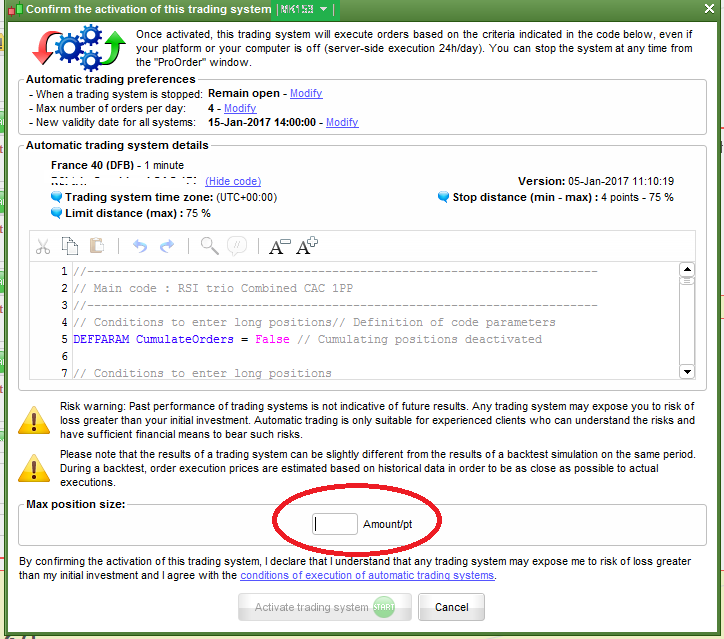
When an auto trade is initiated this window will be brought up – in this box – you need to put MAXIMUM number of trades that you would like the system
to trade . So if it is set to one – it will only do one trade even if the code/system would initiate another.
Hi, Thanks for the response,
I thought that part refers to the max position size take in one trade? so for example if the conditions are met then prorealtime will open £1 per point (or whatever currency the instrument is in).
Does that refer to the max total positions?
Also with reference to the first point that you mentioned.
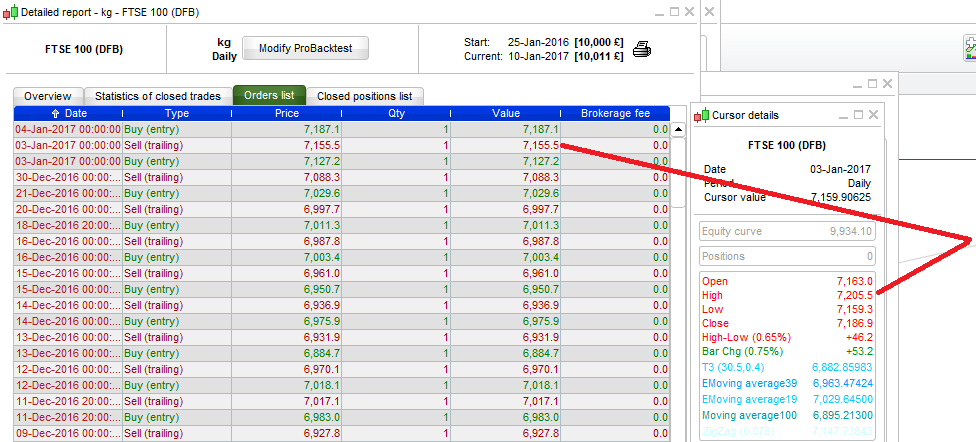
Having had a brief look, Trailing Stop is working from the High of the period, so when it moves lower than 50 points from the Registered “Hi” – the “Trailing Stop” instruction is stopping out the trade.
SET STOP pLOSS 20 – May be better suited.
(There’s not much point using trailing stops becuase if you are hoping to use it on autotrade the code for real – I don’t think IG/IT systems allow it …)
“Hi, Thanks for the response, I thought that part refers to the max position size take in one trade? so for example if the conditions are met then prorealtime will open £1 per point (or whatever currency the instrument is in). Does that refer to the max total positions?”
Yes that’s right – It refers to Maximum positions. (I know it’s mesleading! 🙂
Trailing Stop
Cont D on PRT brings up databox .
Ah ok I see! That’s embarrassing that I did not realise that haha!
I think I understand what you are saying about the trailing stop, do you mean that when the trade opens they are calculated from the wrong point?
IG definitely do allow trailing stops on their accounts. The idea of the system was just to try and guess the trend and let it run until it stopped out by the trailing (with no target) but IG trailing stops seem to be really unreliable. What I am trying now is to use the trailing stop code found in the blog section of this site rather than the embedded one and also have a slightly larger set stop loss too. The problem though is that it still doesn’t really explain why as soon as when one is stopped out, another trade immediately opens (running on daily charts). It also only seems to happen on some instruments rather than others (has happened on GBPUSD and FTSE250 but not GBPJPY).
“The problem though is that it still doesn’t really explain why as soon as when one is stopped out”
I’m thinking – It opens another trade because the price is above the 21 MA.
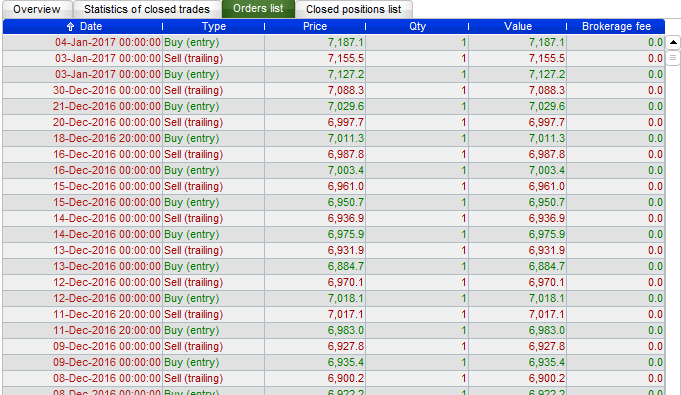
Just looking at the times that the trades are transacted – most are at midnight …
If your trade open and close on the same candlestick and your conditions are still true, a new trade could be opened, because the “old” script is still in memory until the next Close when the code will be read.
Ok so even though it is the daily chart, because the price itself is still above/below it may or may not open another trade..
Is there a way to code it only to make one trade per day?