Hi guys,
I would like to check if I have used the function IsLastBarUpdate the correct way.
Say for example, in my price chart I have 2 indicator, Donchien UpBand/LowBand, Bollinger UpBand/LowBand.
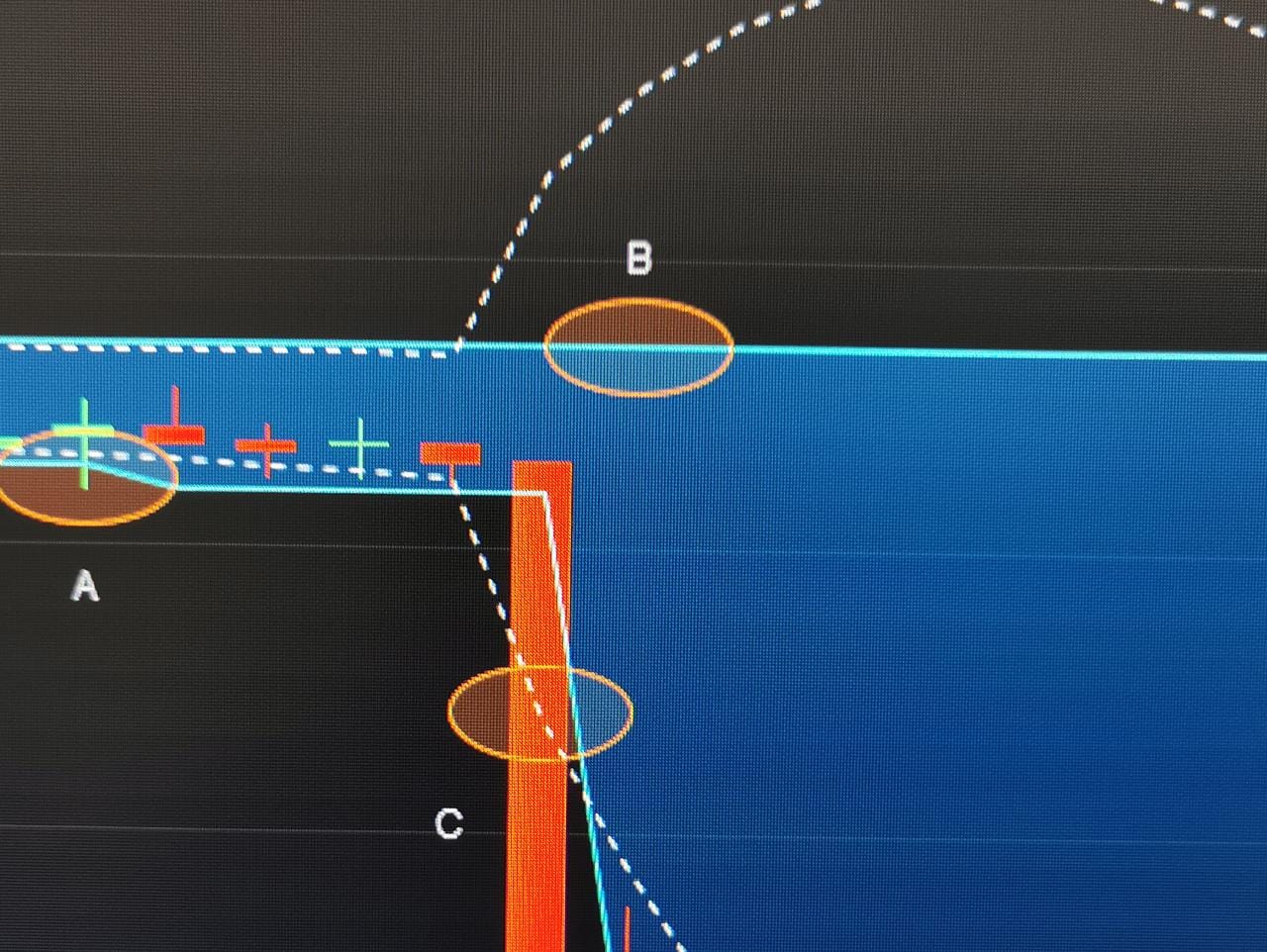
It is a simple mean reversion strategy which is described below. Pls see the attached chart as well.
Buy when the price is below the DonchienLB (point A)
and
Sell when the price is above the DonchienHB] for Take Profit (point B) OR when the price is below the BollingerLB (StopLoss) (point C)
The codes using the Simplified Creation is:
// Definition of code parameters
DEFPARAM CumulateOrders = False // Cumulating positions deactivated


// Conditions to enter long positions
indicator1 = DonchianChannelDown[20]
c1 = (close < indicator1)

IF c1 THEN
BUY 1 SHARES AT MARKET
ENDIF

// Conditions to exit long positions
indicator2 = DonchianChannelUp[20]
c2 = (close > indicator2)
indicator3 = BollingerDown[20](close)
c3 = (close < indicator3)

IF c2 OR c3 THEN
SELL AT MARKET
ENDIF
However, the execution of the trades is only done in the next period.
Now I would like to have the above strategy to get executed immediately the moment the conditions are met without having to wait for the next interval.
I use the IsLastBarUpdate function, so now the code looks like this:
// Definition of code parameters
DEFPARAM CumulateOrders = False // Cumulating positions deactivated

X = 1000

if IsLastBarUpdate then

for i = 1 to x do

// Conditions to enter long positions
indicator1 = DonchianChannelDown[20]
c1 = (close < indicator1)

IF c1 THEN
BUY 1 SHARES AT MARKET
ENDIF

// Conditions to exit long positions
indicator2 = DonchianChannelUp[20]
c2 = (close > indicator2)
indicator3 = BollingerDown[20](close)
c3 = (close < indicator3)

IF c2 OR c3 THEN
SELL AT MARKET
ENDIF

Next

EndIF
Basically I have added the code at the top after DefParam
X = 1000
if IsLastBarUpdate then
for i = 1 to x do
and at the bottom
Next
EndIF
Is this the correct way to do it? Appreciate your advice.
IsLastBarUpdate behaviour:
- in strategies it allows to know when preloaded bars have ended and live bars (demo and real) start
- in indicators it identifies the current bar.
As to immediately, it simply doesn’t exist, as all strategies are executed AFTER a bar closes, so that’s when conditions are evaluated, then trades are opened or closed or pending orders are placed; then the new bar opens (it’s just a few microseconds delay, if any).
To get as close as possible to immediately, you’ll have to resort to MTF support to be able to use a lower TF other than the one used for setup.
But to place orders on the spur you cannot use UpdateOnClose, because with it, a 1-minute bar closes at the same time as a 4-hour or daily bar. Use default, instead.
Hi Roberto,
Thanks for the feedback. I partly agree with you. Yes, conditions need to be met and are executed at bar close before buying. However for the sell condition more often that not its act like a trailing StopLoss or trailing TakeProfit. Apologies I have still not able to grasp the UpdateOnClose and TimeFrame function fully. Let me try again:
For the condition
Buy when the price is below the DonchienLB (point A) in the 15-min time frame
and
Sell when the price is above the DonchienHB] for Take Profit (point B) at any point in time OR when the price is below the BollingerLB (StopLoss) (point C) at any point in time
I do the following on a 1-second time frame (time unit = 1 second), and run the code below, where I define the buying condition with TImeframe (15 minute, UpdateOnClose) and the selling condition with TimeFrame(default). Since i run the test with time unit = 1 second, the default time of the sell condition will be 1 second. Code as below.
Sorry I cannot find the insert PRT Code icon, so insert it as Blockquote instead. Modification to the original code generated by the Simplified creation is :
- adding Timeframe(15 minute, UpdateOnClose) before the buy condition
- adding Timeframe(default) before the sell condition
- running the test on time unit = 1 second.
Is the code below satisfy the conditions:
Buy when the price is below the DonchienLB (point A) in the 15-min time frame
and
Sell when the price is above the DonchienHB] for Take Profit (point B) at any point in time OR when the price is below the BollingerLB (StopLoss) (point C) at any point in time
Code is as below:
// Definition of code parameters
DEFPARAM CumulateOrders = False // Cumulating positions deactivated
Timeframe(15 minute, UpdateOnClose)
// Conditions to enter long positions
indicator1 = DonchianChannelDown[20]
c1 = (close < indicator1)
IF c1 THEN
BUY 1 SHARES AT MARKET
ENDIF
Timeframe(default)
// Conditions to exit long positions
indicator2 = DonchianChannelUp[20]
c2 = (close > indicator2)
indicator3 = BollingerDown[20](close)
c3 = (close < indicator3)
IF c2 OR c3 THEN
SELL AT MARKET
ENDIF
Ok, your code is doing exactly what you want, what’s the issue?
The only issue I can detect (but you may even take it as an advantage) is that if your trade closes before the 15-minute entry candle does, another trade will open in the same direction because C1 will change only at the closing of the 15-minute candle. You may leave it as is, if that’s what you want, or you need some additional code to prevent entering further trades before the 15-minute candle closes.
Thank you so much Sir. Appreciate your guidance.
Nicolas pointed me out that IsLastBarUpdate only works with indicators, it’s not for strategies.
Sorry for my bad statement.
Sorry phanz, sometimes misunderstandings happen.
My first statement was correct. You can read documentation at https://www.prorealcode.com/documentation/islastbarupdate/.
Disregard my previous post.
Sorry again (sad)
Thanks, Roberto, you have been very helpful. Appreciate.