Comment tracer un rectangle jusqu’à comblement d’un gap

Viewing 13 posts - 31 through 43 (of 43 total)
  • Author
    Posts
  • #197857 quote
    sharteel
    Participant
    Junior

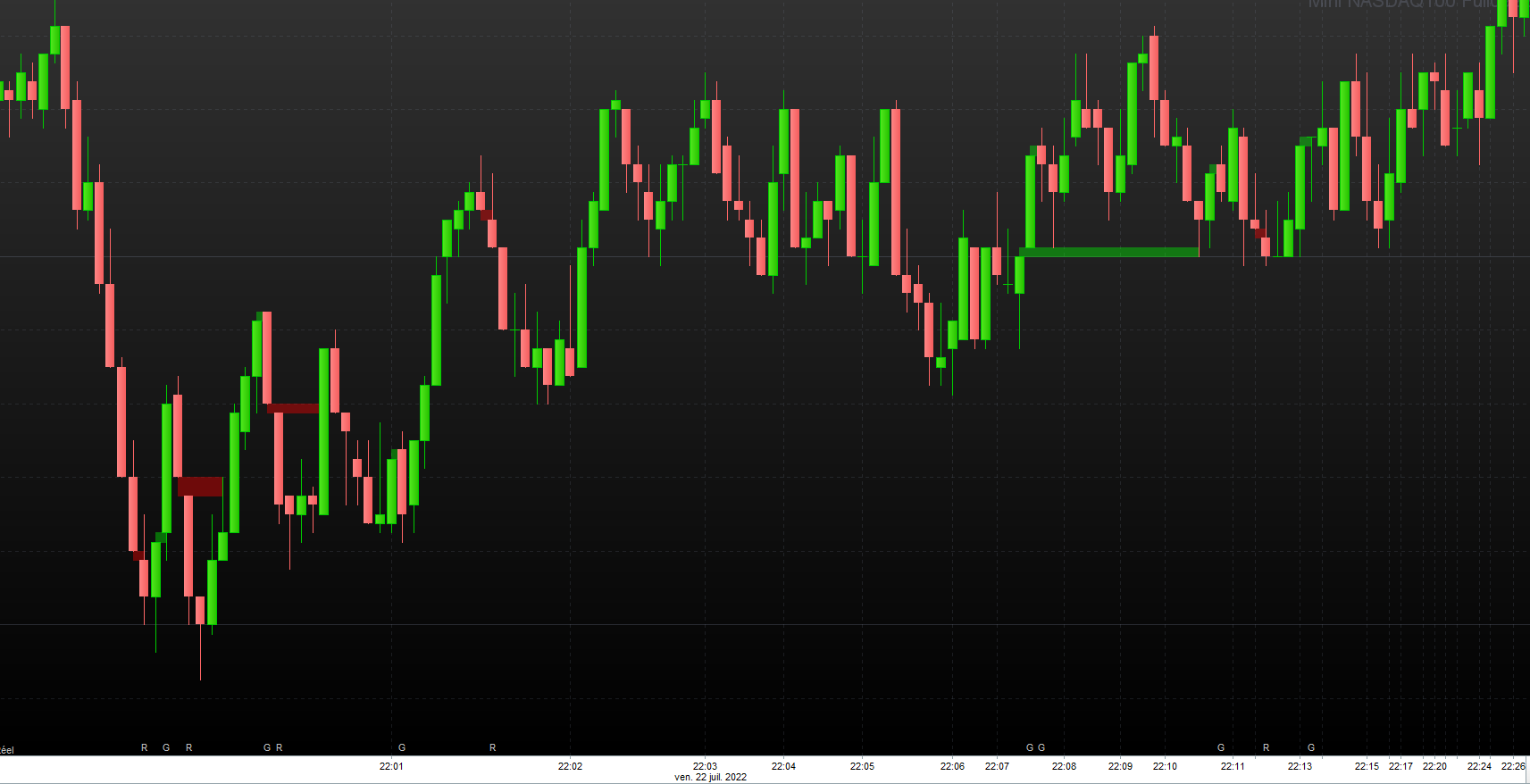
    si on ajoute les deux indicateurs, on obtient cela.

    pour l’indicateur red gap, la modification de condition est la suivante, même principe que pour green gap avec le “égal” en plus.

    if high[barindex[j]] >= $y1[i]  then  // compare indexed high with y1
    sharteel_gap_0004_green_red_2_indicators.png sharteel_gap_0004_green_red_2_indicators.png
    #203133 quote
    rwanderer
    Participant
    New

    Bonjour sharteel, trés beau travail sur la detection de GAP.
    As-tu le code avec les deux indicateurs de combinés à partager ?
    Question subsidiaire : es-t il envisageable de spécifier les horaires de marché ou la variable open s’adapte t-elle à l’indice ?


    Merci à toi

    #203470 quote
    sharteel
    Participant
    Junior

    hello,

    rapidement.

    merci, il s’agit d un travail en commun avec Druby.

    Pour les plage horaire, il faut rajouter un if avec date début et date fin avant la boucle FOR général, de mémoire, pour éviter des calculs inutiles.

    pour un gap rouge, il faut changer la ligne 9 avec :

     if open<low[1] then // condition

    et inversement pour le gap vert:

    if open>high[1] then // condition

    et a partir de la ligne 60, il faut commenter / decommenter.

    // control
    if open<low[1] then
    drawtext("R",barindex,10)anchor(bottom,index,yShift) // R for red gap
    endif/*
    if open>High[1] then
    drawtext("G",barindex,10)anchor(bottom,index,yShift) // G for green gap
    endif*/
    return

    j utilise deux script que je nomme: gap_vert et l’autre gap_rouge.

    ++

    #204237 quote
    rwanderer
    Participant
    New

    Bonsoir shartell,

    Merci pour ce retour !
    Je test ce code sur l’indice cac et sincérement, il y’a des éléments qui reste confus.
    Vous serez t-il possible de publier le code entier pour le red gap et celui pour le green gap ?

    Cordialement,

    #206007 quote
    BenLaeft
    Participant
    New

    Bonjour,

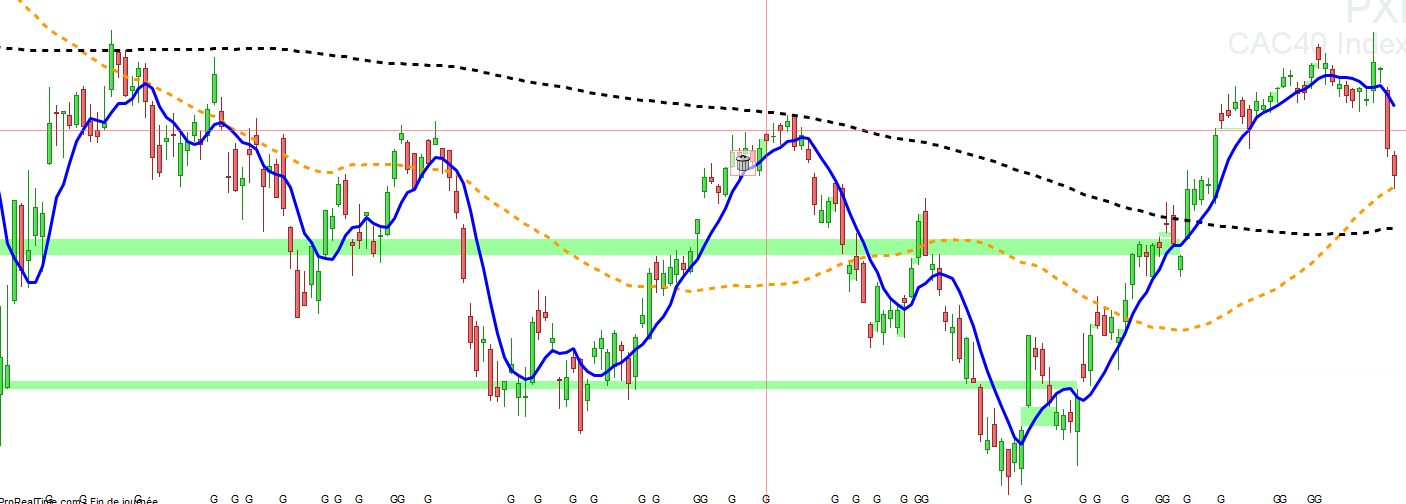
    Après un test sur PX1, j’ai deux rectangles qui demeurent… (pas de gap ouvert aussi loin que je remonte)

    Auriez-vous une explication à ce bug ?

    Merci

    gv.png gv.png
    #206010 quote
    BenLaeft
    Participant
    New

    Je viens de comprendre que ce sont les gaps en cours non fermés qui se tracent à l’infini vers la gauche.

    Est-ce normal ?

    #206011 quote
    BenLaeft
    Participant
    New

    Résolu.

    J’ai ajouté

    if $x2[i] = 0 then
    $x2[i] = barindex
    endif

    dans la boucle du j.

    gv-1.png gv-1.png
    #206013 quote
    BenLaeft
    Participant
    New

    Enfin j’ai ajouté ça dans la boucle de tracé du rectangle afin d’éliminer les faux positifs entre 2 journées consécutives.

    if $x2[i]-$x1[i] = 1 then
    continue

    Merci pour ce code, je débute et ça m’a permis de comprendre comment ça marche.

    #206525 quote
    rwanderer
    Participant
    New

    Bien vu BenLaeft !

    Pourrais-tu partager le code entier stp ?

    #206547 quote
    sharteel
    Participant
    Junior

    hello,

    les rectangles s affichent jusqu’à un comblement complet. Plus la variable X est grande, plus on remonte dans le temps pour détecter des vieux gaps. C’était l’idée de base 🙂

    il y a des améliorations à faire, parfois, il y a un phénomène de delay dans l affichage.

    voici les deux scripts originaux.  Un script rouge et un script vert, gap rouge = baisse et gap vert = hausse

    // original creators: druby & sharteel from prorealcode forum on 2022
    
    //defparam drawonlastbaronly=true
    once count=-1  // arr[count]
     
    X = 500  // lookback/search scope
     
    // on injecte les datas dans les tableaux  // we inject the data into the arrays
     
    // red gap
    if open<low[1] then  // condition
    count = count+1  // count for array index on true condition
    toto=1
    $x1[count]=barindex[1]  // data set = [ $x1, $y1, $y2, later  $x2 ]
    $y1[count]=low[1]
    $y2[count]=open
    r=255
    g=0
    b=0
     
    endif
    
    if islastbarupdate then
     
    if barindex > X then  // reduce  search to within scope
    z=barindex-X
    endif
    
    for i = 0 to lastset($x1)           // loop through each data set index
    if $x1[i] <  z then              // shorten loop, test if x1 is within X lookback scope
    continue                      //  jump to next loop iteration, dont do this data set, out of 'X' scope
    else
    for j = $x1[i]+1 to barindex    // loop forward though each data set in scope
    
    if high[barindex[j]] >= $y1[i]  then  // compare indexed high with y1
    $x2[i] = barindex-barindex[j]     // if true store in arr $x2
    break
    endif                          // break out of loop, if x2 found
    next
     
    endif
    next
     
    // on lit les tableaux
    for i = 1 to lastset($x1) do
    if $x1[i] < z then  // limit drawing to scope X
    continue // miss iteration if out of scope
    else
    if $x2[i]>0 then
    drawrectangle($x1[i],$y1[i],$x2[i],$y2[i]) coloured(r,g,b,100) bordercolor(0,0,0,0)
    else
    
    drawrectangle($x1[i],$y1[i],barindex,$y2[i]) coloured(r,g,b,100) bordercolor(0,0,0,0)
    endif
    endif
    next
    
    // end of islastbarupdate
    endif
    
    // control
    if open<low[1] then
    drawtext("R",barindex,10)anchor(bottom,index,yShift) // R for red gap
    endif/*
    if open>High[1] then
    drawtext("G",barindex,10)anchor(bottom,index,yShift) // G for green gap
    endif*/
    return
    // original creators: druby & sharteel from prorealcode forum on 2022
    //defparam drawonlastbaronly=true
    once count=-1  // arr[count]
     
    X = 500  // lookback/search scope
     
    // on injecte les datas dans les tableaux  // we inject the data into the arrays
     
    // green gap
    if open>high[1] then  // condition
    count = count+1  // count for array index on true condition
    
    $x1[count]=barindex[1]  // data set = [ $x1, $y1, $y2, later  $x2 ]
    $y1[count]=high[1]
    $y2[count]=open
    r=0
    g=255
    b=0
     
    endif
     
    if islastbarupdate then
     
    if barindex > X then  // reduce  search to within scope
    z=barindex-X
    endif
    
    for i = 0 to lastset($x1)           // loop through each data set index
    if $x1[i] <  z then              // shorten loop, test if x1 is within X lookback scope
    continue                      // jump to next loop iteration, dont do this data set, out of 'X' scope
    else
    for j = $x1[i]+1 to barindex    // loop forward though each data set in scope
     
    if low[barindex[j]] <= $y1[i]  then  // compare indexed high with y1
    $x2[i] = barindex-barindex[j]     // if true store in arr $x2
    break                             // break out of loop, if x2 found
    endif
    
    next
     
    endif
    next
     
    // on lit les tableaux
    for i = 1 to lastset($x1) do
    if $x1[i] < z then  // limit drawing to scope X
    continue // miss iteration if out of scope
    else
    if $x2[i]>0 then
    drawrectangle($x1[i],$y1[i],$x2[i],$y2[i]) coloured(r,g,b,100) bordercolor(0,0,0,0)
    else
    drawrectangle($x1[i],$y1[i],barindex,$y2[i]) coloured(r,g,b,100) bordercolor(0,0,0,0)
    endif
    endif
    next
    
    // end of islastbarupdate
    endif
    
    // control
    if open>High[1] then
    drawtext("G",barindex,10)anchor(bottom,index,yShift) // G for green gap
    endif
    return
    

    +++

    rwanderer thanked this post
    #207741 quote
    BenLaeft
    Participant
    New

    Messieurs,

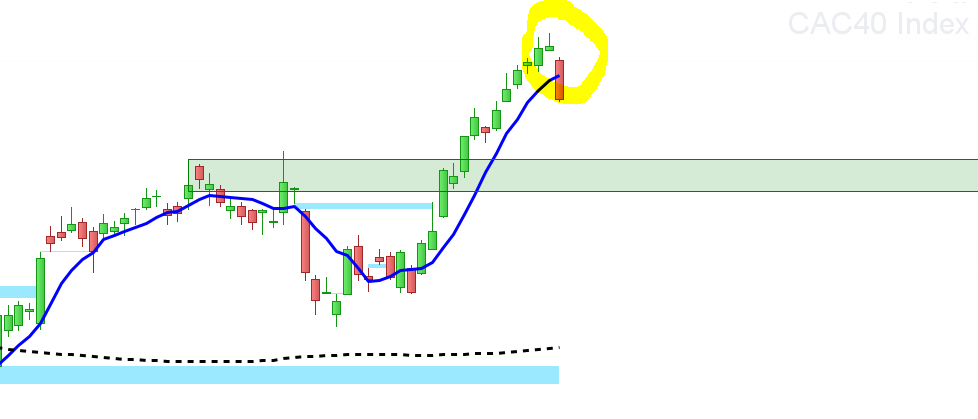
    Je rencontre effectivement un souci sur l’ouverture des gaps.

    Ceux-ci ne s’affichent pas le premier jour…

    Exemple du CAC40 hier :

    Capture-1.png Capture-1.png
    #207811 quote
    sharteel
    Participant
    Junior

    bonjour,

    en fait, la barre courante n’est pas terminée. La ligne s affichera à partir de j+1.

    peut rajouter une détection plus live. je vais regarder.


    ++

    rwanderer thanked this post
    #223978 quote
    jprt
    Participant
    New

    Merci pour ces 2 indicateurs.
    Peut-on modifier le code pour que les couleurs soient réglables dans les parametres de l’indicateur ou celà n’est pas possible ?

Viewing 13 posts - 31 through 43 (of 43 total)
  • You must be logged in to reply to this topic.

Comment tracer un rectangle jusqu’à comblement d’un gap


ProBuilder : Indicateurs & Outils Personnalisés

New Reply
Author
author-avatar
sharteel @sharteel Participant
Summary

This topic contains 42 replies,
has 5 voices, and was last updated by jprt
2 years, 3 months ago.

Topic Details
Forum: ProBuilder : Indicateurs & Outils Personnalisés
Language: French
Started: 07/14/2022
Status: Active
Attachments: 19 files
Logo Logo
Loading...