Intra day camarilla Pivots not matching chart display

Viewing 15 posts - 1 through 15 (of 24 total)
  • Author
    Posts
  • #201125 quote
    Paulg999
    Participant
    New

    Hi,

    I would be most grateful if you could help me get the camarilla pivot levels I see on my chart inline with the PRT test so that I can conduct back tests with confidence.

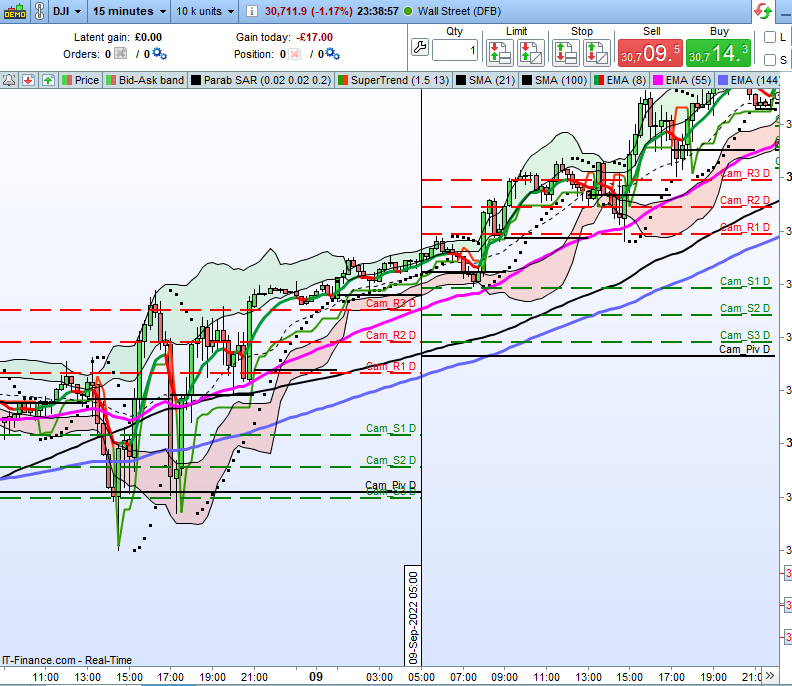
    I am having problems when I back test a strategy which uses intraday camarilla levels. I performed a basic strategy test to ensure that the back test picked up some simple bounces of pivot levels but the results were mixed which would suggest that there is disparity between the chart levels I see & the back test levels. This make me think that my displayed levels are being calculated differently to those which the back test uses.🤷‍♀️

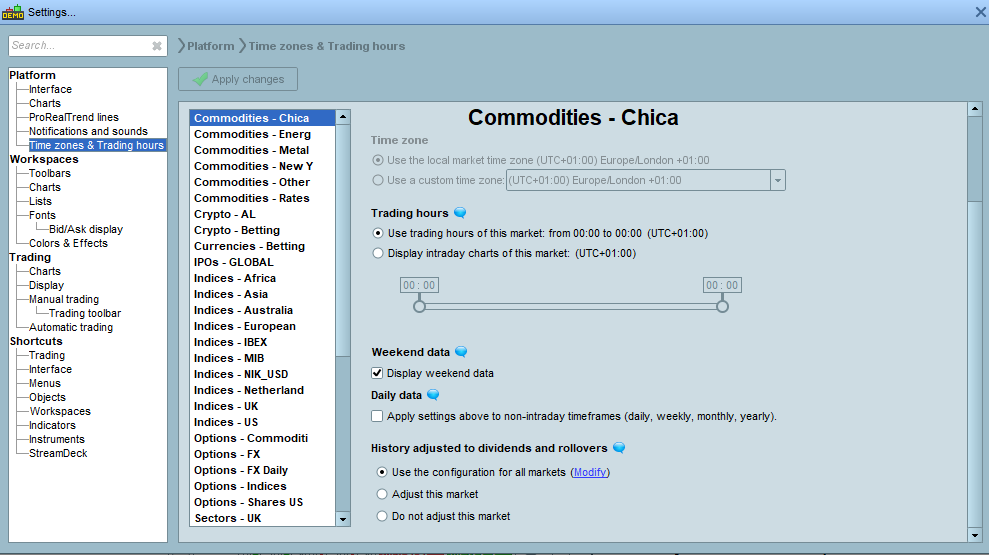
    I am hoping that a minor adjustment of settings will correct the issue. Please find attached some screenshots of my current settings.

    I appreciate any efforts to get this corrected for me.

    Thank you.

    #201154 quote
    Paulg999
    Participant
    New

    Apologies but I have no idea what you mean.

    Can you expand?


    KR

    #201180 quote
    Nicolas
    Keymaster
    Master

    Hi Paul, sorry but did you reply to someone in the topic? I do not see other messages than yours?

    There are no instructions to get the camarilla pivots levels, you have to calculate them by yourself in your code, could you please share us your code in order to check them?

    #201186 quote
    MauroPro
    Participant
    Veteran

    If it can be useful, this is a code written by Roberto Gozzi.


    // PIVOT CAMARILLA by Roberto Gozzi

    DEFPARAM DrawOnLastBarOnly = true
    IF IntraDayBarIndex = 0 THEN
    inizio = BarIndex
    ENDIF

    myH = ( DHIGH(1) )
    myL = ( DLOW(1) )
    myC = ( DCLOSE (1) )

    IF OpenDayOfWeek = 1 THEN
    myH = ( DHIGH(2) )
    myL = ( DLOW(2) )
    myC = ( DCLOSE (2) )
    ENDIF

    PP = myc//PP = Previous Day’s Close

    R1 = ((myH-myL) * 1.1)/12+myC
    RR2 = ((myH-myL)*1.1)/6+myC // Note: RR2 is used instead of R2 since R2 is the symbol for “R squared” in probuilder language.
    R3 = ((myH-myL)*1.1)/4+myC
    R4 = ((myH-myL)*1.1)/2+myC

    S1 = myC-((myH-myL)*1.1)/12
    S2 = myC-((myH-myL)*1.1)/6
    S3 = myC-((myH-myL)*1.1)/4
    S4 = myC-((myH-myL)*1.1)/2

    DrawSegment(Inizio,R1,BarIndex,R1) COLOURED(255,0,0) style(dottedLine,2)
    DrawText(“Cama R1”, BarIndex+5,R1) COLOURED(255,0,0)
    DrawSegment(Inizio,RR2,BarIndex,RR2) COLOURED(255,0,0) style(dottedLine,2)
    DrawText(“Cama R2”,BarIndex+5,RR2) COLOURED(255,0,0)
    DrawSegment(Inizio,R3,BarIndex,R3) COLOURED(255,0,0) style(dottedLine,2)
    DrawText(“Cama R3”,BarIndex+5,R3) COLOURED(255,0,0)
    DrawSegment(Inizio,R4,BarIndex,R4) COLOURED(255,0,0) style(dottedLine,2)
    DrawText(“Cama R4”,BarIndex+5,R4) COLOURED(255,0,0)
    DrawSegment(Inizio,S1,BarIndex,S1) COLOURED(0,180,0) style(dottedLine,2)
    DrawText(“Cama S1”,BarIndex+5,S1) COLOURED(0,180,0)
    DrawSegment(Inizio,S2,BarIndex,S2) COLOURED(0,180,0) style(dottedLine,2)
    DrawText(“Cama S2”,BarIndex+5,S2) COLOURED(0,180,0)
    DrawSegment(Inizio,S3,BarIndex,S3) COLOURED(0,180,0) style(dottedLine,2)
    DrawText(“Cama S3”,BarIndex+5,S3) COLOURED(0,180,0)
    DrawSegment(Inizio,S4,BarIndex,S4) COLOURED(0,180,0) style(dottedLine,2)
    DrawText(“Cama S4”,BarIndex+5,S4) COLOURED(0,180,0)
    DrawSegment(Inizio,PP,BarIndex,PP) COLOURED(0,0,0) style(dottedLine,2)
    DrawText(“Cama PP”,BarIndex+5,PP) COLOURED(0,0,0)

    RETURN R1 COLOURED(255,0,0)style(dottedLine,2) AS “CAMA R1” , RR2 COLOURED(255,0,0)style(dottedLine,2) AS “CAMA R2” , R3 COLOURED(255,0,0)style(dottedLine,2) AS “CAMA R3”, R4 COLOURED(255,0,0)style(dottedLine,2) AS “CAMA R4” , S1 COLOURED(0,180,0) style(dottedLine,2)AS “CAMA S1”, S2 COLOURED(0,180,0) style(dottedLine,2)AS “CAMA S2” , S3 COLOURED(0,180,0)style(dottedLine,2)AS “CAMA S3” , S4 COLOURED(0,180,0) style(dottedLine,2)AS “CAMA S4” ,PP COLOURED(0,0,0)style(line,2) AS “CAMA PP”

    Paulg999 and robertogozzi thanked this post
    #201193 quote
    Paulg999
    Participant
    New

    Thanks for postings. I will post the code I was using a little later (It was just a test piece to make sure things were doing as I expect).

    #201237 quote
    Paulg999
    Participant
    New

    Hi,

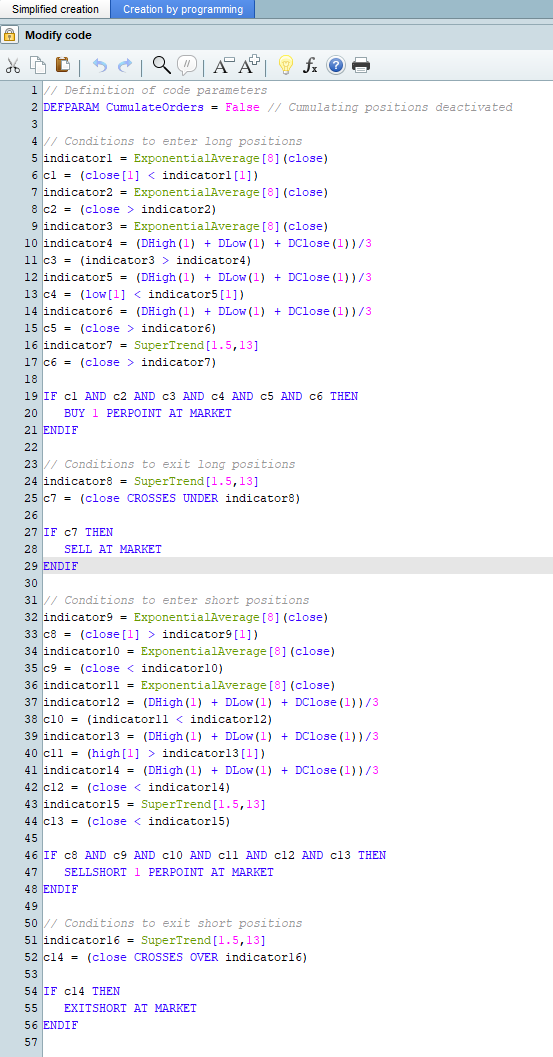
    Please find attached itf file & a copy of the code for longs only. The itf file contains both longs and shorts.

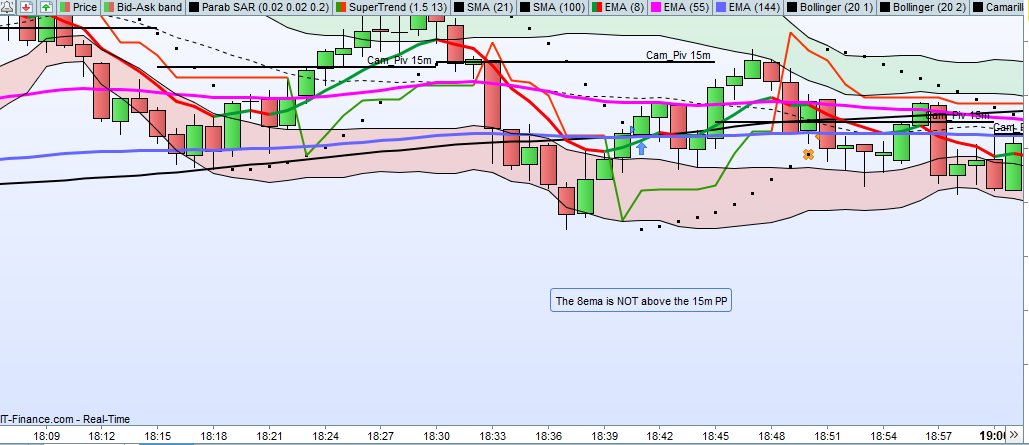
    So this was a really simple test to make sure that the back test was recognising a bounce of the 15m Camerilla Pivot as I see it on my chart & the bottom line is there is disparity & I don’t understand why.

    In simple terms, for longs i want to see the 8ema above the 15m PP, a colour change on the 8ema from Red to Green, the low of the previous bar below the pivot & the close of the current bar above the PP whilst price is above the Supertrend.

    The test dates are from 14th September to 23rd September on the 1m chart using PRT 15m Camerilla’s on Wall Street (DFB)

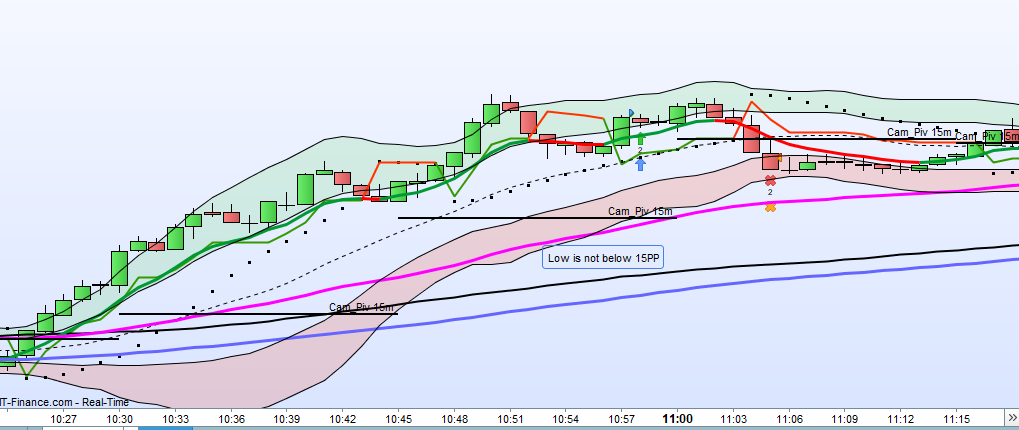
    I have included screenshots for the first two longs dated but you will see multiple examples of these across both short & longs if you use the itf file.

    21/09/22 @ 10:58 [Low NOT below 15mPP.PNG]

    19/09/22 @ 18:40 [The 8ema is NOT above the 15m PP.PNG]

    I hope the above makes it easier to identify where the problem lies.

    Many thanks for your continued support.

    // Definition of code parameters
    DEFPARAM CumulateOrders = False // Cumulating positions deactivated

    // Conditions to enter long positions
    indicator1 = ExponentialAverage[8](close)
    c1 = (close[1] < indicator1[1])
    indicator2 = ExponentialAverage[8](close)
    c2 = (close > indicator2)
    indicator3 = ExponentialAverage[8](close)
    indicator4 = (DHigh(1) + DLow(1) + DClose(1))/3
    c3 = (indicator3 > indicator4)
    indicator5 = (DHigh(1) + DLow(1) + DClose(1))/3
    c4 = (low[1] < indicator5[1])
    indicator6 = (DHigh(1) + DLow(1) + DClose(1))/3
    c5 = (close > indicator6)
    indicator7 = SuperTrend[1.5,13]
    c6 = (close > indicator7)

    IF c1 AND c2 AND c3 AND c4 AND c5 AND c6 THEN
    BUY 1 PERPOINT AT MARKET
    ENDIF

    // Conditions to exit long positions
    indicator8 = SuperTrend[1.5,13]
    c7 = (close CROSSES UNDER indicator8)

    IF c7 THEN
    SELL AT MARKET
    ENDIF

    #201249 quote
    JS
    Participant
    Senior

    Hi @Paulg999

    You talk about 1 minute and 15 minutes, but I don’t see multiple time frames in your code… 🙂

    Furthermore, I see that you use: DHigh, DLow and DClose.

    I assume you know these relate to daily rates (DHigh(1) is yesterday’s daily high)

    Paulg999 thanked this post
    #201299 quote
    Paulg999
    Participant
    New
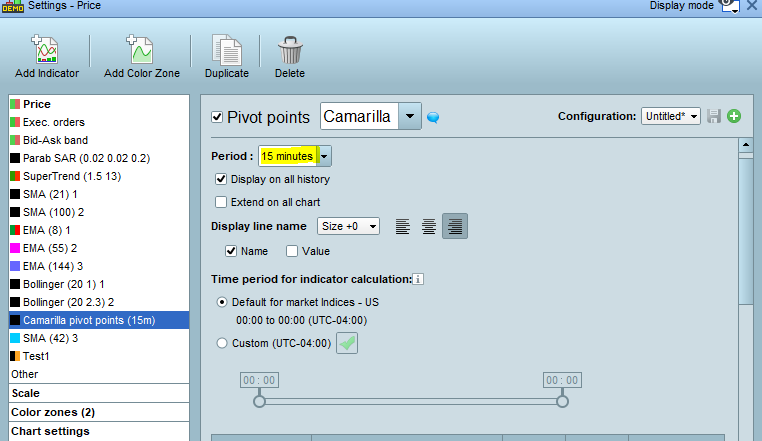
    Hi JS, Thanks for the response. As you may have been able to tell I am no coder & just used the indicator available within PRT (as per attachment [Pivot Points.png]). I do see what you mean now reference the code relating to DHigh, DLow and DClose but I am at a loss to understand why the code is like that when the indicator is selected to 15m. I have just changed the pivot setting to weekly & that too reads the same code as above (Day levels) i.e it never changes. Q1. I am curious (if you know) Why does the indicator display the 5m/15m/1Hr/Day & Week on the chart correctly but only return the same Day levels in the code? Q2. As I only use the simplified code (due to lack of programming capability), is it possible to use separate/custom indicators for each level type (5m/15m/1Hr/Day & Week) where the code would be entered correctly for each PP type? Q3. If the answer to Q2 is “Yes”, where would I find such indicators? Q4. If the answer to Q2 is “No”, what would be my options given this scenario? Thank you very much for your help, it is greatly appreciated.
    #201304 quote
    JS
    Participant
    Senior

    Hi @Paulg999

    The indicator can be adjusted to the time frame you use, so the indicator displays the correct values.

    The code calculates the Camarilla based on daily rates, namely DHigh, DLow and DClose, so you only get daily pivot Camarilla here.

    Yes, you can change the code by replacing the daily rates with “normal” rates, for example: DHigh => High, DLow => Low, DClose => Close

    I see that you mix up the concepts of indicators and code, an indicator shows calculations graphically in the graph but cannot generate buy /sell signals, for example. The code is there for the calculations and can generate buy and sell signals but cannot perform graphical actions.

    The indicator you use is good, but your code needs to be adjusted.

    I will try to customize the code for you.

    #201313 quote
    JS
    Participant
    Senior
    Hi @Paulg999 I have adjusted all daily rates to “normal” rates…
    // Definitie van code parameters
    DEFPARAM CumulateOrders = False // Opstapelen posities gedeactiveerd
    
    // Condities om long posities te openen
    indicator1 = ExponentialAverage[8](close)
    c1 = (close[1] < indicator1[1])
    indicator2 = ExponentialAverage[8](close)
    c2 = (close > indicator2)
    indicator3 = ExponentialAverage[8](close)
    indicator4 = (High[1] + Low[1] + Close[1])/3
    c3 = (indicator3 > indicator4)
    indicator5 = (High[1] + Low[1] + Close[1])/3
    c4 = (low[1] < indicator5[1])
    indicator6 = (High[1] + Low[1] + Close[1])/3
    c5 = (close > indicator6)
    indicator7 = SuperTrend[1.5,13]
    c6 = (close > indicator7)
    
    IF c1 AND c2 AND c3 AND c4 AND c5 AND c6 THEN
    BUY 1 CONTRACT AT MARKET
    ENDIF
    
    // Condities om long posities te sluiten
    indicator8 = SuperTrend[1.5,13]
    c7 = (close CROSSES UNDER indicator8)
    
    IF c7 THEN
    SELL AT MARKET
    ENDIF
    
    // Condities om short posities te openen
    indicator9 = ExponentialAverage[8](close)
    c8 = (close[1] > indicator9[1])
    indicator10 = ExponentialAverage[8](close)
    c9 = (close < indicator10)
    indicator11 = ExponentialAverage[8](close)
    indicator12 = (High[1] + Low[1] + Close[1])/3
    c10 = (indicator11 < indicator12)
    indicator13 = (High[1] + Low[1] + Close[1])/3
    c11 = (high[1] > indicator13[1])
    indicator14 = (High[1] + Low[1] + Close[1])/3
    c12 = (close < indicator14)
    indicator15 = SuperTrend[1.5,13]
    c13 = (close < indicator15)
    
    IF c8 AND c9 AND c10 AND c11 AND c12 AND c13 THEN
    SELLSHORT 1 CONTRACT AT MARKET
    ENDIF
    
    // Condities om short posities te sluiten
    indicator16 = SuperTrend[1.5,13]
    c14 = (close CROSSES OVER indicator16)
    
    IF c14 THEN
    EXITSHORT AT MARKET
    ENDIF
    
    #201391 quote
    Paulg999
    Participant
    New
    Hi JS, Just want to thank you for your posting. My son has just gone down with Covid & my wife is away so I am struggling to get much time looking at this. Will be back in touch as soon as I can. I dare say I will have some questions.   Thanks again. P
    #201392 quote
    JS
    Participant
    Senior

    Strength, take care…

    #201564 quote
    Paulg999
    Participant
    New
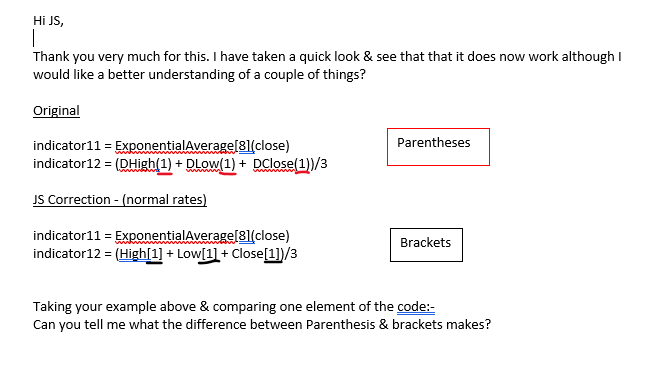
    Hi JS, Please see question in attachment.   Thanks
    #201584 quote
    JS
    Participant
    Senior

    Hi Paulg999

    The brackets refer to the bar index where [0] is the most recent and [10] is that of 10 bars ago, e.g. Close[0] and Close[10].

    The brackets can also be used to indicate a certain period of time, for example: Average[10](Close)

    Calculate the average over the last 10 bars.

    Parentheses can relate to a used time frame for example, DClose(0)

    Is the Close value of the daily time frame and DClose(10) is the Close value of 10 bars ago in the daily time frame.

    Paulg999 thanked this post
    #201585 quote
    Paulg999
    Participant
    New
    Hi JS, When I add an additional Pivot level to a set of conditions how do i differentiate it from the first one? // Conditions to enter long positions indicator1 = ExponentialAverage[8](close) indicator2 = (High[1] + Low[1] + Close[1])/3 c1 = (indicator1[1] < indicator2[1]) indicator3 = ExponentialAverage[8](close) indicator4 = (High[1] + Low[1] + Close[1])/3 c2 = (indicator3 > indicator4) // The above conditions to take place on 5m indicator5 = Close[1] + (High[1]-Low[1]) * (1.1 / 4) c3 = (close > indicator5) indicator6 = Close[1] + (High[1]-Low[1]) * (1.1 / 6) c4 = (low[1] < indicator6[1]) indicator7 = Close[1] + (High[1]-Low[1]) * (1.1 / 6) c5 = (close > indicator7) // The above conditions take place on 15m When the back test runs it looks like only the 15m instruction is being considered.
Viewing 15 posts - 1 through 15 (of 24 total)
  • You must be logged in to reply to this topic.

Intra day camarilla Pivots not matching chart display

ProBuilder: Indicators & Custom Tools

New Reply
Author
author-avatar
Paulg999 @paulg999 Participant
Summary

This topic contains 23 replies,
has 4 voices, and was last updated by Paulg999

3 years, 3 months ago.

Topic Details
Forum: ProBuilder: Indicators & Custom Tools
Language: English
Started: 09/21/2022
Status: Active
Attachments: 12 files
Logo Logo
Loading...