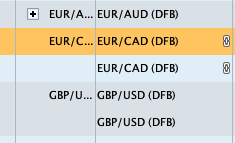
Hi, in the previous version, I was able to consolidate my trading lines, but it doesn’t seem to be available in the new version (see attachment – I can consolidate when I have more than one position, but not for a single position!?). Is there a way to make it just one line as opposed to duplicate?
Thanks,
Julien
It is not clear to me what I am looking at in your screenshot (so small / no context) but have you tried ‘Group by’ … on the top menu bar?
Thanks for the reply. Unfortunately, I’m not going to actually show my positions, but I have one trade in EUR/CAD, one trade in GBP/USD and two trades in EUR/AUD. In version 11 I could consolidate everything into one line (next to EUR/AUD you see the ‘+’ sign). Version 12 only have this option if you have more than one trade in a currency. I don’t want to see EUR/CAD twice or GBP/USD twice and the previous version I could make it one line, but not any more. The ‘Group by’ function is how you list you trades, i.e. all currency transactions together, all equity transactions together, etc. It doesn’t put them all into one line!?
In version 11 I could consolidate everything into one line
Is your screenshot of the Open Trades window?
If Yes, I have noted weirdness also compared with v11, but I thought it was my imagination … I’m glad you highlighted it!
When I get time I will open v11 and check if the v12 weirdness (I am experiencing) is not on v11 re the Group by function on the Open Trades window.