Bonjour,
j’essaye de simplifier le code si dessous concernant l’Inside bar que j’ai programmé en intégrant toutes les variantes sur X barres. Je me suis arrêté à 10 mais il pourrait en avoir plus. Le programme peut donc m’alerter sur un Inside bar ou un double Inside bar ou un triple Inside bar etc …
Pour rappel un inside bar part du high<=high[1] and low>=low[1]. Savez-vous si il est possible de simplifier ce petit code pour me sortir toutes les configurations ?
En vous remerciant pour votre aide
I1 = LOW>=LOW[1] AND HIGH<=HIGH[1]
I2 = LOW>=LOW[2] AND HIGH<=HIGH[2] AND LOW[1]>=LOW[2] AND HIGH[1]<=HIGH[2]
I3 = LOW>=LOW[3] AND HIGH<=HIGH[3] AND LOW[1]>=LOW[3] AND HIGH[1]<=HIGH[3] AND LOW[2]>=LOW[3] AND HIGH[2]<=HIGH[3]
I4 = LOW>=LOW[4] AND HIGH<=HIGH[4] AND LOW[1]>=LOW[4] AND HIGH[1]<=HIGH[4] AND LOW[2]>=LOW[4] AND HIGH[2]<=HIGH[4] AND LOW[3]>=LOW[4] AND HIGH[3]<=HIGH[4]
I5 = LOW>=LOW[5] AND HIGH<=HIGH[5] AND LOW[1]>=LOW[5] AND HIGH[1]<=HIGH[5] AND LOW[2]>=LOW[5] AND HIGH[2]<=HIGH[5] AND LOW[3]>=LOW[5] AND HIGH[3]<=HIGH[5] AND LOW[4]>=LOW[5] AND HIGH[4]<=HIGH[5]
I6 = LOW>=LOW[6] AND HIGH<=HIGH[6] AND LOW[1]>=LOW[6] AND HIGH[1]<=HIGH[6] AND LOW[2]>=LOW[6] AND HIGH[2]<=HIGH[6] AND LOW[3]>=LOW[6] AND HIGH[3]<=HIGH[6] AND LOW[4]>=LOW[6] AND HIGH[4]<=HIGH[6] AND LOW[5]>=LOW[6] AND HIGH[5]<=HIGH[6]
I7 = LOW>=LOW[7] AND HIGH<=HIGH[7] AND LOW[1]>=LOW[7] AND HIGH[1]<=HIGH[7] AND LOW[2]>=LOW[7] AND HIGH[2]<=HIGH[7] AND LOW[3]>=LOW[7] AND HIGH[3]<=HIGH[7] AND LOW[4]>=LOW[7] AND HIGH[4]<=HIGH[7] AND LOW[5]>=LOW[7] AND HIGH[5]<=HIGH[7] AND LOW[6]>=LOW[7] AND HIGH[6]<=HIGH[7]
I8 = LOW>=LOW[8] AND HIGH<=HIGH[8] AND LOW[1]>=LOW[8] AND HIGH[1]<=HIGH[8] AND LOW[2]>=LOW[8] AND HIGH[2]<=HIGH[8] AND LOW[3]>=LOW[8] AND HIGH[3]<=HIGH[8] AND LOW[4]>=LOW[8] AND HIGH[4]<=HIGH[8] AND LOW[5]>=LOW[8] AND HIGH[5]<=HIGH[8] AND LOW[6]>=LOW[8] AND HIGH[6]<=HIGH[8] AND LOW[7]>=LOW[8] AND HIGH[7]<=HIGH[8]
I9 = LOW>=LOW[9] AND HIGH<=HIGH[9] AND LOW[1]>=LOW[9] AND HIGH[1]<=HIGH[9] AND LOW[2]>=LOW[9] AND HIGH[2]<=HIGH[9] AND LOW[3]>=LOW[9] AND HIGH[3]<=HIGH[9] AND LOW[4]>=LOW[9] AND HIGH[4]<=HIGH[9] AND LOW[5]>=LOW[9] AND HIGH[5]<=HIGH[9] AND LOW[6]>=LOW[9] AND HIGH[6]<=HIGH[9] AND LOW[7]>=LOW[9] AND HIGH[7]<=HIGH[9] AND LOW[8]>=LOW[9] AND HIGH[8]<=HIGH[9]
I10 = LOW>=LOW[10] AND HIGH<=HIGH[10] AND LOW[1]>=LOW[10] AND HIGH[1]<=HIGH[10] AND LOW[2]>=LOW[10] AND HIGH[2]<=HIGH[10] AND LOW[3]>=LOW[10] AND HIGH[3]<=HIGH[10] AND LOW[4]>=LOW[10] AND HIGH[4]<=HIGH[10] AND LOW[5]>=LOW[10] AND HIGH[5]<=HIGH[10] AND LOW[6]>=LOW[10] AND HIGH[6]<=HIGH[10] AND LOW[7]>=LOW[10] AND HIGH[7]<=HIGH[10] AND LOW[8]>=LOW[10] AND HIGH[8]<=HIGH[10] AND LOW[9]>=LOW[10] AND HIGH[9]<=HIGH[10]

INSIDEBAR = (I1 OR I2 OR I3 OR I4 OR I5 OR I6 OR I7 OR I8 OR I9 OR I10)

RETURN INSIDEBAR
Voici une version écrite simplifiée.
Les variables I1-10 sont uniques en ce sens qu’elles testent une taille de barre d’écart croissante.
Au fur et à mesure que le code s’exécute sur chaque mesure, chaque variable ‘I’ est stockée à partir des mesures précédentes.
Les variables j1-10 utilisent des variables ‘I’ avec ces valeurs précédentes.
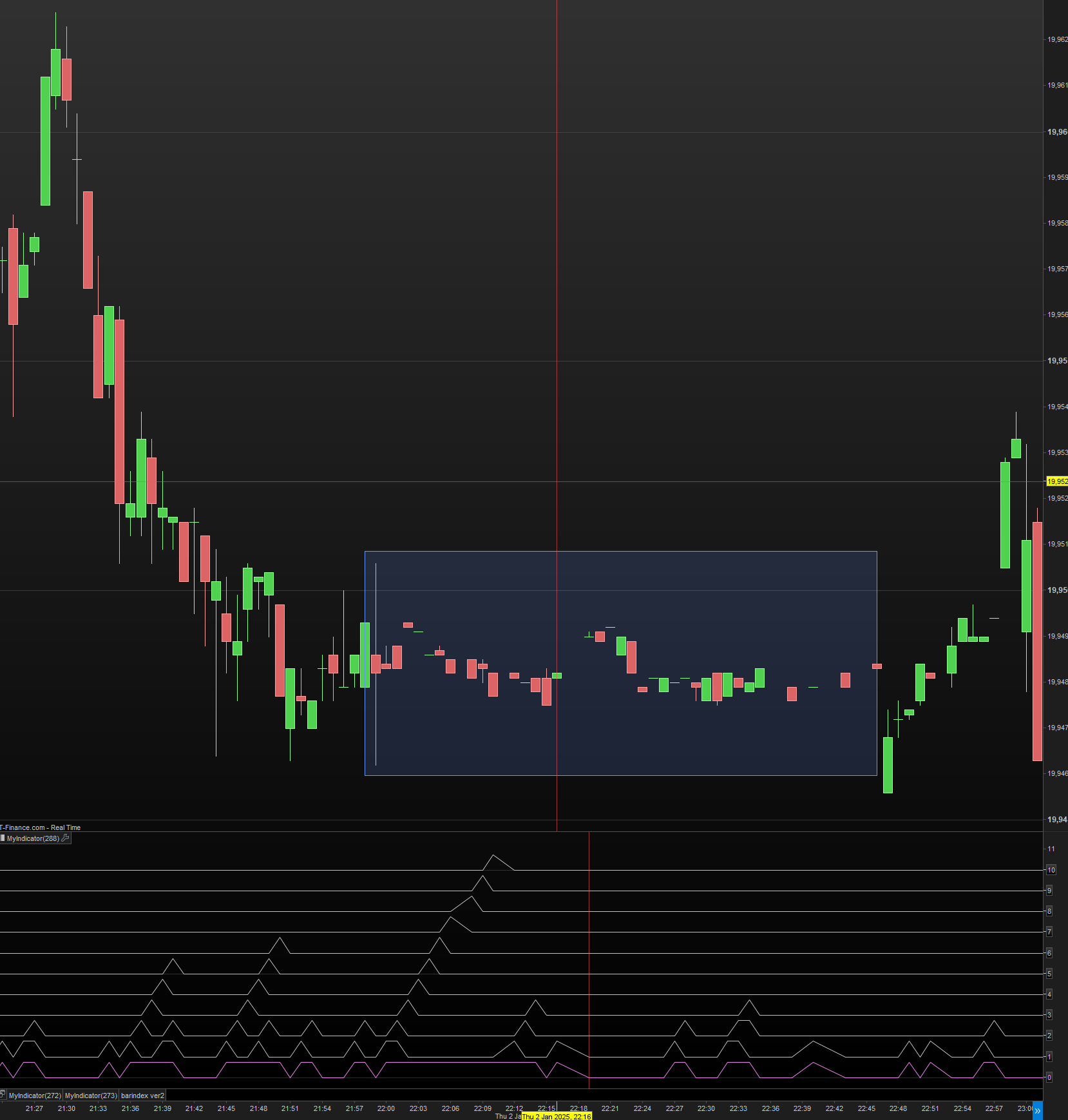
La section dessin affiche les résultats logiques des variables ‘j’ ainsi que le résultat global de l’insidebar, pour obtenir une visualisation.
Pour autant que je sache, cela donne le même résultat à votre version.
D’après l’image, le rectangle montre qu’environ 40 bougies insidebar tombent dans l’ombre d’une grande bougie.
Les bougies plus grandes fabriquées entraînent une probabilité plus élevée de beaucoup de bougies intérieures, surtout avant une activité de marché plus faible.
I1  = LOW>=LOW[1]  AND HIGH<=HIGH[1]
I2  = LOW>=LOW[2]  AND HIGH<=HIGH[2]
I3  = LOW>=LOW[3]  AND HIGH<=HIGH[3]
I4  = LOW>=LOW[4]  AND HIGH<=HIGH[4]
I5  = LOW>=LOW[5]  AND HIGH<=HIGH[5]
I6  = LOW>=LOW[6]  AND HIGH<=HIGH[6]
I7  = LOW>=LOW[7]  AND HIGH<=HIGH[7]
I8  = LOW>=LOW[8]  AND HIGH<=HIGH[8]
I9  = LOW>=LOW[9]  AND HIGH<=HIGH[9]
I10 = LOW>=LOW[10] AND HIGH<=HIGH[10]

j1  = I1
j2  = I2  AND I1[1]
j3  = I3  AND I2[1] AND I1[2]
j4  = I4  AND I3[1] AND I2[2] AND I1[3]
j5  = I5  AND I4[1] AND I3[2] AND I2[3] AND I1[4]
j6  = I6  AND I5[1] AND I4[2] AND I3[3] AND I2[4] AND I1[5]
j7  = I7  AND I6[1] AND I5[2] AND I4[3] AND I3[4] AND I2[5] AND I1[6]
j8  = I8  AND I7[1] AND I6[2] AND I5[3] AND I4[4] AND I3[5] AND I2[6] AND I1[7]
j9  = I9  AND I8[1] AND I7[2] AND I6[3] AND I5[4] AND I4[5] AND I3[6] AND I2[7] AND I1[8]
j10 = I10 AND I9[1] AND I8[2] AND I7[3] AND I6[4] AND I5[5] AND I4[6] AND I3[7] AND I2[8] AND I1[9]

INSIDEBAR = (j1 OR j2 OR j3 OR j4 OR j5 OR j6 OR j7 OR j8 OR j9 OR j10)


// drawing

$p[10]= 0.75 * j10 + 10
$p[9] = 0.75 * j9 + 9
$p[8] = 0.75 * j8 + 8
$p[7] = 0.75 * j7 + 7
$p[6] = 0.75 * j6 + 6
$p[5] = 0.75 * j5 + 5
$p[4] = 0.75 * j4 + 4
$p[3] = 0.75 * j3 + 3
$p[2] = 0.75 * j2 + 2
$p[1] = 0.75 * j1 + 1
$p[0] = 0.75 * Insidebar + 0

RETURN $p[0] coloured("violet"),$p[1],$p[2],$p[3],$p[4],$p[5],$p[6],$p[7],$p[8],$p[9],$p[10]
Bonjour Druby,
merci pour ton aide sur le sujet mais malheureusement cela ne répond pas à la problématique de base avec avec un inside bar supérieur à 10. En gros ce que je cherche à faire c’est à la base du programme documenter une variable qui représente le nombre d’inside bar. J’ai essayé cette variante de code (ci-dessous) uniquement avec pour condition high<=high[1] dans un premier temps mais cela ne fonctionne pas et je n’arrive pas à trouver l’astuce. Merci
IF BARINDEX>=1 THEN
FOR N = 1 TO 10 DO
IF HIGH<=HIGH[N-1] THEN
INSIDE = 1 + N
ELSE
INSIDE = 0
ENDIF
NEXT
ENDIF
RETURN INSIDE
Bonjour peut être :
//// Initialisation de la variable pour compter les inside bars
insideCount = 0
// Vérification si nous sommes au-delà de la première barre
IF barindex > 1 THEN
// Boucle pour vérifier toutes les barres précédentes
FOR n = 1 TO MIN(10, barindex-1) DO // Limite à 10 dernières barres ou jusqu’à la première barre
IF high <= high[n] AND low >= low[n] THEN
insideCount = insideCount + 1
ELSE
BREAK // Arrêter la boucle si ce n’est plus un inside bar
ENDIF
NEXT
ENDIF
RETURN insideCount
Bonjour Jacques,
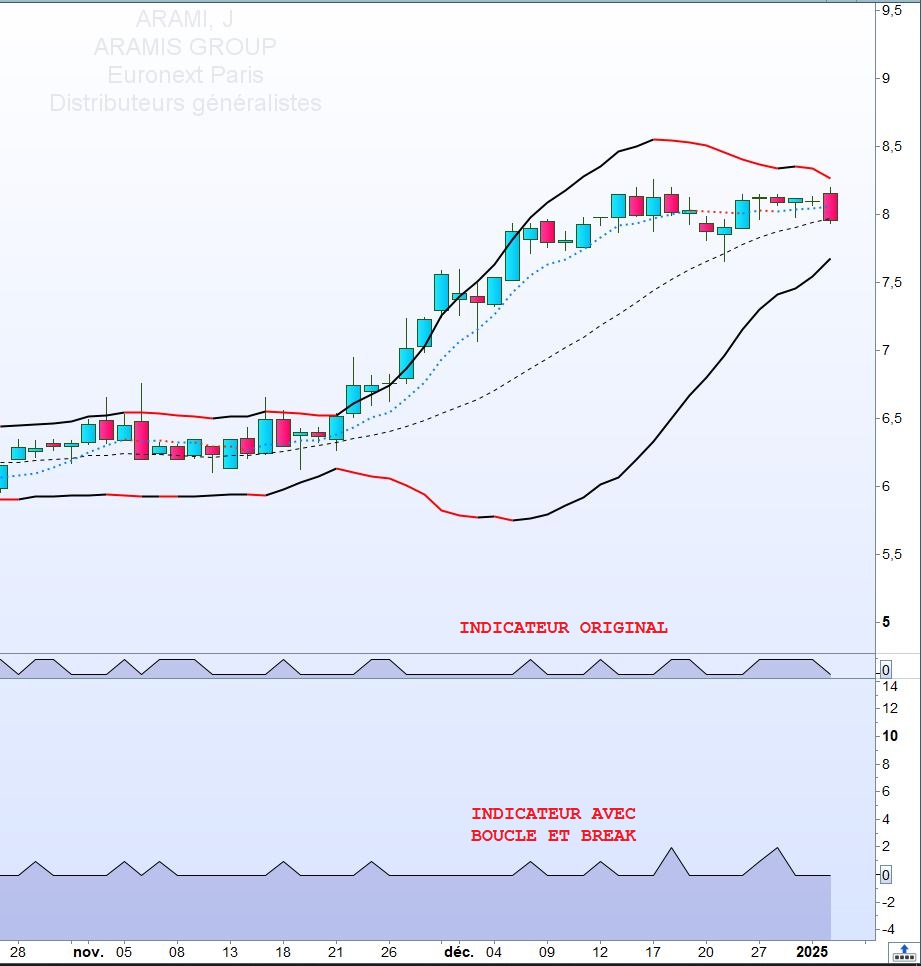
merci pour votre suggestion mais cela ne fonctionne pas. J’avais essayé cette possibilité mais le résultat escompté diffère du code de base (en fichier joint). J’ai pris pour exemple le titre sur Euronext Aramis en journalier. Le premier indicateur est la version non optimisée proposée initialement. La seconde votre proposition. Le dernier Inside bar commence le 27/12/24 et il est clôturé le 02/01/25 soit 4 séances. Sur votre proposition du 27/12 au 30/12. Merci en tout cas pour votre aide.
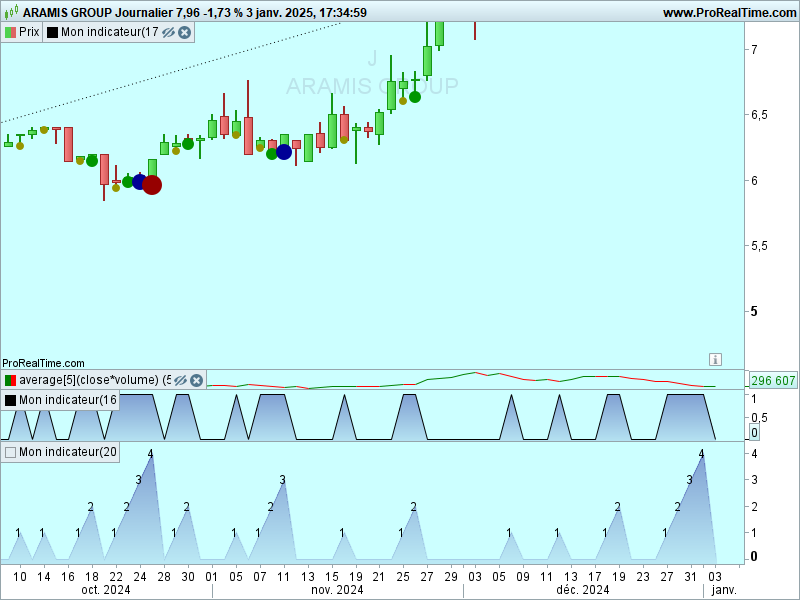
en simplifiant /reprenant votre code initial ce code CI APR7Srenvoie bien la profondeur de l’inside bar (4 pour ARAMIS du 27/12 au 02/01 :
// Initialisation de la profondeur maximale détectée
maxI = 0
// Vérification des 10 niveaux
IF LOW >= LOW[1] AND HIGH <= HIGH[1] THEN
maxI = 1
ENDIF
IF LOW >= LOW[2] AND HIGH <= HIGH[2] AND LOW[1] >= LOW[2] AND HIGH[1] <= HIGH[2] THEN
maxI = 2
ENDIF
IF LOW >= LOW[3] AND HIGH <= HIGH[3] AND LOW[1] >= LOW[3] AND HIGH[1] <= HIGH[3] AND LOW[2] >= LOW[3] AND HIGH[2] <= HIGH[3] THEN
maxI = 3
ENDIF
IF LOW >= LOW[4] AND HIGH <= HIGH[4] AND LOW[1] >= LOW[4] AND HIGH[1] <= HIGH[4] AND LOW[2] >= LOW[4] AND HIGH[2] <= HIGH[4] AND LOW[3] >= LOW[4] AND HIGH[3] <= HIGH[4] THEN
maxI = 4
ENDIF
IF LOW >= LOW[5] AND HIGH <= HIGH[5] AND LOW[1] >= LOW[5] AND HIGH[1] <= HIGH[5] AND LOW[2] >= LOW[5] AND HIGH[2] <= HIGH[5] AND LOW[3] >= LOW[5] AND HIGH[3] <= HIGH[5] AND LOW[4] >= LOW[5] AND HIGH[4] <= HIGH[5] THEN
maxI = 5
ENDIF
IF LOW >= LOW[6] AND HIGH <= HIGH[6] AND LOW[1] >= LOW[6] AND HIGH[1] <= HIGH[6] AND LOW[2] >= LOW[6] AND HIGH[2] <= HIGH[6] AND LOW[3] >= LOW[6] AND HIGH[3] <= HIGH[6] AND LOW[4] >= LOW[6] AND HIGH[4] <= HIGH[6] AND LOW[5] >= LOW[6] AND HIGH[5] <= HIGH[6] THEN
maxI = 6
ENDIF
IF LOW >= LOW[7] AND HIGH <= HIGH[7] AND LOW[1] >= LOW[7] AND HIGH[1] <= HIGH[7] AND LOW[2] >= LOW[7] AND HIGH[2] <= HIGH[7] AND LOW[3] >= LOW[7] AND HIGH[3] <= HIGH[7] AND LOW[4] >= LOW[7] AND HIGH[4] <= HIGH[7] AND LOW[5] >= LOW[7] AND HIGH[5] <= HIGH[7] AND LOW[6] >= LOW[7] AND HIGH[6] <= HIGH[7] THEN
maxI = 7
ENDIF
IF LOW >= LOW[8] AND HIGH <= HIGH[8] AND LOW[1] >= LOW[8] AND HIGH[1] <= HIGH[8] AND LOW[2] >= LOW[8] AND HIGH[2] <= HIGH[8] AND LOW[3] >= LOW[8] AND HIGH[3] <= HIGH[8] AND LOW[4] >= LOW[8] AND HIGH[4] <= HIGH[8] AND LOW[5] >= LOW[8] AND HIGH[5] <= HIGH[8] AND LOW[6] >= LOW[8] AND HIGH[6] <= HIGH[8] AND LOW[7] >= LOW[8] AND HIGH[7] <= HIGH[8] THEN
maxI = 8
ENDIF
IF LOW >= LOW[9] AND HIGH <= HIGH[9] AND LOW[1] >= LOW[9] AND HIGH[1] <= HIGH[9] AND LOW[2] >= LOW[9] AND HIGH[2] <= HIGH[9] AND LOW[3] >= LOW[9] AND HIGH[3] <= HIGH[9] AND LOW[4] >= LOW[9] AND HIGH[4] <= HIGH[9] AND LOW[5] >= LOW[9] AND HIGH[5] <= HIGH[9] AND LOW[6] >= LOW[9] AND HIGH[6] <= HIGH[9] AND LOW[7] >= LOW[9] AND HIGH[7] <= HIGH[9] AND LOW[8] >= LOW[9] AND HIGH[8] <= HIGH[9] THEN
maxI = 9
ENDIF
IF LOW >= LOW[10] AND HIGH <= HIGH[10] AND LOW[1] >= LOW[10] AND HIGH[1] <= HIGH[10] AND LOW[2] >= LOW[10] AND HIGH[2] <= HIGH[10] AND LOW[3] >= LOW[10] AND HIGH[3] <= HIGH[10] AND LOW[4] >= LOW[10] AND HIGH[4] <= HIGH[10] AND LOW[5] >= LOW[10] AND HIGH[5] <= HIGH[10] AND LOW[6] >= LOW[10] AND HIGH[6] <= HIGH[10] AND LOW[7] >= LOW[10] AND HIGH[7] <= HIGH[10] AND LOW[8] >= LOW[10] AND HIGH[8] <= HIGH[10] AND LOW[9] >= LOW[10] AND HIGH[9] <= HIGH[10] THEN
maxI = 10
ENDIF
return maxi
 JS
JSParticipant
Master
Salut,
Voici le code pour le “InsideBarCount”…
Vous pouvez régler la “Profondeur” avec “MaxDepth”…
Un bon indicateur, après un nombre élevé d’intérieurs, généralement un grand mouvement…
MaxDepth = 20
InsideBarCount = 0

FOR depth = 1 TO MaxDepth DO
Condition = 1
FOR i = 1 TO depth DO
Condition = Condition AND (LOW[i-1] >= LOW[depth] AND HIGH[i-1] <= HIGH[depth])
NEXT

IF Condition THEN
InsideBarCount = depth
ENDIF
NEXT

RETURN InsideBarCount
Bonjour à tous,
merci pour vos aides sur le sujet. JS le programme fonctionne parfaitement merci.
@+
Bonjour,
Je vous propose une autre approche algorithmique avec une version sans boucle, “short & sweet”, à tester pour vérifier sur plusieurs cas qu’elle donne les bons résultats par rapport à la version de départ à simplifier.
Au-delà de la simplification de départ, et du gain habituel d’avoir un temps d’éxécution plus rapide avec une version sans boucle temporelle (relativement négligeable ici sur des boucles plutôt courtes), ici l’intérêt est surtout de s’affranchir du plafond qui serait imposé au compteur de bougies par la taille max de la boucle en cas de looooongue inside bars (par exemple pour reprendre le cas d’Aramis Group en journalier, le compteur d’inside atteint 22 le 23/04/24).
once refhigh=High
once reflow=Low
once inside=0

if high<=refhigh and low>=reflow THEN
  inside=inside+1
ELSE
  inside=0
  refhigh=High
  reflow=Low
ENDIF

return inside
(et j’oubliais de préciser: je déplace le sujet du forum proscreener au forum probuilder)
En lisant un autre sujet, cela m’a fait repenser à celui-ci, et bien que ne faisant pas partie de la requête initiale, au cas où voici un autre avantage d’une solution sans boucle: en plus de ne pas être plafonné dans le décompte, si on veut chercher en cas de très longue inside bar une “inside dans l’inside”, on n’est pas non plus limité dans le nombre d’itérations accru qu’aurait généré une “double boucle”:
once refhigh=High
once reflow=Low
once inside=0

IF high<=refhigh and low>=reflow THEN
 inside=inside+1
ELSE
 inside=0
 refhigh=High
 reflow=Low
 inside2=0
ENDIF

IF inside=1 THEN
 subhighref=high
 sublowref=low
ELSIF inside>1 THEN
 IF high<=subhighref and low>=sublowref THEN
  inside2=inside2+1
 ELSE
  inside2=0
  subhighref=high
  sublowref=low
 ENDIF
ENDIF

return inside, inside2 style(dottedline)