Inside and outsidebars

Viewing 5 posts - 1 through 5 (of 5 total)
  • Author
    Posts
  • #152771 quote
    imokdesign
    Participant
    Senior

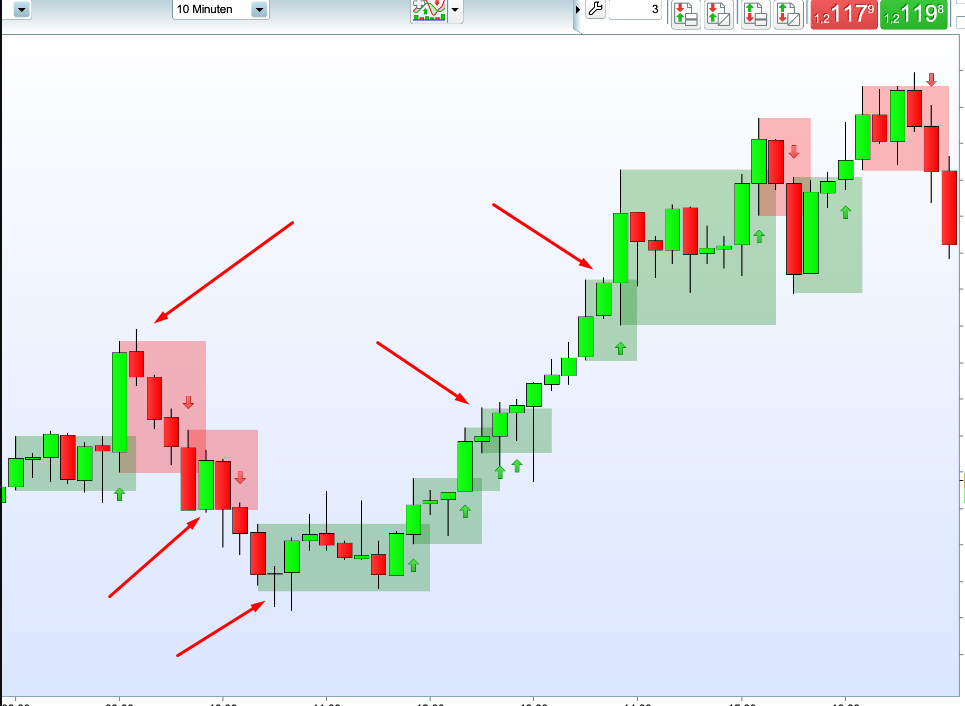
    Hello together, i have difficulties to get an indikator run. I want to programm an Inside and outsidebar Range (Book: Das große buch der Markttechnik) indikator (look at the screenshot example i mannualy made). 🙂

    // Definition der Insidebar-Range
    
    a = High[4]
    b = Low[4]
    MyRange = a - b
    
    // Condition Inside- und Outsidebar
    
    c1 = MyRange >= Close
    c2 = MyRange < Close
    
    // Signal Inside- oder Outsidebar
    IF c1 THEN
    a = 1 // DRAWARROWUP (x1, y1) COLOURED (R, V, B, a)
    ELSIF c2 THEN
    a = -1 // DRAWARROWDOWN (x1, y1) COLOURED (R, V, B, a)
    ELSE
    a = 0
    ENDIF
    
    Return a


    ). The signal shoult be generate if a (inside)bar Leafs the range from the outsidebar with a close is higher as the high of the outsidebar-Range.

    Here is my code. unfortunately my indicator shows nothing Should i work with a “BREAK”?

    Bildschirmfoto-2020-12-06-um-22.43.01.png Bildschirmfoto-2020-12-06-um-22.43.01.png
    #152773 quote
    imokdesign
    Participant
    Senior

    … I see in line three and four, there is still a [4]. It shouldn’t be there. But I don’t understand how to write it that it don’t limit the Range to a set number of bars.

    #152782 quote
    Vonasi
    Moderator
    Master

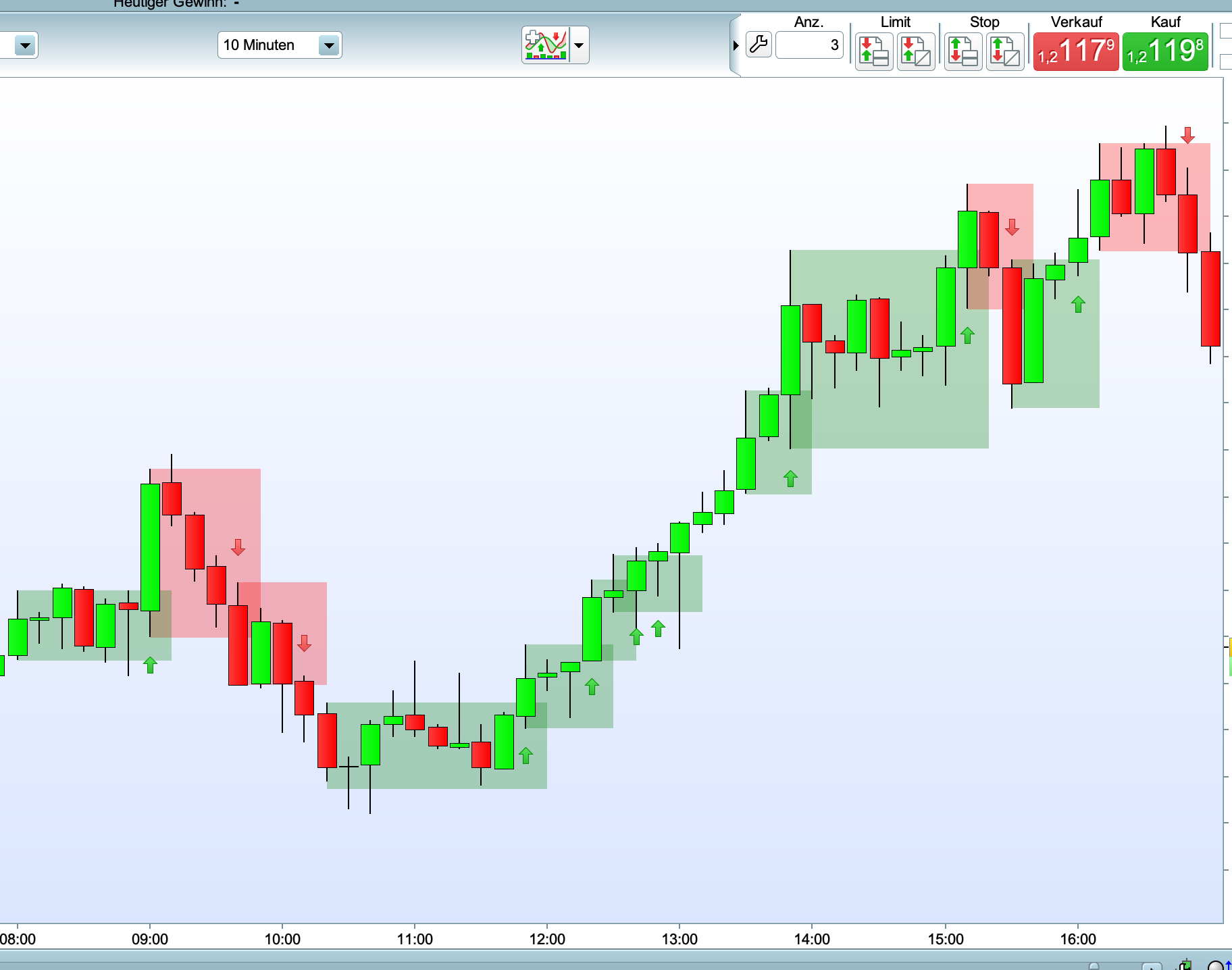
    You need to define exactly what an ‘Inside and outsidebar Range’ is. In your image you have candles followed by what I would call an inside candle (the high and low did not break the previous high and low) but also candles that did break the previous high and low as shown by the arrows in the image.

    Screenshot_6.png Screenshot_6.png
    #152787 quote
    pableitor
    Participant
    Master

    I dont quite understand 100%  what  your indicator should do but  this code would signal when the close is higher or lower than the previous 4 bar highest-lowest range :

    // Definition der Insidebar-Range
    
    a = Highest[4](high)[1]
    b = Lowest[4](low)[1]
    MyRange = a - b
    
    // Condition Inside- und Outsidebar
    
    c1 = (close - b ) > MyRange 
    c2 = (a - close ) > MyRange 
    
    // Signal Inside- oder Outsidebar
    IF c1 THEN
    a = 1 // DRAWARROWUP (x1, y1) COLOURED (R, V, B, a)
    ELSIF c2 THEN
    a = -1 // DRAWARROWDOWN (x1, y1) COLOURED (R, V, B, a)
    ELSE
    a = 0
    ENDIF
    
    Return a
    #152927 quote
    imokdesign
    Participant
    Senior

    I dont quite understand 100% what your indicator should do

    Its from a thick Book called “Das große Buch der Markttechnik”. Try to explain it in a few words. Its a part of a classical mehtod of a Candle-Trailingstop for Trading the Progression or at the last high/low of a Trend. It try to simulate a syntheticly Trendstop (at the low/highs) in a sub-trend. For example the Signal starts with a Reversalbar with a stop under the Candle. As soon we has an inside bar, the stop get one candle back and waits there until a close leave the insidebar Range. So its nealy the same if you would go down in a smaller timeframe and trade the trend with lower lows or higher highs (trend in a trend) #Dow theorie. Maby these links can give you a good visulation:

    https://www.att-trading.com/trading-wiki/markttechnik/innenstab/
    https://www.mql5.com/de/market/product/38491?source=Market+Product+Form+Author#description
    http://markttechnik.net/wp-content/uploads/2015/08/markttechnik-innenstab.png


    @Vonasi
    @pableitor thanks for your help.  In my head I know what i want to do, but sometimes its not easy for me to get the logical sequence of a code. 🙂

Viewing 5 posts - 1 through 5 (of 5 total)

  • You must be logged in to reply to this topic.

Inside and outsidebars


ProBuilder: Indicators & Custom Tools

New Reply
Author
author-avatar
imokdesign @imokdesign Participant
Summary

This topic contains 4 replies,
has 3 voices, and was last updated by imokdesign
5 years, 2 months ago.

Topic Details
Forum: ProBuilder: Indicators & Custom Tools
Language: English
Started: 12/06/2020
Status: Active
Attachments: 2 files
Logo Logo
Loading...