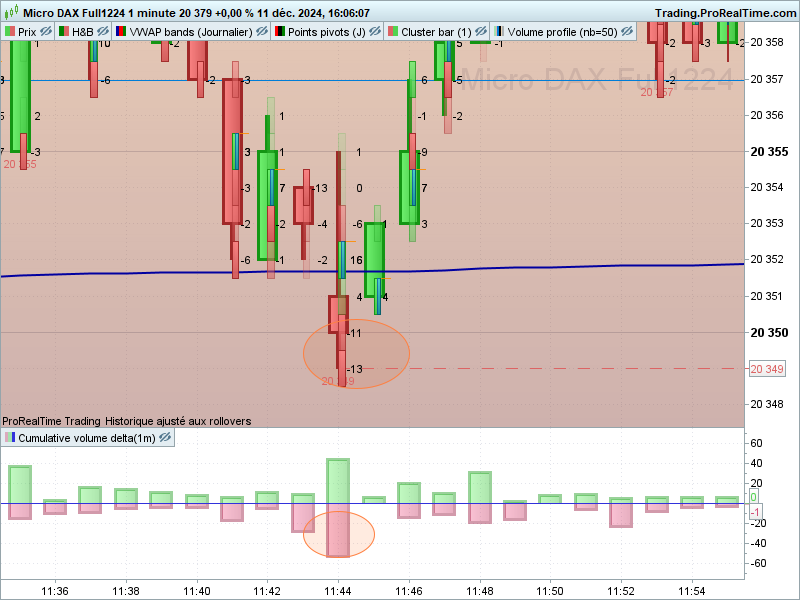
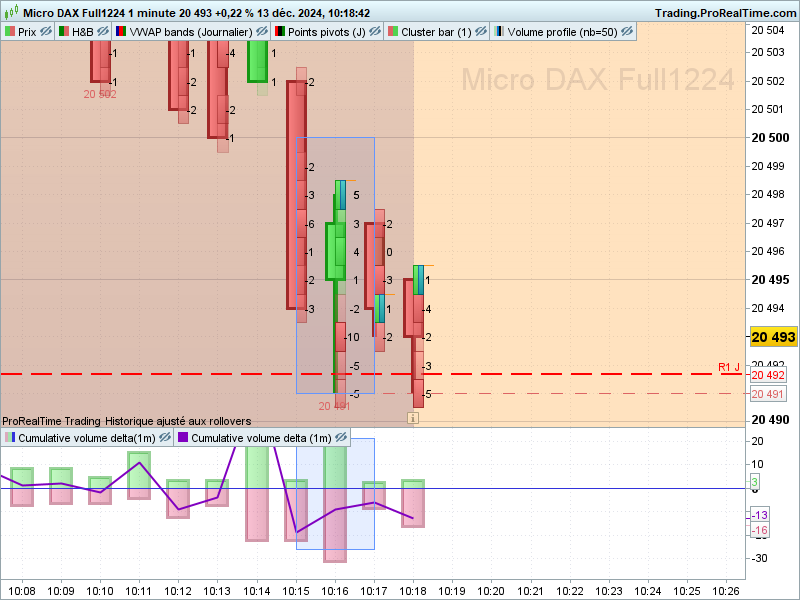
J’ai trouvé ce code sur trading view mais il faudrait que ce soit validé avec prorealtime…
// This Pine Script™ code is subject to the terms of the Mozilla Public License 2.0 at
https://mozilla.org/MPL/2.0/
// © nico-von
//@version=5
indicator(“OrderFlow Absorption Indicator”, shorttitle = “Absorption”, overlay = true,
max_labels_count = 500, max_boxes_count = 500)
//<constants>
const int UP_DIRECTION = 1
const int NT_DIRECTION = 0
const int DOWN_DIRECTION = -1
const string PHDT_TT = “Plot historical absorption occurrences. Using historical data alone cannot accurately replicate real-time absorption, so detections may differ.”
const string HDT_TT = “Timeframe for calculating historical absorption: A smaller timeframe results in more accurate detections but in a slower indicator, potentially hindering real-time absorption detection.”
const string TL_TT = “Limit detections to consider only traded volume that is greater than or equal the selected volume filter value within the chosen time limit, in seconds. Real-time only.”
const string VLMT_TT = “Traded volume greater than or equal this value will be marked as absorbed. The larger value, the fewer detections.”
const string VLMT_AUTO_TT = “Automatically set the minimum size according to the standard deviation of traded volume for the last selected minutes.”
const string HIST_GP = “Historical/ Backfill Settings”
const string MINS_ERROR = “SD Interval must be greater than 0”
const string DATA_GP = “Tick Settings”
const string AB_GP = “Time Limit Settings”
const string AVLMT_GP = “Volume Filter Settings”
const string OTHER_GP = “Other Settings”
const string CHAR_TO_USE = “×”
const string CHAR_TO_USE_POINTER = “■”
const string STYLE_GROUP = “Style Settings”
const string IN_DELTA = “Delta Colour Settings”
const int DEF_SD_MULT = 10
//<input>
bool useLtfInput = input.bool(false, “Plot Historical Absorption”, tooltip = PHDT_TT,
confirm = true, group = HIST_GP, display = display.none)
string ltfInput = input.timeframe(“1”, “Historical Data Timeframe”, tooltip = HDT_TT,
confirm = true, group = HIST_GP, display = display.none)
float tickSizeInput = input.float(5, “Desired Tick Size”, confirm = true, group = DATA_GP)
bool enableTimeLimitInput = input.bool(false, “Enable time limit (realtime only)”, confirm = true,
tooltip = TL_TT, group = AB_GP, display = display.none)
float timeLimitInput = input.float(0.5, “Time limit (seconds)”, confirm = true, group = AB_GP,
display = display.none)
float volumeLimitInput = input.float(5, “Volume Filter”, tooltip = VLMT_TT, confirm = true,
group = AVLMT_GP, display = display.none)
bool autoVolumeLimitInput = input.bool(true, “Use Auto Mode”, tooltip = VLMT_AUTO_TT, confirm = true,
group = AVLMT_GP, display = display.none)
int autoVolMinsInput = input.int(30, “SD Interval (minutes)”, confirm = true, group = AVLMT_GP,
display = display.none)
int autoSdMultInput = input.int(DEF_SD_MULT, “SD Multiplier”, confirm = true, group = AVLMT_GP,
display = display.none)
bool deltaModeInput = input.bool(true, “Enable Delta Mode”, confirm = true, group = OTHER_GP,
display = display.none)
color neutralColourInput = input.color(color.yellow, “Regular”, group = STYLE_GROUP,
display = display.none)
color askColourInput = input.color(color.red, “Ask Delta”, group = STYLE_GROUP, inline = IN_DELTA,
display = display.none)
color bidColourInput = input.color(color.green, “Bid Delta”, group = STYLE_GROUP, inline = IN_DELTA,
display = display.none)
//<interface>
type absorptionObj
varip float movePrice
varip float nextPriceInQueue
varip int moveDirection
varip float volumeAbsorbed
varip float volumeAccumulator
varip bool absorbed
varip float absorbingPrice
varip bool isBuy
varip int startingTime
varip int nextTimeInQueue
type absorptionDisplayObj
varip float sellVolAbsorbed
varip float buyVolAbsorbed
varip float deltaValue
varip bool isrealtime
varip float volumeLimit
//<function>
calculateTick(float price, float tickSize) =>
float multiplier = math.round(price / tickSize)
multiplier * tickSize
convertSecstoMs(float seconds) =>
math.round(seconds * 1000)
checkAbsorption(int currDirection, int moveDirection, bool metTimeLimit = true) =>
absorbed = (currDirection != moveDirection) and metTimeLimit
absorbed
getDirection(float movePrice, float nextPrice, int upDirection, int ntDirection, int downDirection) =>
if movePrice == nextPrice
ntDirection
else if movePrice > nextPrice
downDirection
else if movePrice < nextPrice
upDirection
getVolumeChange(float newVolume, float prevVolume) =>
newVolume – prevVolume
checkPriceChange(float currPrice, float newPrice) =>
currPrice != newPrice
updateAbsorptionObj(absorptionObj object, float priceTick, float volumeChange,
float volumeLimit, int timeNow = na, int timeLimit = na) =>
bool priceChanged = checkPriceChange(object.movePrice, priceTick)
int currDirection = getDirection(object.movePrice, priceTick, UP_DIRECTION, NT_DIRECTION, DOWN_DIRECTION)
object.absorbingPrice := na
object.absorbed := false
if na(object.movePrice)
object.movePrice := priceTick
if na(object.startingTime) and not na(timeNow)
object.startingTime := timeNow
if priceChanged and object.moveDirection == NT_DIRECTION
object.moveDirection := currDirection
object.nextPriceInQueue := priceTick
object.nextTimeInQueue := timeNow
if priceChanged and object.moveDirection != NT_DIRECTION
bool metTimeLimit = true
if not na(timeLimit) and not na(timeNow)
int expectedTime = object.startingTime + timeLimit
metTimeLimit := timeNow <= expectedTime
bool absorbed = checkAbsorption(currDirection, object.moveDirection, metTimeLimit)
object.absorbingPrice := object.movePrice
object.absorbed := absorbed and (object.volumeAccumulator >= volumeLimit)
object.volumeAbsorbed := object.absorbed ? object.volumeAccumulator : 0
object.isBuy := object.moveDirection == DOWN_DIRECTION
object.startingTime := object.nextTimeInQueue
object.nextTimeInQueue := timeNow
object.movePrice := object.nextPriceInQueue
object.nextPriceInQueue := priceTick
object.moveDirection := currDirection
object.volumeAccumulator := volumeChange
else if not priceChanged
object.volumeAccumulator += volumeChange
object.isBuy := na
// return
object
includeToAbsorbingMap(map<float, absorptionDisplayObj> absorbingPrices,
absorptionObj mainObject, bool isDelta, float volumeLimit, bool isRealTime = false) =>
if mainObject.absorbed
absorptionDisplayObj absorptionDisplay = absorbingPrices.keys().includes(mainObject.absorbingPrice) ?
absorbingPrices.get(mainObject.absorbingPrice) :
absorptionDisplayObj.new(0, 0)
if mainObject.isBuy
absorptionDisplay.buyVolAbsorbed += mainObject.volumeAbsorbed
else
absorptionDisplay.sellVolAbsorbed += mainObject.volumeAbsorbed
absorptionDisplay.deltaValue := absorptionDisplay.buyVolAbsorbed – absorptionDisplay.sellVolAbsorbed
absorptionDisplay.volumeLimit := volumeLimit
absorptionDisplay.isrealtime := isRealTime
if isDelta and math.abs(absorptionDisplay.deltaValue) < absorptionDisplay.volumeLimit
absorbingPrices.remove(mainObject.absorbingPrice)
else
absorbingPrices.put(mainObject.absorbingPrice, absorptionDisplay)
absorbingPrices
getHistoricalData() =>
[calculateTick(close, tickSizeInput), volume]
getAutoVolumeLimit(int len) =>
ta.stdev(volume, len)
//<calculation>
var simple string ltfDisabler = timeframe.from_seconds(timeframe.in_seconds(timeframe.period) * 2)
float closeTick = calculateTick(close, tickSizeInput)
var int timeLimit = enableTimeLimitInput ? convertSecstoMs(timeLimitInput) : na
varip absorptionObj mainObject = absorptionObj.new(na, na, NT_DIRECTION, 0, 0, na, na, na)
varip float prevVolume = volume
varip bool isBarConfirmed = false
varip map<float, absorptionDisplayObj> absorbingPrices = map.new<float, absorptionDisplayObj>()
// reset
if isBarConfirmed and barstate.isnew
isBarConfirmed := false
absorbingPrices := map.new<float, absorptionDisplayObj>()
float volumeChange = getVolumeChange(volume, prevVolume)
// historical
[priceTick, volChangeLTF] = request.security_lower_tf(syminfo.tickerid, useLtfInput ? ltfInput : ltfDisabler,
getHistoricalData(), true, ignore_invalid_timeframe = true)
// volume limit (filter)
if autoVolMinsInput <= 0
log.error(MINS_ERROR)
autoVolumeLimitVal = request.security(syminfo.tickerid, “1”, getAutoVolumeLimit(autoVolMinsInput)
, ignore_invalid_symbol = true, calc_bars_count = autoVolMinsInput)
float volumeLimit = if autoVolumeLimitInput and not na(autoVolumeLimitVal)
autoVolumeLimitVal * autoSdMultInput
else
volumeLimitInput
priceTick := barstate.ishistory ? priceTick : na
if not na(priceTick)
for i = 0 to priceTick.size() – 1
if priceTick.size() == 0
break
mainObject := updateAbsorptionObj(mainObject, priceTick.get(i), volChangeLTF.get(i), volumeLimit)
absorbingPrices := includeToAbsorbingMap(absorbingPrices, mainObject, deltaModeInput, volumeLimit)
// live
if barstate.isrealtime
mainObject := updateAbsorptionObj(mainObject, closeTick, volumeChange, volumeLimit, timenow, timeLimit)
absorbingPrices := includeToAbsorbingMap(absorbingPrices, mainObject, deltaModeInput, volumeLimit, true)
// prep values for next bar
prevVolume := volume
if barstate.isconfirmed
prevVolume := 0
isBarConfirmed := true
// <display>
for key in absorbingPrices.keys()
chart.point xy = chart.point.new(time, na, key)
absorptionDisplayObj absorptionDisplay = absorbingPrices.get(key)
string labelText = deltaModeInput ?
str.format(“{0} {1}”, CHAR_TO_USE_POINTER, absorptionDisplay.deltaValue) :
str.format(“{0} ▲ {1} {2} ▼ {3}”, CHAR_TO_USE_POINTER,
str.tostring(absorptionDisplay.buyVolAbsorbed, “#.###”),
CHAR_TO_USE, str.tostring(absorptionDisplay.sellVolAbsorbed, “#.###”))
color textColour = deltaModeInput ?
absorptionDisplay.deltaValue >= 0 ? bidColourInput : askColourInput :
neutralColourInput
string tooltip = str.format(“{0} \nVol Absorbed by Bids: {1} \nVol Absorbed by Asks: {2} \nVol Filter Value: {3} \nRealtime Data: {4}”,
key, absorptionDisplay.buyVolAbsorbed, absorptionDisplay.sellVolAbsorbed,
absorptionDisplay.volumeLimit, absorptionDisplay.isrealtime ? “Yes” : “No”)
label.new(xy, labelText, xloc = xloc.bar_time, yloc = yloc.price, color = color.new(color.white, 100),
style = label.style_label_left, textcolor = textColour, tooltip = tooltip)
// recommendations table
string recommendedTickSize = str.format(“Recommended Tick Size: {0}”,
str.tostring(request.security(syminfo.tickerid, “1”, ta.atr(14)), “#.###”))
string recommendedFilterArg = not na(autoVolumeLimitVal) ?
str.tostring(autoVolumeLimitVal * DEF_SD_MULT, “#.###”) : “Cannot be determined.”
string recommendedFilterSize = str.format(“Recommended Volume Filter: {0}”, recommendedFilterArg)
table recommendationTable = table.new(position.top_right, 1, 2, bgcolor = color.new(color.black,50))
recommendationTable.cell(0, 0, recommendedTickSize, text_color = color.white, text_halign = text.align_left)
recommendationTable.cell(0, 1, recommendedFilterSize, text_color = color.white, text_halign = text.align_left)