


Indicators on wrong panel

Viewing 5 posts - 1 through 5 (of 5 total)
  • Author
    Posts
  • #181478 quote
    deachne
    Participant
    New

    Hi,

    Real new to PRT so forgive my ignorance.

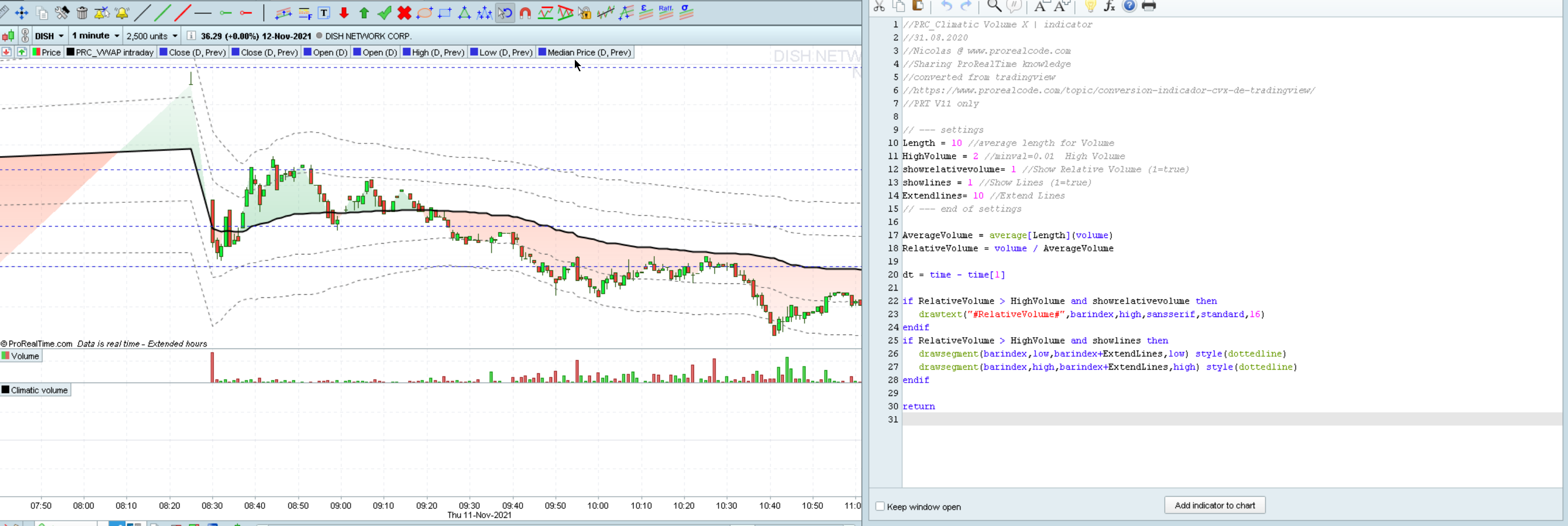
    I am having trouble with most indicators I download from the PRC site being put into the opposite panel they should be.

    My example here is with the climatic volume indicator @Nicoles redid for V11.

    Will 10.3 indicators work in version 11?

    #181479 quote
    deachne
    Participant
    New
    #181483 quote
    robertogozzi
    Moderator
    Master

    The example is missing. It will help understand what you mean.

    Indicators developed on v10.3 work on v11 (unless they use variable names that are now keywords, like kijunsen, but fixing them is very easy), the other way round is not true.

    #181484 quote
    robertogozzi
    Moderator
    Master

    Ok, now it’s there.

    Please do not embed any pic in your post, only use the select button to attach them, as they slow down loading the pages.

    Thank you 🙂

    I understand what you mean, but it’s the same as in v10.3.

    You have to add it ON your chart, not BELOW.

    When you add a custom indicator simply using the ADD button, it is (and it was in v10.3, as well) added below. Only some built-in indicators go directly ON the chart, like MAs.

    You’ll have to click the PRICE tag on the top left corner of your chart, then select ADD INDICATOR, then choose an indicator from the drop down list.

    #181515 quote
    deachne
    Participant
    New

    That worked. Thanks Roberto

    Will have lots of questions. Look forward to your help!

Viewing 5 posts - 1 through 5 (of 5 total)
  • You must be logged in to reply to this topic.

Indicators on wrong panel


Platform Support: Charts, Data & Broker Setup

New Reply
Author
author-avatar
deachne @deachne Participant
Summary

This topic contains 4 replies,
has 2 voices, and was last updated by deachne

4 years, 3 months ago.

Topic Details
Forum: Platform Support: Charts, Data & Broker Setup
Language: English
Started: 11/12/2021
Status: Active
Attachments: 1 files
Logo Logo
Loading...
