Indicatore Weinstein stage

Viewing 3 posts - 1 through 3 (of 3 total)
  • Author
    Posts
  • #259636 quote
    Andrea85Andrea85
    Participant
    Junior

    Buongiorno,


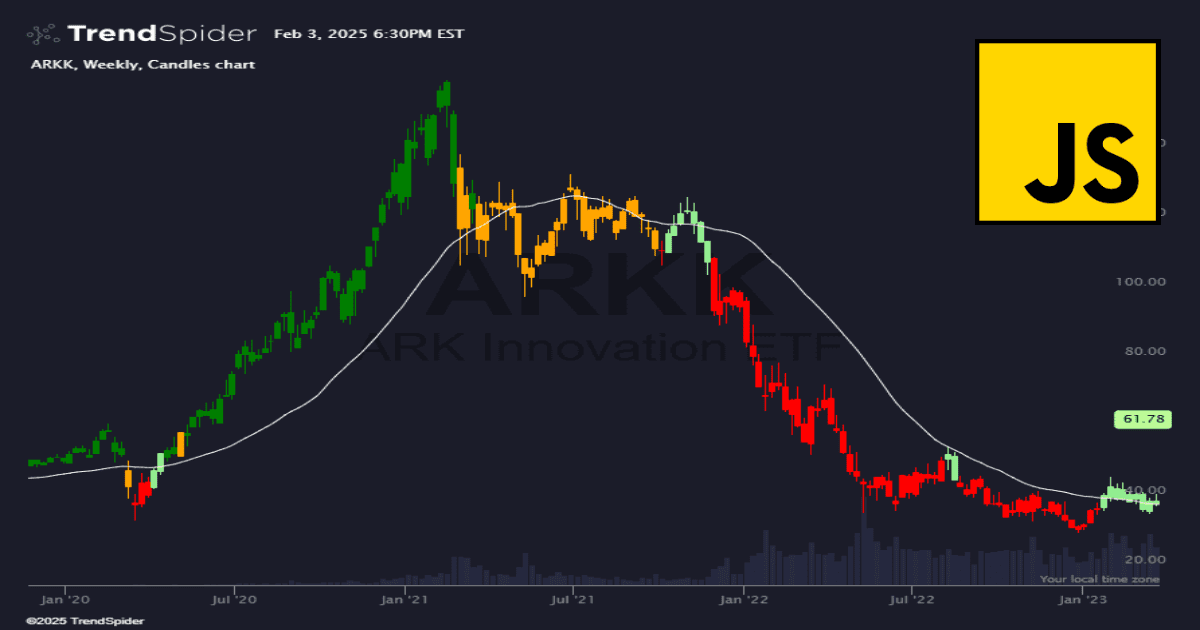
    qualcuno può aiutarmi nel creare un indicatore che indichi i vari stage di Weinstein colorando le candele del prezzo in maniera differente come nel modello di Trendspider? Grazie!


    il codice di Trendspider è il seguente:

    // This script had been cloned from “Weinstein Stage Analysis” at 27 Jan 2025, 16:14

    describe_indicator(‘Weinstein Stage Analysis’);


    // This is an experimental implementation of Weinstein Stage Analysis for candle coloring.

    // Please note that this is an interpretation and may not perfectly align with all aspects of the analysis.


    const smaLength = input.number(‘MA Length’, 30, { min: 1 });

    const withinRangePercent = input.number(‘Within Range %’, 5, { min: 0, max: 25 });


    // Allow user to select the moving average type

    const maType = input.select(‘MA Type’, ‘sma’, constants.ma_types);

    const computeMA = indicators[maType];


    // Allow user to adjust candle colors

    const stage2Color = input.color(‘Stage 2 Color’, ‘green’);

    const stage3Color = input.color(‘Stage 3 Color’, ‘orange’);

    const stage4Color = input.color(‘Stage 4 Color’, ‘red’);

    const stage1Color = input.color(‘Stage 1 Color’, ‘lightgreen’);


    // Fetch weekly data

    const weeklyData = await request.history(current.ticker, ‘W’);

    assert(!weeklyData.error, Error fetching weekly data: ${weeklyData.error});


    const weeklyMA = computeMA(weeklyData.close, smaLength);

    const withinRange = mult(weeklyMA, withinRangePercent / 100);


    let currentTrend = ”;

    const myColors = for_every(

      weeklyData.open, weeklyData.close, shift(weeklyData.open, 1), shift(weeklyData.close, 1), weeklyMA, shift(weeklyMA, 1), withinRange,

      (_open, _close, _pOpen, _pClose, _ma, _pMa, _withinRange, _prevColor) => {

        const myBodyLow = Math.min(_open, _close);

        const myBodyHigh = Math.max(_open, _close);


        if (myBodyLow > _ma + _withinRange && _pMa < _ma) {

          currentTrend = ‘upward’;

          return stage2Color;

        } 


        if (myBodyHigh < _ma – _withinRange && _pMa > _ma) {

          currentTrend = ‘downward’;

          return stage4Color;

        }


        if (currentTrend == ‘upward’) {

          return stage3Color;

        }


        if (currentTrend == ‘downward’) {

          return stage1Color;

        }


        return _prevColor || null;

      }

    );


    // Map weekly colors to the chart’s time frame

    const myMappedColors = interpolate_sparse_series(land_points_onto_series(weeklyData.time, myColors, time, ‘le’), ‘constant’);

    color_candles(myMappedColors);


    // Paint the weekly MA for reference

    const myMappedMA = land_points_onto_series(weeklyData.time, weeklyMA, time, ‘le’);

    const myInterpolatedMA = interpolate_sparse_series(myMappedMA, ‘linear’);

    paint(myInterpolatedMA, { name: Weekly ${maType.toUpperCase()}, color: ‘white’ });


    // Create signals based on candle colors

    const myGreenSignal = for_every(myMappedColors, _color => _color === stage2Color ? 1 : 0);

    const myOrangeSignal = for_every(myMappedColors, _color => _color === stage3Color ? 1 : 0);

    const myRedSignal = for_every(myMappedColors, _color => _color === stage4Color ? 1 : 0);

    const myLightGreenSignal = for_every(myMappedColors, _color => _color === stage1Color ? 1 : 0);


    register_signal(myGreenSignal, ‘Stage 2’);

    register_signal(myOrangeSignal, ‘Stage 3’);

    register_signal(myRedSignal, ‘Stage 4’);

    register_signal(myLightGreenSignal, ‘Stage 1’);

    trendspider.png trendspider.png
    #259639 quote
    NicolasNicolas
    Keymaster
    Legend

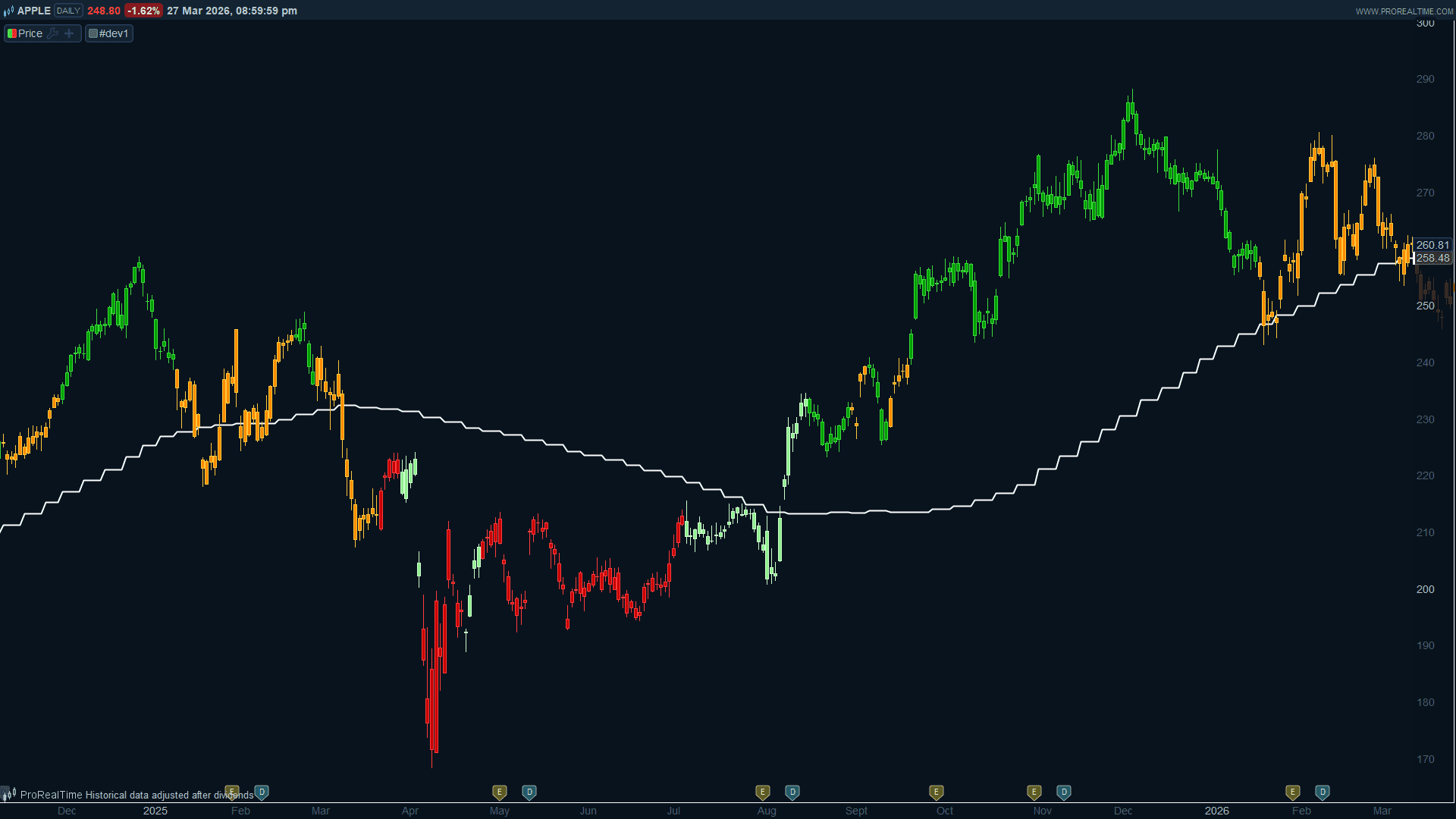
    Di seguito trovate l’indicatore Javascript della fase di Weinstein convertito in un indicatore di codice compatibile con prorealtime:

    // Weinstein Stage Analysis for ProRealTime
    // Converted from JavaScript indicator
    // Works best on daily charts using weekly MA as reference
    // https://www.prorealcode.com 
    // ProRealCode 
    
    // --- Configurable parameters (editable via ProRealTime variable editor)
    smaLength = 30
    withinRangePct = 5
    
    // --- Weekly data (computed on completed weekly bars only)
    TIMEFRAME(Weekly, UpdateOnClose)
    wOpen = open
    wClose = close
    wMA = Average[smaLength](close)
    prevWMA = Average[smaLength](close)[1]
    TIMEFRAME(default)
    
    // Buffer zone around the weekly MA
    withinRange = wMA * withinRangePct / 100
    
    // Weekly candle body boundaries
    wBodyLow = Min(wOpen, wClose)
    wBodyHigh = Max(wOpen, wClose)
    
    // Stage entry conditions (body position vs MA + MA slope)
    stage2Trigger = wBodyLow > wMA + withinRange AND prevWMA < wMA
    stage4Trigger = wBodyHigh  wMA
    
    // Persistent stage state tracker (uses lookback [1] to keep previous state)
    // 0 = undefined, 1 = basing, 2 = uptrend, 3 = topping, 4 = downtrend
    IF stage2Trigger THEN
       stageState = 2
    ELSIF stage4Trigger THEN
       stageState = 4
    ELSIF stageState[1] = 2 OR stageState[1] = 3 THEN
       stageState = 3
    ELSIF stageState[1] = 4 OR stageState[1] = 1 THEN
       stageState = 1
    ELSE
       stageState = 0
    ENDIF
    
    // Candle color based on Weinstein stage
    IF stageState = 2 THEN
       r = 0
       g = 160
       b = 0
    ELSIF stageState = 3 THEN
       r = 255
       g = 140
       b = 0
    ELSIF stageState = 4 THEN
       r = 200
       g = 0
       b = 0
    ELSIF stageState = 1 THEN
       r = 144
       g = 238
       b = 144
    ELSE 
       r = 128
       g = 128
       b = 128
    ENDIF
    
    DRAWCANDLE(open, high, low, close) COLOURED(r, g, b)
    
    // Plot the weekly MA on the price chart for reference
    RETURN wMA AS "Weekly SMA" COLOURED(255, 255, 255) STYLE(Line, 2)
    
    Iván González and Andrea85 thanked this post
    weinstein-phase-indicator.png weinstein-phase-indicator.png
    #259663 quote
    Andrea85Andrea85
    Participant
    Junior

    Grazie mille Nicolas!

    Fantastico!

Viewing 3 posts - 1 through 3 (of 3 total)

  • You must be logged in to reply to this topic.

ProRealAI ProRealAI New

Stuck on this ProBuilder code?

Describe what this topic is trying to build, in plain English, and ProRealAI writes the ProRealTime™ indicator, screener or system for you.

Available in 7 languages
Try ProRealAI

Indicatore Weinstein stage


ProBuilder: Indicatori & Strumenti Personalizzati

New Reply
Author
author-avatar
Andrea85 @andrea85 Participant
Summary

This topic contains 2 replies,
has 2 voices, and was last updated by Andrea85Andrea85

5 months, 3 weeks ago.

Topic Details
Forum: ProBuilder: Indicatori & Strumenti Personalizzati
Language: Italian
Started: 03/29/2026
Status: Active
Attachments: 2 files
ProRealCode ProRealCode
Loading...