ProRealCode - Trading & Coding with ProRealTime™
Hi there @ProRealCode!
(I’m new to this forum and this is my first post, so hopefully I’ve choosen the correct place to post it. If not, please feel free to move it.)
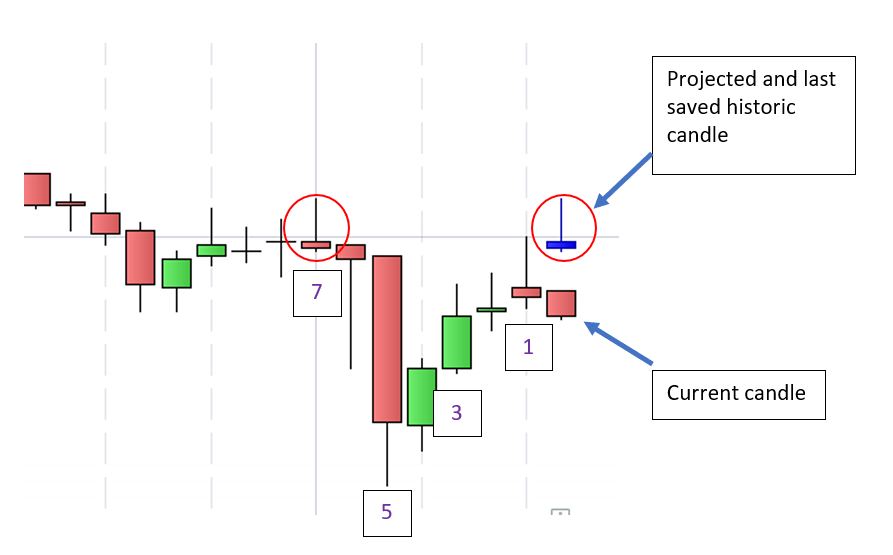
I’m about to create an indicator that will project past candle patterns (based on a defined search pattern – which I’ll come back to later) into the future – after the current candle so to speak.
As ProBuilder is giving me a hard time doing so, I’d like to place some questions first.
So my initial two questions would be:
1. Is it possible to draw a variable amount of candles (i.e. 7-20) ‘after’ the current candle?
2. If yes, how could I do it?
My challenges:
Saving the open, high, low, close within defined arrays. Honestly I wasn ‘t able to debug my arrays and see if this works in the first place.
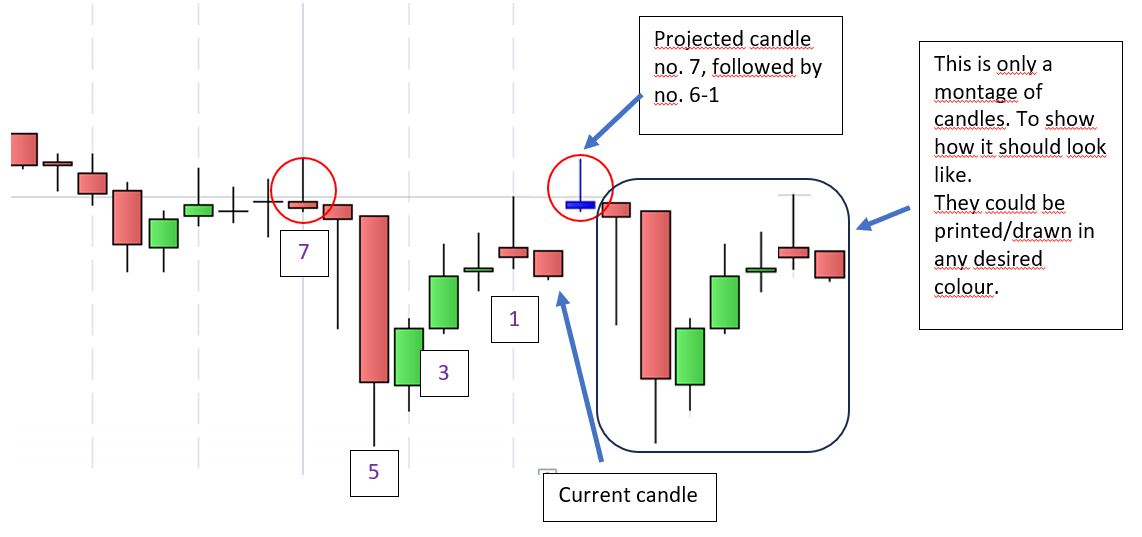
The result is always the same: I receive a single candle. It’s always the candle with the highest index of that array. But I’m missing the previous saved candles. So if my number of candles would be 7, I always receive candle no. 7 but not 1-6.
Furthermore the candle is always printed at the same spot of the current candle and not the spot/s following after.
My code so far:
defparam drawonlastbaronly = true
defparam calculateonlastbars = 200
// define number of candles to save to the arrays; can be adjusted at the input tab of the indicator but will be set to 7 for now
period = 7
// Reset Arrays
if not i <= period then
lastBarIndex = 0
unset($Open)
unset($High)
unset($Low)
unset($Close)
endif
// Save candles to arrays
for i = 0 to period - 1
$Open[i] = open[i + 1]
$High[i] = high[i + 1]
$Low[i] = low[i + 1]
$Close[i] = close[i + 1]
next
// Draw x candles after current bar
for i = 0 to period - 1
drawcandle($Open[i], $High[i], $Low[i], $Close[i]) coloured(0,0,230)
next
return
Attached you’ll also find two screenshots, one to show how it looks like and one how it is supposed to look like if working correct.
Any help, solution,… is highly appreciated.
Thank you in advance.
Best regards,
Florian
Hi,
the issue is because the drawcandle command is only on same barindex the code is read.
Instead, you could go for now with the following workaround: using the drawsegment command, once with a bigger thickness for candle body, and twice with smaller thickness for both candle wicks (or once from low to high if same color to avoid potential overlap effects), and placing those onan x coordinate being bardindex+N, N being the number of candles in the future of the current one.
adding the option at the end style(line,thickness), thickness being an integer between 1 and 5 (option not in the doc page above as it appeared some time later), line could also be dottedline and its variants, but I assume you’ll want a line.
DRAWSEGMENT(x1,y1,x2,y2) COLOURED(R,V,B,a) style(line,thickness)
For later, a request I placed some time ago could become handy for a future slightly more inetresting workaround… It is in “the right hands”, and it “might” be granted (I prefer to wait until informed of next updates before considering it’s coming for sure), and it would result in being able to access x coordinate “between” 2 barindex for a graphic object moving if scrolling or zooming. If that happens, then the better workaround would become using a drawrectangle for body and a drawsegment for wicks.
There could also be more directly: placing a request to be able to drawcandle anywhere, asking for a 5th optional parameter for position.
But for now, I’d pragmatically stick with 1st workaround above, to be able now to draw your patterns in the future, not just for an end result, but first to really visualise what your code is doing to debug it more easily .
Hi JC,
thank you for your fast response.
To make sure I understand it correct, my assumptions would be:
currently it is not possible due to the fact that the function ‘drawcandle” will not move through the different indices with no option of shifting it incrementally by 1. Correct?
I furthermore assume, my arrays are each correctly ‘filled’ with the last 7 open’s, high’s, low’s and close’s, correct?
So before taking action on the workaround you supposed I would have one more essential question (of course to all readers around):
is it possible to search the historic data for a similar pattern as stored within the arrays?
Thanks again,
Florian
defparam drawonlastbaronly = true
candleNumber = 20 // Number of forward candles 2+
// make sure candleNumber not greater than barindex
once candleNumber = max(barindex+1,candleNumber)
once period = candleNumber -1 // array index range, 0 to period
// load arrays
if candleNumber > 1 then
for i = 0 to period // loop to load array's
$open[i] = open[i]
$high[i] = high[i]
$low[i] = low[i]
$close[i] = close[i]
next
// draw candles
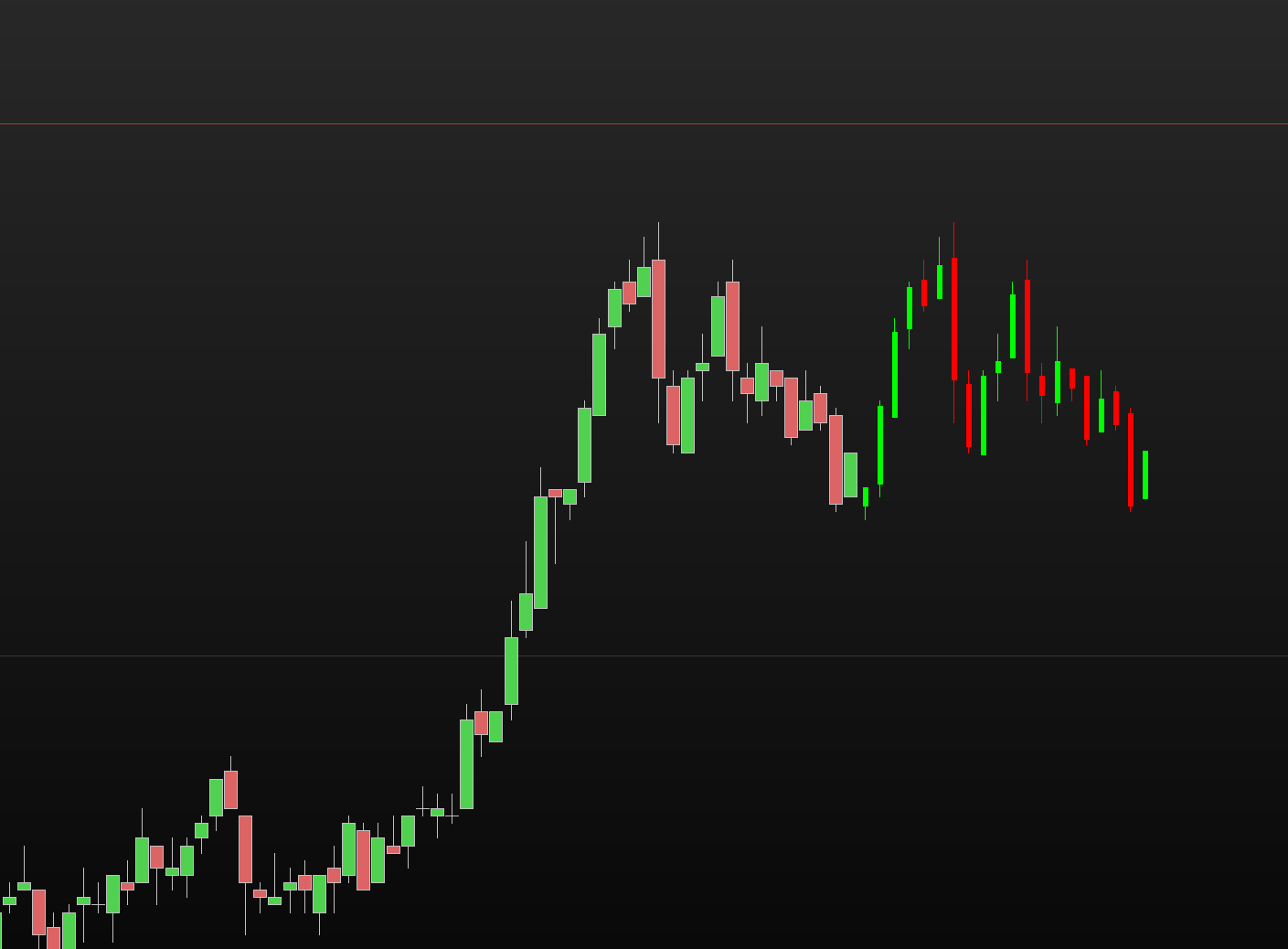
if islastbarupdate then
for i = 0 to period // loop to draw future candles
os = i+1 // offset for, start from current bar + 1
x1 = barindex + os
x2 = x1
idx = period-i // reverse i to idx, 0-6 to 6-0
y1 = $open[idx]
y2 = $close[idx]
bear = y1= max(y1,y2) // define a bear candle type
// candle body
if bear then // bear
drawrectangle(x1,y1 ,x2,y2 )style(line,5)coloured("red")
else // bull
drawrectangle(x1,y1 ,x2,y2 )style(line,5)coloured("lime")
endif
y1 = $high[idx]
y2 = $low[idx]
// candle wicks
if bear then // bear
drawsegment(x1,y1,x2,y2)style(line,1)coloured("red")
else // bull
drawsegment(x1,y1,x2,y2)style(line,1)coloured("lime")
endif
next
endif
endif
return
Hi,
Based on you code and JC’s comments try this.
Hi druby,
this is awesome!
If I would like to search for that pattern in historic data (i. e. the past 1,000 candles), the following questions arise:
1. Is there maybe any kind of ‘pattern’-detector already included in ProBuilder?
2. Does ProBuilder support any kind of function to accomplish my task or would I have to hard-code it into the indicator?
Again, any helpful information and support is highly appreciated 🙂
Thanks all.
regards,
Florian
Hi…
Compiled two long reply and for some reason lost both.
Code below is a starting point for pattern recognition I’ve been working on. 6 bar pattern bull, bull, bear, bear, bull, bull
You need to break down specifically what variables of the pattern are required to define it.
Along with the reasoning of the process of what your trying to do.
Logic takes no prisoners! , but can take you on a long journey and dump you somewhere!
druby
defparam drawonlastbaronly = true
if barindex = 0 then // set constants
BULL = 1
BEAR = -1
endif
// candle type
if open = max(open,close) then
type = BEAR
else
type = BULL
endif
// load pattern (4,3,2,1)
$type[1] = BULL // first LHS
$type[2] = BULL
$type[3] = BEAR
$type[4] = BEAR //
$type[5] = BULL //
$type[6] = BULL // last RHS
// variables
LB = lastset($type) // which bar looking at
pat = 0 // pattern count
start = 0 // start bar
if islastbarupdate then
bar = start
while bar < barindex//-LB
x1 = barindex-bar // x1 offset
pat = pat + 1 // pattern count
if type[x1] = $type[pat] then // if pattern match
if type[x1] = BEAR then
drawtext(pat,barindex[x1],30*pat)anchor(bottom,index,yshift) coloured("red")
elsif type[x1] = BULL then
drawtext(pat,barindex[x1],30*pat)anchor(bottom,index,yshift) coloured("lime")
endif
if pat = LB then // set if end of pattern reached
reset = 1
endif
else // set if no match of pattern
reset = 1
endif
if reset then
bar = bar - (pat-1) // jump back 'n' bars to bar after last pattern start
pat = 0
reset = 0 // reset from complete or no complete pattern
endif
bar=bar+1 // increment while loop bar count
wend
endif
return
Hey druby,
first of all: thank you again and you’re so right. I got completely lost with your last suggestion. Not understanding, what exactly the outcome will be.
Maybe I did not explain what I really want to do as accurate as it might be needed.
So here we go:
1. I want to define a range between 3-7 (max. 10) candles. I will draw a rectangle around those candles (only for visualization purposes).
2. I’ll save the data (3-7 candles in total) from step 1 into an array like: write a ‘1’ if the candle is green (open < close); write a ‘0’ (=zero) if the candle is red (open > close); write a ‘2’ if the candle is a ‘doji’ (open = close).
3. Save the price data of historic candles with the same codification (as above), i.e. the last 5.000 (will later be adjustable by user) candles into a second array.
4. Compare the sample (step 1) with the historic data (step 3); if the pattern is found, then
5. draw a second rectangle around the pattern within the historic data. And save the next 100 (also adjustable) candles following the found pattern into a third array.
6. Project those candles into the future (after the current candle) so to speak.
5a. if the pattern is not found, simply write a notification saying that into the chart. <- already working.
I do have accomplished the steps 1 through 3.
step 4 is not working yet. As I get confused with the way, PRC counts the candles.
step 5 shouldn’t be a huge task to solve – similar to step 1.
step 6 is already solved with your first response.
Questions I still have:
1. How does ProRealCode (ProBuilder) count the candles? I’m pretty sure, the current candle is counted as ‘0’ (=zero). But what about the prior candles? Will they be assigned any numbers from 1 to xyz counting upwards with each new candle forming?
2. Why do I have to flip (reverse) the variable of the variable i (code line #32: idx = period–i // reverse i to idx, 0-6 to 6-0)? Would I have to flip the indeces of the ‘historic array’ as well before any comparison with another array?
I can provide my code if this would be helpful – as it has some lines (above 200) of now I would suggest to export it into a separate file instead of copy-pasting it. Any suggestions from the experts? 🙂
Thanks again,
Florian
Hi Florian, re: your questions…
Just to explain why I use the word ‘Valid’ for a bar, if their is a bar time period, where there was no tick, then the barindex’s, current number, is not incremented. This could lead to the count of barindex, being different to the count of the time periods.
You are right by saying the current candles index is [0] and, the previous one to that would be [1], and then [2], [3] etc. Now this is where it gets tricky. The current candle is always [0], so you can not directly look back to a specific candle as an index since it points to a different bar every new bar.
If you compare the, barindex and the candle index, the barindex is increasing every bar and the candle index is also increasing but from the opposite end. This, because the candle index shifts to the left by 1 bar on each new valid bar
So the index is actually an offset from the current bar to a previous bar, where the current barindex is the reference point.
Looking back to close[10] give the value of close 10 bar prior to the current barindex. After a new bar , then it still points to 10 bars ago but the reference point as change because barindex has been incremented by 1.
Therefore to access the same candle, you need the barindex number, or the offset in bars since, for that candle, let say it was at barindex 300, subtract that from the current barindex, lets say 550, 550-300 = 150, then the candle offset from current bar = 150, close[150] or close[barindex-300].
Now I think the draw command use the reference point from the other end, so you need the offset from barindex = 0, to the bar you want, which I end up with barindex[barindex- 300].
2. lines
#4 candleNumber sets the number of candle required
#8 period is set to 1 less than candleNumber, because array starts at index[0] , this aligns to give correct number required.
#15-20 loads array ‘backward’ from current bar.
# 26 creates a loop for the drawing of the candles in the future with the store array data
# 28,29,30 ensures as ‘i’ increases the offset increase points to the next future bar, the +1 just set the start point to the first future bar when i=0.
# 32 remember the data was stored backwards from the current bar in the array’s, but the future bars are being index forward, so the array needs accessing from last to first, which period – i does.
if i=0, then 0+1 points to first future bar, barindex+1, if period = 9 {0 to 9} then 9-0 = 9 for array index. Next time, when i=1, barindex + 2, 9-1 = 8, etc
Regarding the rest i’ll look into it, posting code would be helpful, at least we would be on same page talking about same thing.
I’m sure I have several questions, but here’s the first,
the first code I posted, made a patten using a number of bars, this pattern is going to change every new bar, is this what initiates the pattern or is it some other criteria.
Q. what timeframe(s) are you planning on using?
Looking through your specification:-
Q. Is the pattern only matching the bull/bear/doji values 1,0,2 and the position sequence.
Q. Its possible that, there might be more than 1 match of the pattern, which one is going to be the relevant one for projecting forward.
5. A rectangle around found pattern, no problem, Again, no need to store 100 candle data, just need to know what barindex it starts, eg. current barindex minus offset to start of pattern + pattern range + 1, retreve data using ohlc with [n].
5a. No pattern label, no problem
6. Project 100 candles forward like in code above.
once it’s up and running, the variable you want to adjust can be setup using the dynamic variable settings, may need to add limits to enter values and make sure they don’t break code.
defparam drawonlastbaronly = true
// general variables
once bear = 0
once bull = 1
once doji = 2
// range in bars of chosen pattern
iRange = 3 //requirement integer, 3 - 7 max 10, default = 3
// determine candle type
if close < open then
candle = bear // bear
elsif close > open then
candle = bull // bull
else
candle = doji // doji , open=close
endif
// highest and lowest of iRange
hi = highest[iRange](high)
lo = lowest[iRange](low)
// drawing
if islastbarupdate then
// draw rectangle around iRange candles
x1 = iRange
y1 = hi
x2 = 0
y2 = lo
drawrectangle(barindex[x1],y1,barindex[x2],y2)coloured("red",100)bordercolor(0,0,0,0)
// display all types for historical data in chart
for i = 0 to barindex
x1 = barindex - i
var = candle[x1]
drawtext(var,barindex[x1],20)anchor(bottom,index,yshift)
next
for i = 0 to iRange - 1
x1 = i
var = candle[i]
drawtext(var,barindex[x1],40)anchor(bottom,index,yshift)
next
endif
return close
Hi Druby,
first of all my apollogies for being offline the past week
Secondly I want to thank you for all your support given so far. It was of great help and I hope that I can give it back one day. Currently I’m still learning a lot of how the ProBuilder works and how it doesn’t.
However: with your great support and help I pretty much solved my initial challenges. But more are already on the horizon… So I’d kindly ask the admins of this forum to leave this post open for now.
What you (and of course all other users of this forum) will find is the code of my indicator (defining it to be in some sort of alpha-status). It’s still under development and not 100% finished. Attached you’ll also find the export-file to use with your own ProRealTime Trading Plattform.
*~*~*~*~*~*~*~*~*~*~*~*~*~*~*~*~*~*~*~*~*~*~*~*~*~*~*~*~*~*~*~*~*~*~*~*~*~*~*~*~*~*~*~*~*~*~*~*~*~*~*~*~*~*~*~*~*~*~*~*~*~*~*~*~*~*~*~*~*~*~*~*~*~*~*~*~*~*~*~*~*~*~*~*~*~*~*~*~*~*~*~*~*~*~*~*~
Important Note:
The use of this indicator is completely at YOUR OWN risk and does NOT recommend any trading ideas or decisions based on real money. I shall not be hold liable to any losses made due to using this indicator (Forecast_PRC_p-type).
*~*~*~*~*~*~*~*~*~*~*~*~*~*~*~*~*~*~*~*~*~*~*~*~*~*~*~*~*~*~*~*~*~*~*~*~*~*~*~*~*~*~*~*~*~*~*~*~*~*~*~*~*~*~*~*~*~*~*~*~*~*~*~*~*~*~*~*~*~*~*~*~*~*~*~*~*~*~*~*~*~*~*~*~*~*~*~*~*~*~*~*~*~*~*~*~
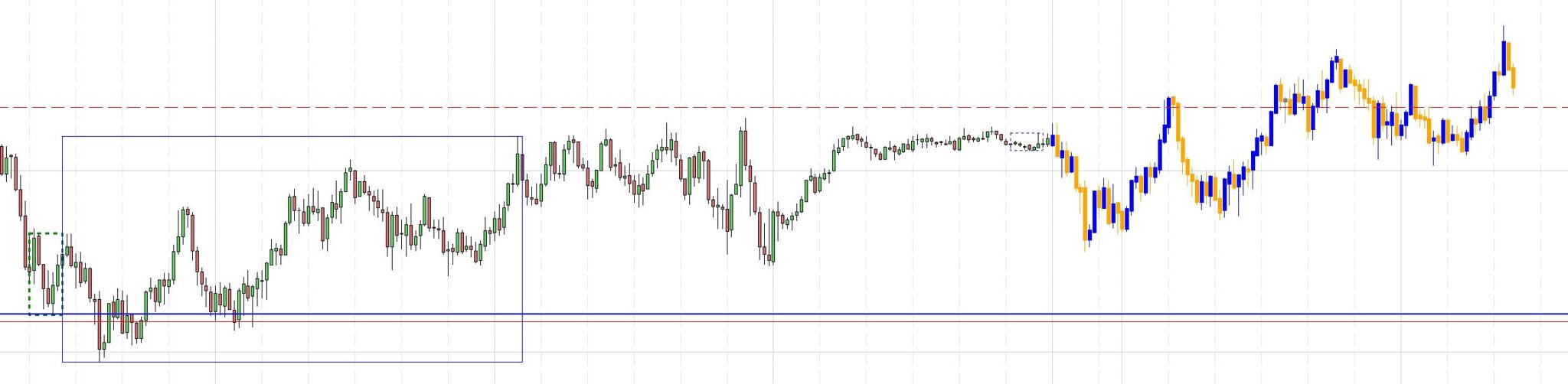
Attached you’ll also find a screenshot of the current state of my indicator. It shows the search pattern (rectangle with blue dashed line), the found pattern (rectangle thick green dashed line) and the result ‘vector’ (rectangle slim blue line). It also shows a potential output for the future price based on historic price information.
So then – the code:
I tried to structure it the best way possible and add comments to show what it does.
// Draws a rectangle across the past x candles - defined by input of user
// Parameters, to draw the rectangle only once around the defined search pattern
defparam drawonlastbaronly = true
//defparam calculateonlastbars = 200 // temporarily void to gain more candles for pattern searching
defparam calculateonlastbars = 5000
// define the number of candles (period) for search pattern
// period = 7 // void, due to available user input
// define the number of forecast candles to be printed (historic data)
// forecast = 100 // void, due to available user input
if islastbarupdate then // to reduce the loading times of an indicator; especially if you would need to pre-load data
// initialize variables
if not hh or not ll or not lastBarIndex then
hh = 0
ll = 0
lastBarIndex = 0
endif
// Calculation of highest high and lowest low for search pattern (without current candle) - to visualize the search pattern with a rectangle
if barindex <> lastBarIndex then
hh = high[1]
ll = low[1]
for i = 1 to period do
hh = max(hh, high[i])
ll = min(ll, low[i])
next
lastBarIndex = barindex
endif
// Define first and last candle for 'pattern'-rectangle
startbar = barindex[period+1]
endbar = barindex[1]
// draw rectangle
drawrectangle(startbar, ll, endbar, hh) style(dottedline3, 1) coloured(0,0,255)
// RESET arrays
// definition of array to temporarily save all pricevalues of defined search pattern (period)
unset($Open)
unset($High)
unset($Low)
unset($Close)
// definition of array to temporarily save all pricevalues of historic values (period) - for comparison
unset($Colorcode)
unset($histOpen)
unset($histHigh)
unset($histLow)
unset($histClose)
unset($histCC)
unset($forecastOpen)
unset($forecastHigh)
unset($forecastLow)
unset($forecastClose)
// Save price values for search pattern as new Arrays "Open, High, Low, Close"
for i = 0 to period do
$Open[i] = open[i]
$High[i] = high[i]
$Low[i] = low[i]
$Close[i] = close[i]
next
// save price values of historic pices as new Arrays "histOpen, histHigh, histLow, histClose" (for comparison)
for j = 0 to BarIndex do
$histOpen[j] = open[j]
$histHigh[j] = high[j]
$histLow[j] = low[j]
$histClose[j] = close[j]
next
// DEFINE color coding for search pattern and historic data and save as new arrays each.
// define sequence of color coding for search pattern (period) and save as new Array "Colorcde"
for i = 0 to period do
if open[i] < close[i] then
$Colorcode[i] = 1
endif
if open[i] > close[i] then
$Colorcode[i] = 0
endif
if open[i] = close[i] then
$Colorcode[i] = 2
endif
next
// define sequence of color coding for historic values (forecast) and save as new Array "histCC"
for j = 0 to BarIndex do
if open[j] < close[j] then
$histCC[j] = 1
endif
if open[j] > close[j] then
$histCC[j] = 0
endif
if open[j] = close[j] then
$histCC[j] = 2
endif
next
// SEARCH for pattern
// Definition of additional variables
historic = BarIndex
// starting loop at a predefined value of j
startIndex = period + forecast
for j = startIndex to historic - period do
match = 1 // set match to 1 at start of each j-loop
// Check the search pattern
for i = 0 to period - 1 do
if $Colorcode[i] <> $histCC[j + i] then
match = 0
break
endif
next
if match = 1 then
// Define hhPattern and llPattern based on candles found in hisoric data
hhPattern = $histHigh[j]
llPattern = $histLow[j]
// Find highest high and lowest low within pattern
for i = 0 to period - 1 do
hhPattern = max(hhPattern, $histHigh[j + i])
llPattern = min(llPattern, $histLow[j + i])
next
// Define start- and endbars of pattern
patternStartBar = BarIndex[j]-1
patternEndBar = BarIndex[j + period]-1
// draw a rectangle around found pattern (green dashed line)
drawrectangle(patternStartBar, llPattern, patternEndBar, hhPattern) style(dottedline3, 3) coloured("green")
// Save the historic candles follwoing after the pattern
for k = 0 to forecast - 1 do
$forecastOpen[k] = open[j - k]
$forecastHigh[k] = high[j - k]
$forecastLow[k] = low[j - k]
$forecastClose[k] = close[j - k]
next
// Draw a rectangle around forecast candles regarding highest high and lowest low (slim blue line)
hhForecast = $forecastHigh[0]
llForecast = $forecastLow[0]
for k = 0 to forecast - 1 do
hhForecast = max(hhForecast, $forecastHigh[k])
llForecast = min(llForecast, $forecastLow[k])
next
forecastStartBar = BarIndex[j]-1
forecastEndBar = BarIndex[j - forecast + 1]-1
drawrectangle(forecastStartBar, llForecast, forecastEndBar, hhForecast) style(line, 1) coloured(0,0,255)
break
endif
next
// Calculate the delta between the last close (or open) and the corresponding close (or open) of historic data
//priceShift = close[0] - $forecastClose[0]
priceShift = open[0] - $forecastOpen[0]
for k = 0 to forecast - 1 // Loop to draw the last 10 candles
// Offset for, start from current bar + 1
os = k + 1
// Adjusted x1 and x2 to use the correct offset
x1 = barindex + os
x2 = x1
// Reverse j to idx, 0-9 to 9-0; 9 = last index
idx = k
// Retrieve open and close values for the current index
y1 = $forecastOpen[idx] + priceShift
y2 = $forecastClose[idx] + priceShift
//New by June 13th 2024 (~*~)
// Define if it's a doji candle
doji = y1 = y2 // Compare open and close values
// Define if it's a bear or bull candle
bear = y1 > y2 // Compare open and close values
// Candle body
if doji then //(~*~)
drawrectangle(x1,y1, x2,y2) style(line, 5) coloured("grey")
else
if bear then // Bear
drawrectangle(x1,y1, x2,y2) style(line,5) coloured("orange")
else // Bull
drawrectangle(x1,y1, x2,y2) style(line,5) coloured("blue")
endif
endif
// Retrieve high and low values for the current index
y1 = $forecastHigh[idx] + priceShift
y2 = $forecastLow[idx] + priceShift
// Candle wicks
if not doji then // (~*~)
if bear then // Bear
drawsegment(x1,y1,x2,y2) style(line,1) coloured("orange")
else // Bull
drawsegment(x1,y1,x2,y2) style(line,1) coloured("blue")
endif
else
drawsegment(x1,y1,x2,y2) style(line, 1) coloured("grey")
endif
next
endif
return
Thank you and good trades.
regards,
Florian
Indicator projecting past candles into the future
This topic contains 9 replies,
has 3 voices, and was last updated by Florian878
1 year, 7 months ago.
| Forum: | ProBuilder: Indicators & Custom Tools |
| Language: | English |
| Started: | 06/04/2024 |
| Status: | Active |
| Attachments: | 5 files |
The information collected on this form is stored in a computer file by ProRealCode to create and access your ProRealCode profile. This data is kept in a secure database for the duration of the member's membership. They will be kept as long as you use our services and will be automatically deleted after 3 years of inactivity. Your personal data is used to create your private profile on ProRealCode. This data is maintained by SAS ProRealCode, 407 rue Freycinet, 59151 Arleux, France. If you subscribe to our newsletters, your email address is provided to our service provider "MailChimp" located in the United States, with whom we have signed a confidentiality agreement. This company is also compliant with the EU/Swiss Privacy Shield, and the GDPR. For any request for correction or deletion concerning your data, you can directly contact the ProRealCode team by email at privacy@prorealcode.com If you would like to lodge a complaint regarding the use of your personal data, you can contact your data protection supervisory authority.