


Indicator Pivot Bug

Viewing 5 posts - 1 through 5 (of 5 total)

  • Author
    Posts
  • #163139 quote
    reb
    Participant
    Master

    Hi

    I am using as part of an indicator the code of Pivot point as below :

    If OpenDayOfWeek = 1 Then
    Ht = DHigh(2)
    Bs = DLow(2)
    C = DClose(2)
    Endif
    If OpenDayOfWeek => 2 and dayofweek < 6 Then
    Ht = DHigh(1)
    Bs = DLow(1)
    C = DClose(1)
    Endif
    Pivot = (Ht + Bs + C) / 3


    I have noticed sometimes differences between the code and my eye. After some reseachs, I have found the reason of those discrepencies: the Pivot point calculation.

    To simplify, the indicator could be :  if close > Pivot, it returns 1 and if close < Pivot, it returns -1

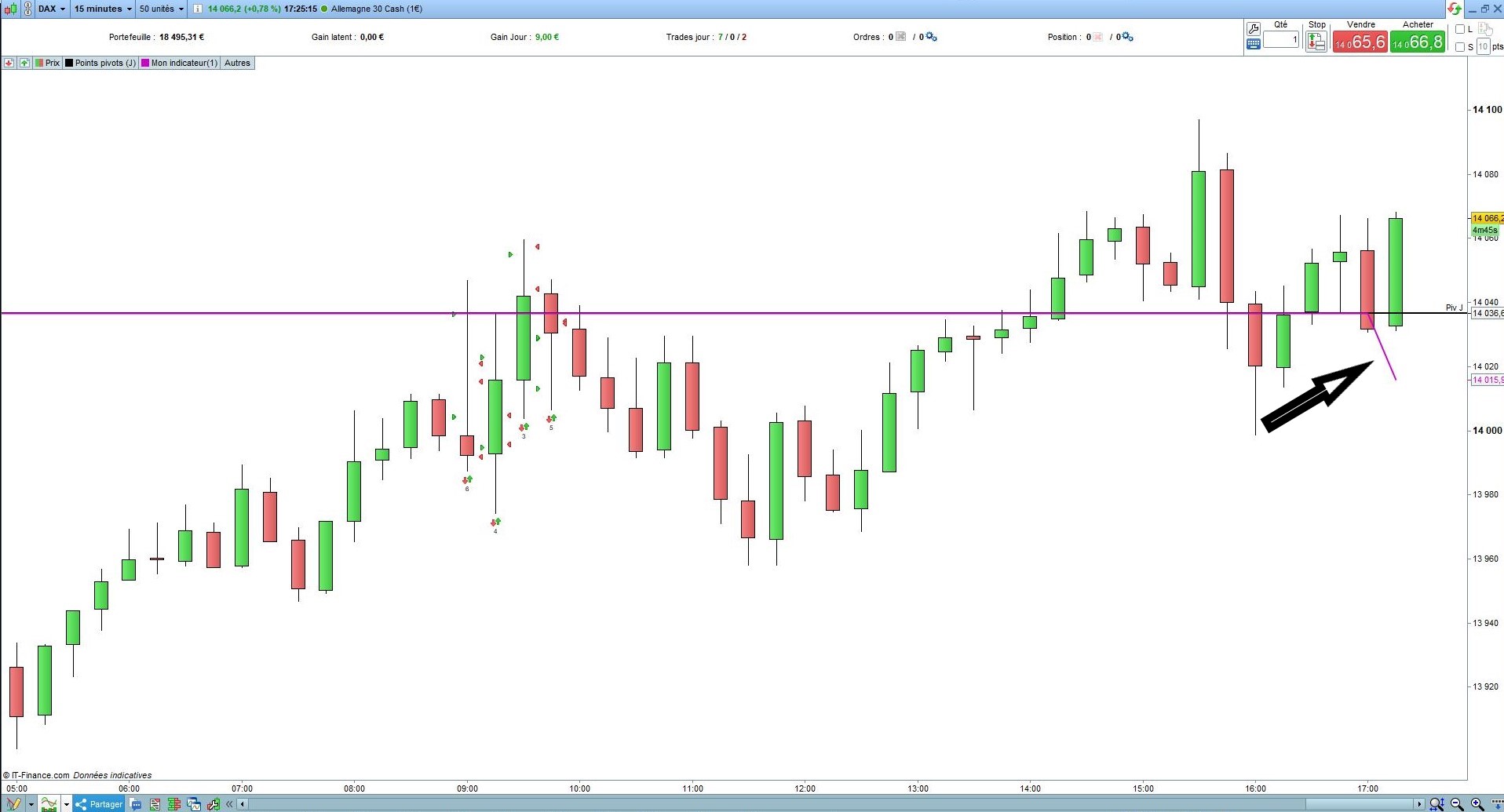
    the black line is the native Pivot from PRT and the purple one the result of the above the code.

    For a reason I don’t understand the Pivot value at the current bar is different. (see pic below)

    This difference disappears if I reload PRT, and it comes back the next bar

    Do you have an idea about this issue ?

    Thanks in advance

    Reb

    DAX-15-17h25.jpg DAX-15-17h25.jpg
    #163151 quote
    Vonasi
    Moderator
    Master

    reb – Topic moved to ProBuilder forum as it is an indicator issue. I have also inserted the code that you posted using the ‘Insert PRT Code’ button. Please ensure that you do the same with all future posts that include code. I have edited your post and inserted the code.

    There have been several posts recently about DCLOSE, DHIGH, DLOW and DOPEN not returning the correct values and whilst we wait for PRT to provide a fix it is best to use MTF to return the daily time frame high, low, open and close values rather than use DCLOSE, DHIGH, DLOW and DOPEN.

    #163155 quote
    reb
    Participant
    Master

    ok thanks Vonasi for your answer

    #163156 quote
    reb
    Participant
    Master

    Here is the new code

    timeframe( daily)
    If OpenDayOfWeek = 1 Then
    Ht = High[2]
    Bs = Low[2]
    C = Close[2]
    Endif
    If OpenDayOfWeek => 2 and dayofweek < 6 Then
    Ht = High[1]
    Bs = Low[1]
    C = Close[1]
    Endif
    Pivot = (Ht + Bs + C) / 3
    #163167 quote
    robertogozzi
    Moderator
    Master

    @reb

    Always use the ‘Insert PRT Code’ button when putting code in your posts to make it easier for others to read.

    Thank you 🙂

Viewing 5 posts - 1 through 5 (of 5 total)
  • You must be logged in to reply to this topic.

Indicator Pivot Bug


ProBuilder: Indicators & Custom Tools

New Reply
Author
author-avatar
reb @reb Participant
Summary

This topic contains 4 replies,
has 3 voices, and was last updated by robertogozzi
4 years, 11 months ago.

Topic Details
Forum: ProBuilder: Indicators & Custom Tools
Language: English
Started: 03/04/2021
Status: Active
Attachments: 1 files
Logo Logo
Loading...

