indicator on chart – how to only display …

Viewing 10 posts - 1 through 10 (of 10 total)

  • Author
    Posts
  • #209544 quote
    Lady Y
    Participant
    New

    Hi again,

    i followed one of the tutorial but missing something basic.

    look at code below.  regarding ‘signal = 0‘, i dont want to display it in the charge as it distorted it. i am only intresed in the ‘signal = low‘ to b displayed on chart. how can i handle it?

    smaShort = average [short]
    smaLong = average [long]
    sto = Stochastic[14,3](close)

    if smaShort > smaLong then
    if sto crosses over 20 then

    signal = low
    else
    signal = 0
    endif
    endif
    return signal

    #209546 quote
    robertogozzi
    Moderator
    Master

    Try this one (not tested):

    smaShort = average [short]
    
smaLong = average [long]
sto = Stochastic[14,3](close)
    signal = low
    Once t = 0
    if smaShort > smaLong then
    
   if sto crosses over 20 then
             t = 255
    
      else

             t = 1

          endif

    endif

    return signal coloured(“Green”,t)
    #209547 quote
    Lady Y
    Participant
    New

    thank you for the speedy answer.

    so i dont understand how it worked for the person that did the tutrial : ‘Example program 2 – Trading system with target and stop’

    #209557 quote
    Lady Y
    Participant
    New

    Hi again,

    is there away for me to say if statement is true return value A, but if its false dont return anything.

    ONCE means it only return once.

    i want to mark on chart only when all conditions are met.

    thanks

    #209560 quote
    robertogozzi
    Moderator
    Master

    It’s not possible to return NOTHING. If a variable is set it returns the retained value, no matter if it had been assigned bars before or in the current bar. If it’s cleared (assigned 0), it will return 0.

    That’s why your indicator, like Macd, Rsi etc… will not display correctly when added ON the chart. The returned value is on a different scale than the price. On a DAX chart the price is about 15000 while your indicator returns 0 or 1. If you make the chart be displayed normally you won’t see your indicator, if you shrink your chart to see your indicator, the price bars will appear as a straight line.

    #209587 quote
    Nicolas
    Keymaster
    Master

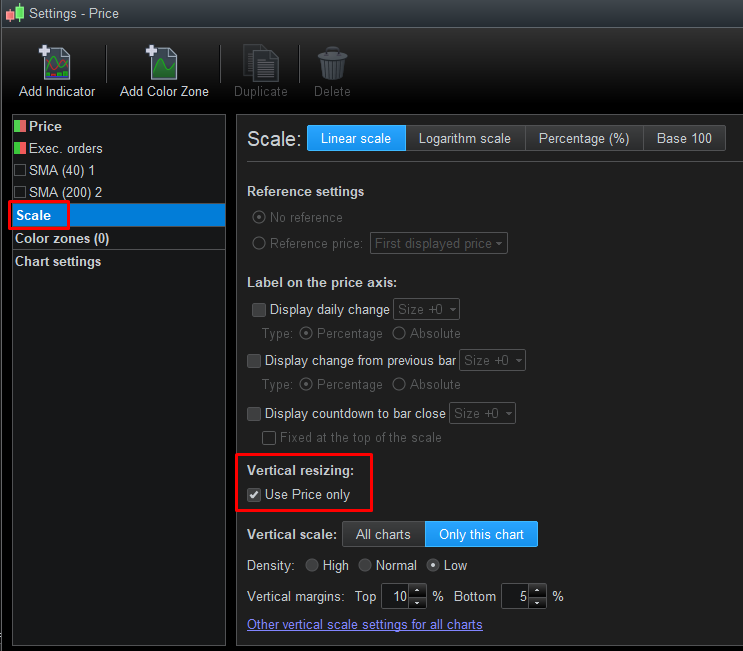
    In order to not get a distorted chart because using values off scale, change the scale option of  the Y axis (see attached picture).

    vertical-resizing.png vertical-resizing.png
    #209791 quote
    PeterSt
    Participant
    Master

    This is beating around the bush. The fact that we can’t “switch off” an indicator is highly annoying.

    On another note : I don’t think I am using any shortcuts for any of the many functions in PRT, but I want one : for Vertical Resizing – Use Price only – as I am using this x times per day. But we can’t assign a shortcut to that as far as I know.
    Or allow it to don’t show anything when I decide so, like Lady Y asks.

    #209798 quote
    GraHal
    Participant
    Master

    can’t “switch off” an indicator is highly annoying.

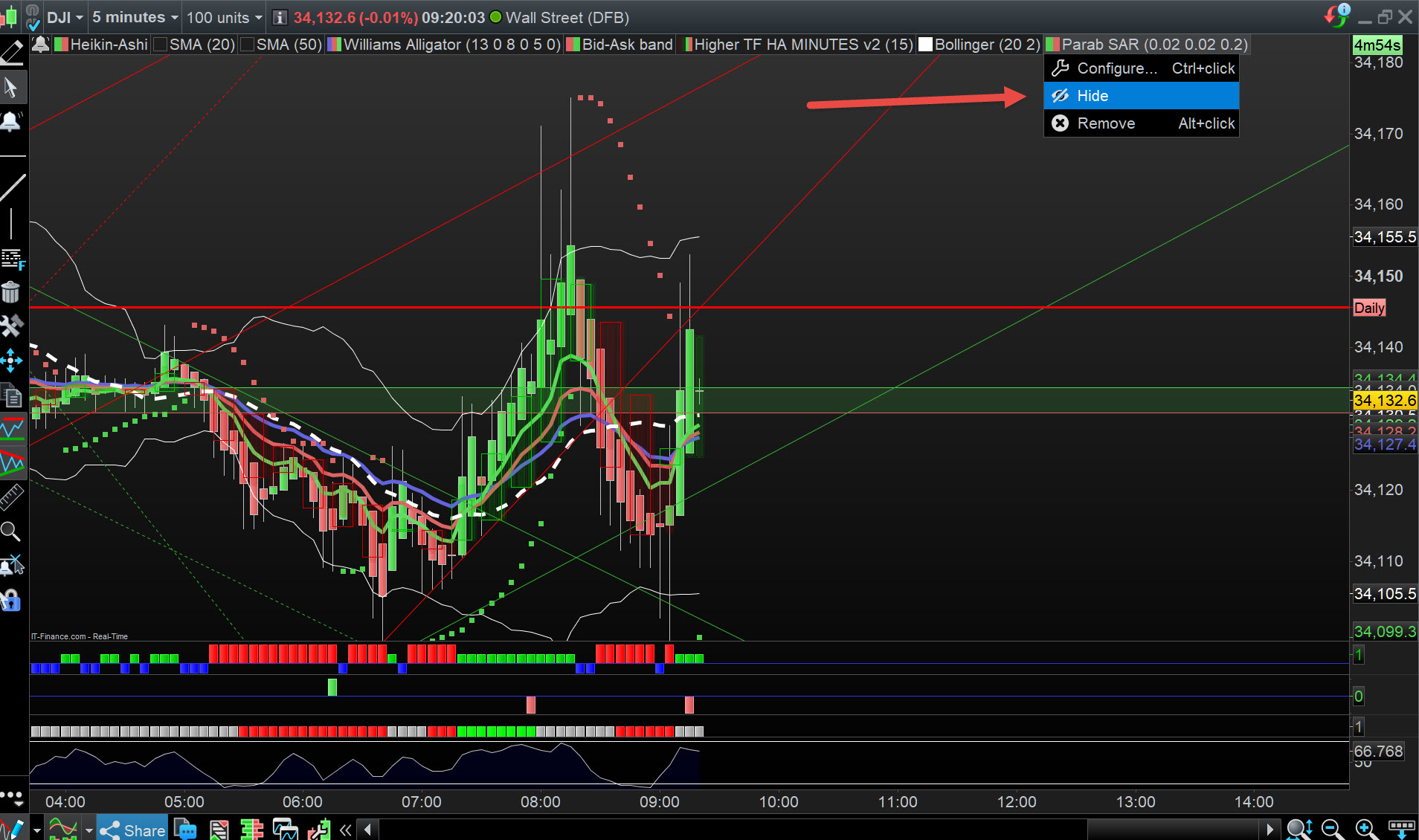
    If on Prie Chart then you can ‘hide’ an Indicator by right click > hide.

    #209802 quote
    GraHal
    Participant
    Master

    we can’t assign a shortcut to that as far as I know. Or allow it to don’t show anything when I decide so, like Lady Y asks.

    Have you Suggested it to PRT direct using the form on the link below?
    https://www.prorealtime.com/en/contact

    Click on Suggestion Box on the left under the photo (I know you know Peter, but others may not).

    #209809 quote
    GraHal
    Participant
    Master

    If on Prie Chart then you can ‘hide’ an Indicator by right click > hide.

    Above should correctly have read … left click > hide (after pointing at the Indicator) … see attached at red arrowhead.

    Peter.jpg Peter.jpg
Viewing 10 posts - 1 through 10 (of 10 total)
  • You must be logged in to reply to this topic.

indicator on chart – how to only display …


Platform Support: Charts, Data & Broker Setup

New Reply
Author
author-avatar
Lady Y @lady-y Participant
Summary

This topic contains 9 replies,
has 5 voices, and was last updated by GraHal

3 years ago.

Topic Details
Forum: Platform Support: Charts, Data & Broker Setup
Language: English
Started: 02/11/2023
Status: Active
Attachments: 2 files
Logo Logo
Loading...