Indicator in its own window?

Viewing 3 posts - 1 through 3 (of 3 total)

  • Author
    Posts
  • #219920 quote
    Niklas87Niklas87
    Participant
    New

    When i create my own idicators and use the RETURN AS command and add them to my grafh they always comes upp in the price window, however some indicators i whant to always open in its own window the way for exemple RSI is shown.

    Cant find the command to do this, so for now i have to open the code and click “add indicator too chart” for it to show upp in the way i whant it to.

    #219939 quote
    NicolasNicolas
    Keymaster
    Legend

    There is no instruction to set if the indicator should applied on a price chart or below. I hope it will be added soon.

    #219944 quote
    PeterStPeterSt
    Participant
    Master

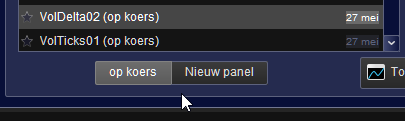
    It’s in there, but it is in V12.

    Nicolas thanked this post
    image_2023-08-28_145414401.png image_2023-08-28_145414401.png
Viewing 3 posts - 1 through 3 (of 3 total)

  • You must be logged in to reply to this topic.

ProRealAI ProRealAI New

Stuck on this ProBuilder code?

Describe what this topic is trying to build, in plain English, and ProRealAI writes the ProRealTime™ indicator, screener or system for you.

Available in 7 languages
Try ProRealAI

Indicator in its own window?


ProBuilder: Indicators & Custom Tools

New Reply
Author
author-avatar
Niklas87 @niklas87 Participant
Summary

This topic contains 2 replies,
has 3 voices, and was last updated by PeterStPeterSt

3 years, 1 month ago.

Topic Details
Forum: ProBuilder: Indicators & Custom Tools
Language: English
Started: 08/28/2023
Status: Active
Attachments: 1 files
ProRealCode ProRealCode
Loading...