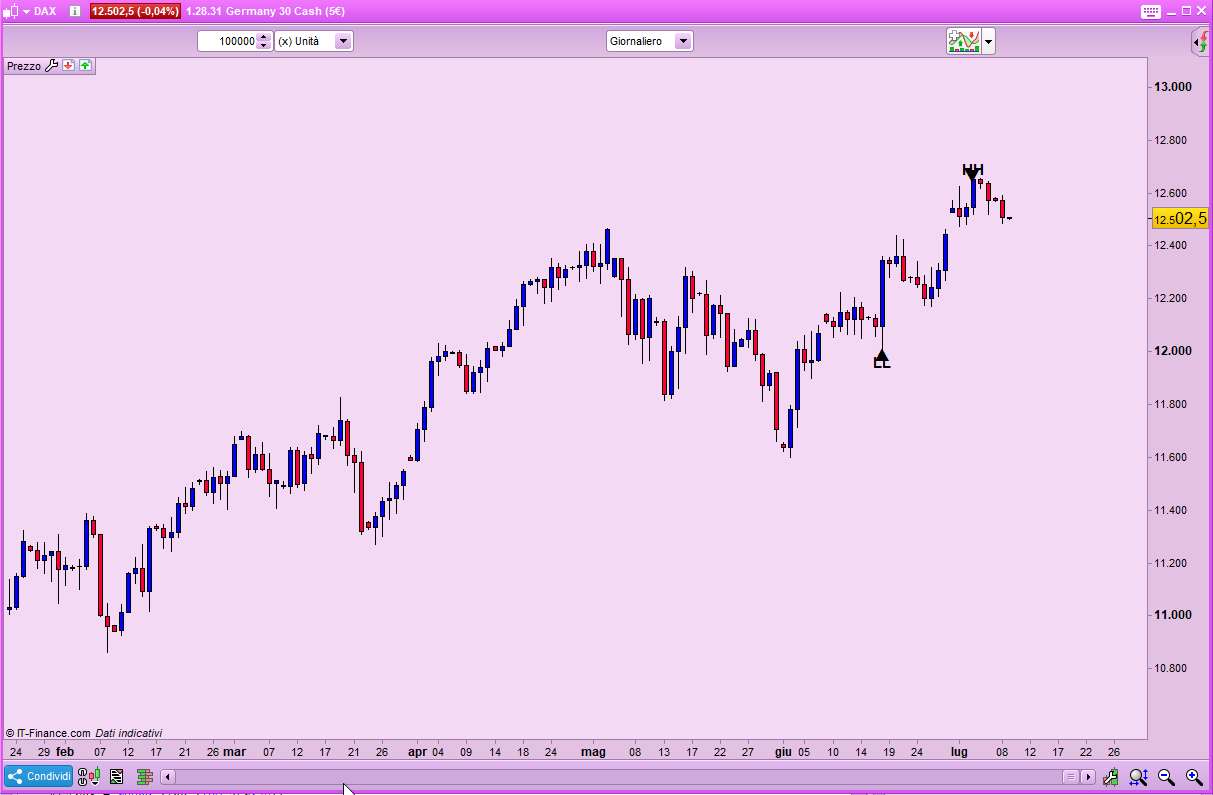
Indicator HH LL

Viewing 5 posts - 1 through 5 (of 5 total)

  • Author
    Posts
  • #102216 quote
    tayna13tayna13
    Participant
    Junior
    could make this indicator not disappear the ” HH LL ” when broken on the opposite side
    CODE :
    topf = high[4] < high[2] and high[3] <= high[2] and high[2] >= high[1] and high[2] > high[0]
    botf = low[4] > low[2] and low[3] >= low[2] and low[2] <= low[1] and low[2] < low[0]
    
    if topf then
    //if high[2]>higherhigh or lastsig=-1 then
    higherhigh=high[2]
    //lastsig=1
    //endif
    endif
    if botf then
    //if low[2]<lowerlow or lowerlow=0 or lastsig=1 then
    lowerlow=low[2]
    //lastsig=-1
    //endif
    endif
    
    atr=averagetruerange[14]
    
    if higherhigh>higherhigh[1] then
    drawtext("▼",barindex[2],higherhigh,dialog,bold,15)
    drawtext("HH",barindex[2],higherhigh+atr*0.2,dialog,bold,15)
    endif
    
    if lowerlow<lowerlow[1] then
    drawtext("▲",barindex[2],lowerlow,dialog,bold,15)
    drawtext("LL",barindex[2],lowerlow-atr*0.2,dialog,bold,15)
    endif
    
    return
     
    higher-high-lower-low-indicator.png higher-high-lower-low-indicator.png
    #102218 quote
    robertogozzirobertogozzi
    Moderator
    Legend
    >> For clarity of messages on ProRealCode’s forums, please use the “insert code PRT” button to separate the text of the code part! Thank you! <<
    #102219 quote
    robertogozzirobertogozzi
    Moderator
    Legend
    What do you mean by “broken on the opposite side”?
    #102229 quote
    tayna13tayna13
    Participant
    Junior

    Example if an HH was given but the 3 candle after the signal is high passing this HH, the signal simply disappears .

    I would like it to remain in the same place that the signal was given
    
    
    #102230 quote
    robertogozzirobertogozzi
    Moderator
    Legend
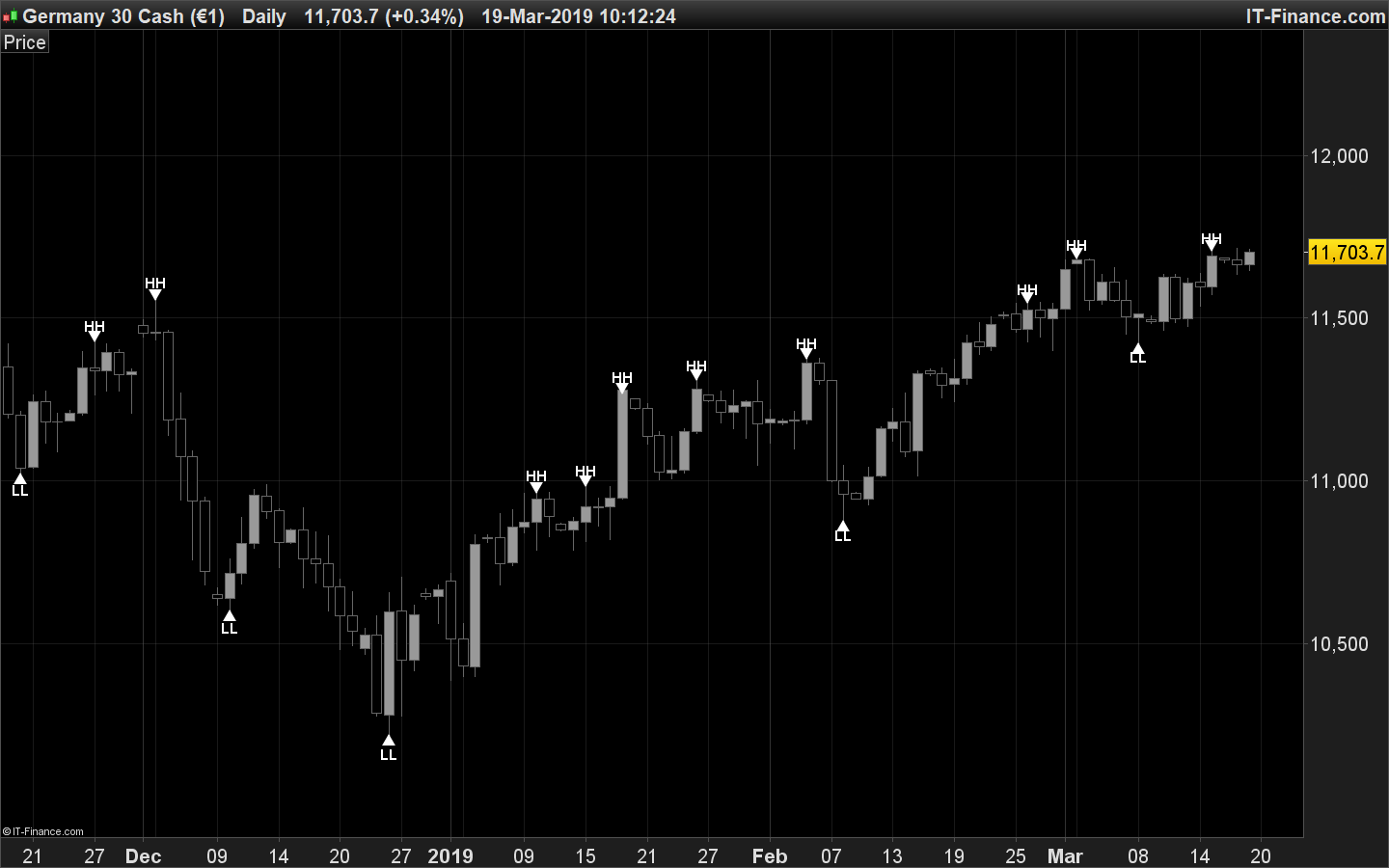
    I hope I could understand what you mean:
    DEFPARAM DrawOnLastBarOnly = true
    topf = high[4] < high[2] and high[3] <= high[2] and high[2] >= high[1] and high[2] > high[0]
    botf = low[4] > low[2] and low[3] >= low[2] and low[2] <= low[1] and low[2] < low[0]
    if topf then
       //if high[2]>higherhigh or lastsig=-1 then
       higherhigh=high[2]
       //lastsig=1
       //endif
    endif
    if botf then
       //if low[2]<lowerlow or lowerlow=0 or lastsig=1 then
       lowerlow=low[2]
       //lastsig=-1
       //endif
    endif
    //atr=averagetruerange[14]
    ONCE SignalHH = 0
    ONCE SignalLL = 0
    if higherhigh>higherhigh[1] then
       SignalHH = barindex[2]
       atrHH=averagetruerange[14]
       HHprice = higherhigh
       //drawtext("▼",barindex[2],higherhigh,dialog,bold,15)
       //drawtext("HH",barindex[2],higherhigh+atr*0.2,dialog,bold,15)
    endif
    if lowerlow<lowerlow[1] then
       SignalLL = barindex[2]
       atrLL=averagetruerange[14]
       LLprice = lowerlow
       //drawtext("▲",barindex[2],lowerlow,dialog,bold,15)
       //drawtext("LL",barindex[2],lowerlow-atr*0.2,dialog,bold,15)
    endif
    drawtext("▼",SignalHH,HHprice,dialog,bold,15)
    drawtext("HH",SignalHH,HHprice+atrHH*0.2,dialog,bold,15)
    drawtext("▲",SignalLL,LLprice,dialog,bold,15)
    drawtext("LL",SignalLL,LLprice-atrLL*0.2,dialog,bold,15)
    return
    x-5.jpg x-5.jpg
Viewing 5 posts - 1 through 5 (of 5 total)
  • You must be logged in to reply to this topic.

ProRealAI ProRealAI New

Stuck on this ProBuilder code?

Describe what this topic is trying to build, in plain English, and ProRealAI writes the ProRealTime™ indicator, screener or system for you.

Available in 7 languages
Try ProRealAI

Indicator HH LL


ProOrder: Automated Strategies & Backtesting

New Reply
Author
author-avatar
tayna13 @tayna13 Participant
Summary

This topic contains 4 replies,
has 2 voices, and was last updated by robertogozzirobertogozzi
7 years, 2 months ago.

Topic Details
Forum: ProOrder: Automated Strategies & Backtesting
Language: English
Started: 07/08/2019
Status: Active
Attachments: 2 files
ProRealCode ProRealCode
Loading...