Indicator for setting previous day HLOC

Viewing 6 posts - 1 through 6 (of 6 total)
  • Author
    Posts
  • #182180 quote
    2point1
    Participant
    New

    Hi,

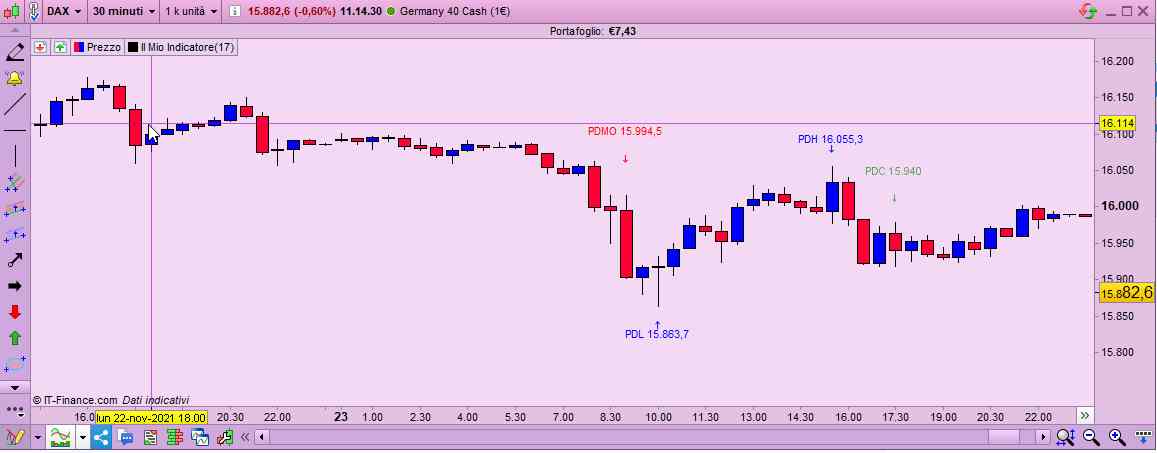
    Currently each morning I set previous day high (PDH), low (PDL), market open (PDMO) and market close (PDC) manually by adding lines to the chart. Since I am following 20+ markets and have custom alerts setup, it’s quite tedious to do this task every day. When the alert comes in, I check the relation between price/alert and the PD lines. Going through the code, I can see that I can add an indicator with DRAWHLINE and DRAWTEXT to achieve this, but I could not find a way to define a time frame for the code to look into, i.e. e.g. when looking at DAX I want the indicator to only look at the bars between 9:00-17:30. Since DAX is an index the data available is 24/6, but this is not what I want the Indicator to take into the consideration.

    I was thinking of using IF statement to check the bar data, such as time and date and compare it with the requirements, but unfortunately I cannot find an instruction or peace of code which could help me to verify the bar datetime value.

    If anyone has a better idea how to achieve the required I would be very grateful.

    Here is a view of the chart and lines I have currently setup manually.

    PD-HLOC.png PD-HLOC.png
    #182184 quote
    2point1
    Participant
    New

    Also to add, I would like the Indicator to use the calculation from specific time frame, e.g. 5 min time frame, so that if I change the time frame to 1 min, it is not recalculating the values. I just noticed, that if I use the example code provided in one of the articles, it will recalculate the values:

    defparam drawonlastbaronly = true
    
    hh = highest[15](high)
    Voffset = 2*pipsize
    
    DRAWHLINE(hh)coloured(0,200,0)
    DRAWTEXT("PDH",barindex-30,hh+Voffset,SansSerif,Standard, 12)coloured(0,153,0)
    
    RETURN
    
    #182185 quote
    robertogozzi
    Moderator
    Master

    It will ALWAYS recalculates itself at any change, be it the TF, the number of units or any of its settings.

    This is the correct behavior.

    You will have to use IF…ENDIF to select the time window you are interested in.

    Use the correct forum, for indicators it’s ProBuilder. I moved it from General trading discussion.

    Thank you 🙂

    #182187 quote
    2point1
    Participant
    New

    Thank you, for your help on moving the topic to the correct group and for you reply.

    Can you please advise how to validate the time window in the IF ENDIF statement, i.e. could you please provide an example?

    #182197 quote
    robertogozzi
    Moderator
    Master

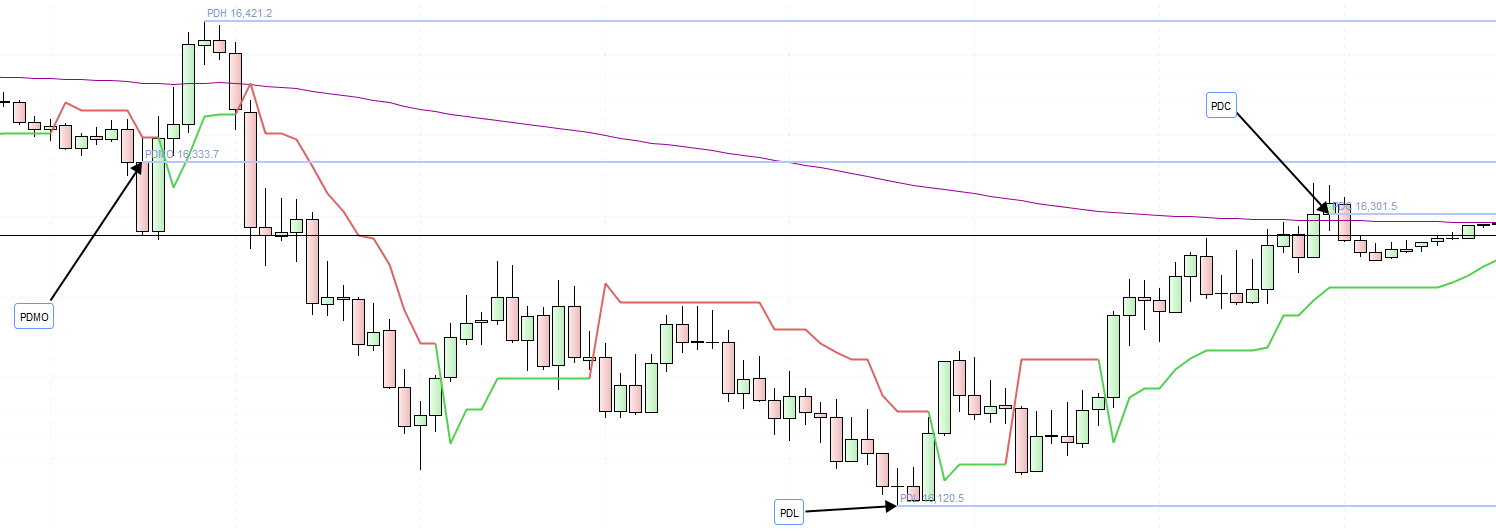
    There you go:

    // DAX example
    //
    // the TF used must show candles that close on both the starting and ending time
    // (in this case it must be a 30-minute TF or lower, but not, say, 7 minutes, as its candles do not close at HH:30)
    //
    DEFPARAM DrawOnLastBarOnly = true
    ONCE StartTime = 090000    //Time window (start)
    ONCE EndTime   = 173000    //Time windows (end)
    ONCE PDH       = high      //Previous Day High
    ONCE PDL       = low       //Previous DayLow
    ONCE DH        = high      //current Day High
    ONCE DL        = low       //current Day Low
    ONCE PDMO      = 0         //Previous Day Market Open
    ONCE MO        = 0         //current Day Market Open
    ONCE PDC       = 0         //Previous Day Close
    ONCE PDMObar   = 0
    ONCE PDHbar    = 0
    ONCE PDLbar    = 0
    ONCE PDCbar    = 0
    ONCE MObar     = 0
    ONCE DHbar     = 0
    ONCE DLbar     = 0
    HR             = highest[4](range)
    MyATR          = AverageTrueRange[100](close)
    Offset1        = MyATR * 1.5
    Offset2        = MyATR
    IF OpenTime = StartTime THEN
       PDMO    = MO
       PDMObar = MObar
       MO      = open
       MObar   = BarIndex
       PDH     = DH
       PDHbar  = DHbar
       DH      = high
       DHbar   = BarIndex
       PDL     = DL
       PDLbar  = DLbar
       DL      = low
       DLbar   = BarIndex
    ENDIF
    IF OpenTime = EndTime THEN
       PDC     = close
       PDCbar  = BarIndex
    ENDIF
    DH  = max(DH,high)
    DL  = min(DL,low)
    IF DH <> DH[1] THEN
       DHbar = BarIndex
    ENDIF
    IF DL <> DL[1] THEN
       DLbar = BarIndex
    ENDIF
    IF PDCbar THEN
       DrawText("PDMO #PDMO#",PDMObar,PDMO + Offset1 + HR) coloured(255,0,0,255)   //Red
       DrawText("↓",PDMObar,PDMO + HR)                     coloured(255,0,0,255)
       //
       DrawText("PDC #PDC#",PDCbar,PDC + Offset1 + HR)     coloured(0,128,0,155)   //Green
       DrawText("↓",PDCbar,PDC + HR)                       coloured(0,128,0,155)
       //
       DrawText("PDH #PDH#",PDHbar,PDH + Offset1)          coloured(0,0,255,255)   //Blue
       DrawText("↓",PDHbar,PDH + Offset2)                  coloured(0,0,255,255)
       //
       DrawText("PDL #PDL#",PDLbar,PDL - Offset1)          coloured(0,0,255,255)   //Blue
       DrawText("↑",PDLbar,PDL - Offset2)                  coloured(0,0,255,255)
    ENDIF
    RETURN
    2point1 thanked this post
    x-11.jpg x-11.jpg
    #182508 quote
    2point1
    Participant
    New

    Thank you! This is a good start. Will tweak it a bit and post it here for others to use.

    robertogozzi thanked this post
Viewing 6 posts - 1 through 6 (of 6 total)
  • You must be logged in to reply to this topic.

Indicator for setting previous day HLOC


ProBuilder: Indicators & Custom Tools

New Reply
Author
author-avatar
2point1 @2point1 Participant
Summary

This topic contains 5 replies,
has 2 voices, and was last updated by 2point1

4 years, 2 months ago.

Topic Details
Forum: ProBuilder: Indicators & Custom Tools
Language: English
Started: 11/24/2021
Status: Active
Attachments: 2 files
Logo Logo
Loading...