Indicator for Close > highest and Close < lowest

Viewing 13 posts - 1 through 13 (of 13 total)
  • Author
    Posts
  • #227079 quote
    RichardVeen
    Participant
    Junior

    I want to create an indicator which create a signal when the Close > highest (of 10 candles) and when the Close < lowest (of 10 candles)

    The code I wrote is:

    LL= (low=lowest[10](low))
    HH=(high=Highest[10](high))

    If  Close>HH then
    DRAW…..
    elsif Close>LL then
    DRAW….
    EndIf
    Return

    But when I add this code to my screen then the indicator appear for all candles which are higher or lower than the previous candle, so it doesn’t look at the highest/lowest of the previous 10 candles.

    What is wrong with the code?

    #227082 quote
    robertogozzi
    Moderator
    Master

    Add this line at the very beginning:

    DEFPARAM DrawOnLastBarOnly = True
    RichardVeen thanked this post
    #227085 quote
    JC_Bywan
    Moderator
    Master

    Hi,

    2 separate errors.

    1) First you defined HH and LL and boolean variables equal to 0 if false, or 1 if true, but later used them for comparison with close, suggesting what you really expect from HH and LL is a level, not a 0 or 1 boolean.

    You wrote:

    LL= (low=lowest[10](low))
    HH=(high=Highest[10](high))

    but you want:

    LL= lowest[10](low)
    HH= Highest[10](high)


    2) Second, you checked above LL instead of below

    You wrote:

    elsif close > LL then

    but according to text description, you meant:

    elsif close < LL then

    #227112 quote
    RichardVeen
    Participant
    Junior

    Thanks for your feedback.

    I followed your advised and the code is now:

    DEFPARAM DrawOnLastBarOnly = True

    LL= lowest[10](low)
    HH= Highest[10](high)

    If Close>HH then
    DRAWARROWdown(barindex,high + 2.5 ) COLOURED(“Blue”,255)
    elsif Close<LL then
    DRAWARROWup(barindex,low – 2.5 ) COLOURED(“Yellow”,255)
    EndIf
    Return

    But now, the indicator doesn’t work at all, I don’t see any arrow on my screen.

    Please help.

    #227113 quote
    GraHal
    Participant
    Master

    I don’t see any arrow on my screen.

    Is it possible that price is between your 2 conditions and so no arrow would be generated?

    #227114 quote
    JC_Bywan
    Moderator
    Master

    You’re right, there was a third error in the code, if latest close is part of the set of 10 candles, it can’t be higher or lower than itself. So when you considered a set of 10 candles, it depends if you included current one in it, or wanted the 10 previous ones.

    If your 10 includes current one, you have to allow for equality and use: close>=HH , close<=LL

    If your 10 are the 10 previous ones, you can use strictly above or below with: close>HH[1] , close<LL[1] ,

    #227115 quote
    RichardVeen
    Participant
    Junior

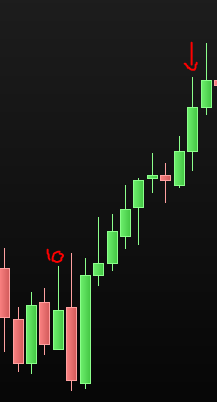
    There is a situation where I expect to see the indicator.

    See attachement.

    Indicator.png Indicator.png
    #227117 quote
    RichardVeen
    Participant
    Junior

    Hi Graham,

    What do you mean exactly?

    #227118 quote
    RichardVeen
    Participant
    Junior

    I changed the code (see below) but nothing happened:

    DEFPARAM DrawOnLastBarOnly = True

    LL= lowest[10](low)
    HH= Highest[10](high)

    If Close>=HH[1] then
    DRAWARROWdown(barindex,high + 2.5 ) COLOURED(“Blue”,255)
    elsif Close<=LL[1] then
    DRAWARROWup(barindex,low – 2.5 ) COLOURED(“Yellow”,255)
    EndIf
    Return

    #227121 quote
    JC_Bywan
    Moderator
    Master

    No defparam line, just:

    LL= lowest[10](low)
    HH= Highest[10](high)
    
    If Close>=HH[1] then
    DRAWARROWdown(barindex,high + 2.5 ) COLOURED(“Blue”,255)
    elsif Close<=LL[1] then
    DRAWARROWup(barindex,low – 2.5 ) COLOURED(“Yellow”,255)
    EndIf
    Return


    (or Close>HH[1], Close<LL[1] if you don’t want your arrow when equal to highest or lowest of previous 10)

    RichardVeen thanked this post
    #227128 quote
    RichardVeen
    Participant
    Junior

    Yes, it’s working!

    Thanks JC_Bywan!

    #227130 quote
    GraHal
    Participant
    Master

    What do you mean exactly?

    If …

    1.  Price / close of the current bar is less than the highest high of the 10 previous bars

      and at the same time …

      2.   Price / close of the current bar is greater than the lowest low of the 10 previous bars

      then

      3.   There will not be an arrow drawn above or below the current bar.

    RichardVeen thanked this post
    #227131 quote
    RichardVeen
    Participant
    Junior

    Thank you for your explanation!

    The code that JC_Bywan wrote is working.

Viewing 13 posts - 1 through 13 (of 13 total)

  • You must be logged in to reply to this topic.

Indicator for Close > highest and Close < lowest


ProOrder: Automated Strategies & Backtesting

New Reply
Author
Summary

This topic contains 12 replies,
has 4 voices, and was last updated by RichardVeen
2 years ago.

Topic Details
Forum: ProOrder: Automated Strategies & Backtesting
Language: English
Started: 01/30/2024
Status: Active
Attachments: 1 files
Logo Logo
Loading...