Indicator for candle color green/red if close above/below EMA

Viewing 8 posts - 1 through 8 (of 8 total)

  • Author
    Posts
  • #203640 quote
    umd
    Participant
    New

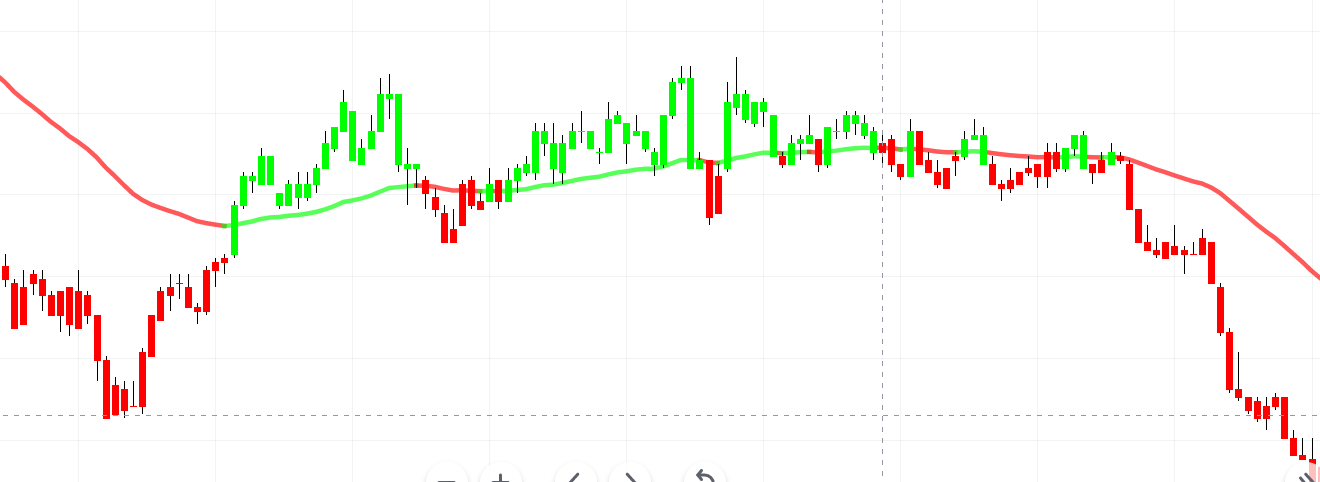
    Hi, Is there an indicator in prorealtime (as shown in below picture)?

    It print green candles when close above EMA line, and red candles when close below EMA line.  All candles will be either green or red.

    EMA line also changes color green/red, depending on bar close above/below EMA line.

    Does anyone have this indicator please?  I use this on Tradingview charts, seems simple, but can’t find on prorealtime.

    Thanks

    #203666 quote
    robertogozzi
    Moderator
    Master

    There you go:

    r = 0
    g = 255
    b = 0
    t = 255
    MyMA = average[Periods,Type](close)
    IF close <= MyMA THEN
       r = 255
       g = 0
       t = 255
    ENDIF
    DrawCandle(Open,High,Low,Close) coloured(r,g,b,t)
    RETURN MyMA coloured(r,g,b,t) AS "My Moving Average"
    umd thanked this post
    #203709 quote
    umd
    Participant
    New

    There you go:

    Thanks for reply.  The above code is showing error “The following variable is undefined: Periods, Type”

    #203711 quote
    umd
    Participant
    New

    There you go:

    Thanks for reply. The above code is showing error “The following variable is undefined: Periods, Type”

    Thanks a lot @robertogozzi, it works now.

    #203714 quote
    robertogozzi
    Moderator
    Master

    Sorry, I forgot to post a couple of lines with the two settings:

    Periods = 20 //any number greater than 0
    Type    = 1  //0-8 as from https://www.prorealcode.com/documentation/average/

    I’m glad you could find a solution.

    umd thanked this post
    #203734 quote
    umd
    Participant
    New

    Sorry, I forgot to post a couple of lines with the two settings:

    I’m glad you could find a solution.

    Thanks again robertgozzi. It works good, I appreciate your reply.

    #213091 quote
    s00071609
    Participant
    Senior

    How can i draw a green candle if the indicator condition is true and red when indicator condition is fale. Its based on Weekly and daily data, and I intend to load it in 15m chart.

    here is the code,

    r = 0
    g = 0
    b = 0
    t = 0
    Timeframe (Weekly)
    indicator1w, indicator2w, ignored, ignored = CALL DTOSC[1, 0](close)
     
    cx1=(indicator1w >= indicator2w)
    
    
    Rem STU Exit Conditions, trail stop when Daily DT > 75 or DT Bear
    Timeframe (Daily)
    indicator1d, indicator2d, ignored, ignored = CALL DTOSC[1, 0](close)
    
    cx2=((indicator1d >= indicator2d) )
    
    timeframe (15 minute)
    If cx1=1 and cx2=1 then
    r = 255
    g = 0
    t = 255
    Endif
    Drawcandle(open,high,low,close) bordercolor(r,g,b,t)
    return
    
    #213128 quote
    robertogozzi
    Moderator
    Master

    I tested this slightly modified version, which works like a charm:

    Timeframe (Weekly,UpdateOnClose)
    //indicator1w, indicator2w, ignored, ignored = CALL DTOSC[1, 0](close)
    indicator1w = average[5,0](close)
    indicator2w = average[10,0](close)
     
    cx1=(indicator1w >= indicator2w)
     
     
    Rem STU Exit Conditions, trail stop when Daily DT > 75 or DT Bear
    Timeframe (Daily,UpdateOnClose)
    //indicator1d, indicator2d, ignored, ignored = CALL DTOSC[1, 0](close)
    indicator1d = average[5,0](close)
    indicator2d = average[10,0](close)
     
    cx2=(indicator1d >= indicator2d)
     
    timeframe (15 minute)
    r = 255
    g = 0
    b = 0
    t = 255
    If cx1=1 and cx2=1 then
    r = 0
    g = 255
    Endif
    Drawcandle(open,high,low,close) coloured(r,g,b,t) bordercolor(r,g,b,t)
    return

    I replaced DTOSC with SMAs, as I don’t have it installed.

Viewing 8 posts - 1 through 8 (of 8 total)
  • You must be logged in to reply to this topic.

Indicator for candle color green/red if close above/below EMA


ProBuilder: Indicators & Custom Tools

New Reply
Author
author-avatar
umd @umd Participant
Summary

This topic contains 7 replies,
has 3 voices, and was last updated by robertogozzi
2 years, 10 months ago.

Topic Details
Forum: ProBuilder: Indicators & Custom Tools
Language: English
Started: 11/06/2022
Status: Active
Attachments: 1 files
Logo Logo
Loading...