Indicator creation

Viewing 5 posts - 1 through 5 (of 5 total)
  • Author
    Posts
  • #104701 quote
    fredrikfxfredrikfx
    Participant
    Junior

    Hi guys


    I need help to create an indicator that says when it´s time to enter a trade. Exit will be handled manually. I want the indicator to

    say go LONG, when close >EMA11, EMA11 > EMA22, EMA22 > EMA35 AND MACD[12,26,4](close) < MACDline[12,26,4](close).

    And go SHORT when close < EMA11, EMA11 < EMA22, EMA22 < EMA35 AND MACD[12,26,4](close) > MACDline[12,26,4](close).

    Thanks in advance

    // Conditions to enter long positions
    
    indicator1 = ExponentialAverage[11](close)
    c1 = (close > indicator1)
    indicator2 = ExponentialAverage[11](close) 
    indicator3 = ExponentialAverage[22](close)  
    c2 = (indicator2 > indicator3)
    indicator4 = ExponentialAverage[22](close) 
    indicator5 = ExponentialAverage[35](close)   
    c3 = (indicator4 > indicator5)
    indicator6 = MACD[12,26,4](close)    
    indicator7 = MACDline[12,26,4](close) 
    c4 = (indicator6 < indicator7)
    
    IF c1 AND c2 AND c3 AND c4 THEN
    
    BUY 1 CONTRACT AT MARKET
    
    ENDIF
    
    
    // Conditions to enter short positions
    indicator8 = ExponentialAverage[11](close)
    c5 = (close < indicator8)
    indicator9 = ExponentialAverage[11](close)
    indicator10 = ExponentialAverage[22](close)
    c6 = (indicator9 < indicator10)
    indicator11 = ExponentialAverage[22](close)
    indicator12 = ExponentialAverage[35](close)
    c7 = (indicator11 < indicator12)
    indicator13 = MACD[12,26,4](close)
    indicator14 = MACDline[12,26,4](close)
    c8 = (indicator13 > indicator14)
    
    IF c5 AND c6 AND c7 AND c8 THEN
    
    SELLSHORT 1 CONTRACT AT MARKET
    
    ENDIF
    
    #104708 quote
    GraHalGraHal
    Participant
    Master

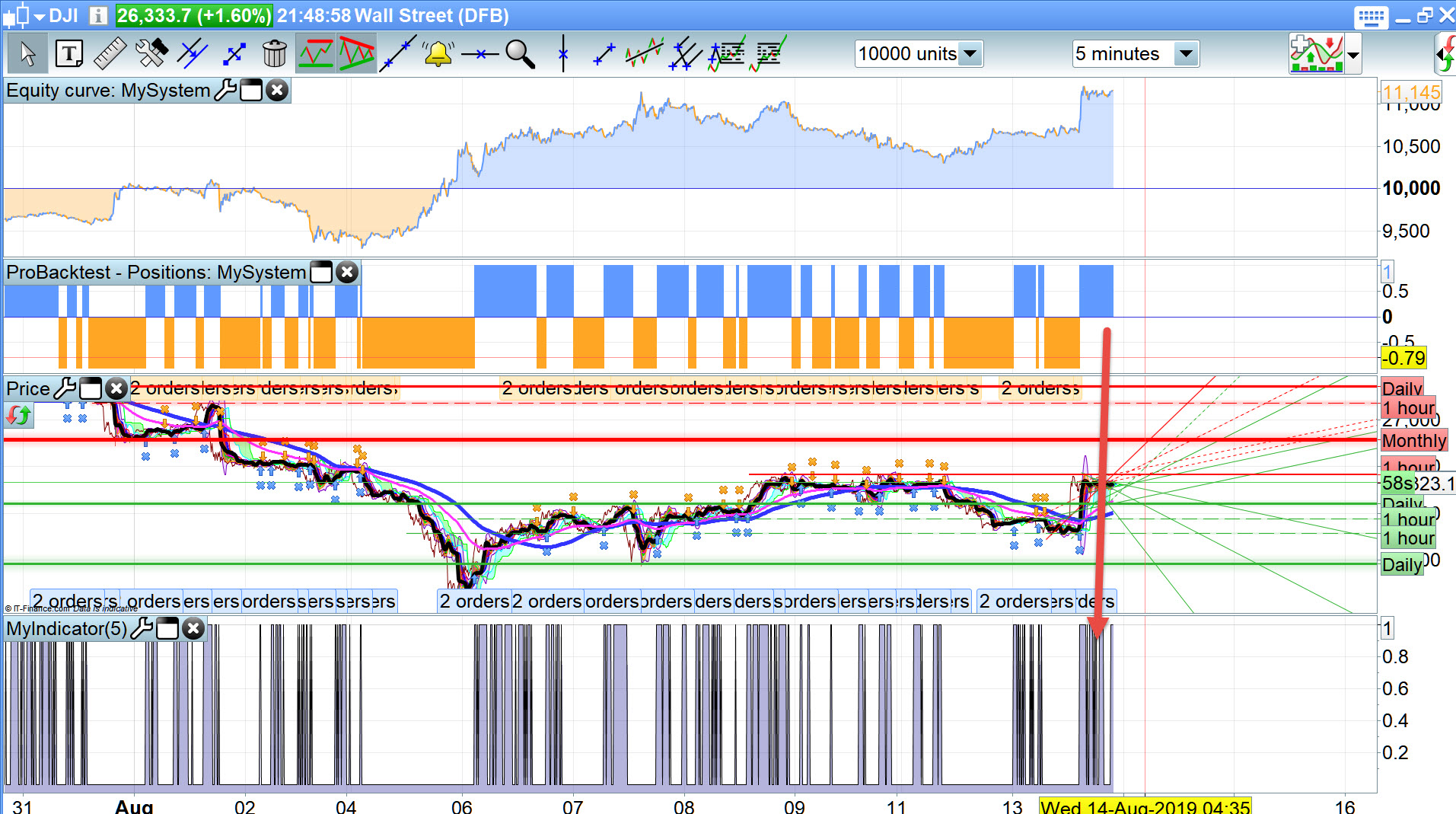
    I can’t recall ever doing an Indicator before, but below will give you a ‘1’ when Buy Conditions are met … see attached.

    You can then set an Alert that will email you so you can then Buy manually??

    indicator1 = ExponentialAverage[11](close)
    c1 = (close > indicator1)
    indicator2 = ExponentialAverage[11](close)
    indicator3 = ExponentialAverage[22](close)
    c2 = (indicator2 > indicator3)
    indicator4 = ExponentialAverage[22](close)
    indicator5 = ExponentialAverage[35](close)
    c3 = (indicator4 > indicator5)
    indicator6 = MACD[12,26,4](close)
    indicator7 = MACDline[12,26,4](close)
    c4 = (indicator6 < indicator7)
     
    MyBuy = c1 AND c2 AND c3 AND c4
    
    Return MyBuy
    Fred.jpg Fred.jpg
    #104711 quote
    GraHalGraHal
    Participant
    Master

    indicator that says when it´s time to enter a trade

    Or are you wanting the Indicator to speak to you (say Go LONG)?

    You can do this by recording a .wav file and using this .wav as the Alert instead of the inbuilt PRT voices / alerts.

    #104785 quote
    fredrikfxfredrikfx
    Participant
    Junior

    Thank you GraHal. This is just what i needed.

    I have one other question. Is it possible to enter a trade in real time. I mean, f.ex. when two lines are crossing, the trade should enter in exactly that moment. Not waiting for the candle to close.

    If it´s possible, how do I define this in the code?

    #104788 quote
    GraHalGraHal
    Participant
    Master

    If you mean on the PRT Alerts … then you would tick the box – ‘Current Candle’

    If you mean on Auto-System … then you would need execute trades on a Low TF – 5 secs or 15 secs maybe having had the conditions running on whatever TF you choose – 1 hour, 4 hours etc.

    MTF however is not available in Live running yet, or it may be if you ask IG to switch MTF on for you!?

Viewing 5 posts - 1 through 5 (of 5 total)
  • You must be logged in to reply to this topic.

ProRealAI ProRealAI New

Stuck on this ProBuilder code?

Describe what this topic is trying to build, in plain English, and ProRealAI writes the ProRealTime™ indicator, screener or system for you.

Available in 7 languages
Try ProRealAI

Indicator creation


ProBuilder: Indicators & Custom Tools

New Reply
Author
author-avatar
fredrikfx @fredrikfx Participant
Summary

This topic contains 4 replies,
has 2 voices, and was last updated by GraHalGraHal

7 years, 1 month ago.

Topic Details
Forum: ProBuilder: Indicators & Custom Tools
Language: English
Started: 08/13/2019
Status: Active
Attachments: 1 files
ProRealCode ProRealCode
Loading...