


indicator ATR bug report

Viewing 2 posts - 1 through 2 (of 2 total)

  • Author
    Posts
  • #91554 quote
    waid
    Participant
    Junior

    Average True Range is computed based on TR with Wilders smoothing method like (w/ period 14):

    ATR = (ATR[1] + TR/13) / 14


    So here is the bug:

    the atr curve, also the value of:

    return AverageTrueRange[14]((close*0.1))

    look like quite different than:

    return AverageTrueRange[14]((close*1))


    In principle, both two are the same but with value diff. order by ten.

    Everyone can try this and saw the difference.


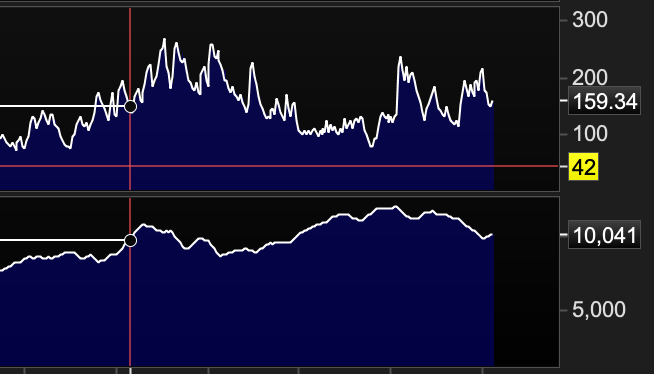
    The attachment is DAX with ATR 20 (top one is default, and the bottom one is function “return AverageTrueRange[20]((close*0.1))“). You may see the result of close * 0.1 is totally ridiculous high (why it is so high with reduced close values?).


    If you don’t get the point, you can read this function:

    miniprice = close * 0.1
    return AverageTrueRange[20]((miniprice))


    ps. You might guess: “Oh maybe the difference is due to the exponential behavior…”. But wait, you can also try to compare it with the exponential behavior indicators like EMA(close), EMA(close/10), and see that the EMA is quite normal that the difference of results among close, close/10 is merely by ten.

    You even can write your own atr and see that yours is quite different from the default atr.

    Screen-Shot-2019-02-17-at-11.54.12-AM.png Screen-Shot-2019-02-17-at-11.54.12-AM.png
    #91601 quote
    Nicolas
    Keymaster
    Master

    Average True Range is calculated with:
    True range is the highest data in absolute value among :

    (today’s high – today’s low)

    (today’s high – yesterday’s close)

    (today’s low – yesterday’s close)

    When you apply a factor like the way you did, it is applied only on the selected price serie and for each bar in the period, so the result cannot be the same as a real factorization of the ATR value:

    If you want to factorize the returned value of the indicator, you should use this kind of syntax:

    a= AverageTrueRange[14](high)
    b= AverageTrueRange[14](high)*0.1
    
    return a,b

    or

    a= AverageTrueRange[14]
    b= AverageTrueRange[14]*0.1
    
    return a,b

    and you’ll get the exact same value divided by 10.

Viewing 2 posts - 1 through 2 (of 2 total)
  • You must be logged in to reply to this topic.

indicator ATR bug report


ProBuilder: Indicators & Custom Tools

New Reply
Author
author-avatar
waid @waid Participant
Summary

This topic contains 1 reply,
has 2 voices, and was last updated by Nicolas

6 years, 11 months ago.

Topic Details
Forum: ProBuilder: Indicators & Custom Tools
Language: English
Started: 02/17/2019
Status: Active
Attachments: 1 files
Logo Logo
Loading...
