Bonjour Nicolas,
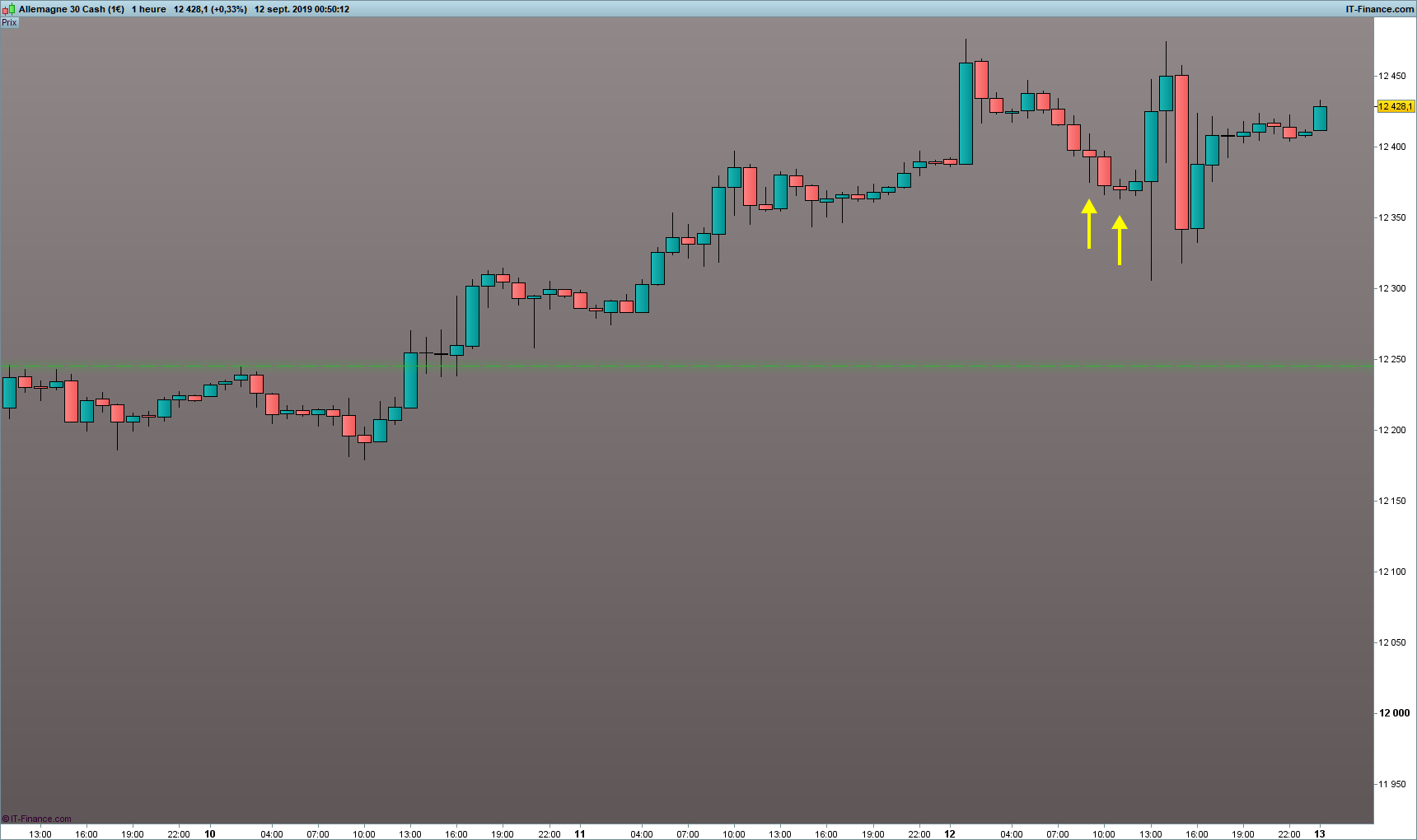
1- Je souhaite indiquer par un symbole (type flèche ou autre) sur un graphe en candles classiques lorsque le corps d’une bougie (open-close) est inférieur par exemple à 50 % de sa taille totale (high-low).
Si c’est plus simple, l’indiquer par un indicateur inférieur reste intéressant aussi 🙂
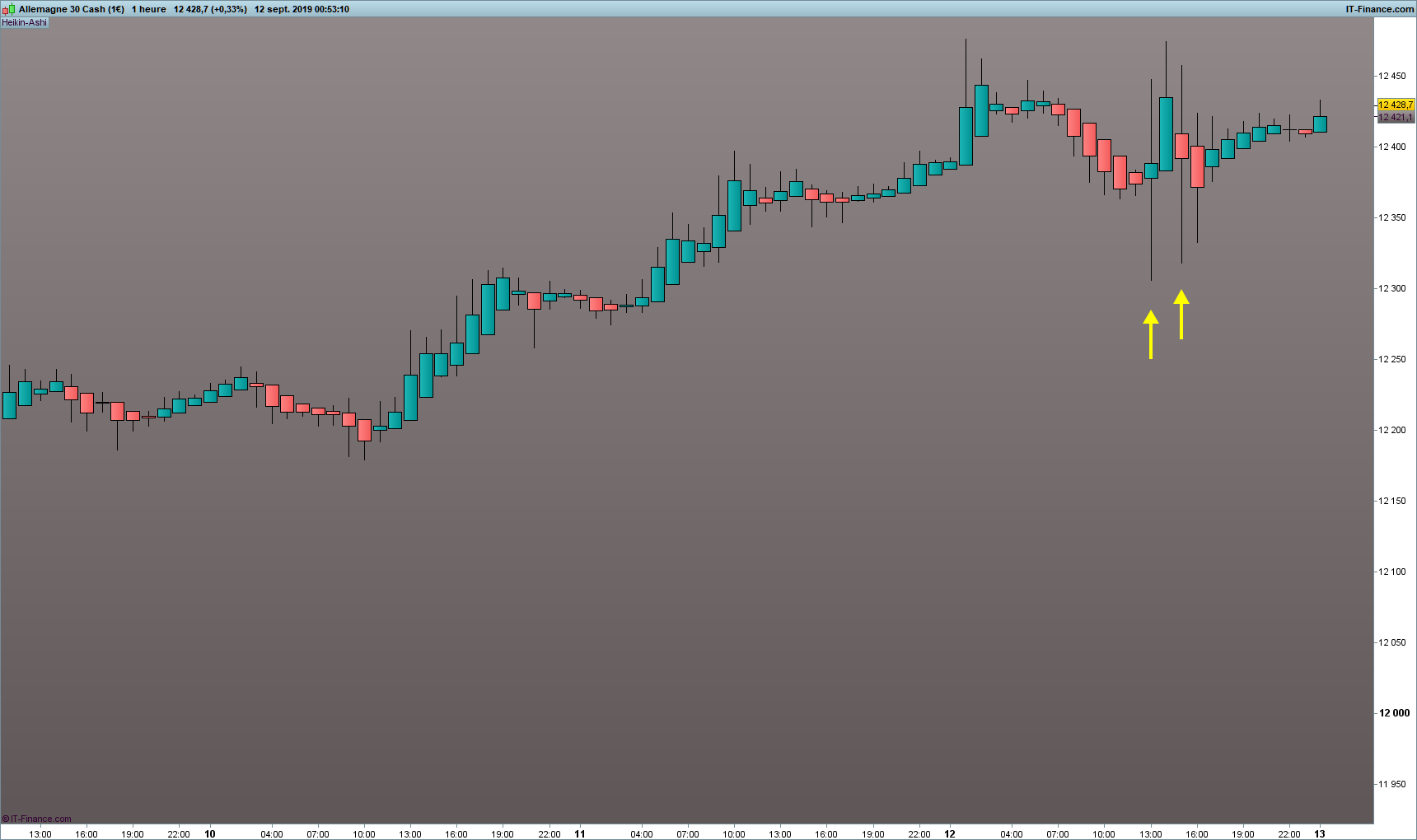
2- Même principe si le graphe est en Heikin Ashi.
Peux-tu m’aider stp ?
Ci dessous :
Exemple 1 : 2 flèches candles classiques.
Exemple 2 : 2 flèches candles en Heikin Ashi
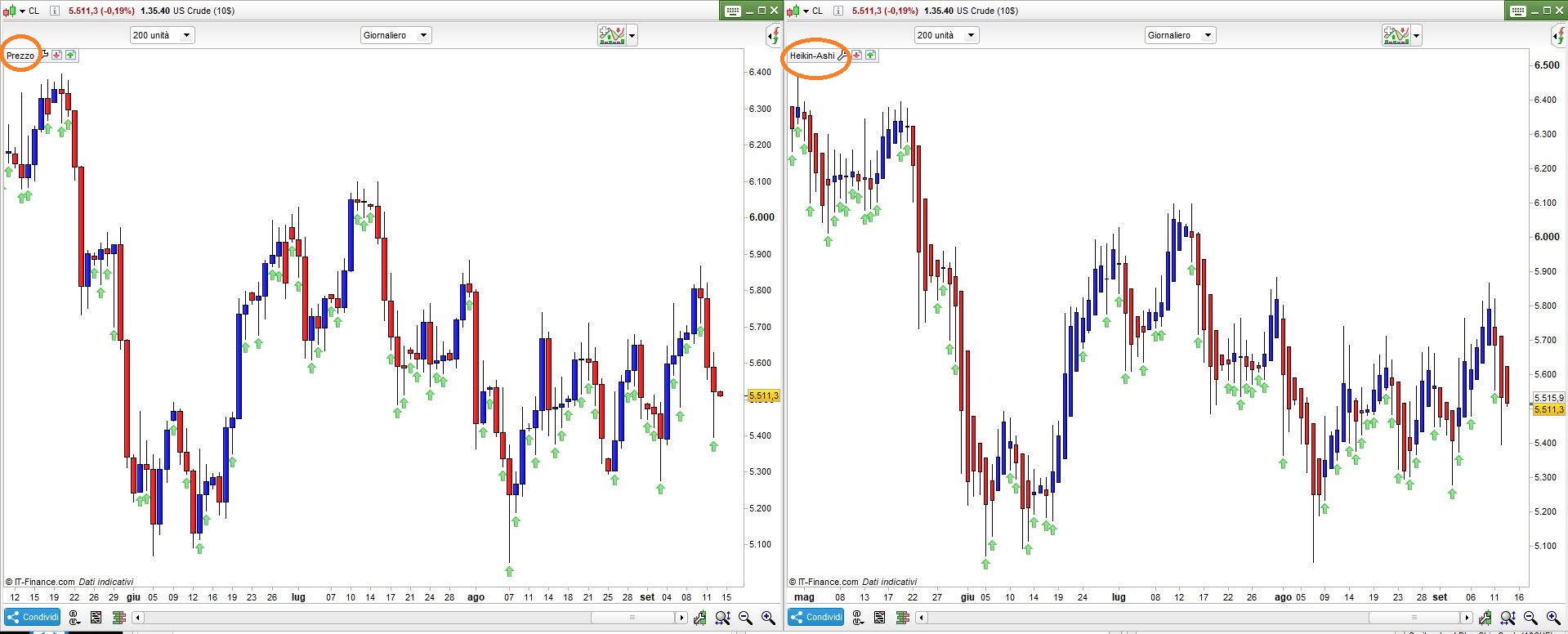
Voilà (couleurs sur http://cloford.com/resources/colours/500col.htm ):
if barindex > 0 then
   xClose  = (open+close+low+high)/4    //TotalPrice
   xOpen   = (xOpen[1]+xClose[1])/2
   haHigh  = Max(xOpen, xClose)
   haLow   = Min(xOpen, xClose)
   xHigh   = Max(High,haHigh)
   xLow    = Min(Low,haLow)
   xRange  = abs(xHigh - xLow)
else
   xClose  = (open+close+low+high)/4    //TotalPrice
   xOpen   = Open
   haHigh  = Max(xOpen, xClose)
   haLow   = Min(xOpen, xClose)
   xHigh   = Max(High,haHigh)
   xLow    = Min(Low,haLow)
   xRange  = abs(xHigh - xLow)
endif
IF abs(xOpen - xClose) < (xRange * 0.5) THEN
   DRAWARROWUP(barindex,xLow-10*pipsize) COLOURED(0,192,0,128)
ENDIF
RETURN
IF abs(xOpen - xClose) < (xRange * 0.5) THEN
   DRAWARROWUP(barindex,xLow-10*pipsize) COLOURED(0,192,0,128)
ENDIF
RETURN
Wow !
Super rapide. Super veloce.
Curieusement, le code pour la partie Chandelier japonais me demande de référencer les xOpen, xClose, xHigh et xLow.
Je ne sais pas ce que j’ai fait, mais cela fonctionne. 🙂
Question : comment demander à ce code qu’il ne s’exécute qu’à partir de 08h00 et jusqu’à 18h00 ?
Je vais l’utiliser en Intra day.
Grazie Roberto – Merci.
Désolé, ma faute, j’ai laissé une partie du code pour les chandeliers HA, c’est correct (vous avez probablement supprimé le “x” initial), avec l’intervalle de temps:
IF OpenTime >= 080000 AND OpenTime <= 180000 THEN
   IF abs(Open - Close) < (Range * 0.5) THEN
      DRAWARROWUP(barindex,Low-10*pipsize) COLOURED(0,192,0,128)
   ENDIF
ENDIF
RETURN
Le même intervalle de temps pour HA:
if barindex > 0 then
   xClose  = (open+close+low+high)/4    //TotalPrice
   xOpen   = (xOpen[1]+xClose[1])/2
   haHigh  = Max(xOpen, xClose)
   haLow   = Min(xOpen, xClose)
   xHigh   = Max(High,haHigh)
   xLow    = Min(Low,haLow)
   xRange  = abs(xHigh - xLow)
else
   xClose  = (open+close+low+high)/4    //TotalPrice
   xOpen   = Open
   haHigh  = Max(xOpen, xClose)
   haLow   = Min(xOpen, xClose)
   xHigh   = Max(High,haHigh)
   xLow    = Min(Low,haLow)
   xRange  = abs(xHigh - xLow)
endif
IF OpenTime >= 080000 AND OpenTime <= 180000 THEN
   IF abs(xOpen - xClose) < (xRange * 0.5) THEN
      DRAWARROWUP(barindex,xLow-10*pipsize) COLOURED(0,192,0,128)
   ENDIF
ENDIF
RETURN
Oui, j’avais effectivement supprimé le X pour que cela fonctionne.
Sinon, c’est exactement ça.
Un grand MERCI Roberto pour le code qui est parfait et la rapidité des réponses. :))
J’espère que ce code pourra aussi aider d’autres personnes.
Mille grazie.
Bonjour,
J’aimerai apporter une “amélioration” à ce code concernant la partie Heikin Ashi. (Merci RobertoGozzi 🙂 )
Signifier avec une flèche lorsque le corps de la bougie est > à un pourcentage “x”
ET rajouter une condition.
il faut que la morphologie de la bougie HA soit avec :
– Open = plus bas (bougie haussière ou Q plat)
ou
– Open = plus Haut (bougie baissière ou Plafond plat)
C’est sûrement la ligne 19 qui ne fonctionne pas…
Un éclairage serait-il possible ?
(x est la variable en %)
if barindex > 0 then
xClose  = (open+close+low+high)/4    //TotalPrice
xOpen   = (xOpen[1]+xClose[1])/2
haHigh  = Max(xOpen, xClose)
haLow   = Min(xOpen, xClose)
xHigh   = Max(High,haHigh)
xLow    = Min(Low,haLow)
xRange  = abs(xHigh - xLow)
else
xClose  = (open+close+low+high)/4    //TotalPrice
xOpen   = Open
haHigh  = Max(xOpen, xClose)
haLow   = Min(xOpen, xClose)
xHigh   = Max(High,haHigh)
xLow    = Min(Low,haLow)
xRange  = abs(xHigh - xLow)
endif
IF OpenTime >= 080000 AND OpenTime <= 180000 THEN
IF abs(xOpen - xClose) > (xRange * x) AND (xOPen=xHigh) OR (xOpen=xLow) THEN
DRAWARROWUP(barindex,xLow-10*pipsize) COLOURED(255,215,0)
ENDIF
ENDIF
RETURN
Oui, c'est la ligne 19 qui fait le travail. Vous pouvez utiliser un pourcentage, dans ce cas le corps doit être plus grand que les ombres:
IF abs(xOpen - xClose) > (xRange * 0.5) AND (xOPen=xHigh) OR (xOpen=xLow) THEN
Merci Roberto.
Je voulais mettre le pourcentage (x) en variable, de cette façon, je pouvais le faire varier plus facilement dans la fenêtre concernant les paramètres indicateur.
Mais c’est bien aussi comme ça.
La voici avec un pourcentage (le fichier .ITF l’a déjà déclaré):
//PerCent = 150                              //%
PerCent = max(0.01,min(99999,PerCent)) / 100 //0.0001% - 999.99%
if barindex > 0 then
xClose  = (open+close+low+high)/4    //TotalPrice
xOpen   = (xOpen[1]+xClose[1])/2
haHigh  = Max(xOpen, xClose)
haLow   = Min(xOpen, xClose)
xHigh   = Max(High,haHigh)
xLow    = Min(Low,haLow)
xRange  = abs(xHigh - xLow)
else
xClose  = (open+close+low+high)/4    //TotalPrice
xOpen   = Open
haHigh  = Max(xOpen, xClose)
haLow   = Min(xOpen, xClose)
xHigh   = Max(High,haHigh)
xLow    = Min(Low,haLow)
xRange  = abs(xHigh - xLow)
endif
IF OpenTime >= 080000 AND OpenTime <= 180000 THEN
IF abs(xOpen - xClose) > (xRange * PerCent) AND (xOPen=xHigh) OR (xOpen=xLow) THEN
DRAWARROWUP(barindex,xLow-10*pipsize) COLOURED(255,215,0)
ENDIF
ENDIF
RETURN
Bonsoir et Merci Roberto pour ce code. C’est sympa.
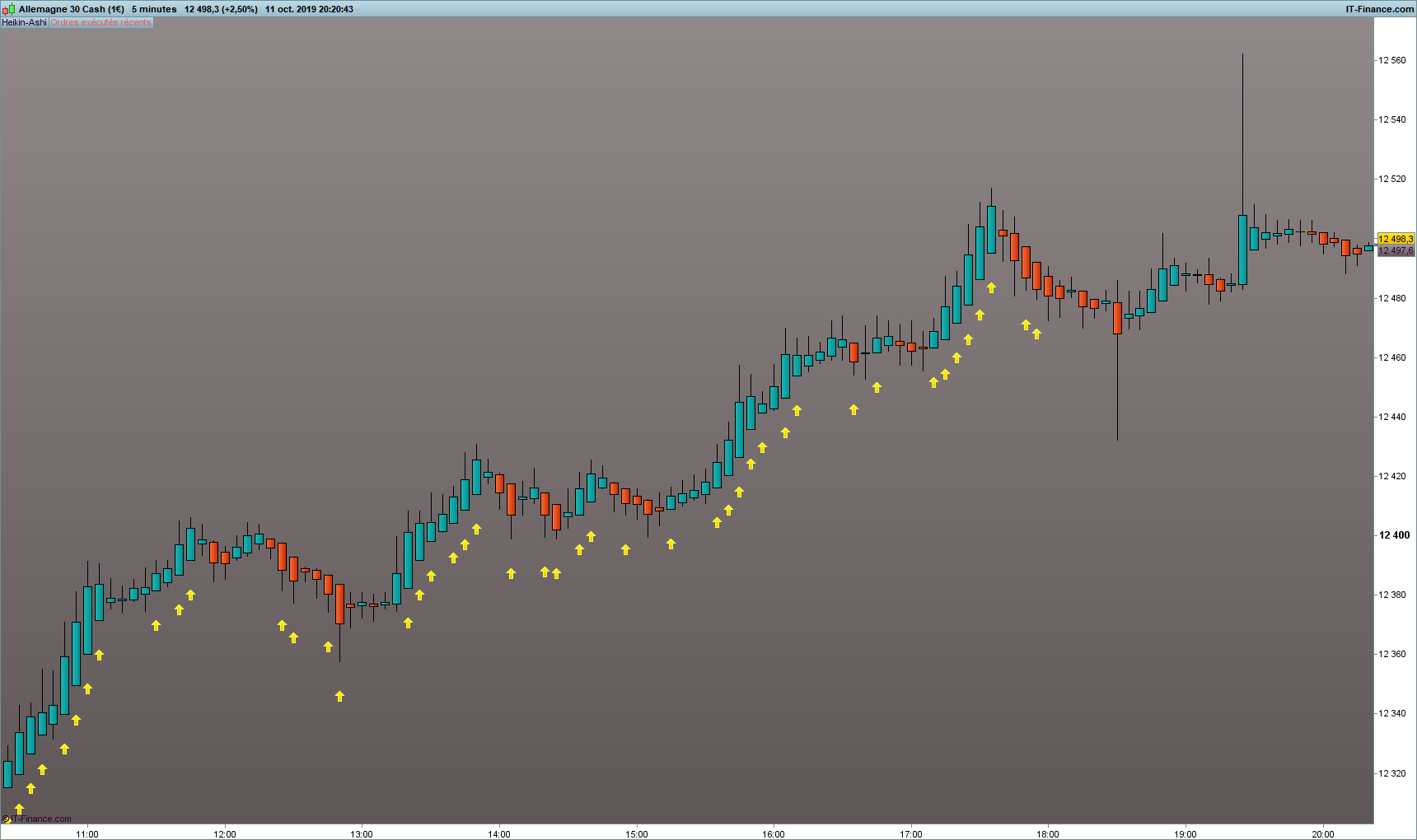
Malheureusement il ne prend pas en compte les pourcentages.
En revanche, il indique toutes les bougies HA qui ont soit :
– open = Low (bougie haussière)
– open = High (bougie baissière)
La partie concernant le pourcentage du corps de la bougie n’est pas prise en compte dans le code, même en testant plusieurs valeurs en %.
Voir graphique ci dessous.