


Indicateur MTF – Multi TimeFrame

Viewing 3 posts - 1 through 3 (of 3 total)
  • Author
    Posts
  • #224059 quote
    Alai-n
    Participant
    Veteran

    Bonjour,


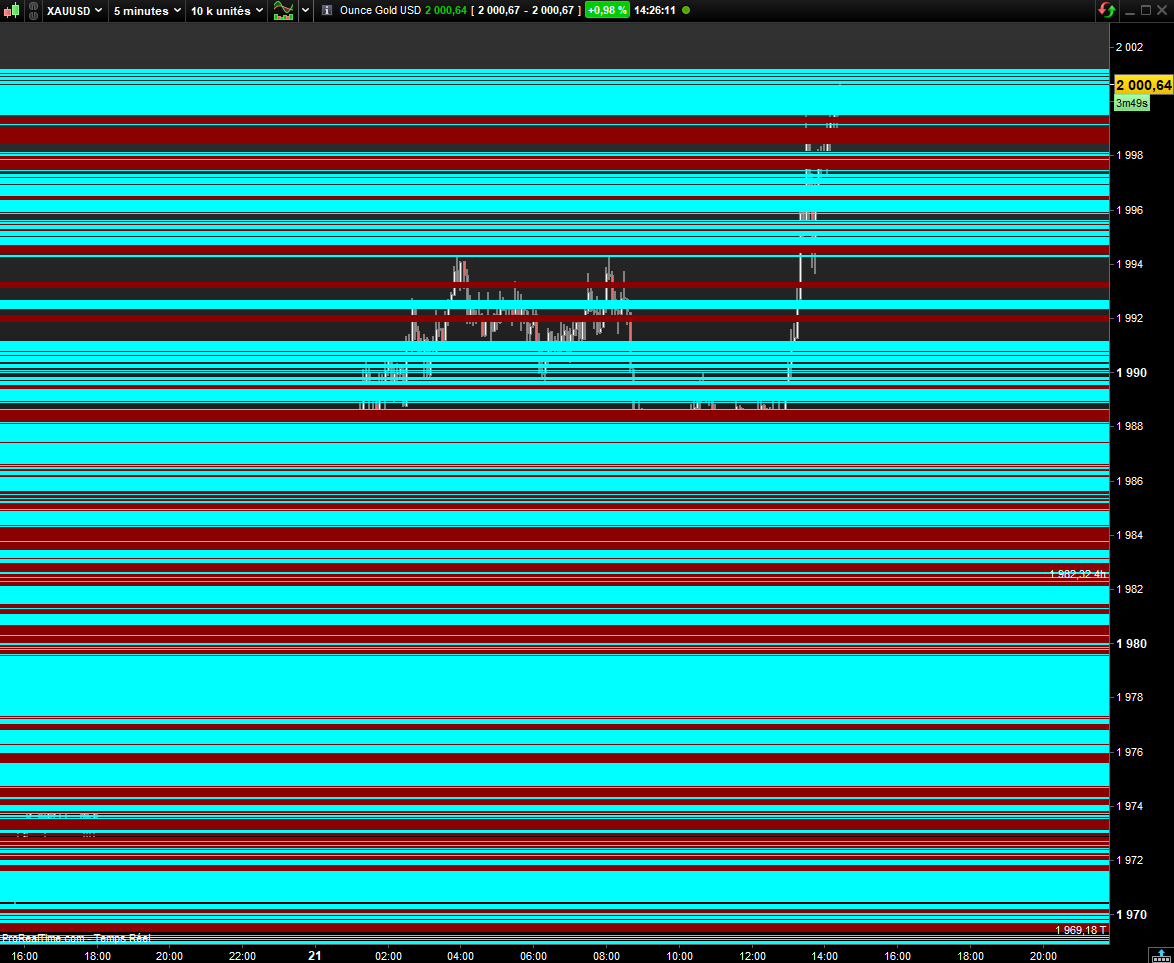
    Je tente en vain d’afficher un indicateur (Moyennes Mobiles 4 heures) sur un graphique d’un TimeFrame inférieur!

    Ci-joint le code et une image du problème évident que je rencontre à l’affichage…

    Un coup de main serait apprécié. Merci

    timeframe(240 minutes)
    ////////////////////////////////////////////////////////////////////////////////////////////////////////////
    //TKP T3 Ema Trend | Indicator
    ////////////////////////////////////////////////////////////////////////////////////////////////////////////
    // T3 MA5 - TKP T3 Trend PSar2
    aLength = 5
    AxPrice = close
    axe1 = ExponentialAverage[aLength](AxPrice)
    axe2 = ExponentialAverage[aLength](axe1)
    axe3 = ExponentialAverage[aLength](axe2)
    axe4 = ExponentialAverage[aLength](axe3)
    axe5 = ExponentialAverage[aLength](axe4)
    axe6 = ExponentialAverage[aLength](axe5)
    ab = 0.7
    ac1 = -ab * ab * ab
    ac2 = 3 * ab * ab + 3 * ab * ab * ab
    ac3 = -6 * ab * ab - 3 * ab - 3 * ab * ab * ab
    ac4 = 1 + 3 * ab + ab * ab * ab + 3 * ab * ab
    anT3Average = ac1 * axe6 + ac2 * axe5 + ac3 * axe4 + ac4 * axe3
     
    // T3 MA8 - TKP T3 Trend PSar
    Length = 8
    xPrice = close
    xe1 = ExponentialAverage[Length](xPrice)
    xe2 = ExponentialAverage[Length](xe1)
    xe3 = ExponentialAverage[Length](xe2)
    xe4 = ExponentialAverage[Length](xe3)
    xe5 = ExponentialAverage[Length](xe4)
    xe6 = ExponentialAverage[Length](xe5)
    b = 0.7
    c1 = -b * b * b
    c2 = 3 * b * b + 3 * b * b * b
    c3 = -6 * b * b - 3 * b - 3 * b * b * b
    c4 = 1 + 3 * b + b * b * b + 3 * b * b
    nT3Average = c1 * xe6 + c2 * xe5 + c3 * xe4 + c4 * xe3
    
    timeframe(default)
    DRAWHLINE (anT3Average) coloured("cyan")
    DRAWHLINE (nT3Average) coloured("darkred")
    
    
    ////////////////////////////////////////////////////////////////////////////////////////////////////////////
    Return
    ////////////////////////////////////////////////////////////////////////////////////////////////////////////
    
    Capture-decran-2023-11-21-152639.png Capture-decran-2023-11-21-152639.png
    #224069 quote
    JC_Bywan
    Moderator
    Master

    Bonjour, tu peux ajouter au tout début du code cette ligne:

    defparam drawonlastbaronly=true


    qui aura pour effet à chaque bougie de redessiner tes lignes horizontales issues des DRAWHLINE dans leur nouvelle position, sans garder les lignes telles qu’elles étaient lors de toutes les bougies précédentes

    Alai-n thanked this post
    #224126 quote
    Alai-n
    Participant
    Veteran

    @JC_Bywan En effet, cela rend le graphique beaucoup plus clair 😉 Merci

Viewing 3 posts - 1 through 3 (of 3 total)

  • You must be logged in to reply to this topic.

Indicateur MTF – Multi TimeFrame


ProBuilder : Indicateurs & Outils Personnalisés

New Reply
Author
author-avatar
Alai-n @alai-n Participant
Summary

This topic contains 2 replies,
has 2 voices, and was last updated by Alai-n

2 years, 3 months ago.

Topic Details
Forum: ProBuilder : Indicateurs & Outils Personnalisés
Language: French
Started: 11/21/2023
Status: Active
Attachments: 1 files
Logo Logo
Loading...
